
The Complete Magento 2 Developer Guide 2026
Everything a Magento 2 developer needs — DI, plugins, observers, indexers, caching, CI/CD, payment gateways, B2B, Hyvä, testing, and APIs. 17 in-depth guides.
This is the complete Magento 2 developer guide from CodeAtoZ — 17 deep-dive tutorials covering every major development topic on Magento 2, from dependency injection and custom modules through to message queues, payment gateways, CI/CD pipelines, and Hyvä theme development. Whether you are a developer new to Magento 2 developer work or an experienced backend engineer expanding into Hyvä or B2B, this Magento 2 developer guide series has the code and context you need.
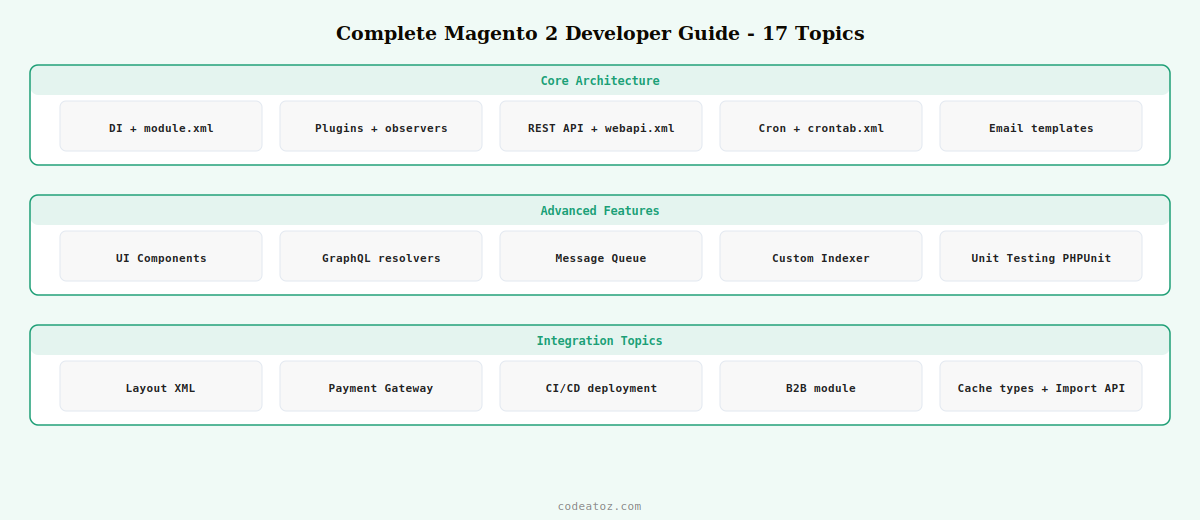
Complete Magento 2 Developer Guide: The 17 Topics
Every guide in this Magento 2 developer series is production-ready PHP code with full context. Jump to the topic you need or work through them in order — each one builds on the architectural principles established in the first few guides.
GUIDE 02Custom ModuleModule structure, registration.php, module.xml
GUIDE 03Plugins & Observersbefore/around/after plugins, event observers
GUIDE 04Custom REST APIwebapi.xml, interface, repository, ACL
GUIDE 05Cron Jobscrontab.xml, cron groups, schedule debug
GUIDE 06Email Templatesemail_templates.xml, variables, transactional
GUIDE 07UI ComponentsAdmin forms, grids, modals via XML
GUIDE 08GraphQL QueriesCustom schema, resolvers, PWA integration
GUIDE 09Message QueueRabbitMQ, communication.xml, consumers
GUIDE 10Custom IndexerIndexerInterface, Mview, flat tables
GUIDE 11Unit TestingPHPUnit, createMock, integration tests, CI
GUIDE 12Layout XMLHandles, containers, blocks, referenceBlock
GUIDE 13Payment GatewayAbstractMethod, authorize, capture, PCI
GUIDE 14CI/CD DeploymentGitHub Actions, rsync, zero-downtime
GUIDE 15B2B ModuleCompany accounts, shared catalogues, quotes
GUIDE 16Cache Types15 types, Redis, Varnish, custom cache
GUIDE 17Product Import APIREST sync, bulk async, CSV model
Complete Magento 2 Developer Guide: Core Architecture Principles
Every guide in this Magento 2 developer series is built on the same three architectural principles. Understanding them upfront makes every other guide in the series click into place faster.
Dependency Injection over ObjectManager. Magento 2’s DI container is the backbone of every custom module. Inject all dependencies through the constructor, never call ObjectManager::getInstance() inside business logic. Classes built this way are testable, maintainable, and upgrade-safe. The Magento 2 developer guide on DI covers this in full detail with virtual type configuration and preference overrides.
Events and plugins over core hacks. The correct Magento 2 developer approach to modifying core behaviour is to use plugins (before/around/after) or observers on dispatched events. Direct edits to core files are overwritten on every Magento update. The plugin and observer guide covers both patterns with real-world examples of when to choose each.
XML-driven configuration. Magento 2 is XML-first. Routes, cron jobs, API endpoints, layout blocks, payment methods, cache types, and message queue topics are all declared in XML. The runtime behaviour is then driven by PHP classes the XML references. This Magento 2 developer guide series uses this XML-first approach consistently across every topic.
Complete Magento 2 Developer Guide: Development Environment Setup
Before working through any guide in this Magento 2 developer series, ensure your local development environment is correctly configured. Magento 2 developer setups require PHP 8.1 or 8.2 (8.3 for the latest 2.4.7 releases), Composer 2.x, MySQL 8.0 or MariaDB 10.6+, Redis, and either Apache or Nginx with appropriate URL rewriting rules.
- Enable developer mode:
bin/magento deploy:mode:set developer— this enables template hints, disables cache for most types, and shows full error stack traces - Disable full page cache during development:
bin/magento cache:disable full_page block_html - Set up Xdebug: essential for stepping through Magento 2 developer code — configure it to connect back to your IDE on port 9003
- Use a dedicated Composer auth.json: store Magento Marketplace credentials in
~/.composer/auth.json, never in the projectauth.jsonthat might be committed
Complete Magento 2 Developer Guide: When to Use Which Pattern
One of the most common questions for developers new to the Magento 2 developer ecosystem is which extension mechanism to use in a given situation. This quick reference covers the most common scenarios:
- Modify a return value from a core method: after plugin on the method — see Guide 03
- Intercept a method and change its arguments: before plugin — see Guide 03
- Replace a core class entirely: preference in di.xml — see Guide 01
- React to an event after it happens: observer — see Guide 03
- Add a REST API endpoint: webapi.xml + interface — see Guide 04
- Run code on a schedule: cron — see Guide 05
- Pre-compute expensive data for fast queries: custom indexer — see Guide 10
- Process heavy tasks asynchronously: message queue — see Guide 09
💡 The Magento 2 developer guides in this series are written for Magento Open Source 2.4.x and Adobe Commerce 2.4.x on PHP 8.1+. All code examples use PHP 8 constructor property promotion and readonly properties where appropriate. Each guide notes explicitly if a feature requires Adobe Commerce (Enterprise Edition) rather than Open Source.
The Adobe Commerce PHP developer documentation is the authoritative reference for all topics covered in this Magento 2 developer guide series. The Magento 2 developer best practices guide covers coding standards, module structure, and performance guidelines. The Adobe Commerce installation guide covers setting up your Magento 2 developer environment. See our Magento 2 development services for custom module builds and Hyvä theme developer guide for the next step after mastering Magento 2 core development.
Frequently Asked Questions — Complete Magento 2 Developer Guide
Where do I start as a new Magento 2 developer?
Start with the dependency injection guide (Guide 01) and the custom module guide (Guide 02) in this Magento 2 developer series. These two guides establish the architectural foundation that everything else builds on. Once you understand constructor DI, module structure, and XML-driven configuration, the plugins, observers, and API guides become significantly easier to follow.
What PHP version does Magento 2 development require?
Magento 2.4.7 requires PHP 8.1, 8.2, or 8.3. PHP 8.3 is the recommended version for new Magento 2 developer environments in 2026. PHP 7.x is no longer supported by any actively maintained Magento 2 version. All code examples in this Magento 2 developer guide series use PHP 8.1+ syntax including constructor property promotion and intersection types.
What is the difference between a plugin and an observer in Magento 2?
Plugins intercept specific method calls on PHP classes — they can modify arguments before the method runs, wrap the method execution, or modify its return value. Observers listen for named events dispatched with $this->_eventManager->dispatch() and respond to them. Plugins are more precise and testable. Observers are better for reacting to business events without knowing which class fires them. Guide 03 in this Magento 2 developer guide covers both with code examples.
Do I need Adobe Commerce or can I use Magento Open Source for these guides?
Most guides in this Magento 2 developer series work with Magento Open Source. Guide 15 (B2B module) requires the Adobe Commerce B2B extension which is available for both Adobe Commerce and as a standalone open-source package. Guide 13 (payment gateway) and Guide 09 (message queue with RabbitMQ) are available on both editions. Each guide notes explicitly when Adobe Commerce is required.
How do I run Magento 2 developer commands after making changes?
In developer mode, most changes take effect immediately without compilation. After adding or modifying DI configuration, plugins, or new PHP classes, run bin/magento setup:di:compile in production mode. After adding layout XML or template files, run bin/magento cache:clean layout block_html. After database schema changes, run bin/magento setup:upgrade. This Magento 2 developer guide series notes the required commands at the end of each relevant tutorial.
How long does it take to become a proficient Magento 2 developer?
With a solid PHP background and working through this Magento 2 developer guide series, a developer can build functional custom modules within 2–4 weeks. Becoming proficient at complex integrations (message queues, custom indexers, payment gateways) typically takes 3–6 months of hands-on project work. Magento 2 has a steep initial learning curve due to its XML-heavy configuration, but the architecture is consistent — once the patterns click, development velocity increases significantly.
Need a Magento 2 Developer for Your Project?
CodeAtoZ builds custom Magento 2 modules, integrations, and extensions — payment gateways, ERP connectors, B2B portals, and Hyvä theme development. Tell us what you need.




