B2B CRM Sync for WooCommerce — Stop Re-Keying Every Order
Every B2B order is three records: a sale, a CRM entry, and an accounting line. If your team retypes each one by hand into HubSpot and QuickBooks, you’re paying a re-keying tax in hours and errors. B2B CRM sync enters the order once and updates everywhere.
B2B CRM sync solves a quiet, expensive problem that almost every growing B2B WooCommerce store hits: the same order data gets typed in three or four times. A trade order comes in, someone copies the customer and deal into the CRM, someone else enters the invoice into the accounting tool, and the store, the CRM and the accounts slowly drift out of agreement. B2B CRM sync ends that by pushing each order automatically from WooCommerce into your CRM and accounting platforms — entered once, reflected everywhere. This guide shows how to set up B2B CRM sync with the B2B Suite for WooCommerce, which connects to seven CRM and accounting platforms out of the box.
Search intent: commercial/technical — B2B WooCommerce stores that want to connect orders to their CRM and accounting. We cover the re-keying problem, why it’s worse in B2B, how automatic sync works, the seven integrations, and setup. It builds on our ERP integration guide and B2B ecommerce platform guide. The free version is on WordPress.org.
B2B CRM Sync: The Re-Keying Tax
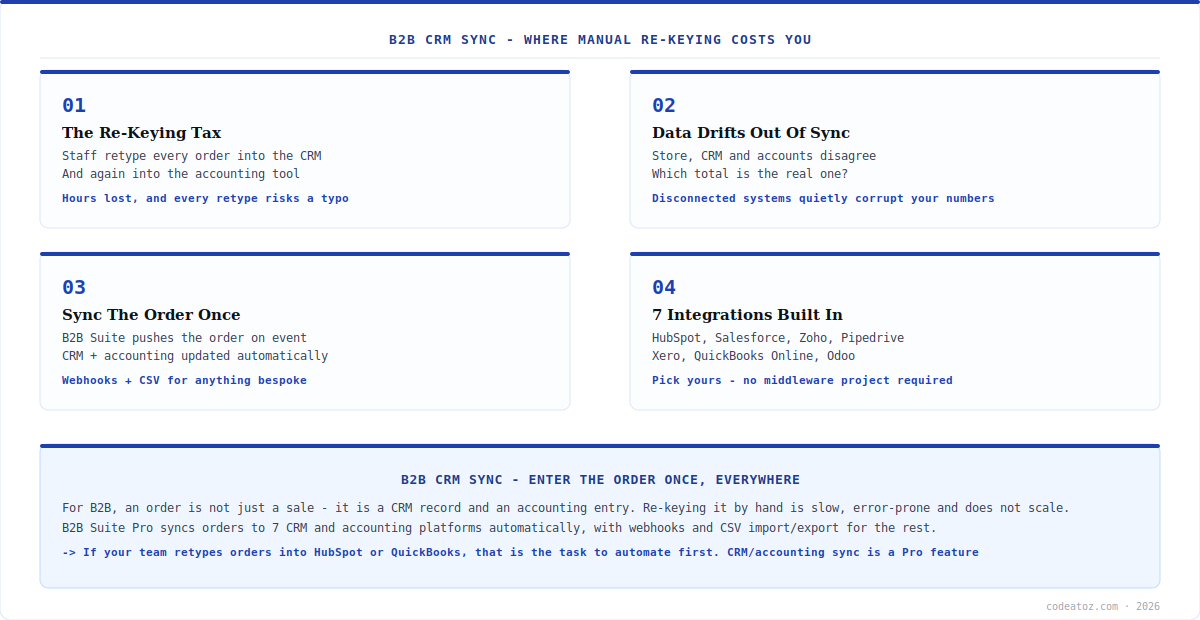
Before B2B CRM sync, the default way stores connect their systems is a person. An order arrives in WooCommerce; someone opens HubSpot or Salesforce and recreates the customer and deal; someone opens Xero or QuickBooks and enters the invoice. Each retype takes minutes, happens on every order, and scales linearly with volume — so the busier you get, the more hours vanish into copying data between screens. That’s the re-keying tax, and B2B CRM sync exists to eliminate it.
The cost isn’t only time. Every manual retype is a chance for a typo — a wrong figure, a mistyped email, a transposed quantity — and those errors propagate into your CRM reports and your accounts, where they’re hard to spot and harder to unwind. Without B2B CRM sync, your three systems are kept in step by human diligence alone, which fails exactly when you’re busiest. The whole point of B2B CRM sync is to make the order flow between systems automatically and accurately, so the data is entered once, correctly, and never retyped.
B2B CRM Sync: Why It Matters More in B2B
B2B CRM sync is more important for B2B than for retail because a B2B order is more than a transaction — it’s part of a relationship that lives in your CRM and a financial record that lives in your accounts. In retail, a sale is often just a sale. In B2B, that order updates a company account’s history, feeds a sales rep’s pipeline, informs the next quote, and becomes an invoice on credit terms. All of that depends on the data actually reaching the CRM and the accounting system, which is precisely what B2B CRM sync guarantees.
There’s also the question of which number is true. When the store, the CRM and the accounts are maintained by separate manual entry, they inevitably disagree — and then nobody’s quite sure which total is real. B2B CRM sync removes that ambiguity by making WooCommerce the single source the others sync from, so the systems agree by construction rather than by someone reconciling them later. For a B2B operation running sales reps, credit terms and quotes off this data, that consistency isn’t a convenience — it’s the difference between decisions made on real numbers and decisions made on drift.
B2B CRM Sync: How It Works and the 7 Integrations
With B2B Suite’s CRM & Accounting Sync module, B2B CRM sync is event-driven: when an order is placed (or reaches a status you choose), the suite pushes it to your connected platforms automatically. No scheduled export to remember, no manual trigger — the order syncs as it happens. For anything the built-in connectors don’t cover (see our B2B workflow guide), there are webhooks and CSV import/export, so even a bespoke downstream system can be fed from the same B2B CRM sync pipeline.
The reach is what makes it practical: B2B Suite connects to seven platforms across CRM and accounting. On the CRM side, that’s HubSpot, Salesforce, Zoho and Pipedrive; on the accounting side, Xero, QuickBooks Online and Odoo. So whichever stack your business already runs, B2B CRM sync most likely has a native connector for it, and you’re not facing a custom middleware project just to stop retyping orders. You pick your CRM, pick your accounting tool, connect them, and the B2B CRM sync handles the flow.
| System type | Supported platforms | Method |
|---|---|---|
| CRM | HubSpot, Salesforce, Zoho, Pipedrive | Native sync |
| Accounting | Xero, QuickBooks Online, Odoo | Native sync |
| Anything else | Custom / bespoke systems | Webhooks |
| Bulk / migration | Spreadsheets, one-off loads | CSV import/export |
Enter the order once, have it everywhere. The test for whether you need B2B CRM sync is simple: does anyone on your team retype WooCommerce orders into HubSpot, Salesforce, Xero or QuickBooks? If yes, that manual step is slow, error-prone and gets worse as you grow. Automatic sync makes WooCommerce the single source your CRM and accounts follow — the order is entered once, correctly, and flows to every system by itself.
B2B CRM Sync: Setting It Up
Setting up B2B CRM sync is a module you enable rather than a project you build. Install B2B Suite Pro, enable the CRM & Accounting Sync module, and connect your platforms — authorise your HubSpot or Salesforce account on the CRM side, your Xero or QuickBooks on the accounting side. Choose which order events trigger a sync, map the fields if you need to customise, and the B2B CRM sync starts pushing orders automatically. Because B2B Suite only loads the modules you enable, turning on sync adds no overhead to the rest of your store, and background work runs through Action Scheduler so it doesn’t block checkout.
A practical note: B2B CRM sync is a Pro feature (the sync connectors, webhooks and CSV tools are part of B2B Suite Pro, $99 one-time), while the underlying B2B foundation — wholesale pricing, quotes, registration — is in the free version. If your needs go beyond the built-in connectors — a custom ERP, a non-standard accounting setup, complex field mapping — that’s genuine integration work, and our ERPNext and integration team builds those on top of the suite’s webhooks. But for the common case of “stop retyping orders into our CRM and accounting tool”, B2B CRM sync is a module you switch on, not a system you commission. That’s the whole appeal: the integration most B2B stores need, without the integration project.
What we’ve learned about B2B data sync
The re-keying tax is almost always underestimated. When we ask a B2B client how long order entry into their CRM and accounts takes, the answer is “a few minutes each” — which sounds trivial until you multiply by order volume and realise it’s a part-time job. Automating it with sync usually frees more staff time than clients expect, which is why it’s often the first thing we automate.
Pick WooCommerce as the single source of truth and stick to it. Sync only works cleanly when one system is authoritative and the others follow. We set WooCommerce as the source for orders and let the CRM and accounts receive from it, rather than trying to sync bidirectionally everywhere — because two systems both claiming to own the order is how you get conflicts and drift, the very problem sync is meant to solve.
Use webhooks for the one system the connectors don’t cover. Most stores run a mainstream CRM and accounting tool the native connectors handle. The exception is usually one bespoke internal system — and that’s exactly what the webhooks are for. We wire those to the webhook feed rather than forcing a custom connector, keeping the whole sync pipeline consistent.
Frequently Asked Questions About B2B CRM Sync
What is B2B CRM sync for WooCommerce?
It’s automatically pushing WooCommerce orders into your CRM and accounting platforms, so the data is entered once in the store and flows everywhere else without manual re-keying. B2B Suite for WooCommerce does this for seven platforms — HubSpot, Salesforce, Zoho, Pipedrive (CRM) and Xero, QuickBooks Online, Odoo (accounting) — plus webhooks and CSV for anything else.
Which CRM and accounting platforms are supported?
Seven in total. On the CRM side: HubSpot, Salesforce, Zoho and Pipedrive. On the accounting side: Xero, QuickBooks Online and Odoo. For systems outside this list, B2B Suite provides webhooks and CSV import/export, so bespoke or less common tools can still be fed from the same sync pipeline without a custom connector.
How does the sync get triggered?
It’s event-driven: when an order is placed, or reaches an order status you choose, B2B Suite pushes it to your connected platforms automatically. There’s no scheduled export to remember or manual trigger to press. Background work runs through WooCommerce’s Action Scheduler, so syncing doesn’t block checkout or slow the store.
Why is re-keying orders a problem?
Two reasons: time and accuracy. Retyping every order into a CRM and an accounting tool takes minutes per order and scales with volume, so it quietly becomes a significant staff cost. And every manual entry risks a typo that propagates into your reports and accounts, where errors are hard to catch. Automatic sync removes both the time cost and the error risk.
Do I need a developer to set up CRM sync?
Not for the common case. For mainstream CRM and accounting platforms, B2B CRM sync is a module you enable and connect by authorising your accounts — no custom development. You’d only need a developer for bespoke requirements: a custom ERP, unusual field mapping, or a non-standard system fed via webhooks, which is genuine integration work our team can build on top of the suite.
Is B2B CRM sync free or Pro?
The CRM & Accounting Sync module (the seven integrations, webhooks and CSV tools) is part of B2B Suite Pro, which is $99 one-time for a single site. The underlying B2B foundation — wholesale pricing, the quote system, registration and approvals — is in the free version on WordPress.org, so you can start free and add sync when you need to connect your CRM and accounts.
Stop Re-Keying Orders — Sync Them
Push WooCommerce orders to HubSpot, Salesforce, Zoho, Xero, QuickBooks, Odoo and more — automatically, with webhooks and CSV for the rest. Pro, $99 one-time, 14-day guarantee.