
Creating a Magento 2 GraphQL Custom Query — Resolver, Schema & DI Step by Step (2026)
Build a Magento 2 GraphQL custom query from schema.graphqls through resolver class and di.xml — with arguments, authentication, and error handling. Full PHP and schema code.
Adding a Magento 2 GraphQL custom query is the correct approach for exposing store data to headless frontends, mobile apps, and PWA Storefront builds that communicate via GraphQL rather than REST. A Magento 2 GraphQL custom query built properly consists of three parts: a schema definition in schema.graphqls that declares the query shape and its return type, a resolver class that implements the business logic, and a di.xml binding that wires the interface to the implementation. This guide builds a complete Magento 2 GraphQL custom query from scratch, including arguments, authentication control, and proper error handling.
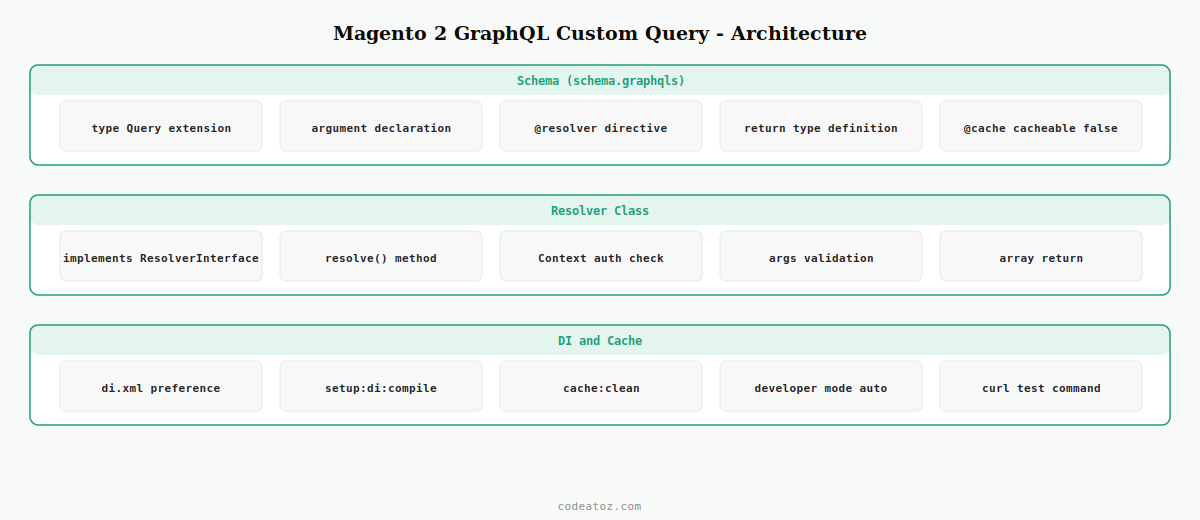
Magento 2 uses a schema-first GraphQL architecture. The schema file declares what your Magento 2 GraphQL custom query is called, what arguments it accepts, and what type it returns. Magento reads all schema.graphqls files from all active modules and merges them into a single unified schema. Your resolver class is called when the query is executed and must return data matching the declared return type exactly.
Step 1: Define the Magento 2 GraphQL Custom Query in schema.graphqls
The schema file declares your Magento 2 GraphQL custom query type, arguments, and return type. Magento reads this file automatically when GraphQL is requested — no manual registration is required beyond placing the file in the correct location.
type Query {
    # Magento 2 GraphQL custom query: fetch dispatch status for an order
    cazDispatchStatus(
        order_id: Int! @doc(description: "The order ID to fetch dispatch status for")
    ): CazDispatchStatus @resolver(class: "CodeAtoZ\Dispatch\Model\Resolver\DispatchStatus")
                         @doc(description: "Get dispatch status for a given order. Requires customer authentication.")
                         @cache(cacheable: false)
}

# Return type for the Magento 2 GraphQL custom query
type CazDispatchStatus {
    order_id:   Int    @doc(description: "Order ID")
    status:     String @doc(description: "Current dispatch status")
    updated_at: String @doc(description: "Last status update timestamp")
    tracking:   String @doc(description: "Tracking number if dispatched")
}
The @resolver directive maps the Magento 2 GraphQL custom query to the PHP class that executes it. The @cache(cacheable: false) directive prevents Magento from caching this query — required for customer-specific data. The ! suffix on Int! means the argument is required.
Step 2: Implement the Magento 2 GraphQL Custom Query Resolver
The resolver class implements MagentoFrameworkGraphQlQueryResolverInterface and its resolve() method. This is where the business logic of your Magento 2 GraphQL custom query lives — authentication checks, data fetching, and building the return array.
<?php
namespace CodeAtoZDispatchModelResolver;

use MagentoFrameworkGraphQlConfigElementField;
use MagentoFrameworkGraphQlExceptionGraphQlAuthorizationException;
use MagentoFrameworkGraphQlExceptionGraphQlNoSuchEntityException;
use MagentoFrameworkGraphQlQueryResolverInterface;
use MagentoFrameworkGraphQlSchemaTypeResolveInfo;
use MagentoGraphQlModelQueryContextInterface;

class DispatchStatus implements ResolverInterface
{
    public function __construct(
        private readonly CodeAtoZDispatchModelDispatchStatusRepository $repository,
        private readonly MagentoSalesApiOrderRepositoryInterface $orderRepo
    ) {}

    public function resolve(
        Field $field,
        $context,
        ResolveInfo $info,
        array $value = null,
        array $args   = null
    ): array {
        // Authentication check for Magento 2 GraphQL custom query
        /** @var ContextInterface $context */
        if ( false === $context->getExtensionAttributes()->getIsCustomer() ) {
            throw new GraphQlAuthorizationException(
                __( 'The current customer is not authorised to access dispatch status.' )
            );
        }

        $orderId = (int) ( $args['order_id'] ?? 0 );
        if ( ! $orderId ) {
            throw new GraphQlNoSuchEntityException( __( 'order_id is required.' ) );
        }

        // Verify the order belongs to the authenticated customer
        $customerId = $context->getUserId();
        try {
            $order = $this->orderRepo->get( $orderId );
        } catch ( Exception $e ) {
            throw new GraphQlNoSuchEntityException( __( 'Order %1 not found.', $orderId ) );
        }

        if ( (int) $order->getCustomerId() !== $customerId ) {
            throw new GraphQlAuthorizationException( __( 'Access denied to this order.' ) );
        }

        // Fetch and return data for the Magento 2 GraphQL custom query
        $status = $this->repository->getByOrderId( $orderId );

        return [
            'order_id'   => $orderId,
            'status'     => $status->getStatus(),
            'updated_at' => $status->getUpdatedAt(),
            'tracking'   => $status->getTracking() ?? '',
        ];
    }
}
Step 3: Wire the Magento 2 GraphQL Custom Query Resolver via di.xml
Resolvers are instantiated by Magento’s object manager via dependency injection. For a Magento 2 GraphQL custom query, di.xml wiring is only needed if you have interface-to-implementation preferences to declare — the resolver class itself is referenced directly from schema.graphqls and does not need a preference. However, any service classes the resolver depends on must be wired.
<config xmlns:xsi="http://www.w3.org/2001/XMLSchema-instance"
        xsi:noNamespaceSchemaLocation="urn:magento:framework:ObjectManager/etc/config.xsd">

    <!-- Bind interface to implementation used by the Magento 2 GraphQL custom query resolver -->
    <preference for="CodeAtoZDispatchApiDispatchStatusRepositoryInterface"
                type="CodeAtoZDispatchModelDispatchStatusRepository"/>

</config>
💡 After adding a new schema.graphqls file or modifying the resolver class, always run bin/magento setup:di:compile and bin/magento cache:clean. Magento compiles the GraphQL schema and resolver bindings during the DI compile step. Without this, your Magento 2 GraphQL custom query returns a schema not found error in production mode.
Testing the Magento 2 GraphQL Custom Query
Test your Magento 2 GraphQL custom query directly with a curl POST to the /graphql endpoint. For authenticated queries, include the customer token in the Authorization header. Magento ships with a built-in GraphQL playground at /graphql in developer mode that you can use for interactive testing.
# Get a customer token first
curl -X POST https://your-store.com/graphql
  -H "Content-Type: application/json"
  -d '{"query":"mutation { generateCustomerToken(email:"[email protected]" password:"password") { token } }"}'

# Then query the Magento 2 GraphQL custom query with the token
curl -X POST https://your-store.com/graphql
  -H "Content-Type: application/json"
  -H "Authorization: Bearer YOUR_TOKEN_HERE"
  -d '{"query":"{ cazDispatchStatus(order_id: 42) { status updated_at tracking } }"}'
The Adobe Commerce GraphQL schema documentation covers all available schema directives. The Magento 2 GraphQL resolver documentation covers the full ResolverInterface API. See our Magento 2 REST API custom endpoint guide for the equivalent REST approach, and our React Magento GraphQL search guide for consuming this query from a React frontend.
Magento 2 GraphQL Custom Query: Authentication Patterns
Magento 2 GraphQL custom queries can be public (no authentication required), customer-authenticated, or admin-authenticated. The $context object in the resolver provides the current user’s identity and role. Set the query as public by omitting the authentication check entirely — or restrict it to specific user types using the context extension attributes.
// Public query — no auth check needed for Magento 2 GraphQL custom query
// (simply skip the getIsCustomer() check)

// Customer-only query:
if ( false === $context->getExtensionAttributes()->getIsCustomer() ) {
    throw new GraphQlAuthorizationException( __( 'Customer login required.' ) );
}
$customerId = $context->getUserId();

// Admin-only query (requires Magento_GraphQlCache integration token):
if ( ! in_array( 'ROLE_ADMIN', $context->getUserRoleIds(), true ) ) {
    throw new GraphQlAuthorizationException( __( 'Admin access required.' ) );
}
Frequently Asked Questions — Magento 2 GraphQL Custom Query
How do I add a Magento 2 GraphQL custom query?
Create etc/schema.graphqls in your module declaring the query name, arguments, return type, and pointing to a resolver class via the @resolver directive. Implement the resolver class extending ResolverInterface with a resolve() method. Wire any interface dependencies in etc/di.xml. Run setup:di:compile and cache:clean. The Magento 2 GraphQL custom query is immediately available at the /graphql endpoint.
What is a resolver in a Magento 2 GraphQL custom query?
A resolver is the PHP class that executes when the Magento 2 GraphQL custom query is called. It implements MagentoFrameworkGraphQlQueryResolverInterface and its resolve() method receives the query arguments, context (authentication info), and field metadata. The method must return an array matching the declared return type in schema.graphqls. Business logic, data fetching, and authentication checks all live in the resolver.
How do I authenticate a Magento 2 GraphQL custom query?
Use the $context parameter in the resolver’s resolve() method. Check $context->getExtensionAttributes()->getIsCustomer() to verify a customer token is present. Throw GraphQlAuthorizationException if the user is not authorised. For customer-specific data in a Magento 2 GraphQL custom query, also verify that the requested resource belongs to the authenticated customer by comparing customer IDs.
Why does my Magento 2 GraphQL custom query return a schema error?
The most common causes: the schema.graphqls file has a syntax error or references a type that doesn’t exist, the resolver class name in the @resolver directive doesn’t match the actual class name exactly (including namespace backslashes doubled to \), or the DI compile step hasn’t been run after adding the file. Run bin/magento setup:di:compile and bin/magento cache:clean after every Magento 2 GraphQL custom query schema change.
Can a Magento 2 GraphQL custom query return multiple items?
Yes — declare the return type as an array using square brackets in schema.graphqls: cazDispatchHistory(order_id: Int!): [CazDispatchStatus]. In the resolver, return a PHP array of associative arrays where each item matches the CazDispatchStatus type fields. Magento’s GraphQL framework serialises the PHP array to the correct JSON response for the Magento 2 GraphQL custom query automatically.
Is a Magento 2 GraphQL custom query cached by default?
Yes — Magento caches GraphQL query results by default using the full-page cache. For a Magento 2 GraphQL custom query that returns customer-specific or frequently-changing data, add @cache(cacheable: false) to the query declaration in schema.graphqls. This prevents Magento from serving stale cached results. Public, rarely-changing data can remain cacheable for better performance.
Need Headless Magento GraphQL Development?
CodeAtoZ builds Magento 2 GraphQL custom queries, mutations, and resolvers for headless PWA and React storefronts.




