
Hyvä Theme Magento 2 — Complete Developer Guide 2026
Complete Hyvä theme Magento 2 developer guide — architecture overview, module compatibility, custom blocks, Alpine.js data, Tailwind config, and migrating from Luma.
The Hyvä theme Magento 2 framework replaces Magento’s performance-killing Luma frontend stack — Knockout.js, RequireJS, and jQuery — with a lightweight stack built on Alpine.js and Tailwind CSS. Stores on Hyvä theme Magento 2 routinely achieve PageSpeed scores above 90 on mobile versus 20–40 on Luma. This Hyvä theme Magento 2 developer guide covers everything you need to build, extend, and customise Hyvä: the module system, Alpine.js components, Tailwind configuration, block overrides, and checkout customisation.
Hyvä theme Magento 2 development is meaningfully different from Luma development. There is no RequireJS, no Knockout.js, and no jQuery by default. The UI component system (uiComponents) that powers Luma’s checkout and forms is replaced with lightweight Alpine.js components. CSS is generated by Tailwind — you configure a tailwind.config.js file and Hyvä’s build system generates a purged CSS bundle on deployment rather than serving the entire CSS framework.
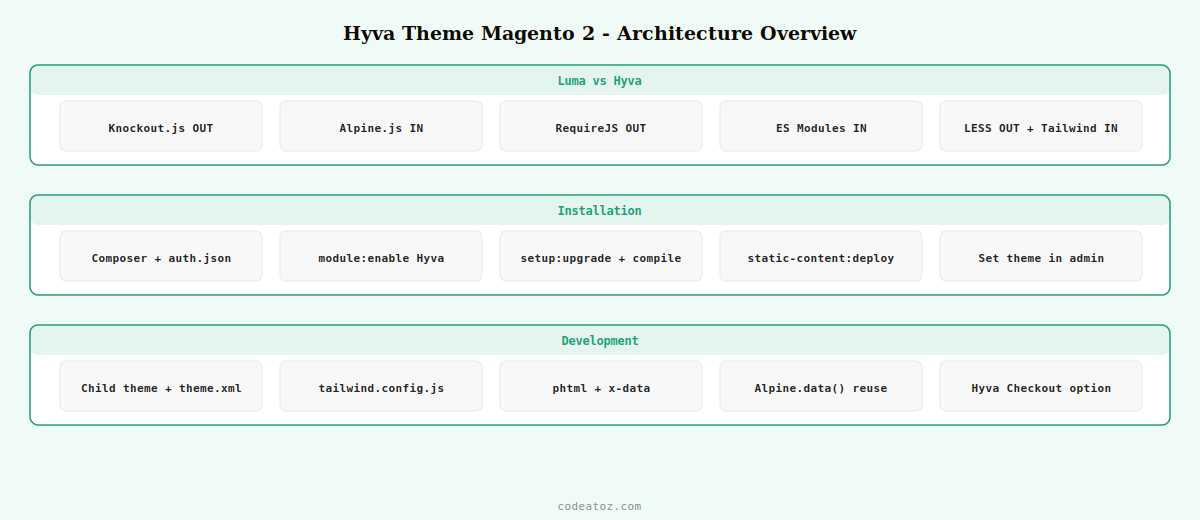
Hyvä Theme Magento 2: Architecture Overview
The Hyvä theme Magento 2 architecture has three layers that work together to deliver its performance advantage. Understanding all three is necessary before you can extend or customise it correctly.
| Layer | Hyvä Theme Magento 2 | Luma |
|---|---|---|
| JavaScript framework | Alpine.js (15kb) | Knockout.js + jQuery (200kb+) |
| CSS framework | Tailwind CSS (purged) | LESS compilation |
| JS module system | ES Modules + events | RequireJS AMD |
| Component model | x-data Alpine components | Knockout uiComponents |
| Checkout | Hyvä Checkout (separate) | Magento Luma Checkout |
| PageSpeed (mobile) | 85–98 | 20–45 |
Hyvä Theme Magento 2: Install and Enable
Hyvä theme Magento 2 is a paid theme available from hyva-themes.com. Purchase includes a GitLab repository token giving you access to the Composer package. Install via Composer then register the theme in Magento.
# Add Hyvä GitLab repository token to auth.json first, then:
composer require hyva-themes/magento2-default-theme

# Enable the Hyvä theme Magento 2 modules
bin/magento module:enable Hyva_Theme Hyva_ThemeAdminhtml Hyva_ThemeFallback

# Run setup
bin/magento setup:upgrade
bin/magento setup:di:compile
bin/magento setup:static-content:deploy

# Set the Hyvä theme in admin
# Content > Design > Configuration > select your store > set theme to Hyvä Default
Hyvä Theme Magento 2: Create a Custom Child Theme
Always create a child theme for customisations rather than editing the Hyvä parent theme directly. A Hyvä theme Magento 2 child theme inherits all parent templates and CSS while letting you override specific files.
<?xml version="1.0"?>
<theme xmlns:xsi="http://www.w3.org/2001/XMLSchema-instance"
       xsi:noNamespaceSchemaLocation="urn:magento:framework:Config/etc/theme.xsd">
    <title>Vendor Custom Hyvä</title>
    <parent>Hyva/default</parent>  <!-- inherits from Hyvä parent -->
</theme>const hyvaModules = require('@hyva-themes/hyva-modules');
module.exports = hyvaModules.mergeTailwindConfig({
theme: {
extend: {
colors: {
primary: {
DEFAULT: '#1D9E75',
lighter: '#34d399',
darker: '#065f46',
},
},
fontFamily: {
sans: ['Inter', 'ui-sans-serif', 'system-ui'],
},
},
},
// Hyvä theme Magento 2 purges CSS from all phtml files automatically
content: [
'./src/**/*.{phtml,xml}',
],
});Hyvä Theme Magento 2: Override Templates and Add Alpine.js Components
Override a Hyvä theme Magento 2 template by creating the file in your child theme at the same relative path as the parent. Add Alpine.js interactivity using x-data directly in the phtml template — no separate JS file required for simple components.
<?php
/** @var $block MagentoCatalogBlockProductAbstractProduct */
$product = $block->getProduct();
?>
<div class="product-card bg-white rounded-lg shadow hover:shadow-lg transition-shadow"
     x-data="{ addingToCart: false, qty: 1 }">

    <!-- Product image -->
    <a href="<?= $block->escapeUrl($product->getProductUrl()) ?>"
       class="block overflow-hidden rounded-t-lg">
        <img src="<?= $block->escapeUrl($block->getImage($product,'category_page_grid')->getImageUrl()) ?>"
             alt="<?= $block->escapeHtmlAttr($product->getName()) ?>"
             class="w-full h-64 object-cover hover:scale-105 transition-transform duration-300"
             loading="lazy"/>
    </a>

    <div class="p-4">
        <h2 class="text-lg font-semibold text-gray-900 mb-2">
            <?= $block->escapeHtml($product->getName()) ?>
        </h2>
        <p class="text-primary text-xl font-bold mb-4">
            <?= /* @noEscape */ $block->getProductPrice($product) ?>
        </p>
        <!-- Hyvä theme Magento 2 Alpine.js add to cart -->
        <button @click="addingToCart = true; $dispatch('add-to-cart', {sku: '<?= $product->getSku() ?>', qty})"
                :disabled="addingToCart"
                class="w-full bg-primary text-white py-2 px-4 rounded-lg hover:bg-primary-darker disabled:opacity-50 transition-colors">
            <span x-show="!addingToCart">Add to Cart</span>
            <span x-show="addingToCart">Adding...</span>
        </button>
    </div>
</div>
💡 In Hyvä theme Magento 2, never use RequireJS or jQuery for new component development. Use Alpine.js x-data for component state and $dispatch / $on for communication between components. For global state shared across the page (cart count, customer login status), use Hyvä’s hyva.getCookie() and the private-content section reload mechanism. Attempting to mix jQuery or Knockout into Hyvä theme Magento 2 components produces significant performance regressions.
The official Hyvä theme Magento 2 developer documentation covers the full template override system, Alpine.js patterns, and Tailwind CSS configuration. The Alpine.js x-data documentation covers the component model used in all Hyvä theme Magento 2 frontend development. See our Hyvä Alpine.js components guide for deeper Alpine.js patterns in Hyvä, and our Hyvä migration guide for moving an existing Luma store to Hyvä theme Magento 2.
Frequently Asked Questions — Hyvä Theme Magento 2 Developer Guide
What is Hyvä theme for Magento 2?
Hyvä theme Magento 2 is a commercial frontend theme that replaces Magento’s default Luma theme. It removes Knockout.js, RequireJS, and jQuery and replaces them with Alpine.js (15kb) and Tailwind CSS. The result is dramatically faster page loads — stores typically score 85-98 on PageSpeed after migrating to Hyvä theme Magento 2, versus 20-45 on Luma. Hyvä is maintained by Dutch agency Hyvä BV and is available with a lifetime or annual licence.
Is Hyvä theme Magento 2 compatible with all extensions?
Not automatically. Extensions that use Knockout.js uiComponents, RequireJS, or jQuery on the frontend need a Hyvä compatibility module to work correctly. Many popular extensions — Amasty, Mageplaza, MageWorx — now ship official Hyvä compatibility packages. Before migrating, audit every extension for Hyvä theme Magento 2 compatibility. The Hyvä compatibility repository lists community-contributed compatibility modules. Extensions that only work in the admin are unaffected.
How do I customise the Hyvä theme Magento 2 CSS?
Create a child theme and add your customisations to tailwind.config.js in the theme’s web/tailwind/ directory. Extend the Tailwind theme object to add custom colours, fonts, and spacing. Run npx tailwindcss build or use Hyvä’s npm run build command to generate the CSS. In production, the CSS is built during setup:static-content:deploy. Never edit the parent Hyvä theme Magento 2 CSS files directly — they are overwritten on updates.
How does Alpine.js work in Hyvä theme Magento 2?
Alpine.js is loaded globally in Hyvä theme Magento 2. Components are defined using x-data attribute on any HTML element. State is reactive — changes to x-data properties automatically update the DOM. Components communicate via $dispatch (sends a custom event) and x-on or @eventname listeners. For complex reusable components, define them using Alpine.data() in a phtml template’s inline script. The Hyvä Alpine.js guide in this series covers all major patterns.
What is Hyvä Checkout and is it required?
Hyvä Checkout is a separate package (additional licence cost) that replaces the Luma checkout with a Hyvä-compatible Alpine.js version. Without Hyvä Checkout, you can use a compatibility layer to run the standard Luma checkout inside a Hyvä theme Magento 2 store — the checkout page loads Luma’s JS stack for that one page. Most stores on Hyvä purchase Hyvä Checkout as well to get the performance benefits on the highest-conversion page of the store.
How long does a Hyvä theme Magento 2 implementation take?
A greenfield Hyvä theme Magento 2 build on a new store takes 4-8 weeks depending on design complexity. Migrating an existing Luma store to Hyvä theme Magento 2 takes 6-16 weeks depending on the number of custom extensions, custom template overrides, and the complexity of the existing frontend. Extension compatibility work is typically the largest time variable. Our Hyvä migration guide covers the full assessment and migration process in detail.
Need a Hyvä Theme Magento 2 Developer?
CodeAtoZ builds and migrates Magento 2 stores to Hyvä — architecture, child theme, extension compatibility, Alpine.js components, and Hyvä Checkout integration.




