
Magento 2 Plugin vs Observer vs Preference — The Essential Decision Guide (2026)
When to use a Magento 2 plugin vs observer vs preference — clear decision rules, before/around/after examples, and upgrade-safety guidance.
Choosing between a Magento 2 plugin observer preference is one of the most common architectural decisions in Magento 2 development. Get it wrong and you end up with full class overrides that break on every core update, or event observers so broad they slow the entire checkout pipeline. This guide gives you a clear decision framework for the Magento 2 plugin observer preference question — with real code examples for each method and a definitive rule for when to use the Magento 2 plugin observer preference that fits your use case.
Magento 2 gives you three primary extension mechanisms, and each has a specific use case, a specific cost, and specific risks if misused. The correct mental model for the Magento 2 plugin vs observer vs preference decision is: try a plugin first, use an observer for side effects, reach for a preference only when nothing else works.
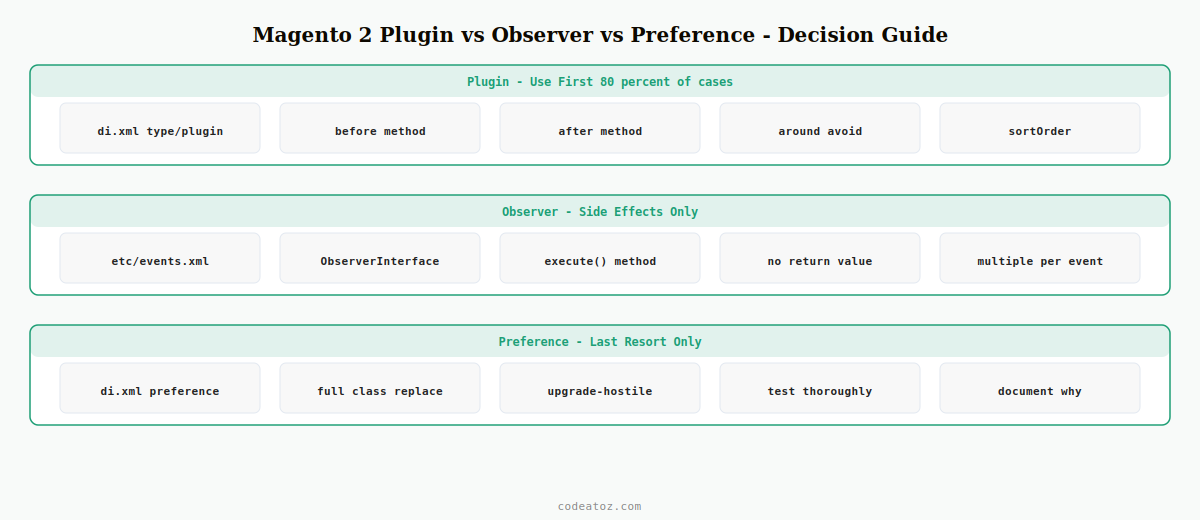
Magento 2 Plugin — The Right Choice 80% of the Time in Plugin vs Observer vs Preference
A Magento 2 plugin intercepts public method calls on any class without replacing the class itself. Multiple plugins can stack on the same method without conflicting. This composability makes plugins the default choice for the Magento 2 plugin observer preference decision — they are safe, stackable, and upgrade-compatible.
<type name="MagentoCheckoutModelSession">
    <plugin name="caz_checkout_session"
            type="CodeAtoZPluginCheckoutSessionPlugin"
            sortOrder="10"
            disabled="false"/>
</type><?php
namespace CodeAtoZPlugin;
class CheckoutSessionPlugin
{
// BEFORE: modify arguments before the original method runs
public function beforeSetQuoteId(
MagentoCheckoutModelSession $subject,
int $quoteId
): array {
// validate or transform $quoteId
return [ $quoteId ]; // must return array of arguments
}
// AFTER: modify the return value after the original runs
public function afterGetQuote(
MagentoCheckoutModelSession $subject,
MagentoQuoteModelQuote $result
): MagentoQuoteModelQuote {
// add custom data to the quote, log, etc.
return $result; // must return the (modified) result
}
}⚠ Avoid around plugins unless you specifically need to conditionally skip the original method. Around plugins wrap the original and break predictable plugin chain execution when multiple around plugins target the same method. For the Magento 2 plugin observer preference decision, before/after plugins are almost always the right choice.
Magento 2 Observer — When to Choose Observer in the Plugin vs Observer vs Preference Decision
A Magento 2 observer reacts to events dispatched by $this->_eventManager->dispatch( 'event_name', $data ). Observers are for side effects only — they cannot modify return values. The key rule in the Magento 2 plugin observer preference question: use an observer when you are reacting to a business event with no need to change data, and use a plugin when you need to change the data flowing through a method.
<config xmlns:xsi="http://www.w3.org/2001/XMLSchema-instance"
        xsi:noNamespaceSchemaLocation="urn:magento:framework:Event/etc/events.xsd">
    <event name="sales_order_place_after">
        <observer name="caz_order_placed"
                  instance="CodeAtoZObserverOrderPlacedObserver"/>
    </event>
</config><?php
namespace CodeAtoZObserver;
use MagentoFrameworkEventObserverInterface;
class OrderPlacedObserver implements ObserverInterface
{
public function execute( MagentoFrameworkEventObserver $observer ): void
{
$order = $observer->getData( 'order' );
// Send to fulfilment API, log to external system, trigger webhook
// You CANNOT modify and return the order here — use a plugin for that
}
}Magento 2 Preference — When to Choose Preference as the Last Option
A Magento 2 preference completely replaces one class with another via di.xml. It is the most powerful and most dangerous option in the Magento 2 plugin observer preference question. Use it only when the method you need to change is not public (plugins require public methods) and no suitable event is dispatched at that point.
<preference for="MagentoSalesModelOrder"
            type="CodeAtoZModelOrder"/>
⚠ Preferences are upgrade-hostile. When Magento updates the original class, your override does not inherit the changes. Security patches, HPOS compatibility changes, and bug fixes in the original are invisible to your override. For the Magento 2 plugin observer preference decision, exhausted all plugin and observer options before reaching for a preference.
The Magento 2 Plugin vs Observer vs Preference Decision Table
- Use a plugin when you need to modify arguments or return values of a public method, or intercept logic at a specific method call point. This covers 80% of Magento 2 plugin observer preference decisions.
- Use an observer when you are reacting to a dispatched business event with side effects only — calling an external API, sending a notification, writing a log — and do not need to modify any data that flows back through the system.
- Use a preference only when the target method is not public (plugins require public methods), no event is dispatched at the relevant point, and refactoring is not an option. Always document why you chose a preference in the Magento 2 plugin observer preference decision for this specific case.
See our guide on Magento 2 dependency injection to understand how all three are wired through di.xml. For the full module structure, see creating a Magento 2 module from scratch. The Adobe Commerce plugin documentation and events and observers documentation cover edge cases.
Frequently Asked Questions — Magento 2 Plugin vs Observer vs Preference
What is the difference between a Magento 2 plugin, observer, and preference?
A Magento 2 plugin intercepts public methods without replacing the class — it can modify arguments and return values. An observer reacts to dispatched events for side effects only — no return value modification. A preference fully replaces a class — upgrade-hostile and a last resort. This is the core of the Magento 2 plugin observer preference decision.
When should I use a Magento 2 plugin vs observer?
Use a Magento 2 plugin when you need to modify method arguments or return values. Use an observer when you are reacting to a business event for side effects only — sending emails, calling external APIs, or logging. The Magento 2 plugin observer preference rule: if you need to change data, use a plugin; if you are reacting to an event, use an observer.
Why should I avoid around plugins in the Magento 2 plugin observer preference decision?
Around plugins wrap the original method and break predictable plugin chain execution when multiple around plugins target the same method. Use before or after plugins instead. Reserve around plugins for cases where you specifically need to conditionally prevent the original method from running.
Can Magento 2 plugins work on private or protected methods?
No — Magento 2 plugins only work on public methods. For protected or private method interception, the Magento 2 plugin observer preference options are limited to a preference (full override) or a refactor to expose the method publicly. Always check whether a suitable event is dispatched at that point first.
Why are Magento 2 preferences upgrade-hostile in the plugin vs observer vs preference decision?
A Magento 2 preference replaces the entire class. When Magento releases an update to the original class — a security patch, HPOS compatibility fix, or bug correction — your override does not inherit those changes. The Magento 2 plugin observer preference best practice is to use preferences only as an absolute last resort and document the reason clearly.
Can multiple Magento 2 plugins target the same method without conflicting?
Yes — this is one of the key advantages in the Magento 2 plugin observer preference decision. Multiple before and after plugins stack safely on the same method, executed in sortOrder order. This is not true for around plugins, which can interfere with each other, and is completely impossible with preferences which allow only one override per class.
Need Magento 2 Extension Development?
CodeAtoZ builds Magento 2 plugins, observers, and custom modules — using the right extension method for each requirement.




