
Magento 2 B2B Module Setup — Company Accounts, Quotes & Shared Catalogues
Complete Magento 2 B2B module setup guide — enable company accounts, configure shared catalogues, set up negotiable quotes, assign customer roles, and customise approval workflows.
The Magento 2 B2B module transforms a standard Magento store into a complete trade portal — company account hierarchies, shared catalogues with account-specific pricing, negotiable quotes, purchase order workflows, and quick order forms for trade buyers. Setting up the Magento 2 B2B module correctly requires configuring six interconnected systems in the right order so each feature works with the others. This guide covers the complete Magento 2 B2B module setup from installation through company account structure, shared catalogue assignment, negotiable quote configuration, and purchase order approval rules.
The Magento 2 B2B module is available both as part of Adobe Commerce (Enterprise Edition) and as a standalone open-source B2B extension. The core B2B features — company accounts, shared catalogues, negotiable quotes, and purchase orders — are enabled and configured via Stores → Configuration → B2B Features. Each feature can be toggled independently, allowing you to enable only the capabilities your trade portal requires.
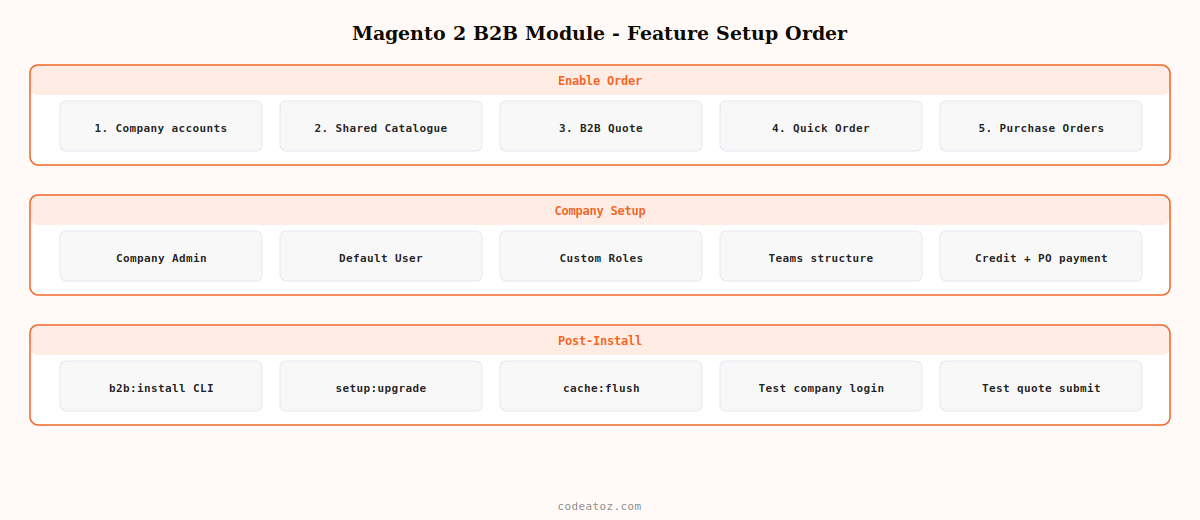
Magento 2 B2B Module: Enable Features in the Correct Order
The Magento 2 B2B module features have dependencies. Enable them in this order to avoid configuration conflicts:
| Step | Feature | Stores > Config path | Dependency |
|---|---|---|---|
| 1 | Company Accounts | B2B Features → Enable Company | None — enable first |
| 2 | Shared Catalogue | B2B Features → Enable Shared Catalog | Requires Company enabled |
| 3 | B2B Quote | B2B Features → Enable B2B Quote | Requires Company enabled |
| 4 | Quick Order | B2B Features → Enable Quick Order | Independent |
| 5 | Requisition Lists | B2B Features → Enable Requisition List | Requires Company enabled |
| 6 | Purchase Orders | B2B Features → Enable Purchase Orders | Requires Company enabled |
Magento 2 B2B Module: Company Account Structure
Company accounts in the Magento 2 B2B module support a three-tier hierarchy: the company account itself, company administrators (who manage the account, users, and purchasing rules), and company users (buyers within the organisation). This hierarchy allows large trade accounts to self-manage their own users, payment methods, and purchasing approval chains without contacting your store admin.
- Company Admin: manages users, teams, roles, and credit limits. Can submit and approve quotes. Full control over company purchasing settings.
- Default User: can browse, add to cart, and submit orders up to any purchase order approval limits the admin has set.
- Custom Roles: create as many roles as needed with granular permissions — view quotes but not submit, view purchase orders but not approve, view invoices only.
Magento 2 B2B Module: Shared Catalogue Configuration
A shared catalogue in the Magento 2 B2B module is a curated product set with custom pricing assigned to specific company accounts. One company sees pricing tier A, another sees tier B, and retail visitors see the standard catalogue. Configure shared catalogues from Catalog → Shared Catalogs.
<?php
use MagentoSharedCatalogApiSharedCatalogManagementInterface;
use MagentoCompanyApiCompanyRepositoryInterface;
use MagentoSharedCatalogApiCompanyManagementInterface;

class AssignCatalogToCompany
{
    public function __construct(
        private readonly CompanyRepositoryInterface         $companyRepo,
        private readonly SharedCatalogManagementInterface  $catalogMgmt,
        private readonly CompanyManagementInterface        $companyCatalogMgmt
    ) {}

    /**
     * Assign a shared catalogue to a company in the Magento 2 B2B module.
     */
    public function assign( int $companyId, int $sharedCatalogId ): void
    {
        $company = $this->companyRepo->get( $companyId );
        $catalog = $this->catalogMgmt->getPublicCatalog(); // or load by ID

        // Assign the company to the shared catalogue
        $this->companyCatalogMgmt->assignCompaniesToCatalog(
            $catalog,
            [ $company ]
        );
    }
}
Magento 2 B2B Module: Negotiable Quotes Setup
Negotiable quotes allow trade buyers to submit a cart for price negotiation, reducing the need for phone calls and email chains. The sales rep sees the submitted quote in the admin, can adjust line prices or add a shipping proposal, and the buyer accepts or counters. Enable negotiable quotes in B2B Features and configure default expiry and minimum order value in Stores → Configuration → Sales → Quotes.
Magento 2 B2B Module: Purchase Order Approval Rules
Purchase order approval rules in the Magento 2 B2B module allow company administrators to require management approval for orders above a certain value. Configure approval rules per company from the Company Admin portal or programmatically via the PurchaseOrderApprovalRuleRepositoryInterface API.
💡 Run bin/magento b2b:install after enabling any Magento 2 B2B module features for the first time to ensure all B2B-specific database tables and ACL entries are created. Without this command, some B2B features appear enabled in config but fail silently because the underlying schema is incomplete.
The Adobe Commerce B2B module documentation covers the complete feature set and configuration reference. The Magento 2 B2B module developer documentation covers the API interfaces for programmatic company and catalogue management. See our Magento 2 layout XML guide for customising B2B checkout layouts, and our Magento 2 development services for B2B portal builds.
Frequently Asked Questions — Magento 2 B2B Module Setup
What is the Magento 2 B2B module?
The Magento 2 B2B module is a suite of features designed for trade and wholesale stores. It adds company account hierarchies, shared catalogues with account-specific pricing, negotiable quotes, purchase order workflows with approval rules, quick order forms, and requisition lists. It is available as part of Adobe Commerce and as a standalone open-source extension for Magento Open Source.
How do I enable the Magento 2 B2B module?
Enable B2B features in Stores > Configuration > General > B2B Features. Enable Company first, then Shared Catalog, B2B Quote, Quick Order, Requisition List, and Purchase Orders in that order to respect dependencies. Run bin/magento b2b:install after enabling features for the first time to create B2B database tables and ACL entries. Run bin/magento setup:upgrade and cache:flush after the install command.
What is a shared catalogue in the Magento 2 B2B module?
A shared catalogue is a subset of your product catalogue with custom pricing assigned to specific company accounts. Different trade accounts see different products at different prices. The public shared catalogue replaces the default catalogue for B2B visitors. Assign catalogues to companies from the Shared Catalogs admin grid or programmatically via CompanyManagementInterface. This is the foundation of tiered B2B pricing in the Magento 2 B2B module.
How do negotiable quotes work in the Magento 2 B2B module?
A company user adds products to their cart and submits a quote request with a comment. The sales rep sees the submitted quote in Sales > Quotes, can adjust line item prices, add a discount, propose shipping, and set an expiry date. The buyer receives a notification, can counter-negotiate or accept. On acceptance, the quote converts to an order. The Magento 2 B2B module negotiable quote feature eliminates manual quoting by phone or email.
Can I customise company roles in the Magento 2 B2B module?
Yes — company administrators can create custom roles with granular permissions from their My Account portal. Permissions include view/create/approve for quotes, purchase orders, and requisition lists, as well as user management. Developers can also add custom permissions to the B2B ACL tree by declaring them in acl.xml and hooking into the role permission system. This allows complex organisational hierarchies with fine-grained purchasing control.
Does the Magento 2 B2B module work with custom payment gateways?
Yes — the Magento 2 B2B module’s purchase order and negotiable quote workflows integrate with any payment method available in Magento, including custom payment gateway modules. B2B adds a Company Credit payment method for approved credit-limit purchases and a Purchase Order payment method for internal PO workflow. Standard payment gateways work at checkout for immediate payment, while company credit and PO are available only to authenticated company accounts.
Need a Magento 2 B2B Trade Portal Built?
CodeAtoZ builds Magento 2 B2B module implementations — company accounts, shared catalogues, negotiable quotes, and custom approval workflows for wholesale and trade stores.




