
Magento 2 Custom Indexer — Mview, Flat Tables & Reindex Command (2026)
A Magento 2 custom indexer pre-computes expensive query results into a flat table, transforming slow multi-join queries into fast single-table lookups. The most common use case for a Magento 2 custom indexer is denormalising catalogue data for custom frontend queries — instead of joining five tables on every product listing request, the indexer runs once (or incrementally) and stores the joined result in a flat table your frontend reads directly. This guide covers the complete Magento 2 custom indexer implementation: declaring it in indexer.xml, implementing IndexerInterface, setting up Mview for incremental updates, and running it via the CLI reindex command.
Magento 2 custom indexer architecture has two modes: full reindex (rebuilds the entire flat table from scratch) and incremental update (processes only the rows changed since the last index run, tracked by Mview). Full reindex runs via bin/magento indexer:reindex vendor_module_custom. Incremental updates run automatically when the subscribed source tables change, making the Magento 2 custom indexer data stay up to date without manual intervention.
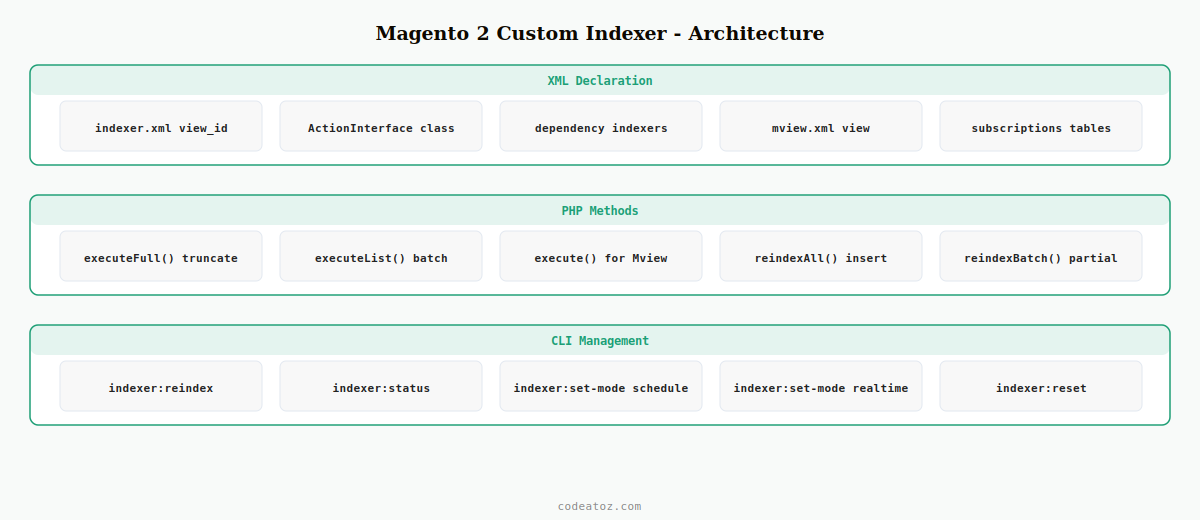
Magento 2 Custom Indexer: Declare in indexer.xml
Register your Magento 2 custom indexer in etc/indexer.xml. The indexer ID is what you use in CLI commands. The class attribute points to your IndexerInterface implementation.
<?xml version="1.0"?>
<config xmlns:xsi="http://www.w3.org/2001/XMLSchema-instance"
        xsi:noNamespaceSchemaLocation="urn:magento:framework:Indexer/etc/indexer.xsd">

    <indexer id="vendor_module_custom_flat"
             view_id="vendor_module_custom"
             class="VendorModuleModelIndexerCustomFlatIndexer"
             primary="catalog_product">

        <title translate="true">Custom Product Flat Data</title>
        <description translate="true">Magento 2 custom indexer for fast product flat queries</description>

        <!-- Dependencies ensure this Magento 2 custom indexer runs after catalog indexers -->
        <dependencies>
            <indexer id="catalog_product_attribute"/>
        </dependencies>
    </indexer>

</config>
Magento 2 Custom Indexer: Implement IndexerInterface
The indexer class implements MagentoFrameworkIndexerActionInterface (and optionally MagentoFrameworkMviewActionInterface for incremental updates). The executeFull() method rebuilds the entire flat table; executeList() processes a batch of IDs.
<?php
namespace VendorModuleModelIndexer;

use MagentoFrameworkIndexerActionInterface;
use MagentoFrameworkMviewActionInterface as MviewActionInterface;
use MagentoFrameworkAppResourceConnection;

class CustomFlatIndexer implements ActionInterface, MviewActionInterface
{
    private const TABLE = 'vendor_module_custom_flat';

    public function __construct(
        private readonly ResourceConnection $resource
    ) {}

    /**
     * Full reindex — Magento 2 custom indexer rebuild from scratch
     */
    public function executeFull(): void
    {
        $connection = $this->resource->getConnection();
        $table      = $this->resource->getTableName( self::TABLE );

        // Truncate and rebuild the flat table
        $connection->truncateTable( $table );
        $this->reindexAll( $connection, $table );
    }

    /**
     * Partial reindex for a list of entity IDs — Magento 2 custom indexer batch
     */
    public function executeList( array $ids ): void
    {
        if ( empty( $ids ) ) return;
        $connection = $this->resource->getConnection();
        $table      = $this->resource->getTableName( self::TABLE );

        // Delete stale rows for these IDs then reindex them
        $connection->delete( $table, ['entity_id IN (?)' => $ids] );
        $this->reindexBatch( $connection, $table, $ids );
    }

    /**
     * Mview incremental update — triggered automatically when source table changes
     */
    public function execute( $ids ): void
    {
        $this->executeList( is_array( $ids ) ? $ids : [$ids] );
    }

    public function executeRow( $id ): void
    {
        $this->executeList( [$id] );
    }

    private function reindexAll( $connection, string $table ): void
    {
        // Example: denormalise product data into the flat table
        $select = $connection->select()
            ->from( ['cpe' => $this->resource->getTableName('catalog_product_entity')], ['entity_id'] )
            ->join( ['cpev' => $this->resource->getTableName('catalog_product_entity_varchar')],
                    'cpe.entity_id = cpev.entity_id AND cpev.attribute_id = 73',
                    ['name' => 'cpev.value'] );

        $rows = $connection->fetchAll( $select );
        if ( $rows ) {
            $connection->insertMultiple( $table, $rows );
        }
    }

    private function reindexBatch( $connection, string $table, array $ids ): void
    {
        $select = $connection->select()
            ->from( ['cpe' => $this->resource->getTableName('catalog_product_entity')], ['entity_id'] )
            ->join( ['cpev' => $this->resource->getTableName('catalog_product_entity_varchar')],
                    'cpe.entity_id = cpev.entity_id AND cpev.attribute_id = 73',
                    ['name' => 'cpev.value'] )
            ->where( 'cpe.entity_id IN (?)', $ids );

        $rows = $connection->fetchAll( $select );
        if ( $rows ) {
            $connection->insertMultiple( $table, $rows );
        }
    }
}
Magento 2 Custom Indexer: Set Up Mview for Incremental Updates
Mview (Materialised View) tracks changes to source tables and triggers your Magento 2 custom indexer incrementally. Declare the Mview subscription in etc/mview.xml.
<?xml version="1.0"?>
<config xmlns:xsi="http://www.w3.org/2001/XMLSchema-instance"
        xsi:noNamespaceSchemaLocation="urn:magento:framework:Mview/etc/mview.xsd">

    <view id="vendor_module_custom"
          class="VendorModuleModelIndexerCustomFlatIndexer"
          group="indexer">

        <subscriptions>
            <!-- Watch these tables for changes to trigger incremental Magento 2 custom indexer -->
            <table name="catalog_product_entity"         entity_column="entity_id"/>
            <table name="catalog_product_entity_varchar" entity_column="entity_id"/>
        </subscriptions>
    </view>

</config># Full reindex of the Magento 2 custom indexer
bin/magento indexer:reindex vendor_module_custom_flat
# Check Magento 2 custom indexer status
bin/magento indexer:status vendor_module_custom_flat
# Set to Update by Schedule (Mview incremental) mode
bin/magento indexer:set-mode schedule vendor_module_custom_flat
# Set to Update on Save (synchronous) mode
bin/magento indexer:set-mode realtime vendor_module_custom_flat
# Reset indexer to force full reindex on next run
bin/magento indexer:reset vendor_module_custom_flatThe Adobe Commerce indexing documentation covers the full Magento 2 custom indexer framework including ActionInterface and Mview. The Magento 2 custom indexer tutorial covers the complete setup with examples. See our Magento 2 DI guide for injecting ResourceConnection, and our Magento 2 cron job guide for scheduling periodic full reindexes alongside incremental Mview updates.
💡 Always create the flat table via a db_schema.xml declarative schema file rather than an install script. Declarative schema creates the table on bin/magento setup:upgrade, handles column additions in future versions automatically, and avoids the deprecated Setup/UpgradeSchema pattern. Your Magento 2 custom indexer flat table should have the entity ID as the primary key with appropriate indexes on the columns you query.
Frequently Asked Questions — Magento 2 Custom Indexer
When should I use a Magento 2 custom indexer?
Build a Magento 2 custom indexer when a frontend page requires expensive queries that join multiple tables on every request. The indexer pre-computes the join into a flat table, reducing the query to a single-table lookup. Common use cases: denormalised product data for custom search, pre-aggregated sales statistics for dashboards, custom catalogue flat data for layered navigation, and pre-computed tier pricing tables for B2B catalogues.
What is Mview and how does it work with a Magento 2 custom indexer?
Mview (Materialised View) is Magento’s change tracking system. It creates changelog tables on the source tables you subscribe to and records every entity ID that changes. When bin/magento cron:run processes the indexer_update_all_views job, it reads the changelog, passes the changed IDs to your execute() method, and clears the changelog. This gives your Magento 2 custom indexer incremental updates without scanning the entire source table.
What is the difference between realtime and schedule mode for a Magento 2 custom indexer?
In realtime mode, the Magento 2 custom indexer runs synchronously when a product is saved — the admin save action blocks until reindexing completes. In schedule mode, changes are tracked by Mview and the Magento 2 custom indexer runs asynchronously on the next cron run, typically within a minute. For large catalogues, always use schedule mode to keep admin product saves fast. Use realtime only for small catalogues where the index update is fast enough not to impact admin usability.
How do I create the flat table for my Magento 2 custom indexer?
Use a db_schema.xml declarative schema file in your module’s etc directory. Define the table with an entity_id primary key column and any denormalised data columns your Magento 2 custom indexer will populate. Run bin/magento setup:upgrade to apply the schema. The declarative schema approach handles table creation on fresh installs and column additions in upgrades without manual version management.
How does a Magento 2 custom indexer affect performance during full reindex?
A full Magento 2 custom indexer reindex uses TRUNCATE on the flat table followed by insertMultiple() for all rows. For large catalogues, break the reindex into batches using a loop that fetches and inserts 1000 rows at a time to avoid memory exhaustion. Wrap the batch in a transaction for atomicity. On a 100,000-product catalogue, a well-written batched Magento 2 custom indexer full reindex completes in under 2 minutes.
How do I debug a Magento 2 custom indexer that is not updating?
Run bin/magento indexer:status to check if the Magento 2 custom indexer is in invalid state requiring a reindex. Check that your mview.xml view_id matches the indexer.xml view_id. Verify cron is running bin/magento cron:run regularly using var/log/cron.log. Check Mview changelog tables — if they accumulate without being processed, your consumer is not running. In realtime mode, check var/log/exception.log for errors thrown during the synchronous Magento 2 custom indexer update on product save.
Need a Custom Magento 2 Indexer Built?
CodeAtoZ builds custom Magento 2 indexers for fast catalogue queries, B2B price flat tables, and custom search data structures.




