
Magento 2 CI/CD Deployment — GitHub Actions Pipeline Guide (2026)
Complete Magento 2 CI/CD deployment guide — GitHub Actions workflow, automated testing, zero-downtime deploy with rsync, static content deploy, and cache warm.
A reliable Magento 2 CI/CD deployment pipeline eliminates the most common cause of production incidents on Magento stores: manual deployment errors. Missed setup:upgrade, forgotten cache:flush, accidentally deployed uncommitted files — every one of these is prevented by a properly configured Magento 2 CI/CD deployment workflow. This guide covers a production-ready Magento 2 CI/CD deployment pipeline using GitHub Actions: automated PHPUnit tests on every pull request, static analysis with PHPStan, rsync-based zero-downtime deployment, and post-deploy cache warming.
Magento 2 CI/CD deployment is more complex than a standard PHP application because the build process has multiple Magento-specific steps that must run in the correct order: Composer install, dependency injection compilation, static content deployment across all configured locales, and then the switch to the new codebase. Each step has failure modes that produce cryptic errors if skipped or run out of order.
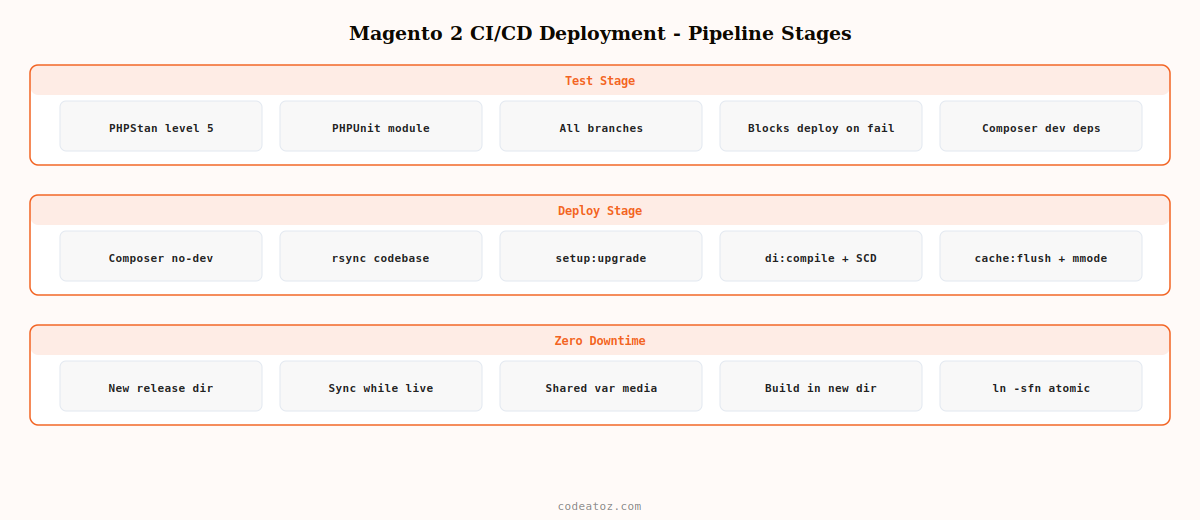
Magento 2 CI/CD Deployment: GitHub Actions Workflow
The Magento 2 CI/CD deployment workflow splits into two jobs: a test job that runs on every push and pull request, and a deploy job that runs only on pushes to main. This separation ensures broken code is caught before it can reach production.
name: Magento 2 CI/CD Deployment

on:
  push:
    branches: [main, staging]
  pull_request:
    branches: [main]

jobs:

  # ── STAGE 1: Test — runs on every push and PR ──────────────────────────
  test:
    runs-on: ubuntu-latest
    steps:
      - uses: actions/checkout@v4

      - uses: shivammathur/setup-php@v2
        with:
          php-version: '8.2'
          extensions: bcmath, ctype, gd, intl, mbstring, simplexml, soap, zip

      - name: Install Composer dependencies
        run: composer install --no-progress --prefer-dist --no-dev

      - name: Run PHPStan static analysis
        run: vendor/bin/phpstan analyse app/code --level=5

      - name: Run PHPUnit — Magento 2 CI/CD deployment test stage
        run: |
          composer install --dev --no-progress
          vendor/bin/phpunit -c dev/tests/unit/phpunit.xml.dist app/code/

  # ── STAGE 2: Deploy — runs only on push to main ────────────────────────
  deploy:
    needs: test
    runs-on: ubuntu-latest
    if: github.ref == 'refs/heads/main' && github.event_name == 'push'
    environment: production

    steps:
      - uses: actions/checkout@v4

      - uses: shivammathur/setup-php@v2
        with:
          php-version: '8.2'
          extensions: bcmath, ctype, gd, intl, mbstring, simplexml, soap, zip

      - name: Composer install (production — no dev)
        run: composer install --no-dev --optimize-autoloader --no-progress

      # ── Build static assets locally ──────────────────────────────────────
      - name: Copy env.php from secrets
        run: echo "${{ secrets.MAGENTO_ENV_PHP }}" > app/etc/env.php

      - name: Enable Magento maintenance mode
        run: ssh ${{ secrets.DEPLOY_SSH }} "cd ${{ secrets.DEPLOY_PATH }} && php bin/magento maintenance:enable"

      - name: Sync codebase to server via rsync
        run: |
          rsync -az --delete
            --exclude='.git'
            --exclude='var/'
            --exclude='pub/media/'
            ./ ${{ secrets.DEPLOY_SSH }}:${{ secrets.DEPLOY_PATH }}/

      - name: Magento 2 CI/CD deployment — post-deploy commands
        run: |
          ssh ${{ secrets.DEPLOY_SSH }} "
            cd ${{ secrets.DEPLOY_PATH }} &&
            php bin/magento setup:upgrade --keep-generated &&
            php bin/magento setup:di:compile &&
            php bin/magento setup:static-content:deploy en_GB en_US -f &&
            php bin/magento cache:flush &&
            php bin/magento maintenance:disable
          "

      - name: Warm Magento 2 CI/CD deployment cache
        run: ssh ${{ secrets.DEPLOY_SSH }} "cd ${{ secrets.DEPLOY_PATH }} && php bin/magento cache:warmup --types=full_page"
Magento 2 CI/CD Deployment: GitHub Secrets Required
The Magento 2 CI/CD deployment pipeline requires several GitHub repository secrets. Add these in your repository Settings → Secrets and Variables → Actions.
- DEPLOY_SSH: SSH connection string (e.g.
[email protected]) for rsync and remote commands - DEPLOY_PATH: absolute path to Magento root on the server (e.g.
/var/www/magento) - MAGENTO_ENV_PHP: the full contents of your production
app/etc/env.phpfile — never commit this to the repository - SSH_PRIVATE_KEY: the private SSH key for the deploy user — add the corresponding public key to
~/.ssh/authorized_keyson your server
Magento 2 CI/CD Deployment: Zero-Downtime Strategy
The simplest Magento 2 CI/CD deployment approach puts the store in maintenance mode during deployment. For stores with strict uptime requirements, a blue-green deployment strategy keeps two copies of the codebase and switches a symlink atomically. After the new codebase is fully built and compiled, the symlink switch takes milliseconds with no maintenance window.
#!/bin/bash
# Zero-downtime Magento 2 CI/CD deployment via symlink switch
DEPLOY_BASE="/var/www"
CURRENT="$DEPLOY_BASE/magento-current"  # symlink pointing to active release
NEW_RELEASE="$DEPLOY_BASE/magento-$(date +%Y%m%d%H%M%S)"

# 1. Create new release directory
mkdir -p "$NEW_RELEASE"

# 2. Rsync to new release (while current is live — no downtime)
rsync -az --delete --exclude='.git' --exclude='var/' --exclude='pub/media/'
  ./  "$NEW_RELEASE/"

# 3. Share var/ and pub/media/ between releases
ln -sfn "$DEPLOY_BASE/shared/var"       "$NEW_RELEASE/var"
ln -sfn "$DEPLOY_BASE/shared/pub/media" "$NEW_RELEASE/pub/media"
cp      "$DEPLOY_BASE/shared/env.php"   "$NEW_RELEASE/app/etc/env.php"

# 4. Build in new release (no traffic yet)
cd "$NEW_RELEASE"
php bin/magento setup:upgrade --keep-generated
php bin/magento setup:di:compile
php bin/magento setup:static-content:deploy en_GB en_US -f
php bin/magento cache:flush

# 5. Atomic symlink switch — zero-downtime Magento 2 CI/CD deployment
ln -sfn "$NEW_RELEASE" "$CURRENT"

# 6. Remove releases older than 3 — keep rollback available
ls -dt "$DEPLOY_BASE"/magento-20* | tail -n +4 | xargs rm -rf
💡 Always use --keep-generated with setup:upgrade in your Magento 2 CI/CD deployment post-deploy commands when you have already run setup:di:compile as a separate step. Without this flag, Magento 2 deletes the generated folder before upgrade then re-runs compilation — doubling the deployment time and temporarily leaving the store without compiled code if the process is interrupted.
The Adobe Commerce deployment overview covers the recommended Magento 2 CI/CD deployment pipeline architecture. The GitHub Actions deployment documentation covers environment protection rules and deployment approvals. See our Magento 2 PHPUnit testing guide for the test stage of the pipeline, and our Magento 2 development services for managed deployment pipeline setup.
Frequently Asked Questions — Magento 2 CI/CD Deployment
How do I set up a Magento 2 CI/CD deployment pipeline?
Create a GitHub Actions workflow with two jobs: a test job running PHPUnit and PHPStan on every push and pull request, and a deploy job running on pushes to main. The deploy job uses rsync to sync the codebase to the server, then runs setup:upgrade, setup:di:compile, static-content:deploy, and cache:flush via SSH. Store server credentials and env.php contents in GitHub repository secrets.
How do I achieve zero-downtime in a Magento 2 CI/CD deployment?
Use a blue-green symlink strategy. Rsync to a new release directory while the current release is serving traffic. Build and compile in the new directory. Create symlinks to shared var/ and pub/media/ directories. Then switch the main symlink atomically with ln -sfn. The web server sees the new codebase from the next request, with no maintenance window required in the Magento 2 CI/CD deployment.
What commands should run after deploying Magento 2?
The post-deploy commands in a Magento 2 CI/CD deployment are: setup:upgrade to apply database schema changes and data patches, setup:di:compile to rebuild the dependency injection container, setup:static-content:deploy to generate CSS and JS bundles for configured locales, and cache:flush to clear all cache types. Run them in this order. After cache flush, optionally warm the full_page cache with cache:warmup.
How should I store Magento 2 env.php in a CI/CD pipeline?
Never commit env.php to your repository as it contains database credentials, encryption keys, and API secrets. Store the production env.php contents as a GitHub Actions secret (MAGENTO_ENV_PHP). In the Magento 2 CI/CD deployment workflow, echo the secret to app/etc/env.php before running Magento build commands. For the zero-downtime symlink approach, store env.php in a shared directory outside the release folders and symlink it into each release.
How long does a Magento 2 CI/CD deployment take?
Total Magento 2 CI/CD deployment time depends on catalogue size. Composer install takes 2-5 minutes. setup:di:compile takes 2-4 minutes. setup:static-content:deploy is the longest step at 5-20 minutes for a large catalogue with multiple locales. Running static content deploy in parallel (using the -j flag for multiple themes) and pre-building on the CI runner before rsync can bring total Magento 2 CI/CD deployment time to under 10 minutes for most stores.
What is the difference between pipeline and CLI deployment in Magento 2?
CLI deployment runs Magento build commands directly on the production server, which is slower and riskier for high-traffic stores. Pipeline deployment (Magento 2 CI/CD deployment) runs the build on a CI server or pre-production environment, syncing only the built artefacts to production. This reduces production server load during deployments, catches build failures before they reach production, and enables rollback by keeping previous releases available via symlink.
Need a Magento 2 CI/CD Pipeline Set Up?
CodeAtoZ sets up Magento 2 CI/CD deployment pipelines with GitHub Actions, zero-downtime rsync deployment, automated testing, and rollback capability.




