WooCommerce AI Upsell Popup — Personalised Offers That Convert (2026)
Build a WooCommerce AI upsell popup that generates personalised product recommendations and persuasive copy using AI — triggered on add-to-cart with a REST endpoint and JavaScript modal.
A WooCommerce AI upsell popup shows the right complementary product with the right persuasive copy at the highest-intent moment — immediately after a customer adds a product to their cart. Unlike static upsell rules that suggest the same products to every customer, a WooCommerce AI upsell popup uses AI to generate a contextual recommendation and personalised copy based on what the customer just added. This guide builds a complete WooCommerce AI upsell popup: a PHP REST endpoint that generates AI recommendations, and a JavaScript modal that fires on add-to-cart success.
WooCommerce AI Upsell Popup: The REST Endpoint
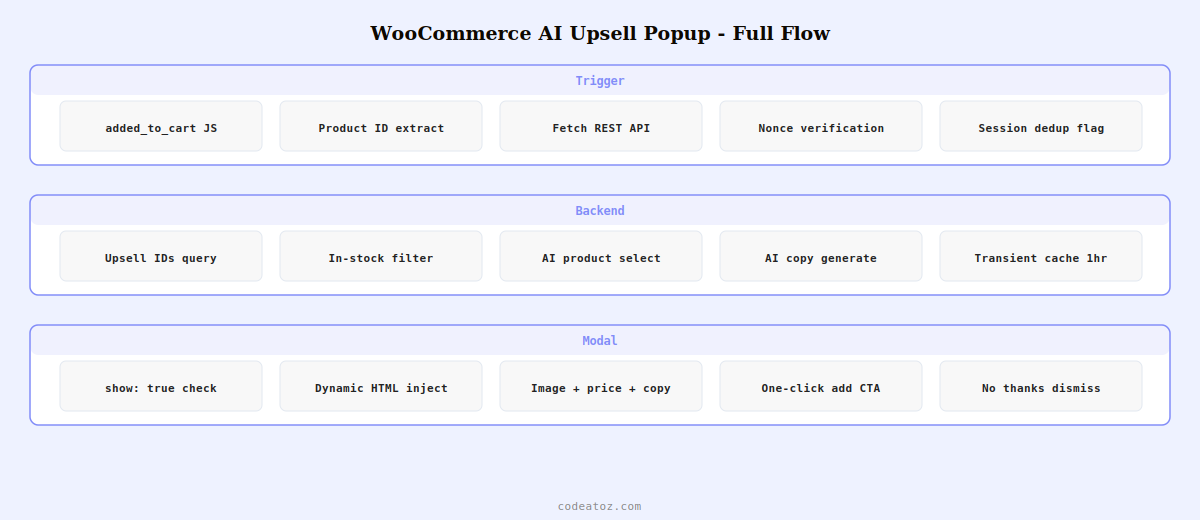
The WooCommerce AI upsell popup backend is a WordPress REST endpoint that accepts the just-added product ID, retrieves candidate upsell products, calls the AI to select the best match and generate compelling copy, and returns the recommendation as JSON to the frontend.
<?php
add_action( 'rest_api_init', function() {
    register_rest_route( 'caz/v1', '/upsell-popup', [
        'methods'             => 'POST',
        'callback'            => 'caz_ai_upsell_popup_handler',
        'permission_callback' => '__return_true',
        'args' => [
            'product_id' => ['required' => true, 'sanitize_callback' => 'absint'],
            'nonce'      => ['required' => true, 'sanitize_callback' => 'sanitize_text_field'],
        ],
    ]);
});

function caz_ai_upsell_popup_handler( WP_REST_Request $request ): WP_REST_Response {
    if ( ! wp_verify_nonce( $request['nonce'], 'caz_upsell_nonce' ) ) {
        return new WP_REST_Response( ['error' => 'Invalid nonce'], 403 );
    }

    $product_id = $request['product_id'];
    $product    = wc_get_product( $product_id );
    if ( ! $product ) {
        return new WP_REST_Response( ['show' => false], 200 );
    }

    // Get candidate upsell products from WooCommerce upsell IDs
    $upsell_ids = $product->get_upsell_ids();
    if ( empty( $upsell_ids ) ) {
        // Fall back to related products if no explicit upsells set
        $upsell_ids = array_slice( wc_get_related_products( $product_id, 5 ), 0, 5 );
    }
    if ( empty( $upsell_ids ) ) {
        return new WP_REST_Response( ['show' => false], 200 );
    }

    // Build candidate data for WooCommerce AI upsell popup selection
    $candidates = [];
    foreach ( array_slice( $upsell_ids, 0, 5 ) as $id ) {
        $up = wc_get_product( $id );
        if ( $up && $up->is_in_stock() ) {
            $candidates[] = [
                'id'    => $id,
                'name'  => $up->get_name(),
                'price' => $up->get_price(),
            ];
        }
    }

    if ( empty( $candidates ) ) {
        return new WP_REST_Response( ['show' => false], 200 );
    }

    $prompt = "A customer just added "{$product->get_name()}" (£{$product->get_price()}) to their cart.
Candidate upsell products: " . json_encode( $candidates ) . "
Task: Choose the single best upsell product and write persuasive popup copy.
Return JSON with these fields:
- product_id: the chosen product ID (integer)
- headline: short popup headline, max 8 words
- body: one persuasive sentence explaining the pairing, max 20 words
- cta: call to action button text, max 5 words
Choose the product that most logically complements what they just added.
Return only valid JSON, no explanation.";

    $response = wp_remote_post( 'https://api.openai.com/v1/chat/completions', [
        'headers' => [
            'Authorization' => 'Bearer ' . get_option('caz_openai_key'),
            'Content-Type'  => 'application/json',
        ],
        'body' => wp_json_encode([
            'model'      => 'gpt-4o-mini',
            'max_tokens' => 150,
            'messages'   => [[ 'role' => 'user', 'content' => $prompt ]],
        ]),
        'timeout' => 20,
    ]);

    $body = json_decode( wp_remote_retrieve_body( $response ), true );
    $ai   = json_decode( $body['choices'][0]['message']['content'] ?? '{}', true );

    if ( empty( $ai['product_id'] ) ) {
        return new WP_REST_Response( ['show' => false], 200 );
    }

    $upsell_product = wc_get_product( (int) $ai['product_id'] );
    return new WP_REST_Response([
        'show'       => true,
        'product_id' => $ai['product_id'],
        'headline'   => sanitize_text_field( $ai['headline'] ?? '' ),
        'body'       => sanitize_text_field( $ai['body'] ?? '' ),
        'cta'        => sanitize_text_field( $ai['cta'] ?? 'Add to Cart' ),
        'product_name' => $upsell_product->get_name(),
        'price'        => wc_price( $upsell_product->get_price() ),
        'image'        => wp_get_attachment_image_url( $upsell_product->get_image_id(), 'medium' ),
        'add_to_cart_url' => $upsell_product->add_to_cart_url(),
    ], 200);
}
WooCommerce AI Upsell Popup: The JavaScript Modal
// WooCommerce AI upsell popup - triggered on successful add-to-cart
jQuery(document).on('added_to_cart', function(e, fragments, cartHash, button) {
    const productId = button.data('product_id');
    if (!productId) return;

    // Call the WooCommerce AI upsell popup REST endpoint
    fetch('/wp-json/caz/v1/upsell-popup', {
        method: 'POST',
        headers: { 'Content-Type': 'application/json' },
        body: JSON.stringify({
            product_id: productId,
            nonce: cazUpsell.nonce  // localised via wp_localize_script
        })
    })
    .then(r => r.json())
    .then(data => {
        if (!data.show) return;

        // Inject and show WooCommerce AI upsell popup modal
        const modal = document.createElement('div');
        modal.innerHTML = `
        <div id="caz-upsell-overlay" style="position:fixed;inset:0;background:rgba(0,0,0,0.6);z-index:9999;display:flex;align-items:center;justify-content:center">
            <div style="background:#fff;border-radius:12px;padding:32px;max-width:420px;width:90%;text-align:center;box-shadow:0 20px 60px rgba(0,0,0,0.3)">
                <p style="font-family:monospace;font-size:11px;color:#818CF8;font-weight:700;letter-spacing:1px;margin:0 0 8px">CUSTOMERS ALSO LOVE</p>
                <h3 style="font-size:20px;font-weight:700;margin:0 0 12px">${data.headline}</h3>
                <img src="${data.image}" style="width:120px;height:120px;object-fit:cover;border-radius:8px;margin:0 0 12px" alt="${data.product_name}"/>
                <p style="color:#555;margin:0 0 4px">${data.body}</p>
                <p style="font-size:18px;font-weight:700;color:#333;margin:0 0 20px">${data.price}</p>
                <a href="${data.add_to_cart_url}" class="button alt" style="display:block;background:#818CF8;color:#fff;padding:14px;border-radius:8px;text-decoration:none;font-weight:700;margin-bottom:10px">${data.cta}</a>
                <button onclick="document.getElementById('caz-upsell-overlay').remove()" style="background:none;border:none;color:#888;cursor:pointer;font-size:14px">No thanks</button>
            </div>
        </div>`;
        document.body.appendChild(modal);
    });
});
💡 Cache WooCommerce AI upsell popup recommendations per product in a transient to reduce AI API calls. Use get_transient('caz_upsell_' . $product_id) and set a 1-hour expiry with set_transient(). The same product will be added to cart many times per day — the AI recommendation for any given product is consistent enough that caching it for 60 minutes saves significant API cost without reducing personalisation quality on the WooCommerce AI upsell popup.
The WooCommerce REST API documentation covers the cart and product endpoints that integrate with the WooCommerce AI upsell popup backend. The WooCommerce added_to_cart JavaScript event documentation covers the trigger hook used to fire the AI upsell popup. See our WooCommerce AI inventory forecast guide for another AI automation pattern, and our WooCommerce development services for custom AI upsell implementations.
Frequently Asked Questions — WooCommerce AI Upsell Popup
How does a WooCommerce AI upsell popup work?
A WooCommerce AI upsell popup triggers on the added_to_cart JavaScript event. It sends the just-added product ID to a PHP REST endpoint. The endpoint retrieves candidate upsell products, passes them to an AI model with the context of what the customer just added, and receives back the best matching product plus personalised headline, body copy, and call-to-action text. This data is returned to the browser and displayed in a modal overlay with a one-click add-to-cart button.
How do I prevent the WooCommerce AI upsell popup from showing repeatedly?
Set a sessionStorage flag when the WooCommerce AI upsell popup is shown: sessionStorage.setItem(‘caz_upsell_shown_’ + productId, ‘1’). At the start of the added_to_cart handler, check for this flag before making the REST API call. This prevents the same customer from seeing the same popup multiple times in one browsing session without blocking it for future visits or on different devices.
How much does a WooCommerce AI upsell popup cost per add-to-cart event?
With GPT-4o-mini, each WooCommerce AI upsell popup recommendation costs approximately $0.001 including the product context and AI copy generation. With transient caching per product (recommended), each unique product generates only one AI call per hour regardless of how many customers add it to their cart. For a store with 100 unique add-to-cart events per hour across 20 products, the hourly cost is approximately $0.02 for all WooCommerce AI upsell popup recommendations.
Can I show the WooCommerce AI upsell popup on the checkout page instead?
Yes — trigger the WooCommerce AI upsell popup on order completion using the woocommerce_thankyou action in PHP, or on the checkout page just before the order is placed using the checkout_place_order JavaScript event. For order completion upsells, use a redirect or AJAX to show a post-purchase offer. The PHP REST endpoint architecture is the same; only the trigger event and display timing change for the WooCommerce AI upsell popup.
How do I ensure the WooCommerce AI upsell popup shows in-stock products only?
Filter candidate products before passing them to the AI by checking $product->is_in_stock() on each upsell candidate. Remove any out-of-stock products from the candidates array before building the AI prompt. This ensures the WooCommerce AI upsell popup never recommends a product the customer cannot actually buy. If no in-stock candidates remain after filtering, return show: false and skip the popup entirely.
What is a typical AOV improvement from a WooCommerce AI upsell popup?
A well-implemented WooCommerce AI upsell popup targeting relevant complementary products typically improves average order value by 10-20%. The AI personalisation improves on static upsell rules by selecting the contextually best match from multiple candidates rather than showing the same product to every customer. Conversion rates on AI-personalised upsell popups are typically 5-12%, meaning 1 in 10 to 1 in 20 customers who see the WooCommerce AI upsell popup add the recommended product.
Want an AI Upsell System for Your WooCommerce Store?
CodeAtoZ builds WooCommerce AI upsell popup systems — REST endpoint, AI recommendation engine, caching layer, and custom modal design matched to your store’s branding.