
Magento 2 Message Queue — RabbitMQ Publisher & Consumer Setup (2026)
The Magento 2 message queue system (MQ) decouples heavy processing from the request cycle — instead of making a customer wait while your code sends emails, syncs an ERP, or generates a PDF, you push a message to a queue and a background consumer handles it asynchronously. The Magento 2 message queue framework supports both RabbitMQ (for production) and MySQL-based queues (for development). This guide covers the complete Magento 2 message queue setup: declaring topics and queues in XML, publishing messages via PublisherInterface, writing a custom consumer, and running consumers via the CLI and cron.
Magento 2 message queue architecture has three layers: the topic (what type of message), the queue (where messages are stored), and the consumer (what processes them). Topics are declared globally; queues and consumers are bound to topics. A single topic can have multiple consumers processing messages in parallel, which is how Magento scales batch operations like bulk product updates and mass order emails.
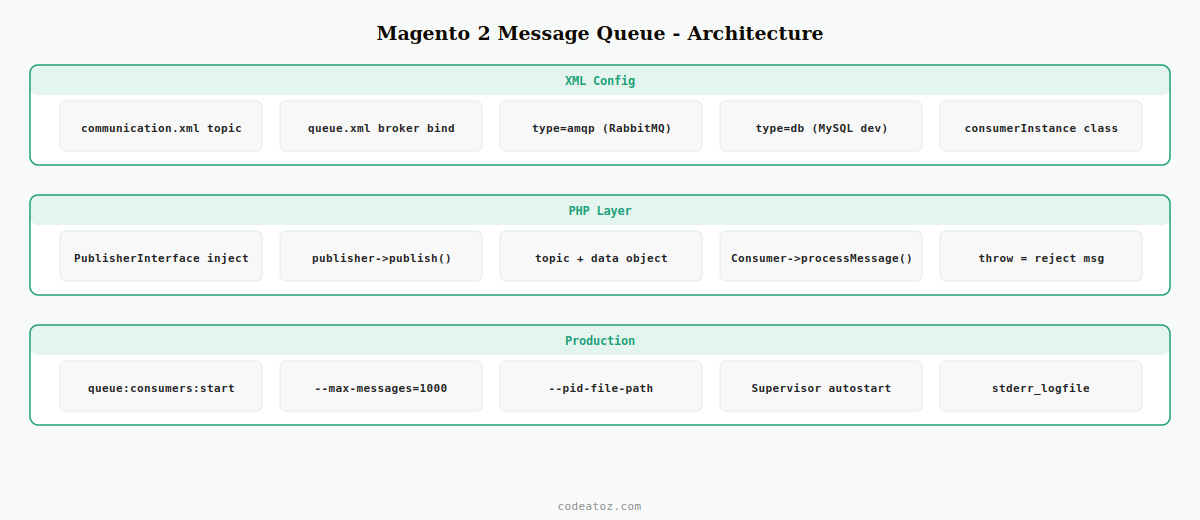
Magento 2 Message Queue: Declare Topics and Queues in communication.xml
Every Magento 2 message queue starts with XML configuration. The communication.xml file declares the topic and its data type. The queue.xml file in your module binds the topic to a queue and assigns a consumer.
<?xml version="1.0"?>
<config xmlns:xsi="http://www.w3.org/2001/XMLSchema-instance"
        xsi:noNamespaceSchemaLocation="urn:magento:framework:Communication/etc/communication.xsd">

    <!-- Declare the Magento 2 message queue topic -->
    <topic name="vendor.module.order.sync"
           request="VendorModuleApiDataOrderSyncRequestInterface"/>

</config><?xml version="1.0"?>
<config xmlns:xsi="http://www.w3.org/2001/XMLSchema-instance"
xsi:noNamespaceSchemaLocation="urn:magento:framework-message-queue:etc/queue.xsd">
<!-- Bind Magento 2 message queue topic to a queue -->
<broker topic="vendor.module.order.sync" type="amqp" exchange="magento">
<queue name="vendor.module.order.sync"
consumer="vendorModuleOrderSyncConsumer"
consumerInstance="VendorModuleModelConsumerOrderSyncConsumer"
maxMessages="100"/>
</broker>
</config>
<!-- For MySQL-based Magento 2 message queue (development): use type="db" instead of "amqp" -->Magento 2 Message Queue: Define the Message Data Interface
Each Magento 2 message queue topic carries a typed data object. Define this as an interface in your module’s Api/Data directory so Magento can serialise and deserialise messages automatically.
<?php
namespace VendorModuleApiData;

interface OrderSyncRequestInterface
{
    public function getOrderId(): int;
    public function setOrderId( int $orderId ): self;
    public function getSyncType(): string;
    public function setSyncType( string $syncType ): self;
}
Magento 2 Message Queue: Publish Messages via PublisherInterface
Inject MagentoFrameworkMessageQueuePublisherInterface into your service class to push messages onto the Magento 2 message queue. Pass the topic name and a populated data object.
<?php
namespace VendorModuleModel;

use MagentoFrameworkMessageQueuePublisherInterface;
use VendorModuleApiDataOrderSyncRequestInterfaceFactory;

class OrderSyncPublisher
{
    public function __construct(
        private readonly PublisherInterface              $publisher,
        private readonly OrderSyncRequestInterfaceFactory $requestFactory
    ) {}

    public function publish( int $orderId, string $syncType = 'full' ): void
    {
        // Create the Magento 2 message queue payload
        $request = $this->requestFactory->create();
        $request->setOrderId( $orderId );
        $request->setSyncType( $syncType );

        // Push to the Magento 2 message queue topic
        $this->publisher->publish( 'vendor.module.order.sync', $request );
    }
}
Magento 2 Message Queue: Write the Consumer
The consumer class receives the typed message from the Magento 2 message queue and processes it. The consumer method signature must match the topic’s data interface type.
<?php
namespace VendorModuleModelConsumer;

use VendorModuleApiDataOrderSyncRequestInterface;
use PsrLogLoggerInterface;

class OrderSyncConsumer
{
    public function __construct(
        private readonly LoggerInterface $logger
    ) {}

    /**
     * Process a message from the Magento 2 message queue.
     * Method name must match the consumerInstance in queue.xml.
     */
    public function processMessage( OrderSyncRequestInterface $request ): void
    {
        $this->logger->info( 'Magento 2 message queue: processing order sync', [
            'order_id'  => $request->getOrderId(),
            'sync_type' => $request->getSyncType(),
        ]);

        try {
            // Your ERP sync or email send logic here
            $this->syncOrderToErp( $request->getOrderId() );
        } catch ( Exception $e ) {
            $this->logger->error( 'Magento 2 message queue consumer failed: ' . $e->getMessage() );
            // Throwing the exception rejects the message back to the Magento 2 message queue
            throw $e;
        }
    }

    private function syncOrderToErp( int $orderId ): void
    {
        // ... ERP sync implementation
    }
}
Magento 2 Message Queue: Run Consumers via CLI and Cron
Magento 2 message queue consumers are started from the command line. For production, run them as persistent processes managed by Supervisor. For development, run them manually.
# Run the Magento 2 message queue consumer manually
bin/magento queue:consumers:start vendorModuleOrderSyncConsumer

# Run with max messages and PID file for Supervisor
bin/magento queue:consumers:start vendorModuleOrderSyncConsumer
  --max-messages=1000
  --pid-file-path=/var/run/magento/order-sync-consumer.pid

# List all registered Magento 2 message queue consumers
bin/magento queue:consumers:list

# Supervisor config for persistent Magento 2 message queue consumer
# /etc/supervisor/conf.d/magento-consumer.conf:
# [program:magento-order-sync]
# command=php /var/www/magento/bin/magento queue:consumers:start vendorModuleOrderSyncConsumer --max-messages=1000
# autostart=true
# autorestart=true
# stderr_logfile=/var/log/supervisor/magento-consumer.err
The Adobe Commerce message queue documentation covers the full topic, queue, and consumer XML configuration for Magento 2 message queue. The RabbitMQ acknowledgement documentation covers message acknowledgement patterns used with the Magento 2 message queue. See our Magento 2 cron job guide for scheduling consumers to restart automatically, and our Magento 2 DI guide for the dependency injection pattern used in the publisher and consumer classes.
💡 Always set --max-messages when starting a Magento 2 message queue consumer in production. Without this flag, the consumer runs indefinitely and can accumulate memory leaks over time. With --max-messages=1000, the consumer processes 1000 messages then exits cleanly. Supervisor restarts it immediately, giving you a fresh PHP process regularly without message loss.
Frequently Asked Questions — Magento 2 Message Queue
What is the Magento 2 message queue used for?
The Magento 2 message queue decouples heavy or slow processing from web requests. Instead of making the customer wait while your code sends emails, syncs an ERP, generates reports, or processes webhooks, you push a message to a queue and a background consumer handles it asynchronously. Magento uses the message queue internally for bulk product actions, import processing, and order email sending.
What is the difference between RabbitMQ and MySQL for the Magento 2 message queue?
RabbitMQ is the recommended Magento 2 message queue backend for production. It is a dedicated message broker that supports message acknowledgement, dead-letter queues, and horizontal scaling. MySQL-based queues store messages in the database and are suitable for development environments or low-volume use cases. For any Magento 2 message queue handling significant throughput in production, use RabbitMQ via the amqp broker type in queue.xml.
How do I declare a custom topic in the Magento 2 message queue?
Create a communication.xml file in your module’s etc directory. Add a topic element with a name attribute (using dot notation, e.g. vendor.module.action) and a request attribute pointing to your data interface class. Create a queue.xml file binding the topic to a named queue with a consumerInstance pointing to your consumer class. Run bin/magento setup:di:compile after adding Magento 2 message queue XML configuration.
How do I run Magento 2 message queue consumers in production?
Use Supervisor to manage consumer processes in production. Create a Supervisor configuration file for each Magento 2 message queue consumer with autostart and autorestart enabled. Set –max-messages to a reasonable limit (500-1000) so the consumer exits and restarts periodically, preventing memory growth. Use bin/magento queue:consumers:list to get all consumer names and create one Supervisor program per consumer.
How does the Magento 2 message queue handle consumer failures?
If a consumer throws an exception, the Magento 2 message queue behaviour depends on the broker type. With RabbitMQ, an unacknowledged message is returned to the queue and will be redelivered. After a configurable number of redeliveries, RabbitMQ can route failed messages to a dead-letter queue for inspection. With the MySQL broker, failed messages remain in the database with an error status. Always log failures and monitor the dead-letter queue or error messages in production.
Can I have multiple consumers for the same Magento 2 message queue topic?
Yes — start multiple instances of the same consumer using bin/magento queue:consumers:start in separate processes. Each Magento 2 message queue consumer instance takes a message, processes it, and acknowledges it. With RabbitMQ, messages are distributed across all running instances automatically, giving you parallel processing that scales with the number of consumer processes you start.
Need Magento 2 Message Queue Integration?
CodeAtoZ builds custom Magento 2 message queue publishers and consumers for ERP sync, order processing, and async batch operations.




