Role-Based Pricing Visibility in WooCommerce — The Complete 2026 Setup
Role-based pricing lets you decide exactly who sees prices in your WooCommerce store — guests, retail customers, wholesale accounts — and what each group sees instead. Here’s how to do it properly, server-side, with a rule engine rather than CSS tricks.
Role-based pricing is the foundation of any serious B2B, wholesale or membership WooCommerce store — because WooCommerce, by default, shows every price to every visitor. If your trade margins should only be visible to approved accounts, you need role-based pricing that targets by user role and replaces the price with the right call-to-action for everyone else. This guide shows how to set up role-based pricing the robust way: at the PHP level with a priority-ordered rule engine, using Hide Price for WooCommerce Pro, rather than with cosmetic CSS that leaves your prices exposed in the page source.
Search intent: commercial/how-to — WooCommerce store owners who need to control price visibility by user role. We cover why role-based pricing matters, how a rule engine works, the ten targeting conditions, the six CTA actions, and what’s free versus Pro. It builds on our complete hide price guide and login to see price guide. Try the free version on WordPress.org first.
Role-Based Pricing: Why WooCommerce Needs It
Out of the box, WooCommerce shows prices to everyone, which is exactly wrong for a store that sells at different prices to different customers. For B2B and wholesale sellers, publicly visible trade pricing is a genuine business problem: competitors can see your margins and undercut you, retail visitors can buy at wholesale rates, and your carefully negotiated rate card is one page-view away from anyone. Role-based pricing solves this by tying price visibility to the visitor’s WooCommerce user role — so a wholesale account sees real prices while a guest or retail customer sees something else entirely.
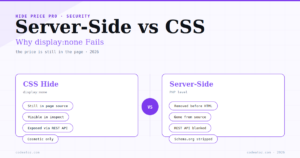
The key thing to understand is that genuine role-based pricing is not a display trick. Hiding a price with CSS (display:none) leaves it fully present in the page source, the browser inspector and the WooCommerce Store API — so anyone technical can still read it. Proper role-based pricing removes the price at the server, before the HTML is ever sent to the browser, based on who the visitor is. That server-side distinction is what separates a real pricing control from a cosmetic one, and it is the whole design principle behind Hide Price Pro.
Role-Based Pricing: How the Rule Engine Works
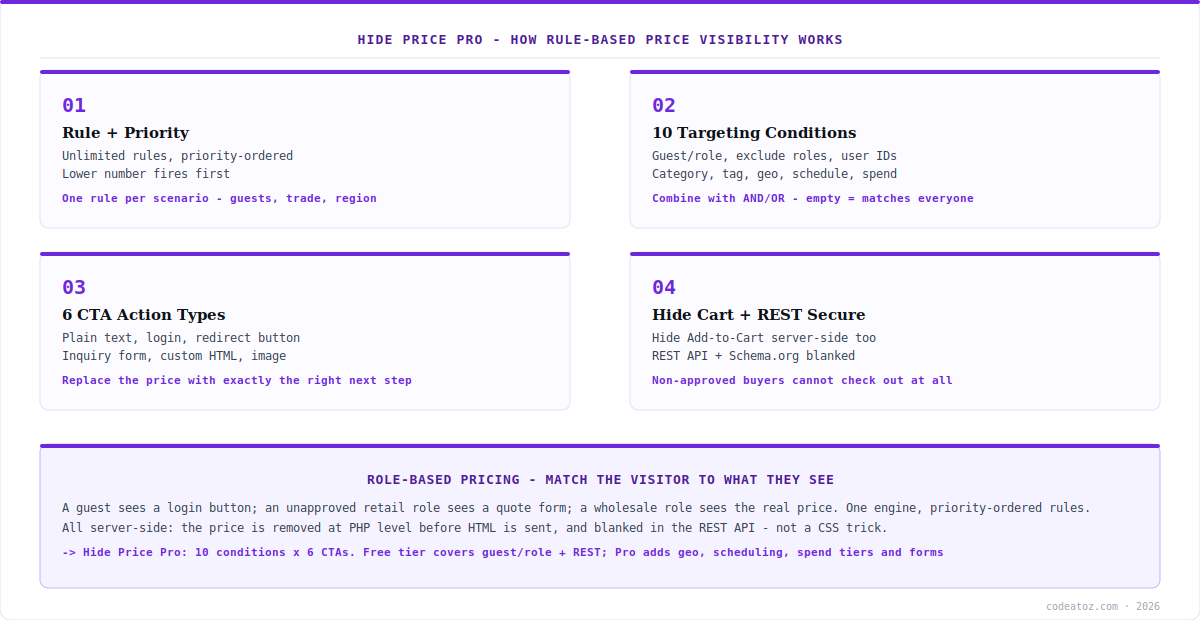
Hide Price Pro implements role-based pricing through a priority-ordered rule engine. You create unlimited rules, each with a priority number — lower numbers fire first — so you can layer scenarios precisely: hide prices from guests at priority 10, show a quote form to unapproved retail customers at priority 20, and let wholesale roles through. Each rule has three parts: a name and priority, a set of conditions that decide which visitors it matches, and an action that decides what those visitors see instead of the price.
This rule-based approach is what makes role-based pricing flexible enough for real stores. An empty condition set matches all visitors; adding conditions narrows the rule to exactly the audience you want. Because rules are priority-ordered, the first matching rule wins, so you design from most-specific to most-general. The engine evaluates everything server-side and caches rules in PHP memory per request — meaning role-based pricing adds zero extra database queries per product render, with negligible performance overhead even on large catalogues. You get precise control without the speed penalty.
Role-Based Pricing: The 10 Targeting Conditions
The power of role-based pricing comes from how precisely you can target. Hide Price Pro ships ten targeting conditions you can combine with AND/OR logic: guest versus logged-in status, specific user roles, excluded roles, specific user IDs, products, categories, tags, geo-country, scheduling, and purchase history or customer spend. User role is the core of role-based pricing, but combining it with the others is where it gets genuinely useful — for example, “hide prices from guests in the Wholesale category” or “show real prices only to the wholesale role who have spent over a threshold“.
| Condition | What it targets | Free or Pro |
|---|---|---|
| Guest / logged-in | Visitor login status | Free |
| User role (include) | Specific WooCommerce roles | Free |
| Product / category / tag | Which items the rule covers | Free |
| Exclude roles | Roles that bypass the rule | Pro |
| Specific user IDs | Named individual accounts | Pro |
| Geo-country | Visitor’s country | Pro |
| Scheduling | Dates, days, time windows | Pro |
| Purchase history / spend | Past orders and total spend | Pro |
A practical note on role-based pricing and administrators: by default, rules apply to everyone, including admins — so if you want to keep seeing prices while logged in as admin, add “administrator” to the Exclude Roles field on each rule. It’s a one-time setup per rule. And because rules on a parent variable product automatically apply to all its variations (including AJAX-loaded variation prices), you never have to list individual variation IDs to make role-based pricing work across configurable products.
Role-Based Pricing: The 6 CTAs and Free vs Pro
Hiding the price is only half of role-based pricing — you also decide what the visitor sees instead. Hide Price Pro offers six CTA action types: plain text, a login button, a redirect button, an inquiry/quote form, custom HTML, or an image from the media library. You can also hide the Add to Cart button server-side, so non-approved buyers can’t check out at all. This means your role-based pricing can guide each audience to the right next step: guests to a login, retail visitors to a quote form, out-of-region buyers to a “contact distributor” message.
On cost, the model is honest and simple. The free version covers the essentials of role-based pricing: unlimited rules with the priority system, guest and user-role targeting, product targeting, plain-text replacement, hiding the cart server-side, and REST API price protection. Pro ($39 one-time for one site, $89 for three, $149 unlimited) adds the advanced conditions — exclude roles, user IDs, geo-targeting, scheduling, purchase history and spend tiers — plus the login/redirect/HTML/image CTAs, the inquiry form, the analytics dashboard, and import/export. If your role-based pricing needs are simple (hide from guests, show to a role), free is genuinely enough; if you need geo, scheduling, forms or analytics, that’s what Pro adds. Full details are on the Hide Price Pro product page.
Start free, upgrade only if you need the advanced conditions. The free version of Hide Price handles core role-based pricing — guest/role targeting, plain-text replacement, and REST API protection — with no feature nags blocking the basics. Pro earns its $39 when you need geo-targeting, scheduling, purchase-history tiers, the inquiry form, or analytics. And Pro reads your existing free-plugin rules and imports them automatically on first activation, so upgrading never means rebuilding.
How we approach role-based pricing for clients
We always design the rules from most-specific to most-general. Because the engine is priority-ordered and the first match wins, the common mistake is a broad “hide from everyone” rule firing before a narrow “show to wholesale” rule. We set wholesale and exclusion rules at low priority numbers so they evaluate first, then the catch-all hide last — which is how role-based pricing stays predictable as rules accumulate.
We insist on server-side from the start. Clients often arrive having tried a CSS or theme-snippet hide and discovered their prices were still in the source and the REST API. We rebuild it server-side, because for B2B pricing a cosmetic hide is not protection — it’s a false sense of one. The price has to be removed at PHP level before the HTML is built.
We treat the admin-exclusion step as mandatory setup. The single most common support question is “why can’t I see my own prices?” — because rules apply to admins by default. We add administrator to the exclude-roles field on every rule as standard, so the store team keeps full visibility while role-based pricing applies to everyone else.
Frequently Asked Questions About Role-Based Pricing
What is role-based pricing in WooCommerce?
Role-based pricing controls who sees prices based on their WooCommerce user role. Wholesale or approved accounts see real prices, while guests or retail customers see something else — a login button, a quote form, or plain text. Done properly it’s server-side: the price is removed at PHP level before the HTML reaches the browser, not hidden cosmetically with CSS.
How do I hide prices from certain user roles?
Create a rule that targets the roles you want to hide from and set an action to replace the price. In Hide Price Pro you name the rule, give it a priority, add a user-role condition, and choose a CTA (plain text, login button, quote form, etc.). You can also exclude roles — for example, let wholesale through while hiding from everyone else.
Does role-based pricing work with variable products?
Yes. Rules on a parent variable product automatically apply to all its variations, including AJAX-loaded variation prices, so you never need to list individual variation IDs. This is handled in both the free and Pro versions, so role-based pricing covers configurable products without extra configuration.
Can admins still see prices with role-based pricing on?
By default, rules apply to everyone including administrators. To keep seeing prices as admin, add “administrator” to the Exclude Roles field on each rule — a one-time setup per rule. This is deliberate: it means role-based pricing is genuinely enforced rather than quietly skipping logged-in staff, and you opt specific roles out explicitly.
Will role-based pricing slow down my store?
No. Hide Price Pro caches rules in PHP memory per request, so role-based pricing adds zero extra database queries per product render, with negligible overhead even on large catalogues. Geo-country lookups, when used, are cached for 24 hours to avoid repeated API calls. The server-side approach is actually lighter than many CSS/JavaScript hides.
Is role-based pricing free in Hide Price?
The core is free: the free version includes unlimited priority-ordered rules, guest and user-role targeting, product targeting, plain-text replacement, hiding the cart server-side, and REST API protection. Pro ($39 one-time, one site) adds exclude-roles, user IDs, geo-targeting, scheduling, purchase-history/spend tiers, the login/redirect/HTML/image CTAs, the inquiry form and analytics.
Set Up Role-Based Pricing the Right Way
Server-side price control with a 10-condition rule engine. Start free, or get Pro for geo-targeting, scheduling, quote forms and analytics — $39 one-time, 14-day guarantee.