
WooCommerce B2B Login to See Price — Complete Setup Guide (2026)
The WooCommerce B2B login to see price pattern is the foundation of any trade portal — it hides pricing from the public, creates an incentive for trade buyers to register, and gives you control over which accounts can access wholesale pricing. A well-implemented WooCommerce B2B login to see price setup combines price hiding with a registration prompt that explains the benefits of a trade account, an admin approval step before pricing is revealed, and a redirect back to the product page immediately after login. This guide covers the complete WooCommerce B2B login to see price workflow with PHP code for every step.
The WooCommerce B2B login to see price workflow has three stages: the discovery stage (guest visits product page, sees login prompt), the registration stage (guest creates a trade account), and the approval stage (admin approves the account and assigns the wholesale role). Only after role assignment does the WooCommerce B2B login to see price reveal pricing on the next login.
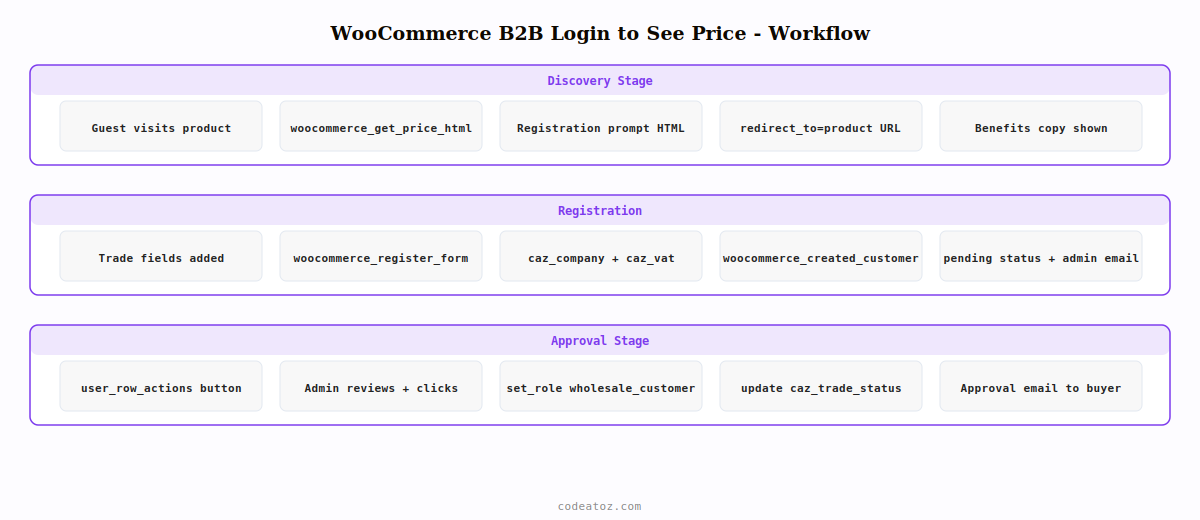
Step 1: WooCommerce B2B Login to See Price — Hide Price & Show Registration Prompt
The registration prompt for WooCommerce B2B login to see price should explain the value of a trade account — not just tell visitors to log in. A compelling prompt increases conversions from visitor to registered trade buyer.
<?php
add_filter( 'woocommerce_get_price_html', 'caz_b2b_login_to_see_price', 10, 2 );

function caz_b2b_login_to_see_price( string $price, WC_Product $product ): string {
    // Approved wholesale roles can see price — WooCommerce B2B login to see price
    $trade_roles = ['wholesale_customer', 'trade_customer', 'administrator'];
    $user        = wp_get_current_user();
    if ( ! empty( array_intersect( $trade_roles, (array) $user->roles ) ) ) {
        return $price;
    }

    // Logged-in but pending approval
    if ( is_user_logged_in() ) {
        return '<span class="caz-pending-approval">'
            . __( 'Your trade account is pending approval. We will notify you by email.', 'caz-b2b' )
            . '</span>';
    }

    // Guest: show WooCommerce B2B login to see price prompt
    $register_url = add_query_arg( 'redirect_to', urlencode( get_permalink() ),
        get_permalink( wc_get_page_id( 'myaccount' ) ) . 'register/' );
    $login_url    = wp_login_url( get_permalink() );

    return '<div class="caz-b2b-price-gate">
        <p class="caz-gate-heading">' . __( 'Trade prices available to registered customers', 'caz-b2b' ) . '</p>
        <p class="caz-gate-benefits">' . __( 'Apply for a free trade account to access wholesale pricing, minimum order discounts, and priority despatch.', 'caz-b2b' ) . '</p>
        <a href="' . esc_url( $register_url ) . '" class="button caz-register-btn">'
            . __( 'Apply for trade account', 'caz-b2b' )
        . '</a>
        <a href="' . esc_url( $login_url ) . '" class="caz-login-link">'
            . __( 'Already registered? Login here', 'caz-b2b' )
        . '</a>
    </div>';
}
Step 2: WooCommerce B2B Login to See Price — Custom Registration Form
The WooCommerce My Account registration page can be extended with trade-specific fields — company name, VAT number, and trade type. These fields help you make informed approval decisions for WooCommerce B2B login to see price accounts.
<?php
// Add fields to WooCommerce registration form
add_action( 'woocommerce_register_form', 'caz_b2b_registration_fields' );

function caz_b2b_registration_fields(): void {
    ?>
    <p class="form-row">
        <label><?php esc_html_e( 'Company name', 'caz-b2b' ); ?> <span class="required">*</span></label>
        <input type="text" name="caz_company" value="<?php echo esc_attr( $_POST['caz_company'] ?? '' ); ?>" required>
    </p>
    <p class="form-row">
        <label><?php esc_html_e( 'VAT registration number', 'caz-b2b' ); ?></label>
        <input type="text" name="caz_vat" value="<?php echo esc_attr( $_POST['caz_vat'] ?? '' ); ?>">
    </p>
    <?php
}

// Save trade fields and set pending role for WooCommerce B2B login to see price
add_action( 'woocommerce_created_customer', 'caz_save_b2b_registration_fields' );

function caz_save_b2b_registration_fields( int $user_id ): void {
    if ( isset( $_POST['caz_company'] ) ) {
        update_user_meta( $user_id, 'caz_company',     sanitize_text_field( $_POST['caz_company'] ) );
        update_user_meta( $user_id, 'caz_vat',         sanitize_text_field( $_POST['caz_vat'] ?? '' ) );
        update_user_meta( $user_id, 'caz_trade_status', 'pending' );
    }
    // Send admin notification for WooCommerce B2B login to see price approval
    wp_mail( get_option('admin_email'),
        'New trade account application',
        'A new trade account has been requested. Review at: ' . admin_url('users.php')
    );
}
Step 3: WooCommerce B2B Login to See Price — Admin Approval & Role Assignment
The approval step of WooCommerce B2B login to see price is where the admin reviews the trade application and assigns the wholesale role. Add a quick-approve button to the WordPress Users list for efficient processing.
<?php
// Add "Approve Trade Account" action to WP Admin Users list
add_filter( 'user_row_actions', 'caz_approve_trade_action', 10, 2 );

function caz_approve_trade_action( array $actions, WP_User $user ): array {
    if ( 'pending' !== get_user_meta( $user->ID, 'caz_trade_status', true ) ) return $actions;

    $url = add_query_arg([
        'action'  => 'caz_approve_trade',
        'user_id' => $user->ID,
        '_nonce'  => wp_create_nonce( 'caz_approve_' . $user->ID ),
    ], admin_url('users.php') );

    $actions['caz_approve'] = '<a href="' . esc_url( $url ) . '" style="color:#7C3AED;font-weight:bold">'
        . __( 'Approve Trade Account', 'caz-b2b' ) . '</a>';
    return $actions;
}

// Handle the approval — assign wholesale role for WooCommerce B2B login to see price
add_action( 'admin_init', function() {
    if ( $_GET['action'] ?? '' !== 'caz_approve_trade' ) return;
    $user_id = absint( $_GET['user_id'] ?? 0 );
    check_admin_referer( 'caz_approve_' . $user_id, '_nonce' );

    $user = get_user_by( 'id', $user_id );
    if ( ! $user ) return;

    $user->set_role( 'wholesale_customer' );  // triggers WooCommerce B2B login to see price
    update_user_meta( $user_id, 'caz_trade_status', 'approved' );

    // Notify customer their WooCommerce B2B login to see price account is active
    wp_mail( $user->user_email,
        'Your trade account is approved',
        'Your trade account has been approved. You can now log in to see trade pricing at: ' . get_home_url()
    );

    wp_redirect( admin_url('users.php?caz_approved=1') );
    exit;
});
The WooCommerce user registration documentation covers the woocommerce_created_customer hook and My Account page customisation for B2B login to see price setups. The WordPress wp_mail() documentation covers the notification emails used in the approval workflow. See our WooCommerce hide price for guests guide for the price hiding foundation this builds on, and our WooCommerce B2B wholesale pricing guide for the role-based pricing system that activates after approval.
💡 Always redirect the customer back to the product page they were viewing after login for a smooth WooCommerce B2B login to see price experience. Pass the product permalink as the redirect_to parameter in the registration and login URLs so the customer lands directly on the product whose price prompted them to register — not on the generic My Account dashboard.
Hide Price Pro — Built-in B2B Registration Gating
Complete WooCommerce B2B login to see price workflow — custom registration prompts, admin approval, role assignment, and automatic price reveal on login.
Frequently Asked Questions — WooCommerce B2B Login to See Price
How do I set up WooCommerce B2B login to see price?
Use the woocommerce_get_price_html filter to check whether the current user has a wholesale role. For guests, return a registration prompt HTML instead of the price. For logged-in users without a wholesale role, return a pending approval message. Once the admin approves the account and assigns the wholesale role, the price filter returns the real price on the customer’s next login. This is the complete WooCommerce B2B login to see price workflow.
How do I make customers register before seeing prices in WooCommerce?
Add the woocommerce_get_price_html filter returning a registration link for non-authenticated visitors. Build the registration URL with a redirect_to parameter pointing to the current product page. After registration, use the woocommerce_created_customer hook to save trade fields and set a pending status. Add an admin approval step before assigning the wholesale role that triggers the WooCommerce B2B login to see price reveal.
Can I automatically approve B2B accounts without manual review?
Yes — skip the pending status and immediately assign the wholesale role in the woocommerce_created_customer hook. This gives instant WooCommerce B2B login to see price access without admin review. Use this approach when your trade portal is open to all business customers. Use the manual approval workflow when you need to verify business credentials, check VAT registration numbers, or assess order potential before granting wholesale pricing access.
How do I redirect customers back to the product after WooCommerce B2B login to see price login?
Include the current product permalink as the redirect_to parameter in both the login URL and registration URL displayed in the WooCommerce B2B login to see price prompt. WordPress’s login form respects the redirect_to parameter and bounces the customer back to the product page after successful authentication. For the My Account registration form, hook into woocommerce_registration_redirect to redirect to the stored product URL after registration.
What fields should I collect in the B2B registration for a login to see price setup?
For a WooCommerce B2B login to see price portal, collect at minimum: company name (required), VAT registration number (for tax exemption verification), trade type or industry (to assess pricing tier), and the customer’s estimated annual order volume (to prioritise high-value accounts). Store these in user meta. For UK stores, requesting a Companies House registration number gives you an easily verifiable signal of business legitimacy.
Is there a WooCommerce B2B login to see price plugin that handles approval automatically?
Yes — Hide Price Pro includes a complete WooCommerce B2B login to see price workflow: customisable registration prompts, trade application fields, admin approval dashboard, automatic role assignment on approval, and notification emails to both the customer and admin. It eliminates the custom PHP code described in this guide and provides a configuration-based setup through the WordPress admin panel.
Need a Complete B2B Trade Portal?
Hide Price Pro handles the complete WooCommerce B2B login to see price workflow — registration gating, approval, role assignment, and price reveal on login.




