Add a Request a Quote Form to WooCommerce — Turn Hidden Prices into Leads
A request a quote form turns an anonymous browser into a named, contactable lead. Instead of showing a price (or a dead-end “call us”), you replace it with an AJAX quote form that saves the lead, emails you instantly, and auto-replies to the customer — no page reload.
A request a quote form is the missing link between hiding a price and actually capturing a sale. For made-to-order products, wholesale catalogues, or any “price on application” business, showing a raw price is often wrong — but showing nothing, or a bare “call us”, wastes the visitor. A request a quote form bridges that gap: it replaces the price with a clear call-to-action that opens a form, captures the enquiry, and turns a hidden price into a lead you can follow up. This guide shows how to add a proper request a quote form to WooCommerce using Hide Price Pro, where the form is built in rather than bolted on.
Search intent: commercial/how-to — WooCommerce sellers who want to replace prices with a quote-request workflow. We cover why a quote form beats an exposed price or an email link, how the AJAX form works, the lead pipeline behind it, when to use it, and setup. It builds on our request a quote guide and price on request guide. See also the free Hide Price plugin.
Request a Quote: Why a Form Beats an Exposed Price
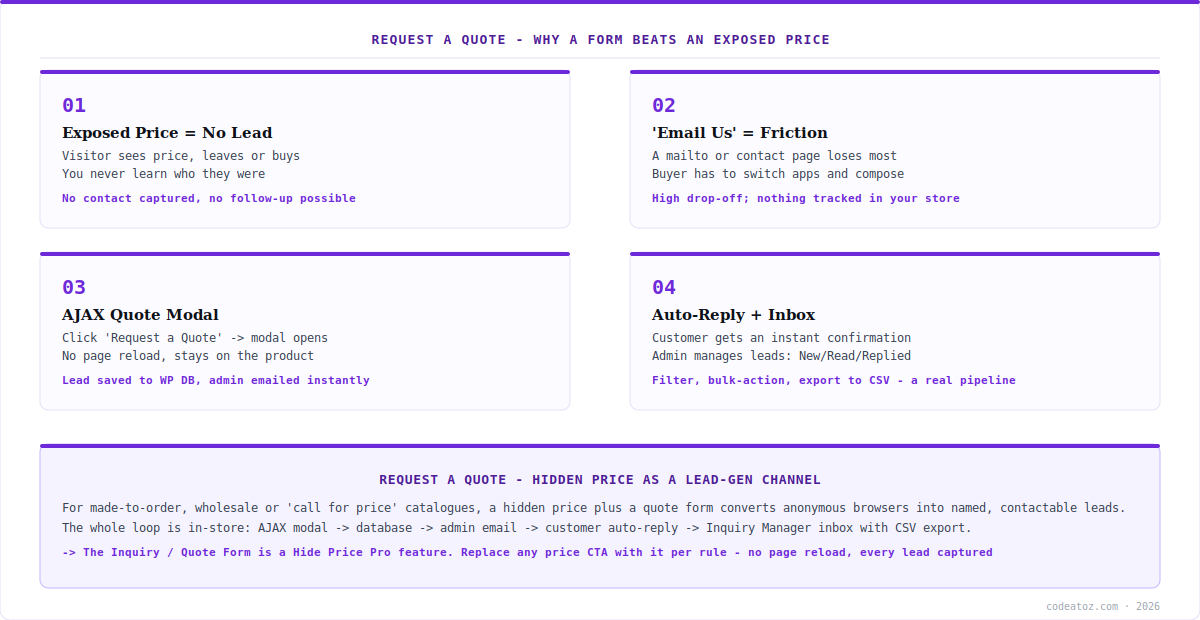
The business case for a request a quote form is simple: a visible price creates no relationship. A visitor sees the number, decides, and leaves — and you never learn who they were or get a chance to follow up. For commodity retail that’s fine, but for wholesale, bespoke or high-consideration products, that anonymous bounce is a lost opportunity. A request a quote form changes the interaction from “here’s the price, take it or leave it” into “tell us what you need and we’ll come back to you” — which captures a contactable lead every time someone’s genuinely interested.
The common alternative — a “call us” message or a mailto: link — is better than nothing but leaks most of its potential. Asking a buyer to switch to their email client, compose a message and remember what they were looking at introduces friction that loses the majority of would-be enquiries, and nothing is tracked in your store. A proper request a quote form keeps the visitor on the product page, captures the enquiry in one click, and records it where you can act on it. That’s the difference between hoping buyers reach out and building an actual lead pipeline from your hidden prices.
Request a Quote: How the AJAX Form Works
In Hide Price Pro, the request a quote form is one of the six CTA actions you can use to replace a hidden price. When a rule hides the price, you set its action to the inquiry/quote form — so instead of a number, the visitor sees a “Request a Quote” button. Clicking it opens an AJAX modal form right on the product page, with no page reload, so the buyer never loses their place or their context.
What makes this a real request a quote system rather than a decorative form is where the submission goes. When the visitor submits, three things happen automatically: the lead is saved to the WordPress database, an email notification is sent to the admin instantly, and an auto-reply confirmation goes to the customer. So the buyer gets immediate reassurance that their enquiry landed, and you get a notification plus a permanent record — all without any external service or manual step. The request a quote flow is entirely self-contained within your store.
Request a Quote: The Lead Pipeline Behind It
A single request a quote submission is useful; a managed pipeline of them is a sales channel. Hide Price Pro includes an Inquiry Manager — an admin inbox for every quote request, with statuses (New, Read, Replied, Closed), filtering, bulk actions and CSV export. So your request a quote leads don’t just land in an email that gets buried; they accumulate in a structured inbox you can work through, mark as handled, and export for your CRM or spreadsheet.
| Approach | Lead captured? | Trackable? |
|---|---|---|
| Exposed price | No — anonymous | No |
| “Call us” / mailto link | Rarely — high friction | No, leaves your store |
| Generic contact form | Sometimes | Not tied to the product |
| Request a quote (AJAX modal) | Yes — one click, in context | Yes — saved, emailed, inbox |
This pipeline is what makes a request a quote form a growth tool rather than a courtesy. Every hidden price becomes a potential lead; every lead is captured, acknowledged, stored and trackable; and the Inquiry Manager plus CSV export means you can measure and act on enquiry volume over time. Combined with the analytics dashboard (which tracks price-hide events and per-rule performance), you can see which products and rules are generating the most request a quote activity and optimise accordingly.
A quote form converts hidden prices into a measurable sales channel. The reason to use a request a quote form rather than just hiding a price is that it captures the demand the hidden price would otherwise lose. AJAX modal so there’s no friction, saved to the database so nothing is lost, admin email so you respond fast, auto-reply so the customer feels acknowledged, and an Inquiry Manager inbox with CSV export so it’s a pipeline, not a pile of emails.
Request a Quote: When to Use It and Setup
A request a quote form is the right CTA when the price genuinely shouldn’t be shown upfront. Classic cases: B2B and wholesale where pricing is account-specific; made-to-order or configurable products where the final price depends on specification; high-value items where you want to qualify the buyer; and “price on application” catalogues by policy. In all of these, replacing the price with a request a quote form is better than either showing a misleading number or showing a dead end. For a straightforward retail product with a fixed price, you wouldn’t hide it — so match the CTA to the product.
Setting it up is quick. Install Hide Price Pro, create a rule targeting the products or roles where you want quotes (for example, the Wholesale category, or guests on made-to-order items), and set the rule’s action to the inquiry/quote form. Optionally hide the Add to Cart button on those products too, so the request a quote form becomes the only path forward. Configure the form fields, admin notification email and auto-reply text in the settings, then test it. From then on, those products show a “Request a Quote” button instead of a price, and every click feeds your lead pipeline. The quote form is a Pro feature; the underlying price-hiding rule engine is available in the free version, and our WooCommerce team can help with custom quote workflows.
What we’ve learned about quote forms
Keeping the buyer on the page is the whole game. The reason we build the request a quote form as an AJAX modal rather than a redirect to a contact page is friction: every extra step or context-switch loses enquiries. A form that opens in place, on the product the buyer is looking at, converts far better than sending them elsewhere to start over.
The auto-reply matters more than people expect. Buyers who submit a quote request and hear nothing assume it failed, and often enquire elsewhere. An instant auto-reply confirming the request landed — even a simple one — holds the lead while you prepare a real response. We always configure it, because silence after a submission quietly kills conversions.
Treat the Inquiry Manager as a real inbox, not an archive. The status workflow (New → Read → Replied → Closed) only helps if the team uses it. We set up a habit of working the inbox daily and exporting to CSV for follow-up, because a quote pipeline that nobody tends is just a nicer place to lose leads.
Frequently Asked Questions About Request a Quote Forms
How do I add a request a quote form to WooCommerce?
Use Hide Price Pro: create a rule targeting the products or roles where you want quotes instead of prices, and set the rule’s action to the inquiry/quote form. The price is replaced with a “Request a Quote” button that opens an AJAX modal. Optionally hide the Add to Cart button too, so the quote form becomes the only path forward on those products.
Where do request a quote submissions go?
Three places automatically: the lead is saved to your WordPress database, an email notification is sent to the admin instantly, and an auto-reply confirmation is sent to the customer. The submissions also appear in the Inquiry Manager — an admin inbox with New/Read/Replied/Closed statuses, filtering, bulk actions and CSV export, so every lead is captured and trackable.
Does the quote form reload the page?
No. The request a quote form opens as an AJAX modal directly on the product page, with no page reload, so the buyer keeps their place and context. This low-friction design is deliberate — asking a visitor to navigate away to a separate contact page loses most enquiries, whereas an in-place modal captures them in one click.
When should I use a quote form instead of showing a price?
When the price genuinely shouldn’t be shown upfront: B2B and wholesale with account-specific pricing, made-to-order or configurable products where price depends on specification, high-value items where you want to qualify buyers, or “price on application” catalogues. For fixed-price retail products you’d normally just show the price — match the CTA to the product type.
Can I manage and export the quote leads?
Yes. The Inquiry Manager is an admin inbox for all quote requests, with statuses (New, Read, Replied, Closed), filtering, bulk actions and export to CSV. So your request a quote leads accumulate in a structured pipeline you can work through and export to a CRM or spreadsheet, rather than getting buried in email.
Is the request a quote form free or Pro?
The inquiry/quote form is a Hide Price Pro feature, along with the analytics dashboard, Inquiry Manager and email notifications. The underlying rule engine that hides prices is available in the free version. So you can hide prices for free, and add the full request a quote lead-capture workflow with Pro ($39 one-time for one site).
Turn Hidden Prices into Leads
Replace prices with an AJAX request a quote form — saved to your database, emailed instantly, auto-replied, and managed in an inbox with CSV export. Pro, $39 one-time.