WooCommerce Hide Price Server-Side vs CSS — Why display:none Fails
If you hide prices with CSS, they’re still there. The number stays in your page source, the browser inspector, the REST API and your structured data — visible to any competitor or scraper. Here’s why real price protection has to be server-side, and what that actually means.
Hide price server-side is the only approach that actually protects your pricing — and most “hide price” solutions don’t do it. If you’ve hidden WooCommerce prices with a CSS snippet, a theme tweak or a JavaScript trick, the uncomfortable truth is that your prices aren’t hidden at all: they’re merely painted over. To genuinely hide price server-side means removing the number at the PHP level, before the HTML is ever built and sent to the browser — so it’s gone from the source, the inspector, the REST API and the structured data. This guide explains exactly where cosmetic hides leak, and what a proper server-side hide protects that CSS can’t.
Search intent: technical/comparison — WooCommerce store owners evaluating how to hide prices securely. We cover why CSS hiding fails, the four places prices leak, what a server-side hide does, REST and Schema.org protection, and how to implement it. It builds on our hide price plugin guide and complete hide price guide. The free Hide Price plugin already does this server-side.
Hide Price Server-Side: Why CSS Hiding Fails
The reason you must hide price server-side comes down to how web pages are built. When WooCommerce renders a product, the price is generated on the server and sent to the browser inside the HTML. A CSS rule like display:none doesn’t remove that price — it just tells the browser not to paint it on screen. The number is still fully present in the HTML that was delivered; it’s simply styled to be invisible. That’s a cosmetic hide, not a security measure, and for anyone who cares to look, the price is trivially recoverable.
This distinction matters enormously for B2B, wholesale and trade stores, where hidden pricing is a genuine commercial boundary. If your trade margins can be read by a competitor viewing the page source, the “hide” has given you a false sense of protection while protecting nothing. To actually hide price server-side means the server decides the visitor shouldn’t see the price and never includes it in the response — so there’s nothing to recover because nothing was sent. That’s the difference between a lock and a curtain, and it’s why serious price control has to happen in PHP, not CSS.
Hide Price Server-Side: The Four Places CSS Leaks
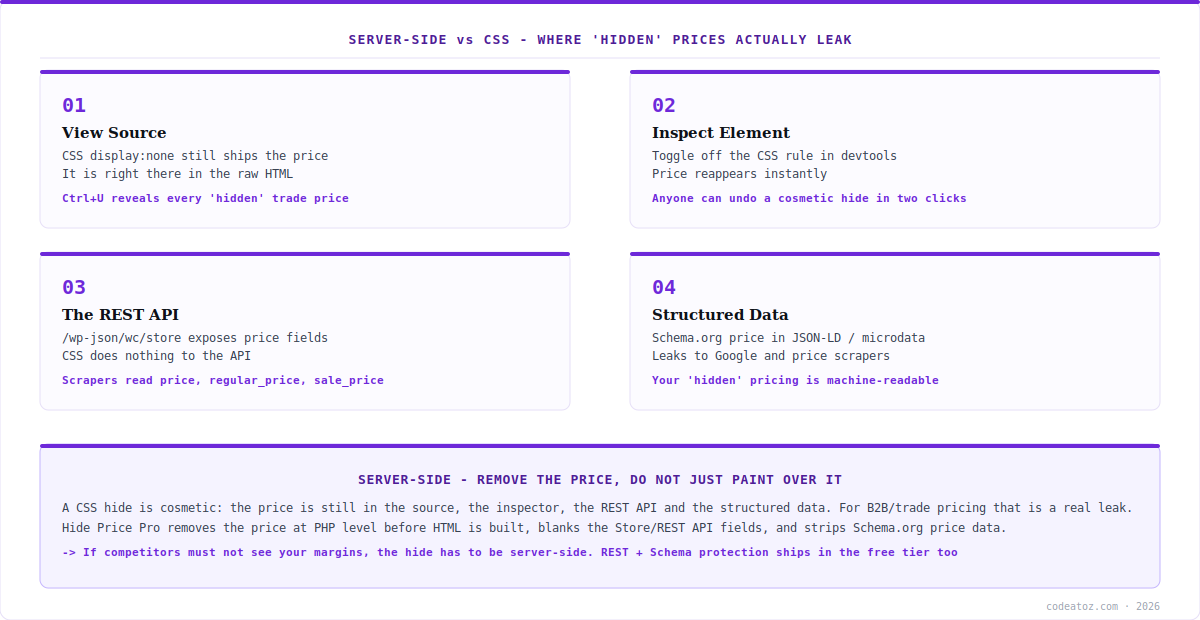
To see why you need to hide price server-side, it helps to know exactly where a CSS or JavaScript hide leaks the price. There are four, and any one of them defeats the purpose. First, view source: pressing Ctrl+U shows the raw HTML the server sent, CSS unapplied — every “hidden” price is right there in plain text. Second, inspect element: opening devtools and toggling off the display:none rule makes the price reappear instantly, a two-click undo anyone can perform.
Third, and most overlooked, the REST API: WooCommerce exposes product data through the Store API and REST API, and CSS does absolutely nothing to those endpoints — a scraper hitting /wp-json/wc/store reads price, regular_price and sale_price directly, no browser involved. Fourth, structured data: WooCommerce outputs Schema.org price data in JSON-LD or microdata for search engines, which means your “hidden” price is machine-readable and can leak to Google and price-comparison scrapers. A cosmetic hide addresses none of these. To close all four, you have to hide price server-side — removing the price from the HTML, blanking the API fields, and stripping the structured data.
| Exposure point | CSS hide | Server-side hide |
|---|---|---|
| View source (Ctrl+U) | Price visible in raw HTML | Price absent — never sent |
| Inspect element | Reappears when CSS toggled | Nothing to toggle back |
| REST / Store API | Fully exposed | price fields blanked |
| Schema.org structured data | Machine-readable price | Price data removed |
| Variable product variations | Often still leak via AJAX | Inherited and protected |
Hide Price Server-Side: What a Proper Hide Does
When you hide price server-side with Hide Price Pro, the price is removed at the PHP level before the HTML is constructed. The server evaluates your rules, decides this visitor shouldn’t see the price, and simply doesn’t put it in the response. So when the page arrives at the browser, there is no price in the source to find, nothing in the inspector to un-hide — because the number was never included. This is the core design principle: remove, don’t paint over.
Crucially, a proper server-side hide extends beyond the visible page. Hide Price Pro blanks the price, regular_price, sale_price and price_html fields in the REST API, so API scrapers get empty values instead of your pricing. It removes the Schema.org structured data, so your prices don’t leak to search engines or comparison bots. And it handles variable products correctly — rules on a parent product are inherited by all variations, including AJAX-loaded variation prices, so there’s no back door through the variation endpoints. When you hide price server-side this thoroughly, the price is genuinely gone from every channel a determined competitor or scraper would check.
A CSS hide is a curtain; a server-side hide is removing the item from the room. The practical test is simple: with a cosmetic hide, your “hidden” price survives view-source, inspect-element, the REST API and the Schema.org data. To hide price server-side closes all four — the price is never sent, the API fields are blanked, and the structured data is stripped. If competitors seeing your margins is a real risk, only the server-side approach actually prevents it.
Hide Price Server-Side: How to Implement It
The good news is you don’t need to write PHP to hide price server-side — that’s exactly what Hide Price does, and the server-side removal plus REST API and Schema.org protection is included even in the free version. Install it, create a rule targeting the visitors who shouldn’t see prices (guests, a retail role, a region), and the plugin removes the price at the PHP level for those visitors across the page, the API and the structured data automatically. There’s no CSS to maintain and no snippet that breaks on a theme update.
If you’ve been relying on a CSS or theme-based hide, the migration is worth doing precisely because your current setup isn’t protecting you. Replace it with a rule-based, server-side hide and verify it the way an attacker would: view the source and confirm the price is absent, check /wp-json/wc/store and confirm the fields are blank, look at the page’s structured data and confirm the price is gone. When all three come back clean, you’ve genuinely managed to hide price server-side. For advanced control — geo-targeting, scheduling, quote forms, analytics — Hide Price Pro adds those on top, but the core server-side protection is free. Our WooCommerce team can audit an existing store’s price exposure if you’re not sure yours is secure.
What we see when we audit “hidden” prices
The REST API is where almost every cosmetic hide fails. Store owners test their hide by looking at the page and seeing no price, then assume it’s secure. The first thing we check is /wp-json/wc/store — and with a CSS or theme hide, the price is right there, fully exposed. It’s the leak people never think to test, and it’s the one scrapers use.
Structured data catches people out second. Even some server-side hides forget the Schema.org output, leaving the price machine-readable in JSON-LD for search engines and comparison bots. We always confirm the structured data is stripped too, because a hide that’s invisible to humans but readable by Google isn’t really hidden where it counts.
Variable products are the sneaky third leak. A hide that works on simple products often lets variation prices through via the AJAX variation endpoint. We test configurable products specifically, because an attacker only needs one exposed channel — and inherited, server-side variation handling is what closes it.
Frequently Asked Questions About Hiding Prices Server-Side
Why isn’t CSS enough to hide WooCommerce prices?
Because CSS (display:none) only tells the browser not to paint the price — the number is still in the HTML the server sent. It stays visible in view-source, reappears when you toggle the CSS in devtools, is fully exposed in the REST API, and remains in the Schema.org structured data. CSS is cosmetic; to actually protect pricing you must hide price server-side.
What does “hide price server-side” actually mean?
It means the price is removed at the PHP level, on the server, before the HTML is built and sent. The server decides the visitor shouldn’t see the price and never includes it in the response — so there’s nothing in the source to find and nothing in the inspector to un-hide. It also blanks the REST API price fields and strips the Schema.org structured data.
Can people really see CSS-hidden prices in the REST API?
Yes. WooCommerce exposes product data through the Store API and REST API, and CSS does nothing to those endpoints. A scraper hitting /wp-json/wc/store reads price, regular_price and sale_price directly, with no browser involved. This is the most overlooked leak — a hide that looks perfect on the page can be completely open via the API.
Does a server-side hide protect structured data too?
It should, and Hide Price does. WooCommerce outputs Schema.org price data in JSON-LD or microdata for search engines, so a cosmetic hide leaves your price machine-readable to Google and comparison scrapers. A proper server-side hide removes that structured data as well, closing the channel where “hidden” prices leak to search and price-comparison bots.
How do I verify my prices are actually hidden?
Test it the way an attacker would: view the page source (Ctrl+U) and confirm the price is absent; open /wp-json/wc/store for the product and confirm the price fields are blank; and check the page’s structured data and confirm no price is present. If all three come back clean — plus variation prices on configurable products — the hide is genuinely server-side and secure.
Is server-side price hiding free?
Yes — the core server-side removal, including REST API price protection and Schema.org stripping, is included in the free Hide Price plugin on WordPress.org. You can hide prices securely for guests and user roles at no cost. Pro ($39 one-time) adds advanced targeting (geo, scheduling, spend tiers), the quote form, analytics and more, but the security foundation is free.
Hide Prices the Secure Way — Server-Side
Remove prices at the PHP level, blank the REST API fields, and strip the structured data. The server-side foundation is free; Pro adds geo, scheduling, quote forms and analytics for $39.