
WooCommerce Campaign Management Plugin — Automate Promotions at Scale (2026)
A WooCommerce campaign management plugin consolidates all promotional mechanics — flash sales, bulk discount rules, BOGO deals, countdown timers, and email campaigns — into a single admin interface with scheduling, reporting, and automatic activation and expiry. Without a WooCommerce campaign management plugin, each promotion type requires separate code, separate admin screens, and separate monitoring. This guide explains what the ideal WooCommerce campaign management plugin architecture looks like and how Smart Campaign Manager Pro by CodeAtoZ implements all five campaign types from one visual admin panel, with full Action Scheduler automation and HPOS compatibility.
Most WooCommerce stores run promotions reactively — a manager manually sets a sale price, forgets to reset it, and the margin erosion continues for days. A WooCommerce campaign management plugin changes this by making every promotion a structured campaign with a defined start, end, scope, and type. The campaign record is the single source of truth: the plugin activates it, runs it, expires it, and logs the results automatically.
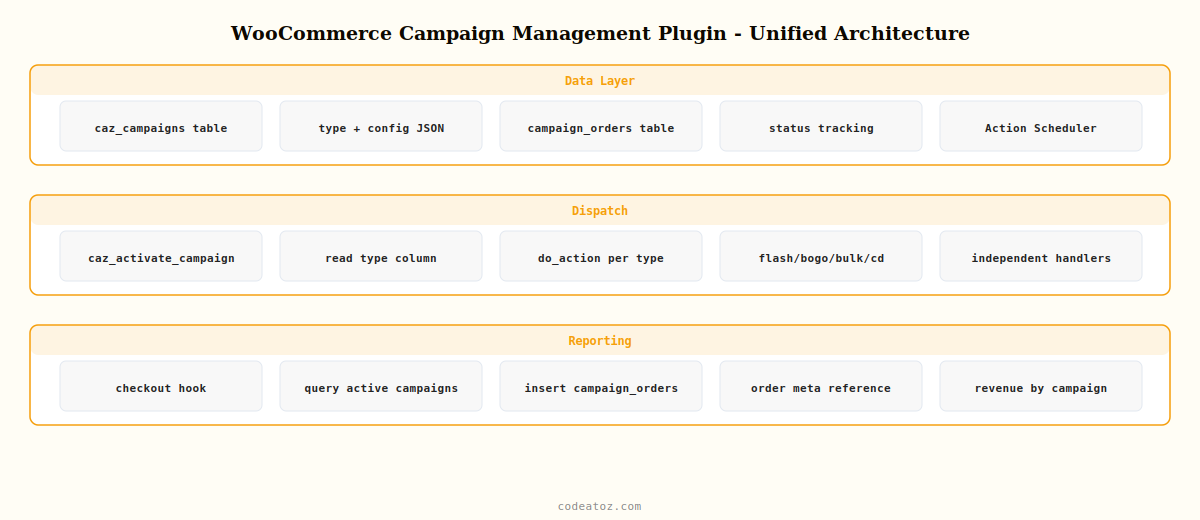
What a WooCommerce Campaign Management Plugin Must Handle
A production-ready WooCommerce campaign management plugin needs to handle these five core scenarios, all from one admin interface:
- Flash sales: percentage or fixed discount, scheduled start and auto-expire end, product and category targeting, email notification trigger
- Bulk discount rules: quantity tier pricing, per-product or per-category, cart-level application, pricing table display on product page
- BOGO deals: buy X get Y free, same-product or cross-product, percentage-off variant, automatic cart injection and removal
- Countdown timers: server-driven end time, product page and cart banner display, automatic hide on expiry, theme-compatible styling
- Campaign reporting: orders and revenue during campaign period, conversion rate before and during, top-performing products, exportable CSV report
WooCommerce Campaign Management Plugin: Campaign Architecture
The WooCommerce campaign management plugin stores all campaign types in a unified table. The campaign type field determines which activation handler fires when the campaign goes live. This architecture means adding a new campaign type — such as a referral discount or a loyalty points multiplier — requires only a new activation handler and a new admin form, not a restructured database.
<?php
// Unified campaign table — WooCommerce campaign management plugin core
function caz_scm_create_tables(): void {
    global $wpdb;
    $charset = $wpdb->get_charset_collate();

    // Main campaigns table
    $sql1 = "CREATE TABLE IF NOT EXISTS {$wpdb->prefix}caz_campaigns (
        id          BIGINT UNSIGNED NOT NULL AUTO_INCREMENT,
        name        VARCHAR(200)    NOT NULL,
        type        VARCHAR(50)     NOT NULL,  -- flash_sale|bulk_discount|bogo|countdown
        config      LONGTEXT        NOT NULL,  -- JSON: type-specific settings
        scope       LONGTEXT        NOT NULL,  -- JSON: product_ids, category_ids
        start_time  DATETIME        NOT NULL,
        end_time    DATETIME,
        status      VARCHAR(20)     NOT NULL DEFAULT 'scheduled',
        created_at  DATETIME        NOT NULL DEFAULT CURRENT_TIMESTAMP,
        PRIMARY KEY (id),
        KEY (type), KEY (status), KEY (start_time), KEY (end_time)
    ) {$charset};";

    // Campaign performance log — WooCommerce campaign management plugin reporting
    $sql2 = "CREATE TABLE IF NOT EXISTS {$wpdb->prefix}caz_campaign_orders (
        id          BIGINT UNSIGNED NOT NULL AUTO_INCREMENT,
        campaign_id BIGINT UNSIGNED NOT NULL,
        order_id    BIGINT UNSIGNED NOT NULL,
        revenue     DECIMAL(10,2)   NOT NULL,
        recorded_at DATETIME        NOT NULL DEFAULT CURRENT_TIMESTAMP,
        PRIMARY KEY (id),
        KEY (campaign_id), KEY (order_id)
    ) {$charset};";

    require_once ABSPATH . 'wp-admin/includes/upgrade.php';
    dbDelta( $sql1 );
    dbDelta( $sql2 );
}

// Dispatcher — routes activation to the correct handler
add_action( 'caz_activate_campaign', 'caz_dispatch_campaign_activation' );

function caz_dispatch_campaign_activation( int $campaign_id ): void {
    global $wpdb;
    $campaign = $wpdb->get_row( $wpdb->prepare(
        "SELECT * FROM {$wpdb->prefix}caz_campaigns WHERE id=%d", $campaign_id
    ));
    if ( ! $campaign ) return;

    // WooCommerce campaign management plugin: delegate to type handler
    do_action( 'caz_activate_campaign_' . $campaign->type, $campaign_id, json_decode( $campaign->config, true ), json_decode( $campaign->scope, true ) );
}
WooCommerce Campaign Management Plugin: Revenue Attribution
A WooCommerce campaign management plugin that cannot measure results is just a scheduling tool. Attribute revenue to campaigns by hooking into woocommerce_checkout_order_processed and checking whether any active campaign applies to the products in the order.
add_action( 'woocommerce_checkout_order_processed', 'caz_attribute_order_to_campaigns', 10 );

function caz_attribute_order_to_campaigns( int $order_id ): void {
    global $wpdb;
    $order = wc_get_order( $order_id );
    if ( ! $order ) return;

    // Find active campaigns during this WooCommerce campaign management plugin session
    $now      = current_time( 'mysql' );
    $campaigns = $wpdb->get_results(
        "SELECT id FROM {$wpdb->prefix}caz_campaigns
         WHERE status='active'
         AND start_time <= '{$now}'
         AND (end_time IS NULL OR end_time >= '{$now}')"
    );
    if ( empty( $campaigns ) ) return;

    $revenue = (float) $order->get_subtotal();

    foreach ( $campaigns as $c ) {
        $wpdb->insert( $wpdb->prefix . 'caz_campaign_orders', [
            'campaign_id' => $c->id,
            'order_id'    => $order_id,
            'revenue'     => $revenue,
        ]);
    }
    // Store campaign IDs in order meta for WooCommerce campaign management plugin reports
    $order->update_meta_data( '_caz_campaigns', wp_json_encode( array_column( $campaigns, 'id' ) ) );
    $order->save();
}
The Action Scheduler documentation covers the scheduling infrastructure that powers this WooCommerce campaign management plugin. The WooCommerce product data documentation covers the API used across all campaign type activation handlers. See our guides on WooCommerce flash sale automation, WooCommerce bulk discount rules, WooCommerce BOGO deal, and WooCommerce countdown timer sale for the full implementation of each campaign type handled by this WooCommerce campaign management plugin.
Smart Campaign Manager Pro — The Complete WooCommerce Campaign Management Plugin
Smart Campaign Manager Pro is the WooCommerce campaign management plugin described in this guide — built by CodeAtoZ, it combines flash sales, bulk discount rules, BOGO deals, countdown timers, and campaign reporting in one visual admin interface. Action Scheduler powered, HPOS compatible, zero PHP required.
Frequently Asked Questions — WooCommerce Campaign Management Plugin
What is a WooCommerce campaign management plugin?
A WooCommerce campaign management plugin is a tool that lets store managers create, schedule, and automatically run promotional campaigns — flash sales, bulk discounts, BOGO deals, and countdown timers — from a single admin interface without writing PHP. A production-ready WooCommerce campaign management plugin uses Action Scheduler for reliable timing, stores campaign configuration in a dedicated database table, attributes orders to active campaigns for revenue reporting, and handles automatic activation and expiry.
How does a WooCommerce campaign management plugin handle multiple campaign types?
Use a unified campaigns table with a type column. When a campaign activates, a dispatcher reads the type and fires a type-specific action hook (caz_activate_campaign_flash_sale, caz_activate_campaign_bogo, etc.). Each campaign type handler implements its own logic independently. This architecture makes the WooCommerce campaign management plugin extensible — new campaign types require only a new handler and admin form, not a database restructure.
How do I track which sales came from a WooCommerce campaign management plugin?
Hook into woocommerce_checkout_order_processed and query the campaigns table for active campaigns at the time of purchase. Log the order ID and revenue in a campaign_orders attribution table with a foreign key to the campaign. Store active campaign IDs in order meta for per-order reporting. The WooCommerce campaign management plugin can then report total revenue, order count, and average order value per campaign by querying the attribution table.
Is a WooCommerce campaign management plugin compatible with HPOS?
Yes — a properly built WooCommerce campaign management plugin uses wc_get_order() and the WooCommerce order API for all order operations, not direct wp_posts queries. Campaign activation uses product meta and price APIs that are unaffected by HPOS. Revenue attribution stores campaign data in its own tables rather than order post meta, using update_meta_data() via the WC_Order object which is HPOS-compatible.
Can a WooCommerce campaign management plugin run multiple campaign types simultaneously?
Yes — a flash sale and a bulk discount rule can both be active at the same time. The priority of each campaign type matters: flash sale prices are set on the product, while bulk discount rules apply at cart level. If both are active, the flash sale sets the base sale price, and the bulk discount rule applies its percentage off the already-discounted flash price. The WooCommerce campaign management plugin should document and log this stacking behaviour clearly.
What is the best WooCommerce campaign management plugin in 2026?
Smart Campaign Manager Pro by CodeAtoZ is the most complete WooCommerce campaign management plugin in 2026, combining flash sale automation, bulk discount rule builder, BOGO deal configuration, countdown timer campaigns, and revenue attribution reporting in one interface. It is built on Action Scheduler, is fully HPOS compatible, supports variable products across all campaign types, and requires no PHP coding from store managers.
Ready to Automate Your Promotions?
Smart Campaign Manager Pro is the complete WooCommerce campaign management plugin — 5 campaign types, visual scheduling, automatic activation, and revenue reporting.




