
WooCommerce BOGO Deal — Buy One Get One Free Setup Guide (2026)
A WooCommerce BOGO deal — buy one get one free — is one of the highest-converting promotions in e-commerce because it creates immediate perceived value. Building a WooCommerce BOGO deal in PHP correctly means automatically injecting the free item into the cart when the qualifying product is added, setting its price to zero without affecting the paid item’s price, and removing it automatically if the qualifying product is removed. This guide covers the complete WooCommerce BOGO deal implementation: same-product BOGO (buy one get one free of the same item), cross-product BOGO (buy product A get product B free), and buy-two-get-one variants with percentage discounts instead of full free items.
WooCommerce BOGO deal logic runs in two places: a cart hook that monitors when qualifying products are added and injects free items, and a second hook that removes the free items when the qualifying product quantity drops below the threshold. Getting the second hook right is critical — a WooCommerce BOGO deal that adds free items but never removes them when the customer changes quantities is a significant loss-making bug.
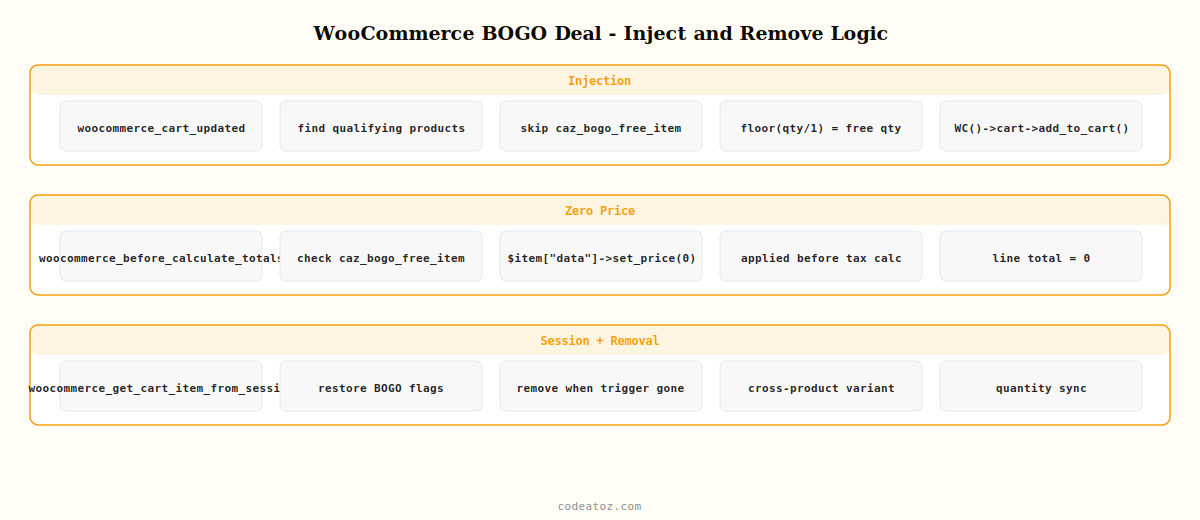
WooCommerce BOGO Deal: Same-Product Free Item Injection
The most common WooCommerce BOGO deal is buy one get one free of the same product. When the cart contains at least one unit of the qualifying product, automatically add another unit at zero price, flagged so it can be identified and removed correctly.
<?php
// Product IDs eligible for WooCommerce BOGO deal
$BOGO_PRODUCTS = apply_filters( 'caz_bogo_products', [ 101, 205, 312 ] );

add_action( 'woocommerce_cart_updated', 'caz_apply_bogo_deal' );

function caz_apply_bogo_deal(): void {
    global $BOGO_PRODUCTS;

    foreach ( WC()->cart->get_cart() as $key => $item ) {
        $product_id = $item['product_id'];

        if ( ! in_array( $product_id, $BOGO_PRODUCTS, true ) ) continue;
        if ( ! empty( $item['caz_bogo_free_item'] ) )           continue; // skip free items themselves

        $paid_qty = (int) $item['quantity'];
        $free_qty = (int) floor( $paid_qty / 1 ); // 1 paid = 1 free for standard WooCommerce BOGO deal

        // Check if a free item for this product is already in cart
        $existing_free_key = caz_find_bogo_free_item( $product_id );

        if ( $free_qty > 0 && ! $existing_free_key ) {
            // Add free item to cart with WooCommerce BOGO deal flag
            WC()->cart->add_to_cart( $product_id, $free_qty, 0, [], [
                'caz_bogo_free_item'    => true,
                'caz_bogo_parent_key'   => $key,
            ]);
        } elseif ( $free_qty > 0 && $existing_free_key ) {
            // Update free item quantity if paid quantity changed
            WC()->cart->set_quantity( $existing_free_key, $free_qty );
        } elseif ( $free_qty === 0 && $existing_free_key ) {
            // Remove free item if paid item removed
            WC()->cart->remove_cart_item( $existing_free_key );
        }
    }
}

function caz_find_bogo_free_item( int $product_id ): ?string {
    foreach ( WC()->cart->get_cart() as $key => $item ) {
        if ( $item['product_id'] === $product_id && ! empty( $item['caz_bogo_free_item'] ) ) {
            return $key;
        }
    }
    return null;
}

// Set free item price to zero — WooCommerce BOGO deal pricing
add_action( 'woocommerce_before_calculate_totals', 'caz_zero_bogo_free_items', 10 );

function caz_zero_bogo_free_items( WC_Cart $cart ): void {
    foreach ( $cart->get_cart() as $item ) {
        if ( ! empty( $item['caz_bogo_free_item'] ) ) {
            $item['data']->set_price( 0 );
        }
    }
}
WooCommerce BOGO Deal: Cross-Product Variant
A cross-product WooCommerce BOGO deal adds a different free product when a qualifying product is in the cart — for example, buy a coffee machine and get a bag of coffee free.
<?php
// Cross-product WooCommerce BOGO deal: buy product A, get product B free
$CROSS_BOGO_RULES = apply_filters( 'caz_cross_bogo_rules', [
    101 => 205,   // buy product 101, get product 205 free
    312 => 415,   // buy product 312, get product 415 free
]);

add_action( 'woocommerce_cart_updated', 'caz_apply_cross_bogo' );

function caz_apply_cross_bogo(): void {
    global $CROSS_BOGO_RULES;
    $cart_product_ids = array_column( WC()->cart->get_cart(), 'product_id' );

    foreach ( $CROSS_BOGO_RULES as $trigger_id => $free_id ) {
        $trigger_in_cart = in_array( $trigger_id, $cart_product_ids, true );
        $free_key        = caz_find_bogo_free_item( $free_id );

        if ( $trigger_in_cart && ! $free_key ) {
            // Add the free product for this cross-product WooCommerce BOGO deal
            WC()->cart->add_to_cart( $free_id, 1, 0, [], [
                'caz_bogo_free_item'  => true,
                'caz_bogo_trigger_id' => $trigger_id,
            ]);
        } elseif ( ! $trigger_in_cart && $free_key ) {
            // Remove free product when trigger removed
            WC()->cart->remove_cart_item( $free_key );
        }
    }
}
WooCommerce BOGO Deal: Persist Free Items in Session
WooCommerce cart item data added via custom session data must be persisted using woocommerce_get_cart_item_from_session so the BOGO flags survive page reloads. Without this hook, the custom data is lost when the cart is loaded from the session.
add_filter( 'woocommerce_get_cart_item_from_session', 'caz_restore_bogo_data', 10, 2 );

function caz_restore_bogo_data( array $cart_item, array $values ): array {
    if ( ! empty( $values['caz_bogo_free_item'] ) ) {
        $cart_item['caz_bogo_free_item']    = $values['caz_bogo_free_item'];
        $cart_item['caz_bogo_parent_key']   = $values['caz_bogo_parent_key']   ?? '';
        $cart_item['caz_bogo_trigger_id']   = $values['caz_bogo_trigger_id']   ?? 0;
    }
    return $cart_item;
}
The WooCommerce cart developer documentation covers woocommerce_cart_updated and all cart item data hooks used in this WooCommerce BOGO deal guide. The WooCommerce cart item data documentation covers the session persistence required for WooCommerce BOGO deal flags to survive page reloads. See our WooCommerce flash sale automation guide for scheduling BOGO campaigns with automatic start and end times, and our Smart Campaign Manager Pro plugin for a visual BOGO deal configuration interface.
💡 Always flag free cart items with a custom key like caz_bogo_free_item so you can distinguish them from regular cart items. Without this flag, the removal logic cannot identify which cart item is the BOGO free one, and customers can manipulate the WooCommerce BOGO deal by removing the paid item while keeping the free item in their cart.
Smart Campaign Manager Pro — BOGO Deal Builder
Create WooCommerce BOGO deals from a visual admin panel — same-product, cross-product, buy-2-get-1, and percentage-off variants with auto-inject and removal logic.
Frequently Asked Questions — WooCommerce BOGO Deal
How do I create a WooCommerce BOGO deal in PHP?
Hook into woocommerce_cart_updated. Check if a qualifying product is in the cart. If the free item is not already present, use WC()->cart->add_to_cart() with custom cart item data flagging it as a BOGO free item. Hook into woocommerce_before_calculate_totals to set the free item’s price to zero. Hook into the cart updated action again to remove the free item when the qualifying product is removed. Persist the BOGO flags using woocommerce_get_cart_item_from_session.
How do I prevent customers from keeping the free item after removing the paid item in a WooCommerce BOGO deal?
In the woocommerce_cart_updated hook, after checking for qualifying products, also check whether any BOGO free items in the cart no longer have their trigger product present. If the trigger product has been removed, call WC()->cart->remove_cart_item() on the free item. Use the caz_bogo_trigger_id stored in the cart item data to identify which paid product triggers each free item in the WooCommerce BOGO deal.
Can I create a WooCommerce BOGO deal where the free item is a different product?
Yes — store a mapping of trigger product ID to free product ID in a configuration array or database table. In the cart hook, check if the trigger product is in the cart and add the mapped free product if not already present. Set the free product’s price to zero in woocommerce_before_calculate_totals. Remove it when the trigger product is removed. This cross-product WooCommerce BOGO deal pattern enables bundle promotions like buy product A, get product B free.
Why is my WooCommerce BOGO free item disappearing after a page refresh?
Custom cart item data is not persisted automatically when WooCommerce restores the cart from the session. Add the woocommerce_get_cart_item_from_session filter to restore your BOGO flags from the $values array back to the $cart_item array. Without this hook, the caz_bogo_free_item flag is lost on reload and your woocommerce_before_calculate_totals hook cannot identify the free item to zero its price.
How do I create a buy-2-get-1 WooCommerce BOGO deal?
Change the floor() calculation in the free quantity logic: floor($paid_qty / 2) for buy-2-get-1 instead of floor($paid_qty / 1) for buy-1-get-1. A customer buying 2 gets 1 free, buying 4 gets 2 free. Cap the free quantity if needed using min($free_qty, $max_free) to prevent the WooCommerce BOGO deal from generating unlimited free items on large quantity orders.
Does a WooCommerce BOGO deal work with WooCommerce coupons at the same time?
Yes — WooCommerce BOGO deal free items are set to zero price before WooCommerce applies coupons. Percentage coupons apply to the non-zero items only (the free item contributes nothing to the subtotal). Fixed-cart coupons reduce the total after the BOGO deal price is applied. If you want to prevent coupon stacking on top of a WooCommerce BOGO deal campaign, use the woocommerce_coupon_is_valid filter to block specific coupon codes when BOGO items are in the cart.
Need a BOGO Deal on Your WooCommerce Store?
Smart Campaign Manager Pro builds WooCommerce BOGO deals visually — same-product, cross-product, buy-2-get-1, with auto inject and auto remove.




