
WooCommerce Flash Sale Automation — Schedule & Auto-Expire Sales (2026)
WooCommerce flash sale automation removes the manual work of running time-limited sales — you set the start time, end time, discount, and products once, and the system handles everything: activating prices at the scheduled moment, deactivating them when the sale ends, sending email notifications to subscribers, and logging every flash sale event. Proper WooCommerce flash sale automation uses Action Scheduler for reliable timing rather than WP-Cron, supports recurring flash sale schedules, and fires hooks at each stage so your other systems (stock management, email, analytics) can react in real time. This guide covers the complete WooCommerce flash sale automation implementation in PHP.
Manual flash sales are error-prone — a store manager who forgets to reset prices after a flash event leaves sale prices running indefinitely, eroding margin. WooCommerce flash sale automation solves this at the architecture level: the sale data is stored with explicit start and end timestamps, and Action Scheduler activates and deactivates prices at exactly the right moment, regardless of what else is happening on the server.
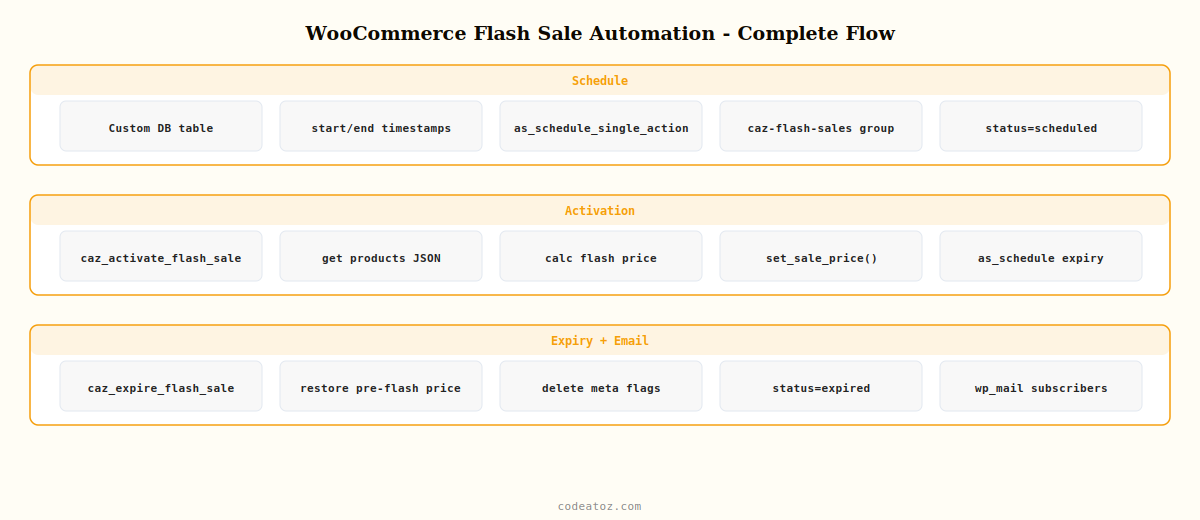
WooCommerce Flash Sale Automation: Data Structure
Store flash sale configuration in a custom database table or as CPT post meta. The WooCommerce flash sale automation record needs the product IDs, sale price, start timestamp, end timestamp, and current status. Using a dedicated table makes querying upcoming and active flash sales significantly faster than scanning post meta on large catalogues.
<?php
register_activation_hook( __FILE__, 'caz_create_flash_sale_table' );

function caz_create_flash_sale_table(): void {
    global $wpdb;
    $table   = $wpdb->prefix . 'caz_flash_sales';
    $charset = $wpdb->get_charset_collate();

    $sql = "CREATE TABLE IF NOT EXISTS {$table} (
        id           BIGINT UNSIGNED NOT NULL AUTO_INCREMENT,
        name         VARCHAR(200)    NOT NULL,
        product_ids  LONGTEXT        NOT NULL,
        sale_percent DECIMAL(5,2)    NOT NULL DEFAULT 0,
        sale_amount  DECIMAL(10,2)   NOT NULL DEFAULT 0,
        start_time   DATETIME        NOT NULL,
        end_time     DATETIME        NOT NULL,
        status       VARCHAR(20)     NOT NULL DEFAULT 'scheduled',
        created_at   DATETIME        NOT NULL DEFAULT CURRENT_TIMESTAMP,
        PRIMARY KEY  (id),
        KEY          (status),
        KEY          (start_time),
        KEY          (end_time)
    ) {$charset};";

    require_once ABSPATH . 'wp-admin/includes/upgrade.php';
    dbDelta( $sql );
}

// Schedule WooCommerce flash sale automation when a sale is saved
function caz_schedule_flash_sale( array $sale_data ): int {
    global $wpdb;
    $table = $wpdb->prefix . 'caz_flash_sales';

    $id = $wpdb->insert( $table, [
        'name'         => sanitize_text_field( $sale_data['name'] ),
        'product_ids'  => wp_json_encode( array_map( 'absint', $sale_data['product_ids'] ) ),
        'sale_percent' => (float) $sale_data['percent'],
        'sale_amount'  => (float) $sale_data['amount'],
        'start_time'   => $sale_data['start'],
        'end_time'     => $sale_data['end'],
        'status'       => 'scheduled',
    ]);

    // Schedule activation using Action Scheduler for reliable WooCommerce flash sale automation
    as_schedule_single_action(
        strtotime( $sale_data['start'] ),
        'caz_activate_flash_sale',
        [ 'sale_id' => $wpdb->insert_id ],
        'caz-flash-sales'
    );

    return (int) $wpdb->insert_id;
}
WooCommerce Flash Sale Automation: Activate and Expire Sale Prices
The activation handler applies sale prices to all products in the flash sale. The expiry handler resets them. Both fire via Action Scheduler for reliable WooCommerce flash sale automation that works even on low-traffic stores where WP-Cron is unreliable.
<?php
add_action( 'caz_activate_flash_sale', 'caz_run_flash_sale_activation' );

function caz_run_flash_sale_activation( int $sale_id ): void {
    global $wpdb;
    $sale = $wpdb->get_row(
        $wpdb->prepare( "SELECT * FROM {$wpdb->prefix}caz_flash_sales WHERE id=%d", $sale_id )
    );
    if ( ! $sale || $sale->status !== 'scheduled' ) return;

    $product_ids = json_decode( $sale->product_ids, true );

    foreach ( $product_ids as $id ) {
        $product = wc_get_product( $id );
        if ( ! $product ) continue;

        $regular = (float) $product->get_regular_price();
        // Calculate flash sale price
        $flash_price = $sale->sale_percent > 0
            ? round( $regular * ( 1 - $sale->sale_percent / 100 ), 2 )
            : max( 0, $regular - $sale->sale_amount );

        // Store original price so WooCommerce flash sale automation can restore it
        $product->update_meta_data( '_caz_pre_flash_price', $product->get_sale_price() );
        $product->update_meta_data( '_caz_flash_sale_id',   $sale_id );
        $product->set_sale_price( (string) $flash_price );
        $product->set_date_on_sale_from( null );
        $product->set_date_on_sale_to( null );
        $product->save();
    }

    // Mark active in DB
    $wpdb->update(
        $wpdb->prefix . 'caz_flash_sales',
        [ 'status' => 'active' ],
        [ 'id' => $sale_id ]
    );

    // Schedule expiry for WooCommerce flash sale automation
    as_schedule_single_action(
        strtotime( $sale->end_time ),
        'caz_expire_flash_sale',
        [ 'sale_id' => $sale_id ],
        'caz-flash-sales'
    );

    do_action( 'caz_flash_sale_activated', $sale_id, $product_ids );
}

add_action( 'caz_expire_flash_sale', 'caz_run_flash_sale_expiry' );

function caz_run_flash_sale_expiry( int $sale_id ): void {
    global $wpdb;
    $sale = $wpdb->get_row(
        $wpdb->prepare( "SELECT * FROM {$wpdb->prefix}caz_flash_sales WHERE id=%d", $sale_id )
    );
    if ( ! $sale ) return;

    $product_ids = json_decode( $sale->product_ids, true );
    foreach ( $product_ids as $id ) {
        $product = wc_get_product( $id );
        if ( ! $product ) continue;
        // Restore pre-flash sale price — WooCommerce flash sale automation cleanup
        $orig = $product->get_meta( '_caz_pre_flash_price' );
        $product->set_sale_price( $orig ?: '' );
        $product->delete_meta_data( '_caz_flash_sale_id' );
        $product->delete_meta_data( '_caz_pre_flash_price' );
        $product->save();
    }

    $wpdb->update(
        $wpdb->prefix . 'caz_flash_sales',
        [ 'status' => 'expired' ],
        [ 'id' => $sale_id ]
    );

    do_action( 'caz_flash_sale_expired', $sale_id, $product_ids );
}
WooCommerce Flash Sale Automation: Email Notifications
Hook into the caz_flash_sale_activated action to send a notification email to your subscriber list when a flash sale goes live. This is what turns WooCommerce flash sale automation into a genuine revenue driver — customers get an immediate, time-sensitive prompt to act.
add_action( 'caz_flash_sale_activated', 'caz_send_flash_sale_email', 10, 2 );

function caz_send_flash_sale_email( int $sale_id, array $product_ids ): void {
    global $wpdb;
    $sale = $wpdb->get_row( $wpdb->prepare(
        "SELECT * FROM {$wpdb->prefix}caz_flash_sales WHERE id=%d", $sale_id
    ));
    if ( ! $sale ) return;

    // Get all opted-in customer emails for WooCommerce flash sale automation
    $emails = get_option( 'caz_flash_sale_subscribers', [] );
    if ( empty( $emails ) ) return;

    $end_human = date_i18n( get_option('date_format') . ' ' . get_option('time_format'),
                            strtotime( $sale->end_time ) );
    $subject   = sprintf( __( 'Flash Sale LIVE: %s — ends %s', 'caz-scm' ), $sale->name, $end_human );

    // Build product list for the email
    $product_lines = '';
    foreach ( array_slice( $product_ids, 0, 5 ) as $id ) {
        $p = wc_get_product( $id );
        if ( $p ) $product_lines .= '• ' . $p->get_name() . ' — now ' . wc_price( $p->get_sale_price() ) . "n";
    }

    $message = sprintf(
        __( "Your WooCommerce flash sale automation just triggered!nn%s is now live:nn%snShop now: %snnSale ends: %s", 'caz-scm' ),
        $sale->name, $product_lines, get_home_url(), $end_human
    );

    foreach ( $emails as $email ) {
        wp_mail( $email, $subject, $message );
    }
}
The Action Scheduler API documentation covers as_schedule_single_action() and all scheduling methods used in this WooCommerce flash sale automation guide. The WooCommerce pricing documentation covers the sale price and date API. The WooCommerce hooks reference lists all product price hooks. See our WooCommerce B2B wholesale pricing guide for role-based pricing that complements WooCommerce flash sale automation on trade stores, and our Smart Campaign Manager Pro plugin for a ready-built WooCommerce flash sale automation solution.
Smart Campaign Manager Pro — Flash Sale Automation Built-In
Schedule and auto-expire WooCommerce flash sale automation campaigns from a visual admin calendar — no code, no cron jobs, no forgotten sales.
Frequently Asked Questions — WooCommerce Flash Sale Automation
How do I automate flash sales in WooCommerce without manually resetting prices?
Store flash sale records in a custom table with start and end timestamps. Use Action Scheduler to fire activation and expiry hooks at exactly the scheduled moments. The activation handler sets sale prices on all products in the campaign; the expiry handler restores the original prices. This WooCommerce flash sale automation approach works reliably on low-traffic stores where WP-Cron timing is inconsistent.
Why should I use Action Scheduler instead of WP-Cron for WooCommerce flash sale automation?
WP-Cron only fires when someone visits the site, making timing unreliable for WooCommerce flash sale automation on stores with irregular traffic. A flash sale scheduled for 12:00 might not activate until 12:15 if no visitor triggers a page load. Action Scheduler runs on a real queue with a dedicated runner, is the library WooCommerce itself uses for background tasks, and provides a WP Admin log of every fired action so you can verify your WooCommerce flash sale automation is working correctly.
How do I apply percentage discounts in WooCommerce flash sale automation?
Read each product’s regular_price using get_regular_price(), multiply by (1 – percent/100), and set the result as the sale_price using set_sale_price(). Save with $product->save(). Store the original sale price in product meta before overwriting so the WooCommerce flash sale automation expiry handler can restore it accurately if the product already had an unrelated sale price.
Can I run recurring WooCommerce flash sale automation on a schedule?
Yes — in the expiry handler, check a recurring flag on the flash sale record and call caz_schedule_flash_sale() again with the next cycle’s start and end times. For weekly flash sales, add 7 days to both timestamps. Action Scheduler handles the rescheduling cleanly. Store a max_recurrences value in the flash sale record and decrement it each cycle to prevent infinite WooCommerce flash sale automation loops.
Does WooCommerce flash sale automation work with variable products?
For variable products, iterate $product->get_children() to get all variation IDs and apply the sale price to each WC_Product_Variation individually. Variable products display the price range from their variations, so setting sale prices on the parent WC_Product_Variable is not sufficient for WooCommerce flash sale automation. Call WC_Product_Variable::sync($product_id) after updating all variations to refresh the parent price range display.
What is the best WooCommerce flash sale automation plugin?
Smart Campaign Manager Pro by CodeAtoZ provides complete WooCommerce flash sale automation: a visual campaign calendar, scheduled activation and auto-expiry, percentage or fixed-amount discounts, category and product targeting, email notification triggers, and a campaign history log. It uses Action Scheduler internally and is fully compatible with WooCommerce HPOS and variable products.
Ready to Automate Your Flash Sales?
Smart Campaign Manager Pro handles WooCommerce flash sale automation from a visual admin panel — schedule, activate, notify, and auto-expire without touching code.




