
WooCommerce Bulk Discount Rules — Quantity-Based Pricing Guide (2026)
WooCommerce bulk discount rules increase average order value by incentivising customers to buy more — buy 5 get 10% off, buy 10 get 20% off, buy 20 get 30% off. Implementing WooCommerce bulk discount rules correctly in PHP requires applying discounts at the cart item level (not via sale prices), showing a pricing table on the product page so customers know the tiers before adding to cart, and validating the discount at checkout to prevent manipulation. This guide covers the complete WooCommerce bulk discount rules implementation: storing tier configurations, applying them via cart hooks, displaying the pricing table, and combining them with user roles for B2B wholesale scenarios.
WooCommerce bulk discount rules work differently from product sale prices. Sale prices are stored on the product and apply to every purchase. Bulk discount rules apply dynamically at the cart level based on the quantity the customer has added — the unit price in the cart changes depending on how many the customer has selected. This means the implementation uses woocommerce_before_calculate_totals rather than the product price filters.
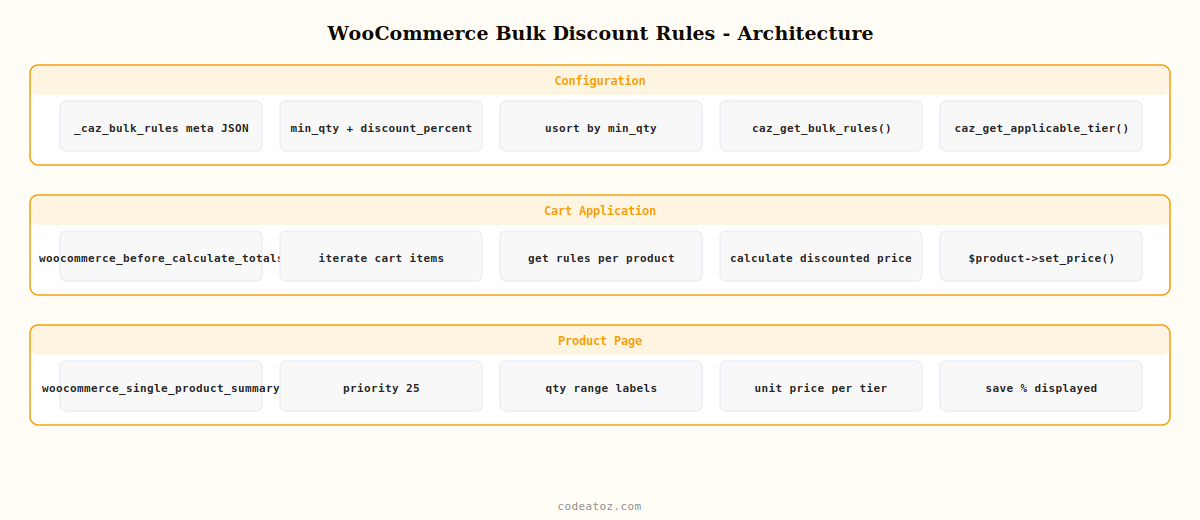
WooCommerce Bulk Discount Rules: Tier Configuration Structure
Store WooCommerce bulk discount rules as JSON in product meta or in a separate options table. Each rule has a minimum quantity threshold and either a percentage discount or a fixed unit price for that tier.
<?php
// Example WooCommerce bulk discount rules structure stored in product meta
// _caz_bulk_rules: [
//   {"min_qty": 5,  "discount_percent": 10},
//   {"min_qty": 10, "discount_percent": 20},
//   {"min_qty": 20, "discount_percent": 30}
// ]

function caz_get_bulk_rules( int $product_id ): array {
    $product = wc_get_product( $product_id );
    if ( ! $product ) return [];
    $rules = $product->get_meta( '_caz_bulk_rules' );
    if ( ! $rules ) return [];
    $parsed = json_decode( $rules, true );
    if ( ! is_array( $parsed ) ) return [];
    // Sort by min_qty ascending for correct WooCommerce bulk discount rules matching
    usort( $parsed, fn($a, $b) => $a['min_qty'] <=> $b['min_qty'] );
    return $parsed;
}

// Find the applicable WooCommerce bulk discount rules tier for a given quantity
function caz_get_applicable_tier( array $rules, int $quantity ): ?array {
    $applicable = null;
    foreach ( $rules as $rule ) {
        if ( $quantity >= $rule['min_qty'] ) {
            $applicable = $rule;  // keep overwriting — last match is the highest qualifying tier
        }
    }
    return $applicable;
}
WooCommerce Bulk Discount Rules: Apply Discounts at Cart Level
Apply WooCommerce bulk discount rules via woocommerce_before_calculate_totals. This hook fires before WooCommerce calculates cart totals, so any price changes you make here are included in the total, tax calculations, and checkout display.
add_action( 'woocommerce_before_calculate_totals', 'caz_apply_bulk_discount_rules', 20 );

function caz_apply_bulk_discount_rules( WC_Cart $cart ): void {
    if ( is_admin() && ! wp_doing_ajax() ) return;
    if ( did_action( 'woocommerce_before_calculate_totals' ) >= 2 ) return;

    foreach ( $cart->get_cart() as $cart_item_key => $cart_item ) {
        $product_id = $cart_item['product_id'];
        $quantity   = $cart_item['quantity'];
        $product    = $cart_item['data'];

        $rules = caz_get_bulk_rules( $product_id );
        if ( empty( $rules ) ) continue;

        $tier = caz_get_applicable_tier( $rules, $quantity );
        if ( ! $tier ) continue;

        // Calculate discounted unit price for WooCommerce bulk discount rules
        $regular_price  = (float) $product->get_regular_price();
        $discount_pct   = (float) ( $tier['discount_percent'] ?? 0 );
        $discounted     = round( $regular_price * ( 1 - $discount_pct / 100 ), 2 );

        // Set the unit price — WooCommerce recalculates line total automatically
        $product->set_price( $discounted );
    }
}
WooCommerce Bulk Discount Rules: Pricing Table on Product Page
Customers need to see the WooCommerce bulk discount rules tiers before they decide how many to buy. Display a pricing table on the product page using the woocommerce_single_product_summary action.
add_action( 'woocommerce_single_product_summary', 'caz_display_bulk_rules_table', 25 );

function caz_display_bulk_rules_table(): void {
    global $product;
    $rules = caz_get_bulk_rules( $product->get_id() );
    if ( empty( $rules ) ) return;

    echo '<div class="caz-bulk-pricing-table">';
    echo '<h4>' . esc_html__( 'Bulk pricing', 'caz-scm' ) . '</h4>';
    echo '<table><thead><tr>';
    echo '<th>' . esc_html__( 'Qty', 'caz-scm' ) . '</th>';
    echo '<th>' . esc_html__( 'Unit price', 'caz-scm' ) . '</th>';
    echo '<th>' . esc_html__( 'Save', 'caz-scm' ) . '</th>';
    echo '</tr></thead><tbody>';

    $regular = (float) $product->get_regular_price();
    foreach ( $rules as $i => $rule ) {
        $next_min   = $rules[ $i + 1 ]['min_qty'] ?? null;
        $qty_label  = $next_min
            ? $rule['min_qty'] . '–' . ( $next_min - 1 )
            : $rule['min_qty'] . '+';
        $unit_price = round( $regular * ( 1 - $rule['discount_percent'] / 100 ), 2 );

        echo '<tr>';
        echo '<td>' . esc_html( $qty_label ) . '</td>';
        echo '<td>' . wc_price( $unit_price ) . '</td>';
        echo '<td style="color:#16a34a">' . esc_html( $rule['discount_percent'] ) . '% off</td>';
        echo '</tr>';
    }

    echo '</tbody></table></div>';
}
The WooCommerce cart documentation covers the woocommerce_before_calculate_totals hook used for WooCommerce bulk discount rules. The WooCommerce product data store documentation covers the meta API for storing bulk rule configurations. See our WooCommerce B2B wholesale pricing guide for combining WooCommerce bulk discount rules with role-based pricing tiers, and our Smart Campaign Manager Pro plugin for a no-code WooCommerce bulk discount rules interface.
💡 Use did_action( 'woocommerce_before_calculate_totals' ) >= 2 at the top of your WooCommerce bulk discount rules cart hook. Without this guard, WooCommerce sometimes calls calculate_totals() recursively, causing your discount to apply multiple times and producing incorrect cart totals.
Smart Campaign Manager Pro — Visual Bulk Discount Rule Builder
Create WooCommerce bulk discount rules with a drag-and-drop tier editor — per product, per category, per user role, with automatic pricing table display.
Frequently Asked Questions — WooCommerce Bulk Discount Rules
How do I add WooCommerce bulk discount rules in PHP?
Store tier configurations (minimum quantity and discount percentage) as JSON in product meta. In the woocommerce_before_calculate_totals hook, iterate the cart items, find each product’s bulk rules, determine which tier applies based on the cart item quantity, calculate the discounted unit price, and call $product->set_price() to override the price for this cart session. WooCommerce recalculates the line total automatically.
Why should WooCommerce bulk discount rules apply at cart level, not as sale prices?
Sale prices on the product apply regardless of quantity. WooCommerce bulk discount rules must be quantity-sensitive — the discount only applies when the customer buys a minimum amount. Applying via woocommerce_before_calculate_totals lets you check the actual cart quantity before modifying the price, whereas sale prices are set statically on the product and cannot vary per customer’s cart quantity.
How do I display a WooCommerce bulk discount rules pricing table on the product page?
Hook into woocommerce_single_product_summary at priority 25 (after the product price which runs at 10). Read the product’s bulk rules from meta, calculate the unit price for each tier, and output an HTML table showing quantity ranges, unit prices, and savings percentages. This gives customers the full WooCommerce bulk discount rules picture before they choose a quantity.
Can WooCommerce bulk discount rules work per category?
Yes — store global category-level WooCommerce bulk discount rules in WordPress options keyed by category ID. In the cart hook, check if the product belongs to a category with bulk rules. Apply the category rule if no product-specific rule exists. Product-specific rules should always take priority over category rules. This lets you set WooCommerce bulk discount rules on an entire category without configuring each product individually.
How do I combine WooCommerce bulk discount rules with user role pricing?
Check the user’s role in the cart hook before applying WooCommerce bulk discount rules. Wholesale customers might have different tier thresholds or discount percentages than retail customers. Store role-specific rule sets in the bulk rules meta (e.g. separate arrays for retail_rules and wholesale_rules) and select which set to apply based on the current user’s role. This makes WooCommerce bulk discount rules a complete B2B quantity incentive system.
Does applying WooCommerce bulk discount rules affect WooCommerce tax calculations?
Yes, in the correct way. Setting the price via $product->set_price() inside woocommerce_before_calculate_totals causes WooCommerce to recalculate taxes based on the discounted unit price. Tax is applied to the already-discounted price, which is the standard commercial behaviour. Coupons and shipping are also calculated after the WooCommerce bulk discount rules price is applied, so all subsequent calculations use the discounted amount.
Need Quantity Pricing on Your WooCommerce Store?
Smart Campaign Manager Pro includes a visual WooCommerce bulk discount rules builder — create tier pricing in minutes without writing a line of PHP.




