
Best WooCommerce B2B Registration and Approval Guide 2026
Build a WooCommerce B2B registration flow — company and VAT capture, pending-approval roles, approve/reject emails, auto-approval, and EU VIES tax-ID validation.
WooCommerce B2B registration is the gate that protects your trade pricing: a signup form that captures company name, VAT number and country, a pending-approval role that keeps wholesale prices hidden until you have reviewed the application, and approval emails that grant the wholesale role on acceptance. B2B Suite ships the complete WooCommerce B2B registration workflow free — with EU VIES, UK HMRC and Australian ABN tax-ID validation in Pro.
The default WooCommerce registration form asks for an email address and nothing else — useless for trade vetting. The B2B Suite WooCommerce B2B registration form captures the business details that let you make an approval decision in seconds, holds applicants in a pending role with retail-only visibility, and turns approval into a one-click action that emails the customer and unlocks their wholesale pricing. Download free on WordPress.org or read the full B2B Suite overview first.
WooCommerce B2B Registration: The Signup Form
Enable the Registration module and B2B Suite adds a dedicated trade signup form capturing company name, VAT/tax number, country, and contact details alongside the standard account fields. Place it on a “Trade Accounts” page and link it from your catalog-mode price-hidden product pages — “Login or apply for a trade account to see pricing” is the highest-converting placement. Submissions create a WordPress user in the pending-approval B2B role: they can log in, but they see retail visibility only (or full catalog mode) until approved, so trade prices never leak to unvetted applicants — the protection that pairs directly with wholesale pricing and catalog mode.
WooCommerce B2B Registration: Approval Workflow and Auto-Approve
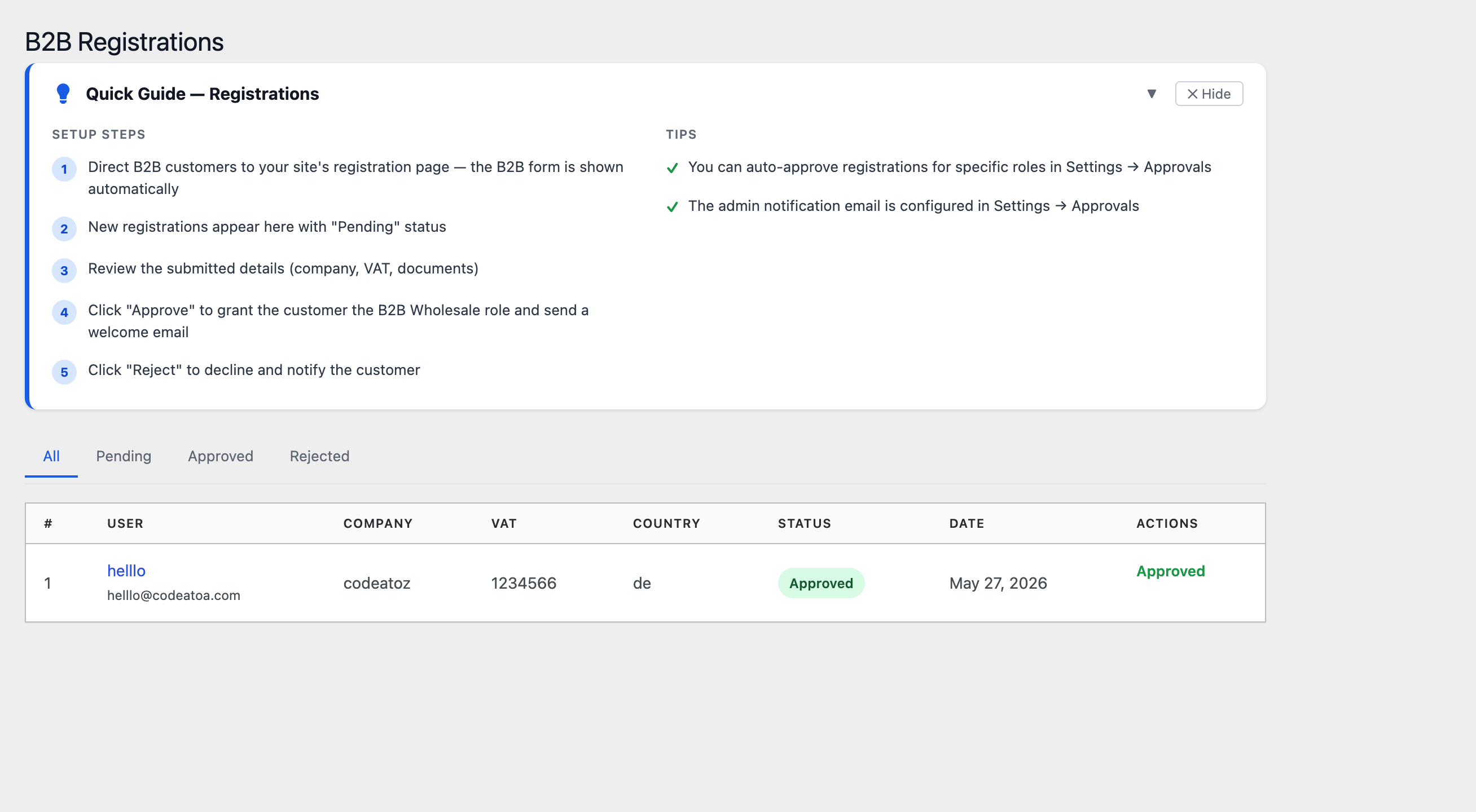
Applications queue in B2B Suite → Registrations with the company, VAT and country details on one screen. Approve grants the wholesale role and sends a welcome email (customisable, with your terms and first-order incentive); reject sends a polite decline with an optional reason. For lower-risk segments you can auto-approve by rule — for example, applicants from your home country with a syntactically valid VAT number go straight to a starter wholesale tier, while everything else queues for manual review. Approved accounts flow into the rest of the suite automatically: they see their tier pricing, can use the RFQ pipeline, and on Pro can be converted into multi-buyer company accounts.
B2B Suite Pro validates tax IDs at registration against the official registries: EU VIES for EU VAT numbers, UK HMRC for GB VAT, and the Australian ABN register. A validated VAT number is both a fraud filter and the prerequisite for compliant zero-rated cross-border B2B sales — the validation result is stored on the account for your tax records.
WooCommerce B2B Registration: Building the Onboarding Funnel
Treat WooCommerce B2B registration as a funnel with three measured steps: visitors hitting the price-hidden catalogue, applications submitted, and applications approved. B2B Suite analytics tracks registrations alongside quotes, so you can see whether trade signups are converting into RFQs and orders. Two funnel optimisations consistently pay off: keep the form short (company, VAT, country, email — everything else can wait until the first order), and respond fast — approve within hours, not days, because a trade buyer comparing suppliers signs up with three of you and orders from whoever unlocks pricing first. The WooCommerce account customisation docs cover adjusting the surrounding My Account experience to match.
Frequently Asked Questions About WooCommerce B2B Registration
How do I add B2B registration to WooCommerce?
Install B2B Suite free from WordPress.org and enable the Registration module. A trade signup form capturing company, VAT and country details is added — place it on a Trade Accounts page. Applicants land in a pending-approval role with retail-only visibility until you approve them, at which point they receive the wholesale role and a welcome email.
How does the WooCommerce B2B registration approval workflow work?
Applications queue in B2B Suite → Registrations showing company, VAT and country on one screen. Approve grants the wholesale role and emails the customer; reject sends a decline with an optional reason. Pending applicants can log in but see no trade pricing, so wholesale prices never leak to unvetted accounts.
Can WooCommerce B2B registration auto-approve trusted applicants?
Yes. B2B Suite supports auto-approval rules — for example, domestic applicants with a valid VAT format go straight to a starter wholesale tier while international or incomplete applications queue for manual review. Auto-approval keeps onboarding instant for low-risk segments without giving up vetting for the rest.
Does WooCommerce B2B registration validate VAT numbers?
B2B Suite Pro validates VAT and tax IDs at registration against official registries — EU VIES for EU VAT, UK HMRC for GB VAT, and the Australian ABN register. The validation result is stored on the account, serving both as a fraud filter and as the documentation basis for zero-rated cross-border B2B transactions.
Can pending B2B registrations see wholesale prices?
No. Pending applicants hold a restricted role that shows retail pricing only — or nothing at all when combined with catalog mode. Wholesale tier pricing unlocks only when an admin (or an auto-approval rule) grants the wholesale role, keeping trade prices invisible to competitors and unvetted signups.
Is WooCommerce B2B registration free in B2B Suite?
Yes. The complete registration workflow — company/VAT/country capture, pending-approval role, approve and reject emails, and auto-approval rules — is in the free WordPress.org version. Pro adds EU VIES, UK HMRC and Australian ABN tax-ID validation plus conversion of approved accounts into multi-buyer company accounts.
What fields should a WooCommerce B2B registration form include?
Keep it short: company name, VAT or tax number, country, and contact email are enough to make an approval decision. Every extra field reduces completions — collect delivery addresses, payment preferences and additional buyers after approval, during the first order or company account setup. Fast approval matters more than exhaustive capture.
Onboard Trade Customers Properly
Registration, approvals and auto-approve — free on WordPress.org. VAT validation and company accounts in Pro.




