
Best WooCommerce Request a Quote Plugin Guide 2026
Add a WooCommerce request a quote system — quote cart, admin pipeline from Pending to Accepted, one-click order conversion, and automated follow-up reminders.
A WooCommerce request a quote system replaces the worst sales channel in B2B — pricing requests buried in email threads — with a tracked pipeline. Customers build a quote cart and submit an RFQ; you set prices in an admin quote builder, send, and convert accepted quotes to orders in one click. B2B Suite includes the full WooCommerce request a quote workflow free, with automation that chases pending quotes so your team does not have to.
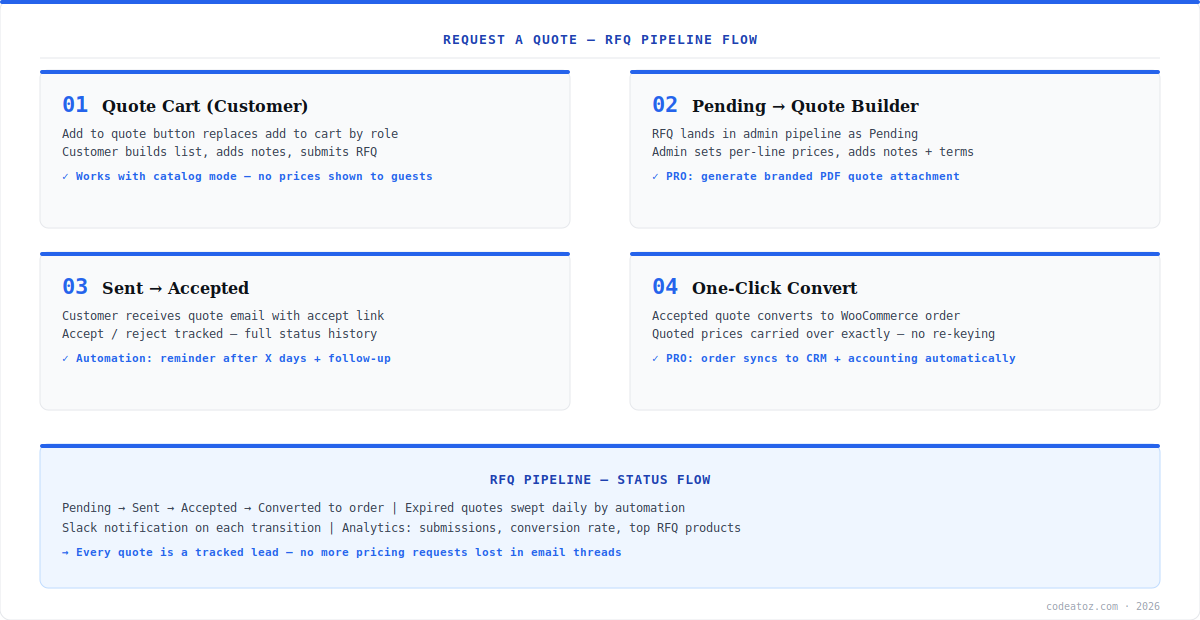
Quotes are leads, and leads that live in inboxes leak. The B2B Suite WooCommerce request a quote module tracks every RFQ through Pending → Sent → Accepted → Converted, fires Slack notifications on each transition, sends automated reminders after a configurable number of days, and reports conversion rates and top-requested products in analytics. Get the free plugin or start with the B2B Suite overview to see where RFQ fits in the suite.
WooCommerce Request a Quote: The Customer Side
With the RFQ module enabled, an “Add to Quote” button appears for the roles you choose — alongside add-to-cart for hybrid stores, or replacing it entirely in catalog mode where prices are hidden from guests. Customers build a quote cart exactly like a shopping cart, attach notes per line or per quote (“need delivery before July, can you do better on 500 units?”), and submit. The WooCommerce request a quote form captures everything your sales team needs to respond without a clarifying email round-trip. This pairs naturally with wholesale pricing — published tier pricing for standard volumes, RFQ for negotiated deals above them.
WooCommerce Request a Quote: Pipeline and Conversion
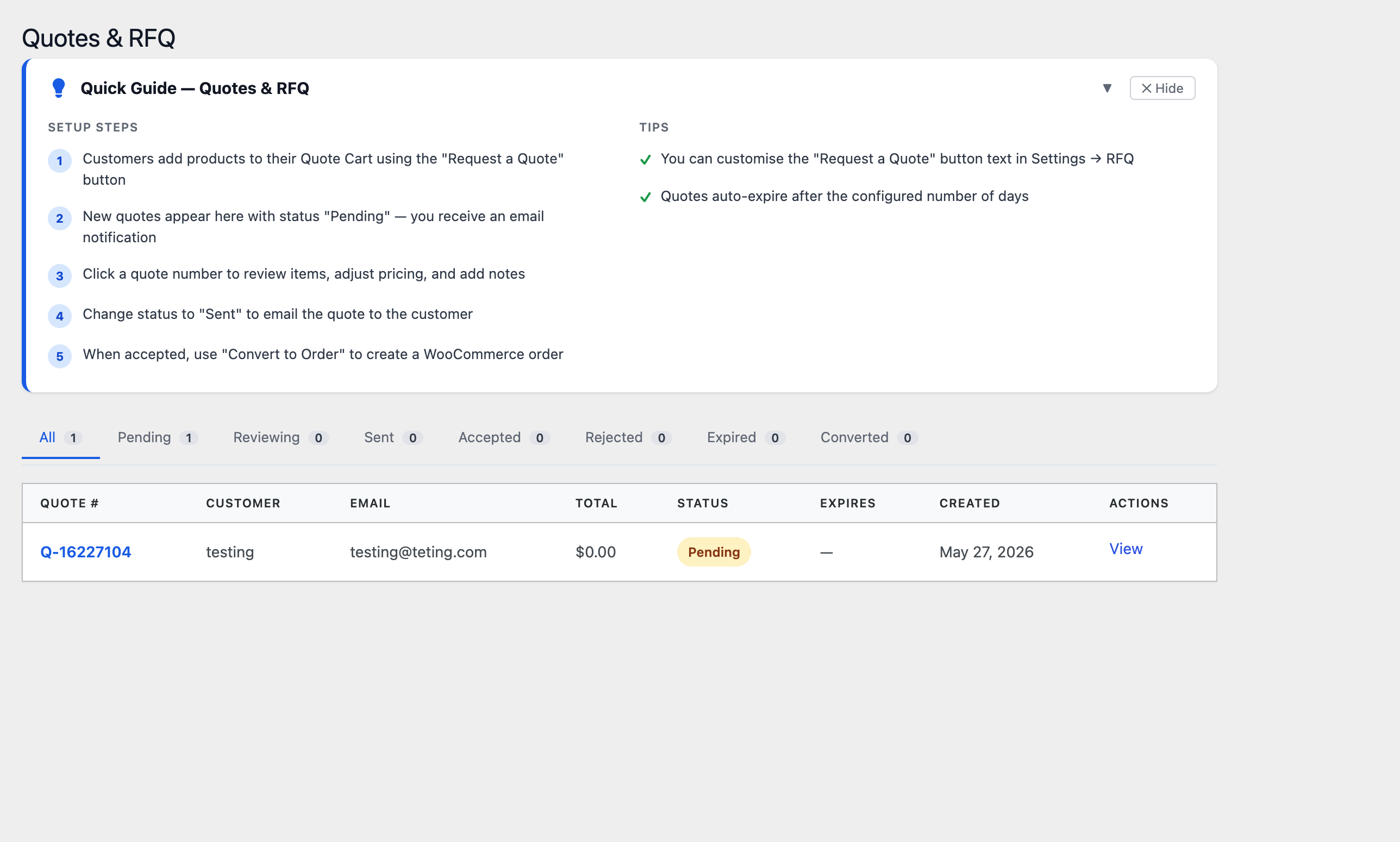
Submitted RFQs land in the admin pipeline as Pending. The quote builder lets you set a price per line, add discount context and terms, and attach internal notes the customer never sees. Send, and the customer receives a quote email with an accept link — Pro adds a branded PDF attachment. On acceptance, one click converts the quote to a standard WooCommerce order with the quoted prices carried over exactly: no re-keying, no price drift between what was quoted and what was charged. The order then flows through your normal fulfilment — and on Pro, syncs automatically to your CRM and accounting via the integrations layer. Because converted orders are native WooCommerce orders, everything downstream — from order management to existing fulfilment plugins — works unchanged.
The silent killer of WooCommerce request a quote systems is the unanswered quote. B2B Suite automation sends a reminder after X days, a second follow-up after Y, notifies your team in Slack via webhook on every status change, and runs a daily sweep that auto-expires stale quotes so your pipeline reflects reality. Configure once in B2B Suite → Automation.
WooCommerce Request a Quote: Measuring What Converts
The analytics module answers the questions email-based quoting never could: how many RFQs came in this month, what percentage converted to orders, what wholesale revenue the quote channel produced, and which products get requested most — your signal for which items deserve published tier pricing instead of per-deal quoting. Data retention is configurable for GDPR. Together with B2B registration feeding qualified accounts into the funnel, the WooCommerce request a quote pipeline becomes a measurable sales machine rather than an inbox folder.
Frequently Asked Questions About WooCommerce Request a Quote
How do I add request a quote to WooCommerce?
Install B2B Suite free from WordPress.org and enable the RFQ module. An Add to Quote button appears for the roles you configure — alongside or instead of add-to-cart. Customers build a quote cart and submit; quotes arrive in your admin pipeline where you price, send, and convert accepted quotes to WooCommerce orders in one click.
Can WooCommerce request a quote replace add to cart for guests?
Yes. Combine the RFQ module with catalog mode: hide prices and add-to-cart from guests and show a Request a Quote button instead. Approved wholesale roles can see tier pricing and buy directly while unapproved visitors must request pricing — the standard pattern for trade-only catalogues.
How does quote-to-order conversion work in WooCommerce request a quote?
When a customer accepts a quote, one click in the B2B Suite pipeline converts it to a native WooCommerce order with the quoted line prices carried over exactly. The order flows through normal fulfilment, emails and any existing order plugins. On Pro, the converted order also syncs automatically to your connected CRM and accounting system.
Does WooCommerce request a quote support automated follow-ups?
Yes. B2B Suite automation sends a reminder email after a configurable number of days, a second follow-up later, posts Slack notifications on every quote status change, and runs a daily sweep that auto-expires stale quotes. Automated follow-up is the highest-impact setting — most lost quotes are simply quotes nobody chased.
Can I generate PDF quotes in WooCommerce?
Yes — PDF quote generation is a B2B Suite Pro feature. Sent quotes include a branded PDF attachment with line items, prices, terms and validity date, which procurement departments typically require for purchase approval. The free version sends fully detailed HTML quote emails with an accept link.
What analytics does the WooCommerce request a quote system provide?
B2B Suite analytics tracks quote submissions, quote-to-order conversion rate, wholesale revenue trend, and your most-requested products. Top-RFQ products are a strong signal for which items should get published tier pricing instead of per-deal quoting. Data retention periods are configurable for GDPR compliance.
Is the WooCommerce request a quote module free?
Yes. The complete RFQ workflow — quote cart, admin pipeline, quote builder, one-click order conversion, automation reminders and Slack notifications — is included in the free B2B Suite plugin on WordPress.org. Pro adds branded PDF quote generation and CRM sync of quotes and converted orders.
Stop Losing Quotes in Email Threads
The full RFQ pipeline — quote cart, builder, automation and one-click conversion — free on WordPress.org.




