
The Complete Shopify Markets Guide — International Selling 2026
Sell internationally with Shopify Markets — market regions, local currencies with rounding rules, domain strategy with hreflang, translated content and duties at checkout.
Shopify Markets is the built-in internationalisation layer that turns one Shopify store into many localised storefronts — each market with its own currencies, languages, domains and duty collection, managed from a single admin and a single product catalogue. Before Shopify Markets, international selling meant expansion stores or third-party multi-currency apps; now it is native configuration under Settings → Markets.
A market in Shopify Markets is a group of countries treated as one selling region — typically your home market plus expansion groups like “European Union”, “North America”, or single high-value countries like Japan. Each market controls pricing and currency, storefront language, URL structure, and whether duties and import taxes are collected at checkout. This guide covers the full setup in launch order. Refer to the Shopify Markets developer documentation for the API layer and the Markets merchant manual for admin configuration.
Shopify Markets: Currency, Pricing and Rounding
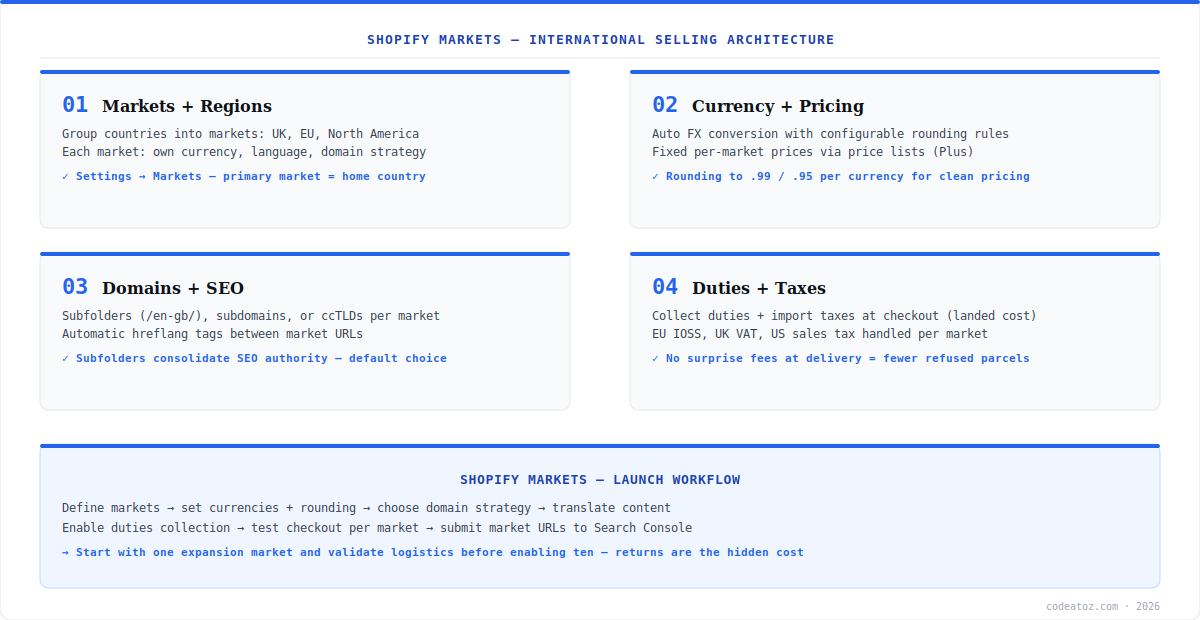
Each market in Shopify Markets sells in the buyer’s local currency with automatic FX conversion from your base prices. The detail that separates professional setups: rounding rules. Raw conversion produces prices like €23.47 — configure rounding per currency so converted prices land on .99 or .95 endings. For full pricing control (not just converted), Shopify Plus merchants set fixed per-market prices via price lists, letting you price Germany at €25 flat regardless of FX movement — essential where competitors anchor local price points. Payouts settle in your store currency unless you enable multi-currency payouts with Shopify Payments.
Shopify Markets: Domains, hreflang and Translation
Shopify Markets supports three URL strategies per market: subfolders (yourstore.com/en-de/ — the default and best for consolidating SEO authority), subdomains, or country-code TLDs for markets where local domains materially affect trust. Whichever you choose, Shopify generates hreflang tags automatically between market URLs so Google serves the right version per country — a task that is error-prone when done manually. Content translation runs through the Translate & Adapt app or any translation app using the translatable resources API; translate at minimum your navigation, product titles, and checkout-adjacent content before launching a language. Our Shopify development team configures Shopify Markets as part of international expansion projects, including the Storefront API context handling for headless builds — the @inContext directive serves market-correct prices and language to headless storefronts.
On headless storefronts, pass the buyer’s market context with the Storefront API @inContext(country: DE, language: DE) directive — every price, availability and translated field in the response localises automatically. Without it, your headless build shows base-market prices to everyone regardless of your Shopify Markets configuration.
Shopify Markets: Duties, Taxes and the Launch Checklist
Collecting duties and import taxes at checkout — landed cost — is the highest-impact conversion setting in Shopify Markets for cross-border selling: parcels with unpaid duties get refused at delivery, and refused parcels are the hidden cost that kills international margins. Enable duty collection per market, configure EU IOSS for sub-€150 consignments, and let Shopify handle UK VAT and US sales tax registration thresholds per market. The launch sequence that works: define one expansion market, set currency rounding, pick the subfolder domain strategy, translate core content, enable duties, place a test order end-to-end in that market, then submit the market URLs in Google Search Console. Validate logistics and returns on one market before switching on ten.
Frequently Asked Questions About Shopify Markets
What is Shopify Markets?
Shopify Markets is Shopify’s built-in internationalisation system — group countries into markets, each with its own currencies, languages, URL structure and duty collection, all managed from one store and one product catalogue. It replaces the old pattern of separate expansion stores or third-party multi-currency apps for most international selling needs.
Does Shopify Markets convert currency automatically?
Yes. Shopify Markets converts your base prices to each market’s local currency using current FX rates, with configurable rounding rules so converted prices end in .99 or .95. Shopify Plus merchants can go further with fixed per-market price lists, setting exact local prices independent of exchange rate movement.
What domain structure should I use with Shopify Markets?
Subfolders (yourstore.com/en-de/) are the default recommendation — they consolidate SEO authority on one domain and Shopify generates hreflang tags between market URLs automatically. Use ccTLDs only where local domain trust materially affects conversion in that market, accepting the cost of building domain authority separately.
How does Shopify Markets handle duties and import taxes?
Shopify Markets can collect duties and import taxes at checkout — landed cost pricing — so buyers pay everything upfront and parcels clear customs without surprise fees at delivery. Enable per market, configure EU IOSS for low-value consignments, and Shopify calculates duty based on HS codes and country of origin on your products.
Does Shopify Markets work with headless storefronts?
Yes. Headless storefronts pass market context via the Storefront API @inContext directive with the buyer’s country and language — prices, availability and translations in the response localise automatically per your Shopify Markets configuration. Detect buyer country at the edge and pass it on every Storefront API query.
Is Shopify Markets free?
Shopify Markets is included on all plans for core features — markets, currencies, languages, domains and duties configuration. Some capabilities carry fees or plan requirements: FX conversion fees apply on converted-currency orders through Shopify Payments, and fixed per-market price lists require Shopify Plus.
How many markets should I launch with in Shopify Markets?
One. Launch a single expansion market, validate the full loop — localised pricing, translated content, duty collection, shipping times and returns handling — then scale to more markets with the playbook proven. The hidden costs of international selling are logistics and returns, not configuration, and they surface market by market.
Expanding Internationally with Shopify Markets?
Our team configures Markets end-to-end — currencies, domains, translation, duties and headless context.




