
Best WooCommerce Wholesale Pricing Setup Guide 2026
Set up WooCommerce wholesale pricing with role, user, product and category rules, quantity tier bands, and coupon-safe discounts — using B2B Suite’s pricing engine.
WooCommerce wholesale pricing done properly needs four things most stores never get: rules at the right granularity (role, user, product, category), quantity tier bands that reward volume, a clear priority system when rules overlap, and — the one everyone discovers too late — coupon safety, so a public coupon code never stacks on top of trade discount. This guide sets up all four with B2B Suite’s pricing engine, free on WordPress.org.
The classic WooCommerce wholesale pricing failure happens on the first sitewide sale: a wholesale customer logs in, their 40% trade discount applies, then the SUMMER20 coupon stacks another 20% on top, and the store sells below cost. B2B Suite prevents this structurally — wholesale rules execute before coupon calculation, so coupons apply to the wholesale base (or can be blocked for wholesale roles entirely). Download the free plugin and follow along, or read the full B2B Suite overview first.
WooCommerce Wholesale Pricing: Rule Targets and Types
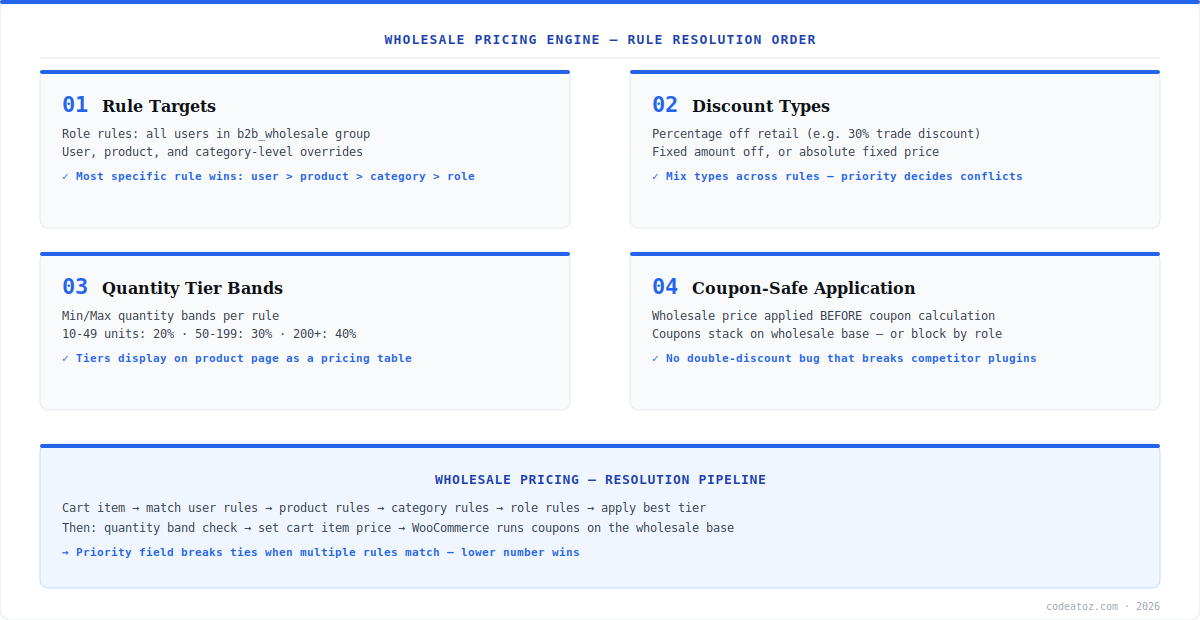
B2B Suite’s WooCommerce wholesale pricing rules target four levels, resolved most-specific-first: user rules (a negotiated price for one account) beat product rules, which beat category rules, which beat role rules (the baseline for everyone in b2b_wholesale). Each rule applies one of three discount types: percentage off retail, fixed amount off, or an absolute fixed price. A typical setup is one role rule for the trade baseline (“b2b_wholesale: 30% off, priority 1”), category rules where margins differ, and user rules only for negotiated key accounts. Rules live at B2B Suite → Pricing Rules in wp-admin — no code required.
WooCommerce Wholesale Pricing: Quantity Tiers and Priority
Quantity tier bands turn WooCommerce wholesale pricing into a volume incentive: 10–49 units at 20% off, 50–199 at 30%, 200+ at 40%. Bands attach to any rule via Min/Max quantity fields, and the tier table renders on the product page so buyers see exactly what the next break point earns them — a proven driver of higher average order values for manufacturers and distributors. When multiple rules match the same cart line, the priority field breaks ties (lower number wins) after specificity is considered. Keep a simple convention: priority 1 for role baselines, 10 for category overrides, 20 for user-specific deals — gaps leave room to insert rules later without renumbering.
Most WooCommerce wholesale pricing plugins hook the same cart filters WooCommerce coupons use, producing unpredictable stacking. B2B Suite applies wholesale pricing before the coupon pass — coupons calculate on the wholesale base price, and you can exclude wholesale roles from coupons entirely. Test your setup with the WooCommerce coupon system before any public sale.
WooCommerce Wholesale Pricing: Five-Minute Setup
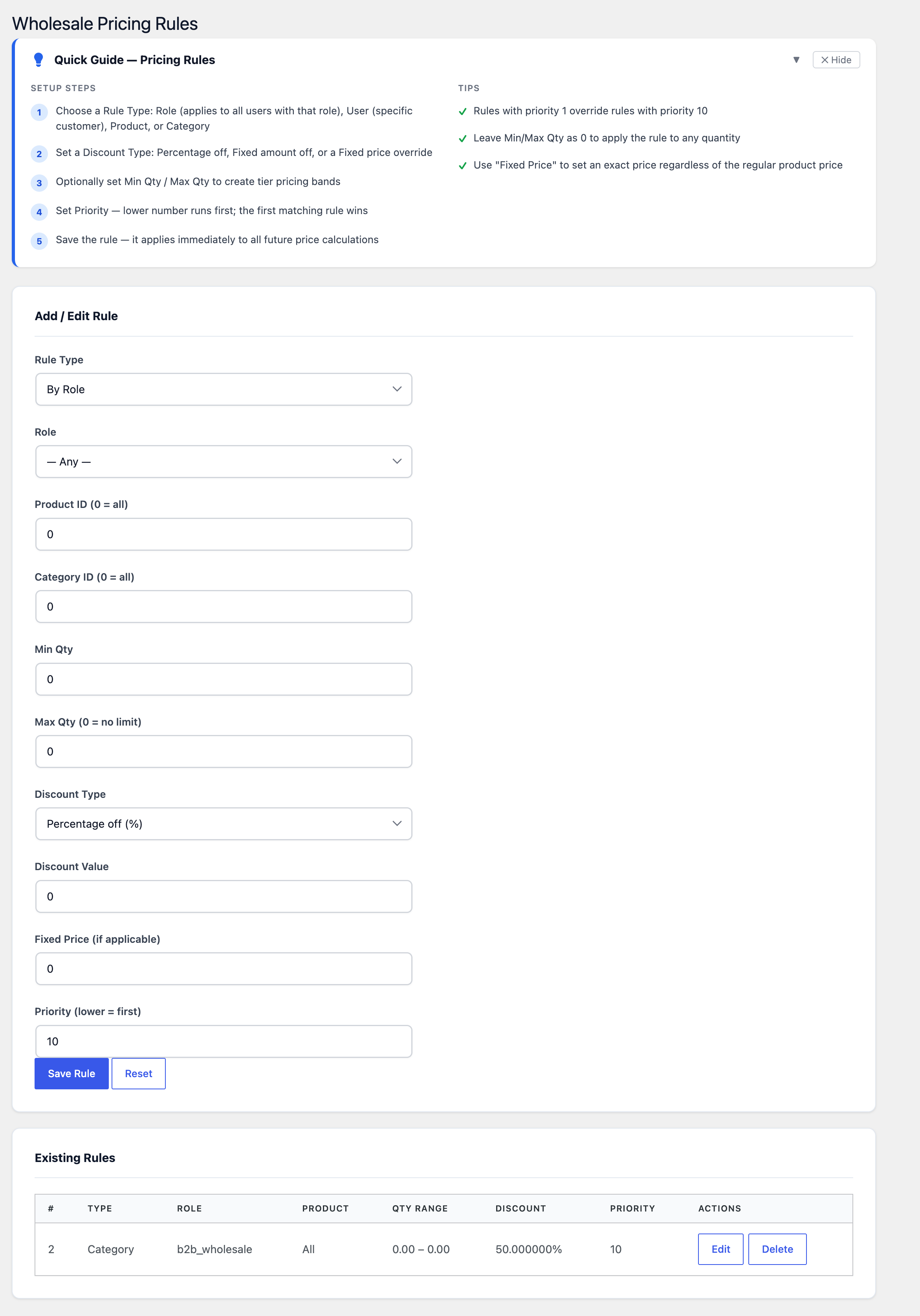
The fastest path to live WooCommerce wholesale pricing: install B2B Suite from WordPress.org, enable the Pricing module in Settings → Modules, create a role rule (b2b_wholesale, 30% off, priority 1), add quantity bands if you sell by volume, then assign the role to your first trade customer — either manually or through the B2B registration and approval workflow. Pair pricing with catalog mode to hide trade prices from guests, and with request-a-quote for products where pricing is negotiated per deal. Pro adds minimum order quantity (MOQ) enforcement per role — see the product page for the full free vs Pro split.
Frequently Asked Questions About WooCommerce Wholesale Pricing
How do I set up WooCommerce wholesale pricing?
Install B2B Suite free from WordPress.org, enable the Pricing module, and create rules at B2B Suite → Pricing Rules. Choose a target (role, user, product or category), a discount type (percentage, fixed amount, or fixed price), optional quantity tier bands, and a priority. Assign the wholesale role to trade customers and pricing applies automatically in cart and checkout.
Can WooCommerce wholesale pricing have quantity tiers?
Yes. B2B Suite supports Min/Max quantity tier bands on any pricing rule — for example 10-49 units at 20% off, 50-199 at 30%, and 200+ at 40%. The tier table displays on the product page so buyers see volume break points, which measurably increases average order value for distributors and manufacturers.
How do I stop coupons stacking on wholesale prices?
B2B Suite applies WooCommerce wholesale pricing before coupon calculation, so coupons compute on the wholesale base instead of double-discounting — and you can block coupon use for wholesale roles entirely. This coupon-safe design prevents the classic below-cost sale that happens when a wholesale discount and a public coupon stack.
Which rule wins when multiple WooCommerce wholesale pricing rules match?
Specificity first, then priority. User-level rules beat product rules, which beat category rules, which beat role rules. When two rules at the same level match, the lower priority number wins. A clean convention: priority 1 for role baselines, 10 for category overrides, 20 for negotiated user deals.
Can I show different prices to retail and wholesale customers?
Yes. WooCommerce wholesale pricing in B2B Suite is role-based — guests and retail customers see standard prices while approved wholesale roles see their tiered trade pricing, in the same store on the same products. Combine with catalog mode to hide prices from guests entirely and require login for any pricing visibility.
Is WooCommerce wholesale pricing free in B2B Suite?
Yes. The complete wholesale pricing engine — role, user, product and category rules, all three discount types, quantity tier bands and coupon-safe application — is in the free version on WordPress.org. Pro adds minimum order quantity (MOQ) enforcement and premium ordering UX like bulk quick-order forms.
Does wholesale pricing leak to the REST or Store API?
Not with B2B Suite. Wholesale prices resolve per authenticated user role, and the plugin is tested against the WooCommerce Store API so guests and unauthenticated REST requests receive retail pricing only. Price leakage through APIs is a common gap in older wholesale plugins — verify yours with an incognito Store API request.
Set Up Wholesale Pricing in 5 Minutes
B2B Suite’s coupon-safe pricing engine is free on WordPress.org — tiers, roles and rules with zero code.




