Building WooCommerce AI Product Recommendations with the OpenAI API (2026)
Add WooCommerce AI product recommendations using PHP, OpenAI embeddings, and a cosine similarity engine — no third-party plugin, full server-side implementation.
WooCommerce AI product recommendations powered by OpenAI embeddings go far beyond “customers also bought” logic. Where collaborative filtering requires thousands of orders to work well, WooCommerce AI product recommendations using semantic similarity work on day one — they understand that a “waterproof hiking jacket” is closely related to “trail running vest” even with no purchase history linking them. This guide builds a complete WooCommerce AI product recommendations system in PHP: generating and storing OpenAI text embeddings for each product, computing cosine similarity at query time, caching results in WordPress transients, and rendering the recommendations in the WooCommerce product page template.
OpenAI’s text-embedding-3-small model converts text into a 1536-dimensional vector that captures semantic meaning. Two products with similar descriptions, categories, and attributes will have vectors that are close in this embedding space — even if they share no exact keywords. The WooCommerce AI product recommendations engine uses this property to surface genuinely relevant products, not just keyword matches or bestsellers.
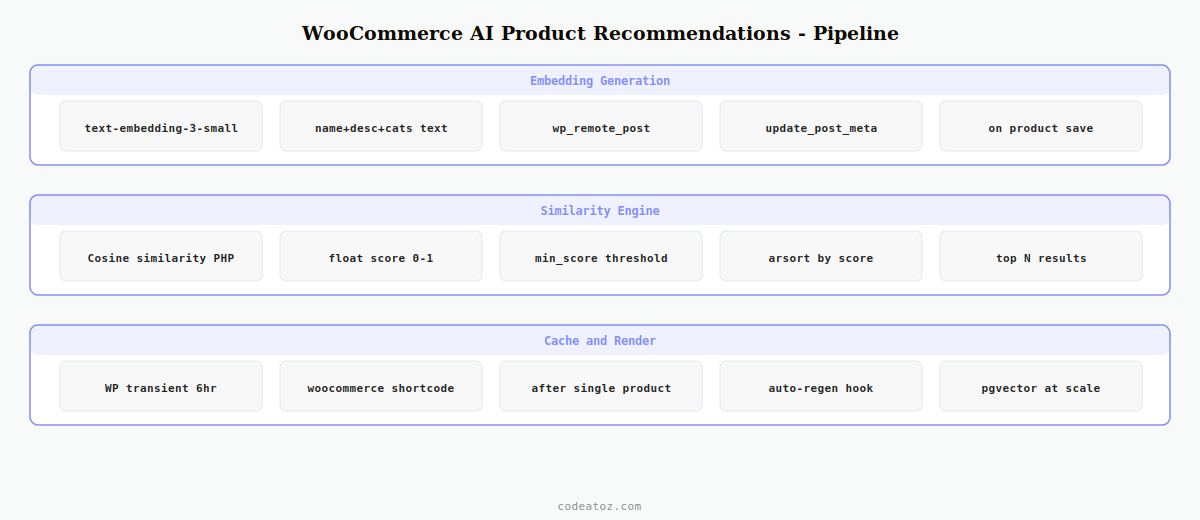
Step 1: Generate OpenAI Embeddings for WooCommerce AI Product Recommendations
The first step in building WooCommerce AI product recommendations is generating an embedding vector for each product. The embedding is created from a string that combines the product name, description, categories, and tags — all the semantic content that defines what the product is.
<?php
class CAZ_AI_Embedding {

    private const EMBEDDING_META = '_caz_openai_embedding';
    private const EMBEDDING_MODEL = 'text-embedding-3-small';

    public static function generate_for_product( int $product_id ): bool {
        $product = wc_get_product( $product_id );
        if ( ! $product ) return false;

        // Build the text used for WooCommerce AI product recommendations
        $categories = implode( ', ', wp_list_pluck(
            get_the_terms( $product_id, 'product_cat' ) ?: [], 'name'
        ));
        $tags = implode( ', ', wp_list_pluck(
            get_the_terms( $product_id, 'product_tag' ) ?: [], 'name'
        ));
        $text = implode( ' | ', array_filter([
            $product->get_name(),
            wp_strip_all_tags( $product->get_description() ),
            wp_strip_all_tags( $product->get_short_description() ),
            $categories,
            $tags,
        ]));

        $api_key  = CAZ_AI_KeyManager::get();  // from our previous guide
        $response = wp_remote_post( 'https://api.openai.com/v1/embeddings', [
            'timeout' => 20,
            'headers' => [
                'Authorization' => 'Bearer ' . $api_key,
                'Content-Type'  => 'application/json',
            ],
            'body'    => wp_json_encode([
                'model' => self::EMBEDDING_MODEL,
                'input' => mb_substr( $text, 0, 8192 ),  // API limit
            ]),
        ]);

        if ( is_wp_error( $response ) ) return false;

        $body      = json_decode( wp_remote_retrieve_body( $response ), true );
        $embedding = $body['data'][0]['embedding'] ?? null;

        if ( ! $embedding ) return false;

        // Store as serialised array — WooCommerce AI product recommendations data
        update_post_meta( $product_id, self::EMBEDDING_META, $embedding );
        return true;
    }

    public static function get( int $product_id ): ?array {
        return get_post_meta( $product_id, self::EMBEDDING_META, true ) ?: null;
    }
}
💡 Cost note: text-embedding-3-small costs $0.02 per 1M tokens — generating embeddings for a 10,000-product catalogue costs roughly $0.50 in total. Re-generate embeddings when a product’s description, categories, or tags change using the woocommerce_update_product hook.
Step 2: Cosine Similarity Engine for WooCommerce AI Product Recommendations
Cosine similarity measures how close two embedding vectors are in direction, regardless of magnitude. For WooCommerce AI product recommendations, a score above 0.85 typically indicates strong semantic similarity; below 0.6 indicates unrelated products.
<?php
class CAZ_AI_Recommender {

    public static function cosine_similarity( array $a, array $b ): float {
        $dot  = 0.0;
        $normA = 0.0;
        $normB = 0.0;
        foreach ( $a as $i => $val ) {
            $dot   += $val * $b[ $i ];
            $normA += $val * $val;
            $normB += $b[ $i ] * $b[ $i ];
        }
        if ( $normA === 0.0 || $normB === 0.0 ) return 0.0;
        return $dot / ( sqrt( $normA ) * sqrt( $normB ) );
    }

    public static function get_recommendations(
        int $product_id,
        int $limit = 4,
        float $min_score = 0.75
    ): array {
        // Check transient cache before computing
        $cache_key = 'caz_ai_rec_' . $product_id . '_' . $limit;
        $cached    = get_transient( $cache_key );
        if ( false !== $cached ) return $cached;

        $source_embedding = CAZ_AI_Embedding::get( $product_id );
        if ( ! $source_embedding ) return [];

        // Fetch all published products with embeddings for comparison
        $all_ids = get_posts([
            'post_type'      => 'product',
            'posts_per_page' => 500,   // adjust per catalogue size
            'post_status'    => 'publish',
            'fields'         => 'ids',
            'meta_key'       => '_caz_openai_embedding',
            'exclude'        => [ $product_id ],
        ]);

        $scores = [];
        foreach ( $all_ids as $id ) {
            $emb = CAZ_AI_Embedding::get( $id );
            if ( ! $emb ) continue;
            $score = self::cosine_similarity( $source_embedding, $emb );
            if ( $score >= $min_score ) {
                $scores[ $id ] = $score;
            }
        }

        arsort( $scores );
        $recommended = array_slice( array_keys( $scores ), 0, $limit );

        // Cache WooCommerce AI product recommendations for 6 hours
        set_transient( $cache_key, $recommended, 6 * HOUR_IN_SECONDS );
        return $recommended;
    }
}
Step 3: Render WooCommerce AI Product Recommendations on the Product Page
Hook the renderer into WooCommerce’s product page using woocommerce_after_single_product_summary. The renderer fetches the recommended product IDs, loads each product, and outputs them in a grid using the WooCommerce product loop template.
add_action( 'woocommerce_after_single_product_summary', 'caz_render_ai_recommendations', 25 );

function caz_render_ai_recommendations(): void {
    global $product;
    if ( ! $product ) return;

    $recommended_ids = CAZ_AI_Recommender::get_recommendations( $product->get_id() );
    if ( empty( $recommended_ids ) ) return;

    echo '<section class="caz-ai-recommendations">';
    echo '<h2>' . esc_html__( 'You might also like', 'caz-plugin' ) . '</h2>';

    // Use WooCommerce shortcode loop to render WooCommerce AI product recommendations
    echo do_shortcode(
        '[products ids="' . implode( ',', array_map( 'absint', $recommended_ids ) ) . '"
         columns="4" limit="4"]'
    );

    echo '</section>';
}
The OpenAI embeddings documentation covers all available models and their dimensions. The WooCommerce product loop template documentation covers how to customise the rendered output. See our guide on the OpenAI WooCommerce plugin for the secure API key storage pattern used here, and our WooCommerce AI development services for production implementations.
WooCommerce AI Product Recommendations: Keeping Embeddings Fresh
WooCommerce AI product recommendations degrade in quality when embeddings are stale — when product descriptions, categories, or tags have changed since the embedding was generated. Automatically regenerate embeddings on product save using the WooCommerce update hook, and run a weekly batch to catch any missed updates.
// Regenerate WooCommerce AI product recommendations embedding on save
add_action( 'woocommerce_update_product', 'caz_regenerate_embedding_on_update' );
add_action( 'woocommerce_new_product',    'caz_regenerate_embedding_on_update' );

function caz_regenerate_embedding_on_update( int $product_id ): void {
    // Schedule async to avoid slowing down the save request
    if ( ! wp_next_scheduled( 'caz_regenerate_embedding', [ $product_id ] ) ) {
        wp_schedule_single_event( time() + 5, 'caz_regenerate_embedding', [ $product_id ] );
    }
}

add_action( 'caz_regenerate_embedding', function( int $product_id ) {
    CAZ_AI_Embedding::generate_for_product( $product_id );
    // Bust the recommendations cache for this product
    delete_transient( 'caz_ai_rec_' . $product_id . '_4' );
});
⚠ Scale note: for catalogues over 2,000 products, the in-memory cosine similarity loop becomes slow. At that scale, store embeddings in a pgvector PostgreSQL column or use a vector database like Pinecone to run similarity searches at the database level rather than in PHP.
Frequently Asked Questions — WooCommerce AI Product Recommendations
How do WooCommerce AI product recommendations differ from collaborative filtering?
Collaborative filtering recommends products based on what other customers bought together — it requires substantial purchase history to work. WooCommerce AI product recommendations using OpenAI embeddings work on semantic similarity between product descriptions, meaning they surface genuinely related products from day one, even on a new store with no order history. The two approaches complement each other on mature stores.
How much does it cost to power WooCommerce AI product recommendations with OpenAI?
Using text-embedding-3-small, generating embeddings for a 10,000-product catalogue costs approximately $0.50 in total. Incremental updates on product saves add a fraction of a cent per product. The cosine similarity comparison at query time runs entirely in PHP — no API cost. WooCommerce AI product recommendations results are cached in WordPress transients, so the embedding comparison only runs once every 6 hours per product.
How do I generate embeddings for all existing products in WooCommerce?
Run a one-time WP-CLI command or a scheduled batch that iterates through all published products and calls CAZ_AI_Embedding::generate_for_product() for each one. Process in batches of 50-100 with a brief sleep between batches to stay within OpenAI’s rate limits. After the initial batch, the update hook keeps embeddings fresh automatically for WooCommerce AI product recommendations.
Can WooCommerce AI product recommendations work without OpenAI?
Yes — the architecture works with any embedding API. Alternatives include Cohere Embed, Google Vertex AI text-embedding, or a self-hosted model via Hugging Face Transformers. The cosine similarity PHP engine and WordPress transient cache work identically regardless of which embedding provider generates the vectors. Swap the API call in CAZ_AI_Embedding::generate_for_product() to change the provider.
How do I improve the quality of WooCommerce AI product recommendations?
Include rich product data in the embedding text — name, full description, short description, categories, tags, and custom attributes. Thin product descriptions produce weaker WooCommerce AI product recommendations because the embedding has little semantic content to work with. Also tune the min_score threshold: 0.85 is strict and returns only near-identical products, 0.70 is looser and returns broader style matches.
How do I scale WooCommerce AI product recommendations to large catalogues?
For catalogues under 2,000 products, the PHP cosine similarity loop is fast enough when combined with the transient cache. For larger catalogues, store embeddings in a PostgreSQL pgvector column and run similarity queries at the database level using the vector distance operators. This reduces the PHP-side computation to a single database query rather than iterating all product embeddings in memory.
Ready to Add AI Recommendations to Your Store?
CodeAtoZ builds production WooCommerce AI product recommendations engines — embedding pipelines, similarity search, and A/B tested recommendation widgets.