
WooCommerce AJAX Add to Cart Without Page Reload — Complete PHP & JS Guide (2026)
Implement WooCommerce AJAX add to cart for simple, variable, and grouped products — PHP handler, JavaScript fetch, nonce security, cart fragment update, and error handling.
Implementing WooCommerce AJAX add to cart is one of the highest-impact UX improvements you can make to any WooCommerce store — it eliminates the full page reload that interrupts a customer’s browsing flow. A proper WooCommerce AJAX add to cart implementation covers three product types (simple, variable, grouped), uses a WordPress nonce for security, refreshes the cart fragment header count, and handles errors gracefully without a redirect. This guide builds a complete, production-ready WooCommerce AJAX add to cart system with PHP AJAX handlers and vanilla JavaScript — no jQuery dependency required.
WooCommerce ships with basic AJAX add to cart for simple products on archive pages via the woocommerce_loop_add_to_cart_link hook, but it does not handle single product pages, variable products, or grouped products out of the box. A full WooCommerce AJAX add to cart implementation requires a custom AJAX action on the PHP side, a JavaScript fetch handler on the frontend, cart fragment refreshing so the header count updates, and proper fallback for customers with JavaScript disabled.
All code in this guide belongs in a custom plugin. For the plugin boilerplate, see our guide on how to build a WooCommerce plugin from scratch. Never add AJAX handlers to functions.php — they will be lost on theme updates and cause issues when WordPress runs AJAX requests without loading theme context.
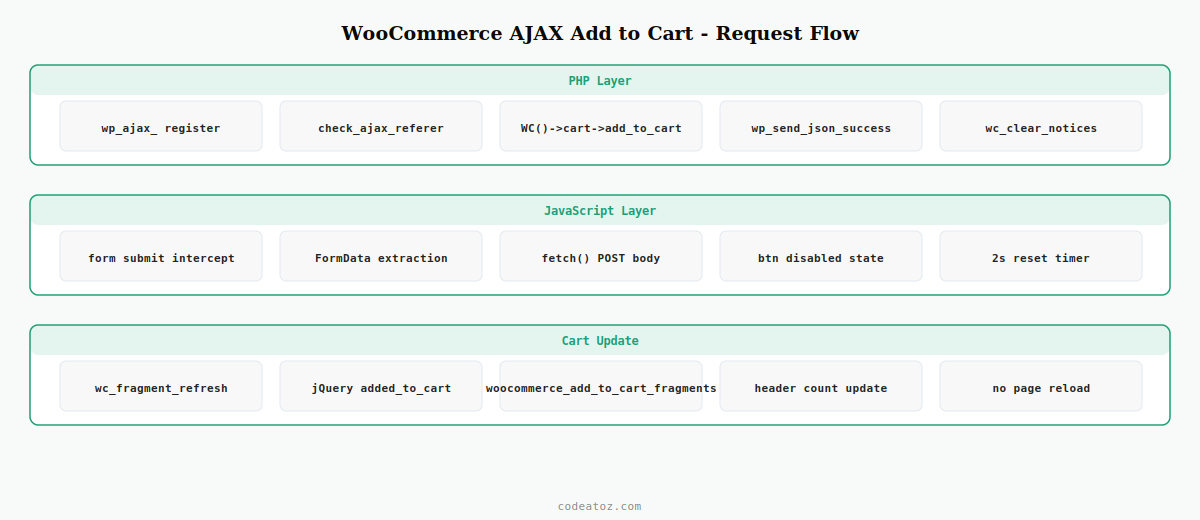
Step 1: Register the WooCommerce AJAX Add to Cart PHP Handler
The WooCommerce AJAX add to cart handler runs server-side when the JavaScript fetch fires. It validates the nonce, adds the product to the cart using WooCommerce’s cart API, and returns a JSON response with the updated cart count and any notices. Two hooks are needed — one for logged-in users and one for guests.
// Register WooCommerce AJAX add to cart handler for both logged-in and guest users
add_action( 'wp_ajax_caz_ajax_add_to_cart',        'caz_handle_ajax_add_to_cart' );
add_action( 'wp_ajax_nopriv_caz_ajax_add_to_cart', 'caz_handle_ajax_add_to_cart' );

function caz_handle_ajax_add_to_cart(): void {
    // Security: verify nonce before any WooCommerce AJAX add to cart action
    check_ajax_referer( 'caz-atc-nonce', 'nonce' );

    $product_id   = absint( $_POST['product_id']   ?? 0 );
    $quantity     = max( 1, absint( $_POST['quantity']  ?? 1 ) );
    $variation_id = absint( $_POST['variation_id'] ?? 0 );
    $variation    = [];

    // Handle variable product attributes for WooCommerce AJAX add to cart
    if ( $variation_id ) {
        foreach ( $_POST as $key => $value ) {
            if ( str_starts_with( $key, 'attribute_' ) ) {
                $variation[ sanitize_key( $key ) ] = sanitize_text_field( $value );
            }
        }
    }

    $cart_item_key = WC()->cart->add_to_cart(
        $product_id,
        $quantity,
        $variation_id,
        $variation
    );

    if ( ! $cart_item_key ) {
        // Collect WooCommerce error notices for the WooCommerce AJAX add to cart response
        $notices = [];
        foreach ( WC()->session->get( 'wc_notices', [] ) as $type => $msgs ) {
            foreach ( $msgs as $msg ) {
                $notices[] = [ 'type' => $type, 'message' => $msg['notice'] ?? $msg ];
            }
        }
        wc_clear_notices();
        wp_send_json_error( [ 'notices' => $notices ], 400 );
    }

    wc_clear_notices();

    wp_send_json_success([
        'cart_count'    => WC()->cart->get_cart_contents_count(),
        'cart_total'    => WC()->cart->get_cart_total(),
        'cart_hash'     => WC()->cart->get_cart_hash(),
        'product_name'  => get_the_title( $product_id ),
    ]);
}
Step 2: Localise Nonce and AJAX URL for the WooCommerce AJAX Add to Cart Script
The JavaScript fetch needs the WordPress AJAX URL and a nonce. Use wp_localize_script() to pass these securely — never hardcode the admin-ajax.php URL or expose a nonce as a visible HTML attribute. This is the correct pattern for any WooCommerce AJAX add to cart implementation.
add_action( 'wp_enqueue_scripts', 'caz_enqueue_ajax_atc_script' );

function caz_enqueue_ajax_atc_script(): void {
    // Only load on pages where WooCommerce AJAX add to cart is needed
    if ( ! is_product() && ! is_shop() && ! is_product_category() ) {
        return;
    }

    wp_enqueue_script(
        'caz-ajax-atc',
        plugin_dir_url( __FILE__ ) . 'js/ajax-add-to-cart.js',
        [],
        '1.0.0',
        true   // load in footer
    );

    wp_localize_script( 'caz-ajax-atc', 'cazATC', [
        'ajaxUrl' => admin_url( 'admin-ajax.php' ),
        'nonce'   => wp_create_nonce( 'caz-atc-nonce' ),
        'addedText'  => __( 'Added!', 'caz-plugin' ),
        'addingText' => __( 'Adding…', 'caz-plugin' ),
        'errorText'  => __( 'Could not add to cart. Please try again.', 'caz-plugin' ),
    ]);
}
Step 3: JavaScript Fetch Handler for WooCommerce AJAX Add to Cart
The JavaScript for WooCommerce AJAX add to cart intercepts the add-to-cart form submission, fires a fetch request to the PHP handler, and updates the button state during the request. This implementation uses the native Fetch API with no jQuery dependency — compatible with all modern browsers and WooCommerce themes.
( function () {
  'use strict';

  // WooCommerce AJAX add to cart: intercept all add-to-cart form submissions
  document.addEventListener( 'submit', async function ( e ) {
    const form = e.target.closest( 'form.cart' );
    if ( ! form ) return;

    e.preventDefault();

    const btn = form.querySelector( '[type="submit"]' );
    const formData = new FormData( form );
    const productId   = formData.get( 'add-to-cart' ) || formData.get( 'product_id' );
    const variationId = formData.get( 'variation_id' ) || 0;
    const quantity    = formData.get( 'quantity' ) || 1;

    if ( ! productId ) return;

    // Update button state for WooCommerce AJAX add to cart feedback
    const originalText = btn.textContent;
    btn.textContent    = cazATC.addingText;
    btn.disabled       = true;

    // Build POST body for the WooCommerce AJAX add to cart handler
    const body = new URLSearchParams({
      action:       'caz_ajax_add_to_cart',
      nonce:        cazATC.nonce,
      product_id:   productId,
      variation_id: variationId,
      quantity:     quantity,
    });

    // Append variation attributes if present
    for ( const [ key, val ] of formData.entries() ) {
      if ( key.startsWith( 'attribute_' ) ) body.append( key, val );
    }

    try {
      const res  = await fetch( cazATC.ajaxUrl, { method: 'POST', body } );
      const data = await res.json();

      if ( data.success ) {
        btn.textContent = cazATC.addedText;
        // Trigger WooCommerce cart fragment refresh
        document.body.dispatchEvent( new CustomEvent( 'wc_fragment_refresh' ) );
        jQuery( document.body ).trigger( 'added_to_cart', [
          {}, {}, btn
        ]);
      } else {
        btn.textContent = cazATC.errorText;
        // Display error notices from WooCommerce AJAX add to cart response
        if ( data.data?.notices ) {
          data.data.notices.forEach( n => console.warn( 'ATC:', n.message ) );
        }
      }
    } catch ( err ) {
      btn.textContent = cazATC.errorText;
      console.error( 'WooCommerce AJAX add to cart fetch error:', err );
    } finally {
      setTimeout( () => {
        btn.textContent = originalText;
        btn.disabled    = false;
      }, 2000 );
    }
  });
} )();
Step 4: Refresh Cart Fragment After WooCommerce AJAX Add to Cart
After a successful WooCommerce AJAX add to cart, the mini-cart count in the header needs to update without a page reload. WooCommerce handles this via cart fragments — small HTML snippets that are refreshed via a separate AJAX call. Triggering the native WooCommerce fragment refresh event handles this automatically.
add_filter( 'woocommerce_add_to_cart_fragments', 'caz_atc_cart_fragment' );

function caz_atc_cart_fragment( array $fragments ): array {
    // Replace the mini-cart span after WooCommerce AJAX add to cart
    ob_start();
    ?>
    <span class="caz-cart-count" aria-label="Cart items">
        <?php echo WC()->cart->get_cart_contents_count(); ?>
    </span>
    <?php
    $fragments['.caz-cart-count'] = ob_get_clean();
    return $fragments;
}
💡 The wc_fragment_refresh CustomEvent and the jQuery added_to_cart trigger in the JavaScript are both needed. The CustomEvent fires the native WooCommerce fragment refresh. The jQuery trigger fires third-party plugins (like mini-cart popups) that listen for the standard WooCommerce event — essential for compatibility when using WooCommerce AJAX add to cart alongside popular plugins.
WooCommerce AJAX Add to Cart for Variable Products
Variable products require the selected variation ID and all attribute values to be included in the WooCommerce AJAX add to cart request. The JavaScript handler above reads all attribute_* fields from the form automatically. On the PHP side, the handler passes these to WC()->cart->add_to_cart() as the $variation array. If no variation is selected when the customer submits, WooCommerce returns a notice — the JS error handler surfaces this message.
// Add before WC()->cart->add_to_cart() in the handler:
if ( $variation_id ) {
    $product = wc_get_product( $variation_id );
    if ( ! $product || 'variation' !== $product->get_type() ) {
        wp_send_json_error([
            'notices' => [[ 'type' => 'error', 'message' => 'Please select product options.' ]]
        ], 400);
    }
    if ( ! $product->is_in_stock() ) {
        wp_send_json_error([
            'notices' => [[ 'type' => 'error', 'message' => 'This variation is out of stock.' ]]
        ], 400);
    }
}
WooCommerce AJAX Add to Cart: Fallback for No-JavaScript Browsers
A production-quality WooCommerce AJAX add to cart implementation always degrades gracefully. Because the JavaScript intercepts the native form submission event, if JavaScript is unavailable the form submits normally and WooCommerce handles the add-to-cart and page reload via its standard flow. No extra PHP code is required for the fallback — the progressive enhancement approach handles it automatically.
⚠ Do not replace the <form class="cart"> with a plain button or <a> tag to implement WooCommerce AJAX add to cart. WooCommerce’s own JavaScript (variation selectors, quantity updates, add-to-cart validation) requires the native form structure. Always intercept the submit event — never replace the form.
The WooCommerce Cart API documentation covers all WC()->cart methods. The WooCommerce AJAX documentation covers the fragment system and available AJAX hooks. See our WooCommerce hooks reference for the woocommerce_add_to_cart hook that fires after every successful add, and our WooCommerce development services for custom cart builds.
Frequently Asked Questions — WooCommerce AJAX Add to Cart
How do I implement WooCommerce AJAX add to cart without a plugin?
Register a WordPress AJAX action with add_action(‘wp_ajax_*’) and add_action(‘wp_ajax_nopriv_*’). In the handler, verify the nonce with check_ajax_referer(), then call WC()->cart->add_to_cart(). Localise the AJAX URL and nonce to JavaScript using wp_localize_script(). In JavaScript, intercept the form submit event and fetch the AJAX handler. This is a complete WooCommerce AJAX add to cart without any plugin dependency.
Why does the cart count not update after WooCommerce AJAX add to cart?
The cart count is updated by WooCommerce’s fragment refresh system. After a successful WooCommerce AJAX add to cart, trigger document.body.dispatchEvent(new CustomEvent(‘wc_fragment_refresh’)) to fire the native fragment update. Also trigger the jQuery added_to_cart event for third-party plugin compatibility. If the count still doesn’t update, ensure the wc-cart-fragments script is enqueued and not dequeued on the page where the WooCommerce AJAX add to cart fires.
How do I handle variable products with WooCommerce AJAX add to cart?
Include the variation_id and all attribute_ prefixed fields in the AJAX POST body. The PHP handler receives these and passes them to WC()->cart->add_to_cart() as the $variation_id and $variation array arguments. Validate that the variation exists and is in stock before calling add_to_cart(). If no variation is selected, WooCommerce AJAX add to cart returns an error notice that the JavaScript can display to the customer.
Is jQuery required for WooCommerce AJAX add to cart?
No — the Fetch API handles the AJAX request in vanilla JavaScript. However, you should still trigger the jQuery added_to_cart event after a successful WooCommerce AJAX add to cart because many third-party plugins (mini-cart popups, wishlist plugins, analytics) listen for this jQuery event. You can fire it with jQuery(document.body).trigger(‘added_to_cart’, [{}, {}, btn]) even in an otherwise jQuery-free implementation.
How do I secure a WooCommerce AJAX add to cart handler?
Always call check_ajax_referer() with a nonce at the very start of the handler before any cart operations. Generate the nonce server-side with wp_create_nonce() and pass it to JavaScript via wp_localize_script() — never in a visible HTML attribute or JavaScript variable accessible from the browser console. Sanitise all POST inputs with absint() for numeric IDs and sanitize_key() for attribute names before using them in the WooCommerce AJAX add to cart logic.
Does WooCommerce AJAX add to cart work with HPOS?
Yes — WooCommerce AJAX add to cart uses WC()->cart->add_to_cart() which is fully compatible with both Classic order storage and High-Performance Order Storage (HPOS). The cart session is separate from order storage, so WooCommerce AJAX add to cart works identically regardless of which order storage engine is enabled in WooCommerce Settings Advanced Features.
Need Custom WooCommerce Cart Development?
CodeAtoZ builds custom WooCommerce AJAX add to cart flows, mini-cart popups, and headless cart implementations — fully HPOS-compatible.




