AI Product Tagging WooCommerce — Auto-Tag at Scale (2026)
Automate AI product tagging WooCommerce — generate relevant tags from product names and descriptions using Claude or GPT, bulk backfill existing products, and improve search discoverability.
Product tags in WooCommerce drive internal search, related products, and navigation — but most stores have inconsistent, sparse, or missing tags because tagging 500+ products manually is tedious. AI product tagging WooCommerce automation reads each product’s name, description, and attributes and generates 5–8 relevant, consistent tags that match your store’s existing taxonomy. This guide implements a complete AI product tagging WooCommerce system: automatic tagging on product save, a WP-CLI bulk backfill for existing products, and a tag normalisation layer that prevents duplicate near-synonyms from fragmenting your tag taxonomy.
AI Product Tagging WooCommerce: Generate Tags on Product Save
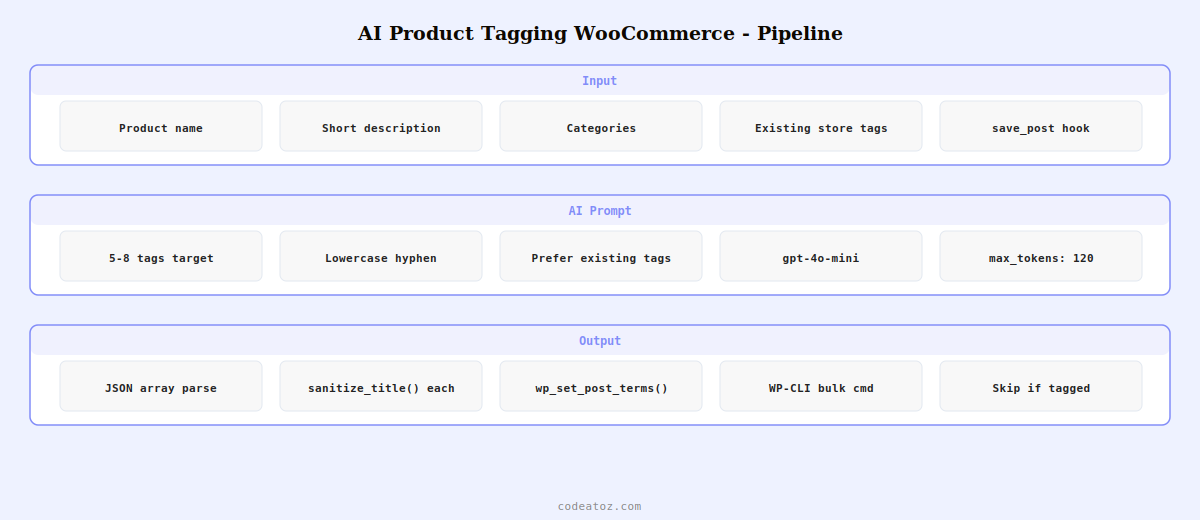
The core AI product tagging WooCommerce workflow hooks into product save, retrieves the product data, passes it to an AI model with a clear taxonomy prompt, and assigns the returned tags via WordPress’s wp_set_post_terms() function.
<?php
add_action( 'save_post_product', 'caz_ai_product_tagging_woocommerce', 20, 2 );

function caz_ai_product_tagging_woocommerce( int $post_id, WP_Post $post ): void {
    if ( defined( 'DOING_AUTOSAVE' ) && DOING_AUTOSAVE ) return;
    if ( wp_is_post_revision( $post_id ) ) return;

    // Only tag if no tags exist (preserve manual tags)
    $existing_tags = wp_get_post_terms( $post_id, 'product_tag', ['fields' => 'names'] );
    if ( ! empty( $existing_tags ) ) return;

    $product    = wc_get_product( $post_id );
    $name       = $product->get_name();
    $desc       = wp_strip_all_tags( $product->get_short_description() ?: $product->get_description() );
    $categories = wp_list_pluck( $product->get_category_ids() ? get_the_terms( $post_id, 'product_cat' ) : [], 'name' );

    // Get existing store tags to guide AI product tagging WooCommerce consistency
    $existing_store_tags = get_terms(['taxonomy' => 'product_tag', 'fields' => 'names', 'number' => 50]);

    $prompt = "Generate product tags for a WooCommerce product.
Product name: {$name}
Description: " . substr( $desc, 0, 300 ) . "
Categories: " . implode( ', ', $categories ) . "
Existing store tags (use these if relevant): " . implode( ', ', array_slice( $existing_store_tags, 0, 30 ) ) . "

Rules for AI product tagging WooCommerce:
- Generate 5 to 8 tags maximum
- Use lowercase, hyphenated format (e.g. 'free-delivery', 'machine-washable')
- Prefer existing store tags when they fit
- Avoid generic tags like 'product' or 'item'
- Focus on material, use case, audience, and key features
Return only a JSON array of tag strings, nothing else.";

    $tags = caz_ai_generate_tags( $prompt );

    if ( ! empty( $tags ) ) {
        wp_set_post_terms( $post_id, $tags, 'product_tag', false );
    }
}

function caz_ai_generate_tags( string $prompt ): array {
    $response = wp_remote_post( 'https://api.openai.com/v1/chat/completions', [
        'headers' => [
            'Authorization' => 'Bearer ' . get_option( 'caz_openai_key' ),
            'Content-Type'  => 'application/json',
        ],
        'body' => wp_json_encode([
            'model'      => 'gpt-4o-mini',
            'max_tokens' => 120,
            'messages'   => [[ 'role' => 'user', 'content' => $prompt ]],
        ]),
        'timeout' => 15,
    ]);

    if ( is_wp_error( $response ) ) return [];
    $body    = json_decode( wp_remote_retrieve_body( $response ), true );
    $content = $body['choices'][0]['message']['content'] ?? '[]';
    $tags    = json_decode( trim( $content ), true );
    // Validate and sanitise each tag for AI product tagging WooCommerce
    return is_array( $tags ) ? array_map( 'sanitize_title', array_slice( $tags, 0, 8 ) ) : [];
}
AI Product Tagging WooCommerce: Bulk Backfill via WP-CLI
For existing stores with large product catalogues and missing tags, run the AI product tagging WooCommerce bulk backfill command to process all untagged products overnight.
# Register the bulk AI product tagging WooCommerce command
# Add to functions.php or a custom plugin

# Run from server command line:
wp caz tag-products --dry-run    # Preview without saving
wp caz tag-products              # Run bulk AI product tagging WooCommerce

# Expected output:
# Tagged product #1042: blue-cotton-hoodie, mens-casual, machine-washable...
# Tagged product #1043: leather-wallet, bifold, slim-design, gift-idea...
# Skipped product #1044: already has 6 tags
# Completed: 487 tagged, 23 skipped, 2 errors
💡 Pass your existing store tags in the AI product tagging WooCommerce prompt. When the AI has access to your current tag library, it selects from existing tags when they fit rather than inventing near-synonyms. This prevents the fragmentation problem where AI product tagging WooCommerce creates “wool”, “woolen”, “wool-blend”, and “merino-wool” as separate tags when your store already uses “merino-wool” consistently. Consistency in your tag taxonomy directly improves related product accuracy and internal search quality.
The WordPress wp_set_post_terms() documentation covers the function used to assign tags in the AI product tagging WooCommerce system. The OpenAI structured outputs documentation covers JSON mode which can improve AI product tagging WooCommerce output reliability. See our WooCommerce AI SEO meta description guide for a complementary AI automation, and our WooCommerce development services for custom AI product data enrichment.
Frequently Asked Questions — AI Product Tagging WooCommerce
How does AI product tagging WooCommerce work?
AI product tagging WooCommerce hooks into the save_post_product action. When a product is saved without existing tags, the system extracts the product name, description, and categories, builds a structured AI prompt specifying the desired tag format and count, calls an AI API (OpenAI or Claude), and parses the JSON array of tags from the response. The tags are assigned to the product using wp_set_post_terms() and appear immediately in the WooCommerce product tag taxonomy.
Will AI product tagging WooCommerce overwrite my manually set tags?
No — the implementation checks whether the product already has tags before calling the AI. If any tags exist, the AI product tagging WooCommerce generator is skipped entirely. This preserves any tags your team has manually set or any tags from previous AI generation runs. To re-generate tags for a product that already has some, either clear the existing tags first or add a custom admin action that forces re-generation for a specific product.
How do I ensure consistent tag formatting in AI product tagging WooCommerce?
Specify the format explicitly in the AI prompt: “lowercase, hyphenated format (e.g. free-delivery, machine-washable)”. Pass your existing store tag list in the prompt so the AI prefers tags already in your taxonomy. After receiving the AI response, run each tag through sanitize_title() which enforces lowercase and hyphenation. The combination of prompt instructions, existing tag context, and sanitize_title() produces consistent AI product tagging WooCommerce output across all products.
How many tags should AI product tagging WooCommerce generate per product?
5-8 tags per product is the recommended range for AI product tagging WooCommerce. Fewer than 5 tags under-represent the product’s searchable attributes. More than 8 tags dilutes the tag taxonomy and makes related products less precise. Specify the range explicitly in the AI prompt and set max_tokens to 120 to prevent over-generation. The AI naturally targets the middle of the specified range when given clear instructions.
Can AI product tagging WooCommerce tag variable products correctly?
Yes — variable products have a parent product post that the AI product tagging WooCommerce system tags. Include variation attributes in the prompt by iterating $product->get_attributes() and including the attribute names and values in the product data passed to the AI. This ensures tags reflect the full variation range — for example, a clothing product with size and colour variations gets tags covering both dimensions rather than just the parent product name.
How much does AI product tagging WooCommerce cost per product?
With GPT-4o-mini at $0.00015 per 1,000 input tokens and $0.0006 per 1,000 output tokens, AI product tagging WooCommerce costs approximately $0.001 per product (including the existing tag list context). Tagging a 1,000-product catalogue costs roughly $1. Claude Haiku is similarly priced. For ongoing new-product tagging (1-10 products per day), the running cost is negligible. The one-time bulk backfill cost for an existing catalogue is the largest single expense.
Want Automated Product Tagging for Your WooCommerce Store?
CodeAtoZ builds AI product tagging WooCommerce systems — on-save automation, bulk backfill, taxonomy consistency rules, and admin review workflows for your store.