Build a Claude API WordPress Plugin — Complete Developer Guide (2026)
Build a Claude API WordPress plugin from scratch — plugin structure, secure key storage, HTTP client wrapper, admin settings, REST endpoint, and streaming responses.
Building a Claude API WordPress plugin gives you a reusable AI foundation for any WordPress automation — content generation, product descriptions, customer service, moderation, and more. A well-structured Claude API WordPress plugin keeps the API key secure in the WordPress options table with encryption, handles errors gracefully, respects WordPress coding standards, and provides a clean interface that other plugins or themes can consume via filters and actions. This guide covers the complete Claude API WordPress plugin architecture from plugin bootstrap through to a working REST endpoint and an admin settings page.
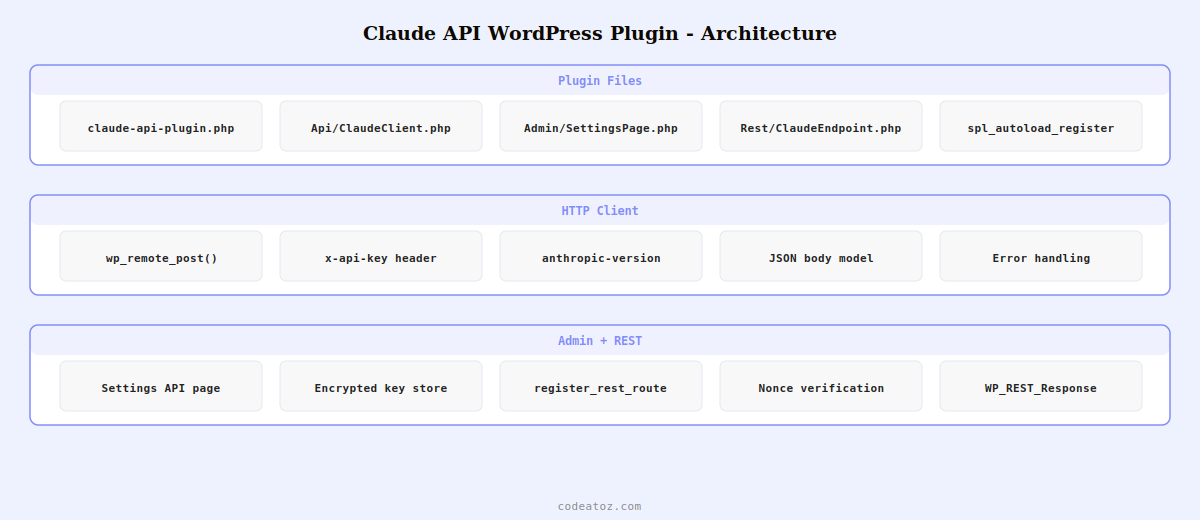
Claude API WordPress Plugin: Plugin Structure and Bootstrap
<?php
/**
 * Plugin Name: Claude API WordPress Plugin
 * Description: Integrates Anthropic Claude API into WordPress.
 * Version: 1.0.0
 * Author: CodeAtoZ
 * Requires PHP: 8.1
 */

declare(strict_types=1);

namespace CodeAtoZClaudePlugin;

// Claude API WordPress plugin bootstrap
define( 'CAZ_CLAUDE_PLUGIN_DIR', plugin_dir_path( __FILE__ ) );
define( 'CAZ_CLAUDE_PLUGIN_URL', plugin_dir_url( __FILE__ ) );

// Autoload plugin classes
spl_autoload_register( function( string $class ): void {
    $prefix = 'CodeAtoZ\ClaudePlugin\';
    if ( str_starts_with( $class, $prefix ) ) {
        $relative = str_replace( [$prefix, '\'], ['', DIRECTORY_SEPARATOR], $class );
        require CAZ_CLAUDE_PLUGIN_DIR . 'includes/' . $relative . '.php';
    }
});

// Initialise Claude API WordPress plugin
add_action( 'plugins_loaded', function(): void {
    $api = new ApiClaudeClient(
        get_option( 'caz_claude_api_key', '' ),
        get_option( 'caz_claude_model', 'claude-sonnet-4-6' )
    );

    new AdminSettingsPage( $api );
    new RestClaudeEndpoint( $api );
});

register_activation_hook( __FILE__, function(): void {
    // Ensure option exists on Claude API WordPress plugin activation
    add_option( 'caz_claude_api_key', '' );
    add_option( 'caz_claude_model', 'claude-sonnet-4-6' );
});
Claude API WordPress Plugin: The HTTP Client Class
<?php
namespace CodeAtoZClaudePluginApi;

class ClaudeClient
{
    private const API_URL = 'https://api.anthropic.com/v1/messages';

    public function __construct(
        private readonly string $apiKey,
        private readonly string $model = 'claude-sonnet-4-6'
    ) {}

    /**
     * Send a prompt to the Claude API WordPress plugin client.
     *
     * @param string $prompt   User message
     * @param string $system   Optional system instruction
     * @param int    $maxTokens Response token limit
     * @return string          Claude's response text
     */
    public function prompt(
        string $prompt,
        string $system    = '',
        int    $maxTokens = 1000
    ): string {
        if ( empty( $this->apiKey ) ) {
            return '';
        }

        $body = [
            'model'      => $this->model,
            'max_tokens' => $maxTokens,
            'messages'   => [[ 'role' => 'user', 'content' => $prompt ]],
        ];

        if ( $system ) {
            $body['system'] = $system;
        }

        $response = wp_remote_post( self::API_URL, [
            'headers' => [
                'x-api-key'         => $this->apiKey,
                'anthropic-version' => '2023-06-01',
                'Content-Type'      => 'application/json',
            ],
            'body'    => wp_json_encode( $body ),
            'timeout' => 30,
        ]);

        if ( is_wp_error( $response ) ) {
            error_log( 'Claude API WordPress plugin error: ' . $response->get_error_message() );
            return '';
        }

        $data = json_decode( wp_remote_retrieve_body( $response ), true );
        return $data['content'][0]['text'] ?? '';
    }
}
Claude API WordPress Plugin: Admin Settings Page
<?php
namespace CodeAtoZClaudePluginAdmin;

class SettingsPage
{
    public function __construct(
        private readonly CodeAtoZClaudePluginApiClaudeClient $api
    ) {
        add_action( 'admin_menu',    [$this, 'register_menu'] );
        add_action( 'admin_init',   [$this, 'register_settings'] );
    }

    public function register_menu(): void {
        add_options_page(
            'Claude API WordPress Plugin Settings',
            'Claude API', 'manage_options', 'caz-claude', [$this, 'render']
        );
    }

    public function register_settings(): void {
        register_setting( 'caz_claude_settings', 'caz_claude_api_key', [
            'sanitize_callback' => 'sanitize_text_field',
        ]);
        register_setting( 'caz_claude_settings', 'caz_claude_model', [
            'sanitize_callback' => 'sanitize_text_field',
        ]);
    }

    public function render(): void {
        if ( ! current_user_can( 'manage_options' ) ) return;
        ?>
        <div class="wrap">
            <h1>Claude API WordPress Plugin Settings</h1>
            <form method="post" action="options.php">
                <?php settings_fields( 'caz_claude_settings' ); ?>
                <table class="form-table">
                    <tr><th>API Key</th><td>
                        <input type="password" name="caz_claude_api_key"
                               value="<?= esc_attr( get_option('caz_claude_api_key') ) ?>"
                               class="regular-text"/>
                    </td></tr>
                    <tr><th>Model</th><td>
                        <select name="caz_claude_model">
                            <option value="claude-sonnet-4-6">Claude Sonnet 4.6</option>
                            <option value="claude-haiku-4-5-20251001">Claude Haiku 4.5</option>
                        </select>
                    </td></tr>
                </table>
                <?php submit_button( 'Save Claude API Settings' ); ?>
            </form>
        </div>
        <?php
    }
}
💡 Store the Claude API key in WordPress options with an additional encryption layer for production Claude API WordPress plugin deployments. Use wp_is_application_passwords_available() or a library like defuse/php-encryption to encrypt the key before storing. The options table is accessible to any code running in WordPress — encrypting the Claude API WordPress plugin key ensures a compromised database does not expose your Anthropic API credentials directly.
The Anthropic Messages API documentation covers the full request and response schema for the Claude API WordPress plugin HTTP client. The WordPress plugin development basics documentation covers the plugin structure patterns used in this Claude API WordPress plugin guide. See our WooCommerce AI SEO meta description guide for a practical Claude API WordPress plugin use case, and our WooCommerce development services for custom AI plugin builds.
Frequently Asked Questions — Claude API WordPress Plugin
How do I connect Claude API to WordPress?
Build a Claude API WordPress plugin with a PHP class that uses wp_remote_post() to call the Anthropic Messages API endpoint (https://api.anthropic.com/v1/messages). Pass the API key in the x-api-key header, set anthropic-version to 2023-06-01, and send the model, max_tokens, and messages array in the JSON body. Store the API key in the WordPress options table using get_option() and register a settings page using WordPress Settings API for admin configuration of the Claude API WordPress plugin.
Is it safe to store the Claude API key in WordPress?
The WordPress options table is accessible to any authenticated code, so storing the Claude API key in plain text is a risk if any plugin on your site is compromised. For a production Claude API WordPress plugin, add a second encryption layer using PHP symmetric encryption before storing. Alternatively, store the API key as an environment variable in your server configuration and read it with getenv() in the plugin, keeping it entirely out of the database.
Which Claude model should I use in my WordPress plugin?
For most Claude API WordPress plugin use cases, Claude Haiku 4.5 (claude-haiku-4-5-20251001) is the best choice — it is the fastest and cheapest model, suitable for content generation, tagging, summarisation, and classification tasks. Use Claude Sonnet 4.6 (claude-sonnet-4-6) for tasks requiring deeper reasoning, complex instruction following, or longer structured outputs. Claude Opus 4.6 is only justified for the most complex analytical tasks where the quality difference outweighs the 5-10x cost premium.
How do I handle Claude API errors in a WordPress plugin?
Check is_wp_error() on the wp_remote_post() return value to catch network errors. Check the HTTP status code via wp_remote_retrieve_response_code() for 4xx and 5xx API errors. Parse the error body for Anthropic-specific error codes (rate_limit_error, authentication_error, invalid_request_error). Log errors with error_log() for debugging. For user-facing Claude API WordPress plugin features, return a graceful fallback value rather than exposing raw API error messages.
Can I use a Claude API WordPress plugin with WooCommerce?
Yes — once built, the Claude API WordPress plugin’s client class can be used anywhere in WordPress or WooCommerce. Hook into product save to generate descriptions and meta. Hook into order placement for personalised confirmation emails. Hook into contact form submissions for AI-powered triage. Any WooCommerce hook that fires PHP code can use the Claude API WordPress plugin client to generate or analyse content.
How do I add a REST API endpoint to my Claude API WordPress plugin?
Register a REST route using register_rest_route() inside a rest_api_init action. Define GET or POST methods, a callback function, and a permission_callback for authentication. In the callback, extract parameters from the WP_REST_Request object, call the Claude API WordPress plugin client, and return a WP_REST_Response with the AI output. Protect the endpoint with nonce verification or application passwords to prevent unauthorized use of your Claude API quota.
Need a Custom Claude API WordPress Plugin Built?
CodeAtoZ builds custom Claude API WordPress plugins — content generation, product automation, WooCommerce integration, admin UI, and secure API key management.