
Building a React Magento GraphQL Search Component — Complete 2026 Guide
A complete React Magento GraphQL search implementation — Apollo Client setup, live search query, debouncing, error states, and category filter with full TypeScript code.
Building a React Magento GraphQL search component gives your headless storefront instant, as-you-type product search powered directly by Magento’s catalogue. A React Magento GraphQL search implementation using Apollo Client is the most production-proven architecture — it handles caching, loading states, error retry, and network deduplication without custom code. This guide builds a complete, TypeScript-typed React Magento GraphQL search component from Apollo setup through debounced live search queries, category filtering, and a production-ready result renderer.
Magento 2 exposes a products GraphQL query that accepts a search string, filter criteria, sort order, and pagination arguments. A React Magento GraphQL search component wraps this query in a useLazyQuery hook from Apollo Client, fires it on debounced keystroke events, and renders results into a dropdown or dedicated search page. The same pattern works for Magento 2.4 on-premise and Adobe Commerce Cloud.
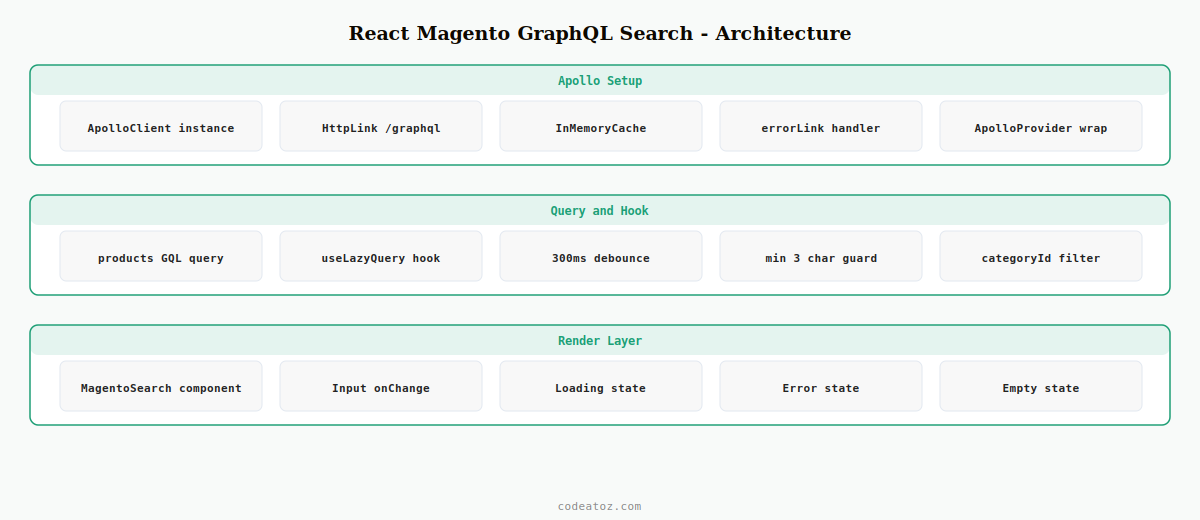
Step 1: Set Up Apollo Client for React Magento GraphQL Search
Apollo Client manages the connection between your React component and Magento’s GraphQL endpoint. For a React Magento GraphQL search, configure Apollo with an HTTP link pointing to /graphql on your Magento instance, and an InMemoryCache to deduplicate identical search queries automatically.
npm install @apollo/client graphqlimport { ApolloClient, InMemoryCache, HttpLink, from, ApolloLink } from '@apollo/client'
import { onError } from '@apollo/client/link/error'
const httpLink = new HttpLink({
uri: process.env.NEXT_PUBLIC_MAGENTO_URL + '/graphql',
credentials: 'same-origin',
})
const errorLink = onError(({ graphQLErrors, networkError }) => {
if ( graphQLErrors ) {
graphQLErrors.forEach(({ message }) =>
console.error( 'React Magento GraphQL search error:', message )
)
}
if ( networkError ) console.error( 'Network error:', networkError )
})
// Apollo client for React Magento GraphQL search
export const apolloClient = new ApolloClient({
link: from([ errorLink, httpLink ]),
cache: new InMemoryCache({
typePolicies: {
// Cache search results by query string for instant back-navigation
Products: { keyFields: ['items'] },
},
}),
defaultOptions: {
query: { fetchPolicy: 'cache-first' },
},
})Step 2: Write the Magento GraphQL Search Query
Magento’s products query accepts a search argument for full-text search and a filter argument for attribute-based filtering. For a React Magento GraphQL search component, request only the fields you need — requesting every field on every product significantly increases response size and slows down your search.
import { gql } from '@apollo/client'

// React Magento GraphQL search query — minimal field selection
export const SEARCH_PRODUCTS_QUERY = gql`
  query SearchProducts(
    $search:  String!
    $pageSize: Int    = 8
    $categoryId: String
  ) {
    products(
      search:   $search
      pageSize: $pageSize
      filter:   { category_id: { eq: $categoryId } }
      sort:     { relevance: DESC }
    ) {
      total_count
      items {
        uid
        sku
        name
        url_key
        thumbnail {
          url
          label
        }
        price_range {
          minimum_price {
            regular_price { value currency }
            final_price   { value currency }
          }
        }
      }
    }
  }
`
Step 3: Build the React Magento GraphQL Search Hook
Extract the query logic into a custom hook so the React Magento GraphQL search component stays focused on rendering. The hook handles debouncing, minimum character thresholds, and converting the Apollo response into the shape your UI expects.
import { useLazyQuery }   from '@apollo/client'
import { useState, useEffect } from 'react'
import { SEARCH_PRODUCTS_QUERY } from '../graphql/search-products.query'

export function useMagentoSearch( categoryId?: string ) {
  const [ term, setTerm ] = useState('')
  const [ debouncedTerm, setDebouncedTerm ] = useState('')

  // Debounce: fire React Magento GraphQL search after 300ms idle
  useEffect(() => {
    const id = setTimeout(() => setDebouncedTerm( term ), 300 )
    return () => clearTimeout( id )
  }, [term])

  const [ runSearch, { data, loading, error } ] = useLazyQuery(
    SEARCH_PRODUCTS_QUERY
  )

  // Trigger React Magento GraphQL search when debounced term changes
  useEffect(() => {
    if ( debouncedTerm.length < 3 ) return   // min 3 chars
    runSearch({ variables: { search: debouncedTerm, categoryId } })
  }, [ debouncedTerm, categoryId, runSearch ])

  return {
    term,
    setTerm,
    results:    data?.products?.items ?? [],
    totalCount: data?.products?.total_count ?? 0,
    loading,
    error,
  }
}
Step 4: Render the React Magento GraphQL Search Component
The search component wires the hook to the UI — an input field, a loading indicator, and a results list. A well-structured React Magento GraphQL search component separates the search input, the result item, and the result list into small reusable components.
import React from 'react'
import { useMagentoSearch } from '../hooks/use-magento-search'

interface Props {
  categoryId?: string
  placeholder?: string
}

export function MagentoSearch({ categoryId, placeholder = 'Search products…' }: Props) {
  const { term, setTerm, results, totalCount, loading, error } = useMagentoSearch( categoryId )

  return (
    <div className="caz-search">
      <input
        type="search"
        value={term}
        onChange={e => setTerm( e.target.value )}
        placeholder={placeholder}
        aria-label="React Magento GraphQL search input"
        className="caz-search__input"
      />

      {loading && <p className="caz-search__status">Searching…</p>}
      {error   && <p className="caz-search__error">Search unavailable. Please try again.</p>}

      {results.length > 0 && (
        <ul className="caz-search__results" role="listbox">
          {results.map( product => (
            <li key={product.uid} className="caz-search__result" role="option">
              <img
                src={product.thumbnail.url}
                alt={product.thumbnail.label}
                width={48} height={48} loading="lazy"
              />
              <div>
                <a href={`/products/${product.url_key}`}>{product.name}</a>
                <span>{product.price_range.minimum_price.final_price.currency}
                  {product.price_range.minimum_price.final_price.value.toFixed(2)}</span>
              </div>
            </li>
          ))}
        </ul>
      )}

      {term.length >= 3 && !loading && results.length === 0 && (
        <p className="caz-search__empty">No products found for "{term}"</p>
      )}
    </div>
  )
}
The Magento 2 products GraphQL query documentation covers all filter and sort fields. The Apollo Client useLazyQuery documentation covers all hook options. See our WooCommerce API React tutorial for the WooCommerce equivalent of this React Magento GraphQL search pattern, and our Magento development services for headless Magento builds.
Frequently Asked Questions — React Magento GraphQL Search
How do I connect React to Magento’s GraphQL API for search?
Install @apollo/client and configure an ApolloClient instance pointing to your Magento /graphql endpoint. Wrap your app in ApolloProvider with the client instance. Then use useLazyQuery with Magento’s products query, passing the search term as a variable. This is the standard React Magento GraphQL search architecture that handles caching, loading states, and error retry automatically.
How do I debounce a React Magento GraphQL search query?
Store the input value in useState and use a useEffect with setTimeout to set a separate debounced state after 300ms. Fire the GraphQL query from a second useEffect that watches the debounced state, not the raw input state. This prevents a React Magento GraphQL search request on every keystroke and keeps the Magento server load manageable.
What fields should I request in a React Magento GraphQL search query?
Request only the fields your UI displays — at minimum: uid, sku, name, url_key, thumbnail url and label, and price_range minimum final_price. Avoid requesting all product attributes in a React Magento GraphQL search query as response sizes grow rapidly with large catalogues and slow your search component noticeably for users on mobile connections.
How do I add category filtering to a React Magento GraphQL search?
Add a categoryId variable to your GraphQL query and pass it to the filter argument as filter: {category_id: {eq: $categoryId}}. Make categoryId optional with a default of null so the React Magento GraphQL search works across the full catalogue when no category is selected. Pass the category ID as a prop to the search component and forward it to the useLazyQuery variables.
How does Apollo Client cache React Magento GraphQL search results?
Apollo stores query results in its InMemoryCache keyed by query variables. When a user searches for the same term twice during a session, Apollo returns the cached result instantly without a network request. Configure fetchPolicy as cache-first for a React Magento GraphQL search in a catalogue that doesn’t change frequently, or network-only for stores with rapidly changing stock and pricing.
Can I use React Magento GraphQL search with Magento 2 on-premise and Adobe Commerce Cloud?
Yes — the products GraphQL query and Apollo Client setup work identically on both Magento 2 on-premise and Adobe Commerce Cloud. The only difference is the GraphQL endpoint URL. For Adobe Commerce Cloud with Live Search enabled, the endpoint URL differs from the standard Magento /graphql — check your Cloud Console for the correct React Magento GraphQL search endpoint.
Need a Headless Magento React Build?
CodeAtoZ builds headless Magento storefronts with React and Next.js — full GraphQL integration, search, cart, and checkout.




