
WooCommerce Price on Request — Replace Price with Enquiry Button (2026)
WooCommerce price on request is the correct pattern for bespoke, configurable, or high-value products where a published price would be misleading — custom machinery, made-to-order items, enterprise software licences, or trade-only products where pricing depends on volume and relationship. A WooCommerce price on request setup replaces the product price and add-to-cart button with a customised enquiry button that links to your contact form, pre-populated with the product name and SKU. This guide covers both the PHP code method and the plugin method for WooCommerce price on request, including capturing product context in the enquiry and managing the resulting leads.
WooCommerce does not have a built-in price on request mode, but WooCommerce’s price display and add-to-cart systems are fully hookable. The WooCommerce price on request implementation uses the same three filters as hiding prices for guests — woocommerce_get_price_html, woocommerce_is_purchasable, and woocommerce_loop_add_to_cart_link — but returns an enquiry button rather than a login prompt.
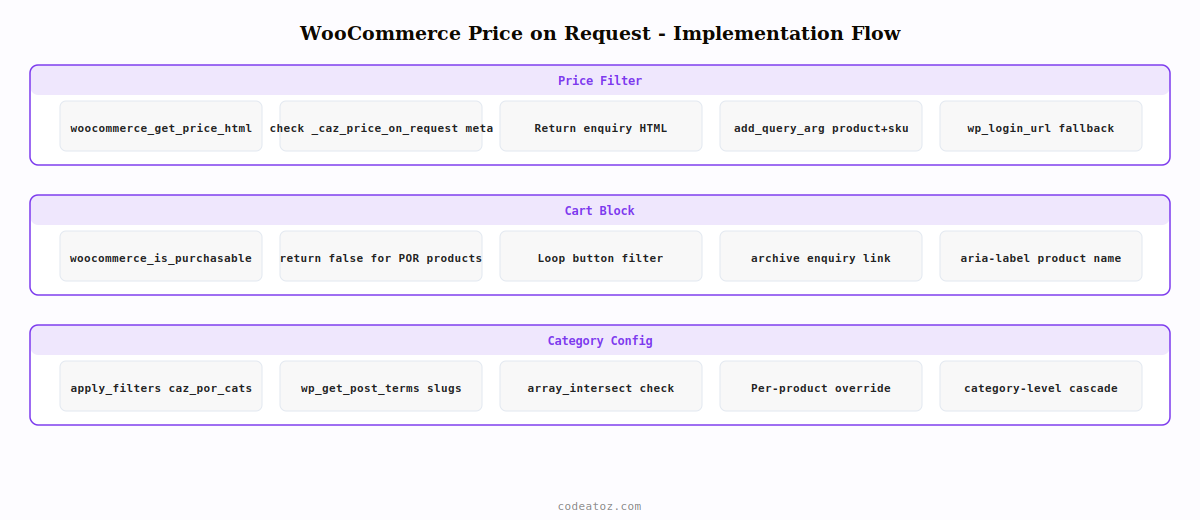
Step 1: WooCommerce Price on Request — Replace the Price Display
Use the woocommerce_get_price_html filter to return your custom price on request text or button HTML instead of the product price. You can apply this globally, per product category, or using a custom product field that enables price on request per product.
<?php
add_filter( 'woocommerce_get_price_html', 'caz_price_on_request', 10, 2 );

function caz_price_on_request( string $price, WC_Product $product ): string {
    // Check if this product has price on request enabled via product meta
    $is_por = $product->get_meta( '_caz_price_on_request' );
    if ( ! $is_por ) return $price;

    // Build enquiry URL with product context pre-populated
    $enquiry_url = add_query_arg([
        'product'  => urlencode( $product->get_name() ),
        'sku'      => urlencode( $product->get_sku() ),
        'ref'      => 'price-enquiry',
    ], get_permalink( get_page_by_path( 'contact' ) ) );

    return '<span class="caz-por-label">' . __( 'Price on request', 'caz-b2b' ) . '</span>
<a href="' . esc_url( $enquiry_url ) . '" class="caz-enquiry-link">'
        . __( 'Request a quote', 'caz-b2b' )
        . '</a>';
}

// Block cart for price on request products
add_filter( 'woocommerce_is_purchasable', 'caz_block_por_cart', 10, 2 );

function caz_block_por_cart( bool $purchasable, WC_Product $product ): bool {
    if ( $product->get_meta( '_caz_price_on_request' ) ) return false;
    return $purchasable;
}
Step 2: Add the WooCommerce Price on Request Toggle to Product Edit Screen
Add a checkbox to the WooCommerce product edit page so store managers can enable price on request per product without code. This is the most practical admin workflow for WooCommerce price on request on multi-product catalogues.
add_action( 'woocommerce_product_options_pricing', 'caz_por_product_field' );

function caz_por_product_field(): void {
    woocommerce_wp_checkbox([
        'id'          => '_caz_price_on_request',
        'label'       => __( 'Price on request', 'caz-b2b' ),
        'description' => __( 'Replaces price with an enquiry button on this product.', 'caz-b2b' ),
    ]);
}

add_action( 'woocommerce_process_product_meta', 'caz_save_por_field' );

function caz_save_por_field( int $post_id ): void {
    $value = isset( $_POST['_caz_price_on_request'] ) ? 'yes' : 'no';
    update_post_meta( $post_id, '_caz_price_on_request', $value );
}
Step 3: Replace Add-to-Cart in Archives for WooCommerce Price on Request
The product archive (shop page, category pages) also needs the add-to-cart button replaced for WooCommerce price on request products. Use the woocommerce_loop_add_to_cart_link filter to swap the button for an enquiry link in all archive contexts.
add_filter( 'woocommerce_loop_add_to_cart_link', 'caz_por_loop_button', 10, 2 );

function caz_por_loop_button( string $button, WC_Product $product ): string {
    if ( ! $product->get_meta( '_caz_price_on_request' ) ) return $button;

    $enquiry_url = add_query_arg([
        'product' => urlencode( $product->get_name() ),
        'sku'     => urlencode( $product->get_sku() ),
    ], get_permalink( get_page_by_path( 'contact' ) ) );

    return '<a href="' . esc_url( $enquiry_url ) . '"
        class="button caz-enquiry-btn"
        aria-label="' . esc_attr( sprintf( __('Enquire about %s', 'caz-b2b'), $product->get_name() ) ) . '">'
        . __( 'Get a quote', 'caz-b2b' )
        . '</a>';
}
WooCommerce Price on Request: Category-Level Configuration
For stores where all products in a category are price on request — such as a “Bespoke Services” or “Custom Machinery” category — apply the price on request logic at the category level so you don’t need to tick the checkbox on every product individually.
// Check product category for WooCommerce price on request
function caz_is_por_product( WC_Product $product ): bool {
    // Per-product override check first
    if ( 'yes' === $product->get_meta( '_caz_price_on_request' ) ) return true;

    // Category-level check for WooCommerce price on request
    $por_categories = apply_filters( 'caz_por_categories', [ 'bespoke', 'custom-machinery', 'enterprise' ] );
    $product_cats   = wp_get_post_terms( $product->get_id(), 'product_cat', [ 'fields' => 'slugs' ] );
    return ! empty( array_intersect( $por_categories, (array) $product_cats ) );
}
The WooCommerce product data store documentation covers the full WC_Product meta API used to store the price on request flag. The WooCommerce hooks reference lists all price display and add-to-cart filters available for WooCommerce price on request customisation. See our guide on WooCommerce hide price for guests for the related approach of hiding prices from non-logged-in visitors, and our WooCommerce B2B wholesale pricing guide for role-based pricing that often accompanies price on request setups.
Hide Price Pro — Includes Price on Request Mode
Enable WooCommerce price on request per product, per category, or globally — with a customisable enquiry button, contact form integration, and no code required.
Frequently Asked Questions — WooCommerce Price on Request
How do I add price on request to WooCommerce without a plugin?
Add the woocommerce_get_price_html filter to return enquiry button HTML instead of the price. Add the woocommerce_is_purchasable filter to return false so the add to cart button is removed. Add the woocommerce_loop_add_to_cart_link filter to replace the archive button with an enquiry link. Store the per-product flag in post meta using a product edit checkbox. These three filters implement complete WooCommerce price on request functionality without a plugin.
How do I pass product information to the enquiry form for price on request?
Add the product name and SKU as URL query parameters when building the enquiry button link in woocommerce_get_price_html. On the contact form page, read the query parameters using $_GET and pre-populate the form fields. Most contact form plugins (Contact Form 7, WPForms, Gravity Forms) support URL parameter pre-population via shortcode attributes. This gives your sales team instant context on which product the WooCommerce price on request enquiry is about.
Does WooCommerce price on request affect product indexing or SEO?
A WooCommerce price on request setup does not remove the product from Google’s index. The product page still has a title, description, and all other SEO content. Price structured data (schema.org/Offer) will not include a price value when price on request is active, so price-based rich snippets will not show for those products in search results. For products where confidential pricing is a business requirement, this is the correct trade-off.
Can I enable WooCommerce price on request for some products and not others?
Yes — store a _caz_price_on_request meta flag on each product and check it in the filter function before applying the price on request logic. Add a checkbox to the product edit screen using woocommerce_product_options_pricing and woocommerce_process_product_meta. This gives store managers full control over which products show a WooCommerce price on request enquiry button without code changes.
How is WooCommerce price on request different from hiding price for guests?
WooCommerce price on request hides the price from everyone — logged in or not — and replaces it with an enquiry button. It is used for products where no published price exists. Hiding price for guests hides the price only from non-logged-in visitors and reveals it after login. It is used for trade catalogues where pricing is available to approved customers. Both approaches use the same WooCommerce price filters but serve different business models.
What is the best WooCommerce price on request plugin?
Hide Price Pro includes a built-in WooCommerce price on request mode alongside role-based price hiding, guest price hiding, and category-level visibility controls. It provides a customisable enquiry button label, contact form URL configuration, and per-product overrides from the product edit screen — all without writing PHP. It is compatible with WooCommerce HPOS, checkout blocks, and major page builders.
Need Price on Request on Your WooCommerce Store?
Hide Price Pro includes WooCommerce price on request mode — per-product, per-category, customisable enquiry button, no code required.




