
Best WooCommerce Critical CSS Guide — Render Path 2026
Implement WooCommerce critical CSS — extract above-fold styles per template, inline under 14KB, defer the full stylesheet, and automate regeneration safely.
WooCommerce critical CSS attacks the render-blocking problem directly: browsers will not paint a single pixel until every stylesheet in the head has downloaded and parsed, and WooCommerce themes routinely ship 200–600KB of blocking CSS. The WooCommerce critical CSS technique extracts only the styles needed for the above-fold view, inlines them in the document head, and defers the full stylesheet — removing the blocking round-trip and typically improving First Contentful Paint by 0.5–1.5 seconds on mobile.
This guide covers the full WooCommerce critical CSS workflow: why the render path blocks, extracting per-template critical styles, the inline-plus-defer loading pattern, plugin automation versus manual tooling, and the WooCommerce-specific pitfalls — dynamic cart classes and checkout exclusions chief among them. It pairs with our CDN setup guide (delivery layer) and image optimisation guide (the other half of LCP). Google’s extract critical CSS guide covers the browser mechanics in depth.
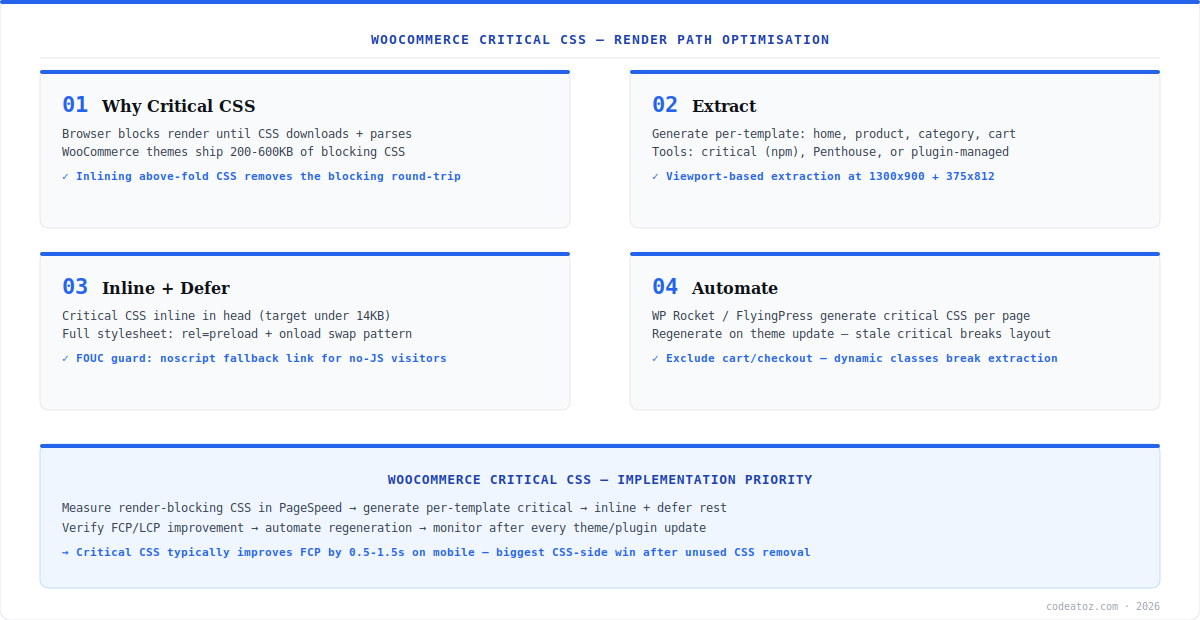
WooCommerce Critical CSS: Extraction Per Template
WooCommerce critical CSS must be generated per template type, not once per site — the above-fold view of the homepage, a product page, a category archive and the blog differ completely. Extract at two viewports minimum (1300×900 desktop, 375×812 mobile) and merge. Tooling options: the critical npm package or Penthouse for build-pipeline extraction, or plugin-managed generation (WP Rocket, FlyingPress) which handles per-page extraction automatically on a remote service — the critical package repository documents the build-pipeline approach. For custom builds, wire extraction into CI so critical styles regenerate whenever the theme’s CSS changes.
// extract-critical.js — run per template URL
import { generate } from 'critical';

const templates = [
  { url: 'https://store.com/', name: 'home' },
  { url: 'https://store.com/product/sample/', name: 'product' },
  { url: 'https://store.com/shop/', name: 'category' },
];

for (const t of templates) {
  await generate({
    src: t.url,
    target: { css: `critical/${t.name}.css` },
    width: 1300, height: 900,
    // mobile pass merged automatically with dimensions array:
    dimensions: [{ width: 375, height: 812 }, { width: 1300, height: 900 }],
    penthouse: { timeout: 60000 }
  });
}WooCommerce Critical CSS: Inline and Defer Pattern
The loading pattern for WooCommerce critical CSS has three parts: the extracted critical styles inline in a <style> tag in the head (keep it under 14KB compressed — beyond that, inlining costs more than it saves on every page view since inline CSS is never browser-cached); the full stylesheet loaded with rel="preload" as="style" plus an onload swap to rel="stylesheet" so it downloads without blocking render; and a <noscript> fallback link for JavaScript-disabled visitors. The result: the browser paints the above-fold view from inline styles immediately while the complete stylesheet arrives asynchronously. The defer non-critical CSS guide documents the exact preload-onload markup and its browser support.
Exclude cart and checkout from WooCommerce critical CSS entirely — their dynamic, state-dependent classes (cart counts, payment method toggles, validation states) break extraction-based approaches and produce broken layouts exactly where revenue happens. And regenerate critical styles after every theme or page-builder update: stale critical CSS is the number one cause of the flash-of-broken-layout reports after updates.
WooCommerce Critical CSS: Automation and Verification
For most stores, plugin automation is the right call: WP Rocket and FlyingPress generate WooCommerce critical CSS per page via remote services, handle the inline-defer markup, and regenerate on content changes — configuration over code. Verify the result in PageSpeed Insights: the “Eliminate render-blocking resources” audit should drop your main stylesheets, and FCP/LCP should improve measurably on mobile. Watch for flash-of-unstyled-content (FOUC) — if visible, the extraction missed above-fold selectors, usually from JavaScript-injected elements; add those selectors to the forced-include list. Our WooCommerce performance team implements WooCommerce critical CSS as part of every Core Web Vitals engagement, after unused-CSS removal and before font optimisation in the priority order.
Frequently Asked Questions About WooCommerce Critical CSS
What is WooCommerce critical CSS?
WooCommerce critical CSS is the technique of extracting only the styles needed to render the above-fold view of a page, inlining them in the document head, and deferring the full stylesheet. It removes render-blocking CSS round-trips and typically improves First Contentful Paint by 0.5-1.5 seconds on mobile WooCommerce stores.
How do I generate WooCommerce critical CSS?
Two routes: plugin automation (WP Rocket or FlyingPress generate per-page critical CSS via remote services and handle the markup), or build tooling (the critical npm package or Penthouse extracting per template at desktop and mobile viewports in CI). Generate separately for homepage, product, category and content templates — their above-fold views differ completely.
How big should inline WooCommerce critical CSS be?
Under 14KB compressed. Inline CSS is never browser-cached — it re-downloads with every page view — so beyond roughly 14KB the inlining cost exceeds the render-blocking saving. If your extraction produces more, it is capturing below-fold styles; tighten the viewport configuration or trim selectors.
Should cart and checkout use WooCommerce critical CSS?
No — exclude cart and checkout. Their layouts depend on dynamic, state-driven classes (cart contents, payment toggles, validation errors) that extraction tools cannot capture reliably, and a broken checkout layout costs far more than the milliseconds saved. Both pages should also be excluded from page caching for the same state-dependence reason.
Why does my site flash unstyled content after adding critical CSS?
FOUC after WooCommerce critical CSS means the inline styles miss selectors that appear above the fold — usually JavaScript-injected elements (sliders, cookie bars, dynamic headers) invisible to the extraction crawl. Add the missing selectors to your tool’s forced-include list, or extract after JavaScript execution with a longer Penthouse timeout.
Does WooCommerce critical CSS need regenerating after updates?
Yes — every theme, page-builder or significant plugin update can change class names and layout, making stored critical CSS stale and visibly breaking above-fold rendering. Plugin solutions regenerate automatically on content changes; manual pipelines should regenerate in CI whenever theme CSS changes. Stale critical CSS is the most common post-update layout bug.
Need a Faster Render Path?
Critical CSS, unused-CSS removal and full Core Web Vitals optimisation — fixed-price performance audits.




