
Best WooCommerce CDN Setup Guide — Edge Caching 2026
Complete WooCommerce CDN setup — static asset delivery, edge image optimisation, full page caching with Cloudflare APO, and automatic cache purging.
WooCommerce CDN setup moves your store’s content delivery from a single origin server to a global edge network — static assets, optimised images, and even full HTML pages served from a location near each visitor. A correct WooCommerce CDN setup brings TTFB under 100ms globally for anonymous traffic and cuts origin server load by 70-90%. This guide covers all three CDN layers in priority order plus the cache purging automation that keeps content fresh.
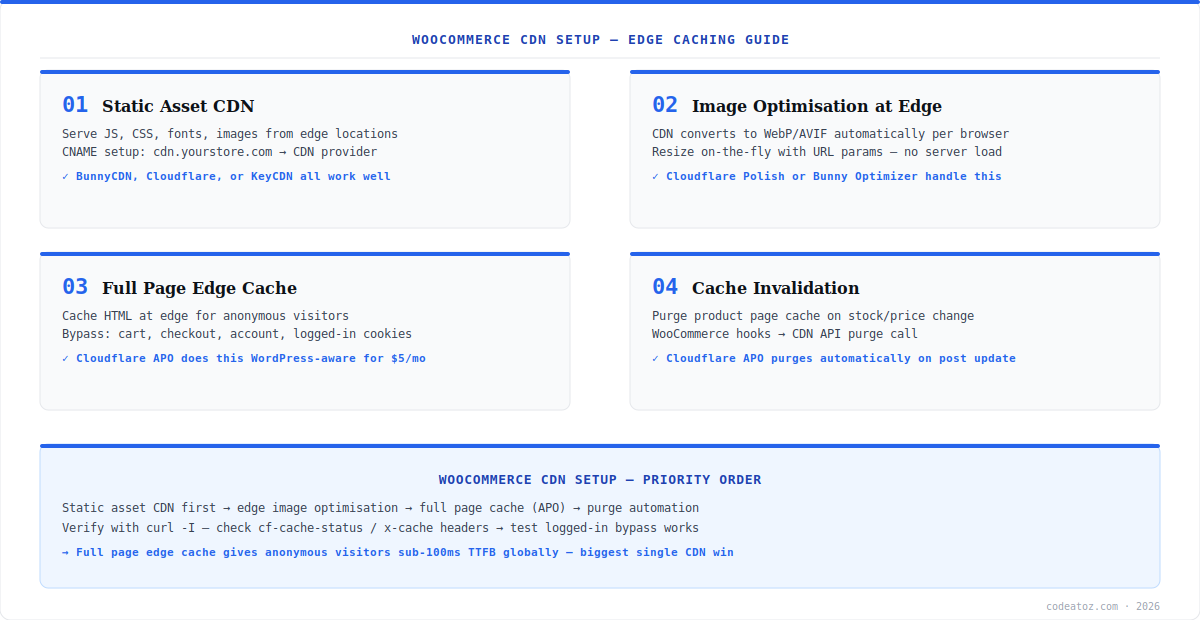
The three layers of WooCommerce CDN setup build on each other: static assets (JS, CSS, fonts, images) are the easy first win; edge image optimisation (WebP/AVIF conversion and resizing) eliminates server-side image processing; and full page edge caching serves complete HTML to anonymous visitors without touching your origin at all. Cloudflare APO ($5/month) implements the third layer WordPress-aware, with automatic purging on content updates. See our WooCommerce image optimisation guide and server configuration guide for the layers beneath the CDN.
WooCommerce CDN Setup: Static Assets and Edge Images
The first layer of WooCommerce CDN setup is serving static assets from the edge. With Cloudflare, this happens automatically once your DNS is proxied (orange cloud) — JS, CSS, fonts, and images are cached at 300+ locations with no plugin needed. With BunnyCDN or KeyCDN, create a pull zone pointing at your origin and rewrite asset URLs to the CDN hostname using a plugin like CDN Enabler — see the BunnyCDN quick start guide for the pull zone setup. The second layer is edge image optimisation: Cloudflare Polish or Bunny Optimizer convert images to WebP/AVIF per-browser and resize on the fly via URL parameters — eliminating server-side thumbnail generation entirely. Check Cloudflare Polish documentation for activation steps.
WooCommerce CDN Setup: Full Page Edge Cache with APO
Full page caching is the highest-impact layer of WooCommerce CDN setup — anonymous visitors receive complete HTML from the nearest edge location with sub-100ms TTFB, and your origin server is never touched. Cloudflare APO (Automatic Platform Optimization, $5/month) implements this WordPress-aware: it understands logged-in cookies, WooCommerce cart sessions, and purges automatically when you update posts or products. Install the official Cloudflare WordPress plugin, enable APO, and verify with curl -I — the cf-cache-status: HIT header confirms edge delivery. Critically, APO bypasses cache for cart, checkout, account pages, and any request carrying a WooCommerce session cookie — dynamic pages stay dynamic. The Cloudflare APO documentation covers the full bypass logic. Our WooCommerce performance team includes WooCommerce CDN setup in every site speed project.
# Verify edge cache status
curl -I https://yourstore.com/product/sample-product/
# Look for: cf-cache-status: HIT (cached) / BYPASS (cart, checkout)

# functions.php — purge CDN on stock change (non-APO setups)
add_action('woocommerce_product_set_stock', function($product) {
    wp_remote_post('https://api.cloudflare.com/client/v4/zones/' . CF_ZONE . '/purge_cache', [
        'headers' => ['Authorization' => 'Bearer ' . CF_TOKEN, 'Content-Type' => 'application/json'],
        'body' => json_encode(['files' => [get_permalink($product->get_id())]]),
    ]);
});The most dangerous WooCommerce CDN setup failure is caching dynamic pages. After enabling full page cache, test in an incognito window: add a product to cart, then confirm the cart icon updates and checkout shows your items. If you ever see another customer’s cart, disable full page caching immediately and fix the bypass rules before re-enabling.
Frequently Asked Questions About WooCommerce CDN Setup
What is WooCommerce CDN setup?
WooCommerce CDN setup is configuring a content delivery network to serve your store’s static assets, optimised images, and optionally full HTML pages from edge locations near each visitor. It reduces TTFB to under 100ms globally for cached content and cuts origin server load by 70-90%, directly improving Core Web Vitals and conversion rates.
Which CDN is best for WooCommerce CDN setup?
Cloudflare is the most complete option for WooCommerce CDN setup — free static asset caching, Polish for edge image optimisation, and APO ($5/month) for WordPress-aware full page caching with automatic purging. BunnyCDN is an excellent lower-cost alternative for asset and image delivery. KeyCDN works well for teams wanting simple pull-zone setups.
Is it safe to cache WooCommerce pages at the CDN edge?
Yes, with correct bypass rules. WooCommerce CDN setup must exclude cart, checkout, my-account, and any request with a WooCommerce session or logged-in cookie from full page caching. Cloudflare APO handles these bypasses automatically for WordPress and WooCommerce. Always test in incognito: add to cart and verify the cart state is yours, never another visitor’s.
What is Cloudflare APO in WooCommerce CDN setup?
Cloudflare APO (Automatic Platform Optimization) is a $5/month WordPress-aware full page edge cache. In WooCommerce CDN setup, it serves complete HTML from 300+ edge locations to anonymous visitors, bypasses cache for carts and logged-in sessions automatically, and purges cached pages when you update posts or products — no manual purge configuration needed.
How do I purge the CDN cache when products change?
With Cloudflare APO, purging happens automatically on post and product updates. For other WooCommerce CDN setups, hook WooCommerce events like woocommerce_product_set_stock and woocommerce_update_product to call your CDN’s purge API for the affected product URL. Purge selectively by URL rather than purging everything — full purges cause origin load spikes.
How do I verify my WooCommerce CDN setup is working?
Verify WooCommerce CDN setup with curl -I on a product URL and check the cache header: cf-cache-status: HIT for Cloudflare or x-cache: HIT for other CDNs means edge delivery is working. Test from multiple regions with a tool like KeyCDN’s performance test. Confirm cart and checkout return BYPASS or DYNAMIC — those must never show HIT.
Need a WooCommerce CDN Setup?
Our performance team configures the full CDN stack — assets, edge images, APO, and purge automation.




