
The Complete Shopware 6 Rule Builder Guide 2026
Master the Shopware 6 Rule Builder — AND/OR condition nesting, cart and customer scopes, the five application points, and custom conditions from plugins.
The Shopware 6 Rule Builder is the central conditions engine of the platform — named, reusable rule sets built from 60+ conditions with nested AND/OR logic, applied everywhere a yes/no decision is needed: shipping method availability, payment filtering, conditional prices, promotions, and Flow Builder filters. Understand the Shopware 6 Rule Builder once and you understand the targeting layer of the entire platform.
What makes the Shopware 6 Rule Builder architecturally distinctive is reuse: a rule like “B2B customers in Germany” is defined once at Settings → Rule Builder and then referenced by a shipping method, two payment methods, a price rule and a flow simultaneously. Change the rule, and every application point updates. This guide covers rule anatomy, the condition scopes, all five application points, extending with custom PHP conditions, and the design patterns that keep rule sets maintainable. The Shopware Rule Builder documentation lists every core condition.
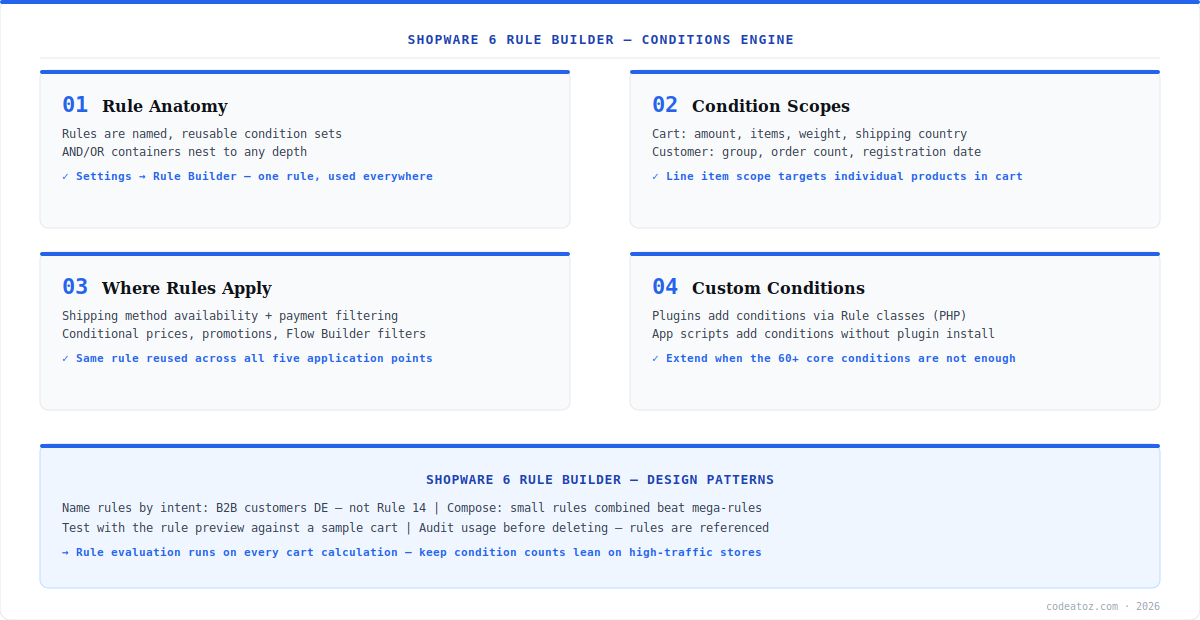
Shopware 6 Rule Builder: Anatomy and Condition Scopes
A rule in the Shopware 6 Rule Builder is a named container of conditions combined with AND/OR operators, nestable to any depth — “(customer group is B2B AND billing country is DE) OR customer has tag key-account”. Conditions come in scopes: cart conditions (total amount, item count, weight, shipping country, goods in cart), customer conditions (group, order count, registration date, tags, default payment method), line item conditions (targeting individual products by ID, category, tag or property), and context conditions (sales channel, language, currency, date range). The scope determines when the rule can evaluate — a line-item condition only makes sense where individual items are assessed, such as item-level promotions.
Shopware 6 Rule Builder: The Five Application Points
Rules from the Shopware 6 Rule Builder attach at five points. Shipping methods: an availability rule decides whether the method appears at checkout (“Express only for DE/AT under 30kg”). Payment methods: the same pattern filters payment options (“invoice payment only for B2B group with 3+ completed orders”). Conditional prices: shipping price matrices and product price rules select tiers by rule. Promotions: rules gate promotion eligibility (“10% campaign only for newsletter subscribers”). And Flow Builder: flows use rules as their condition step, which is why a clean rule library pays dividends across automation. One well-named rule serving five systems is the maintainability win — the Shopware rules concept documentation explains the evaluation model underneath.
Shopware 6 Rule Builder: Custom Conditions from Plugins
When the 60+ core conditions are not enough, plugins extend the Shopware 6 Rule Builder with custom conditions: a PHP class extending Rule implementing match() and getConstraints(), registered in services.xml, plus a small admin component for the condition’s configuration UI — the custom rules developer guide walks through the full implementation. Typical custom conditions we build: customer lifetime value above threshold, ERP credit status, weather-region targeting for seasonal goods. Our Shopware development team builds custom rule conditions when targeting logic outgrows the core set.
namespace MyPluginRule;
use ShopwareCoreFrameworkRuleRule;
use ShopwareCoreFrameworkRuleRuleScope;
use ShopwareCoreCheckoutCheckoutRuleScope;
use SymfonyComponentValidatorConstraintsNotBlank;
use SymfonyComponentValidatorConstraintsType;

class CustomerLifetimeValueRule extends Rule {
    protected float $threshold = 0;
    public function getName(): string { return 'customer_lifetime_value'; }
    public function match(RuleScope $scope): bool {
        if (!$scope instanceof CheckoutRuleScope) return false;
        $customer = $scope->getSalesChannelContext()->getCustomer();
        if (!$customer) return false;
        $ltv = (float) ($customer->getCustomFields()['ltv'] ?? 0);
        return $ltv >= $this->threshold;
    }
    public function getConstraints(): array {
        return ['threshold' => [new NotBlank(), new Type('numeric')]];
    }
}
// services.xml: tag name="shopware.rule.definition"Rules in the Shopware 6 Rule Builder evaluate on every cart calculation. Bloated mega-rules with dozens of nested conditions slow high-traffic checkouts measurably. Keep rules small and composable, name them by intent (“B2B customers DE”, not “Rule 14”), and audit where a rule is referenced before deleting it — application points referencing a deleted rule fail silently to never-match.
Frequently Asked Questions About Shopware 6 Rule Builder
What is the Shopware 6 Rule Builder?
The Shopware 6 Rule Builder is the platform’s central conditions engine — named, reusable rule sets built from 60+ conditions with nested AND/OR logic. Rules attach to shipping methods, payment methods, conditional prices, promotions and Flow Builder flows, so one rule definition controls targeting across the whole store.
What conditions are available in the Shopware 6 Rule Builder?
Core scopes cover cart conditions (amount, items, weight, shipping country), customer conditions (group, order count, tags, registration date), line item conditions (product, category, property targeting), and context conditions (sales channel, currency, language, date range). Plugins and apps can add custom conditions beyond the 60+ built-in set.
Where can rules from the Shopware 6 Rule Builder be applied?
Five application points: shipping method availability, payment method filtering, conditional prices (shipping matrices and price rules), promotion eligibility, and Flow Builder flow conditions. The same rule can serve all five simultaneously — edit it once and every application point updates.
How do I add custom conditions to the Shopware 6 Rule Builder?
From a plugin: create a PHP class extending Rule, implement match() with your logic and getConstraints() for configuration validation, register it in services.xml with the shopware.rule.definition tag, and ship a small admin component for the condition UI. App scripts can also contribute conditions without a full plugin.
Why is my Shopware 6 Rule Builder rule not matching?
The usual causes: a condition scope that does not exist in the evaluation context (line-item conditions in a cart-level check), customer conditions evaluated for guests (no customer object), timezone mismatches on date-range conditions, or an AND group where one condition can never be true. Rebuild the rule incrementally — start with one condition, confirm it matches, then add the next.
Do Shopware 6 Rule Builder rules affect performance?
Rules evaluate on every cart calculation, so very large nested rule sets add measurable latency on high-traffic checkouts. Keep rules small and composable, prefer several focused rules over one mega-rule, and avoid conditions requiring heavy lookups in hot paths. Audit rule usage before deletion — dangling references fail silently.
Building Advanced Targeting in Shopware 6?
Our team designs rule architectures and builds custom rule conditions — LTV, ERP status, regional logic.




