
Best WooCommerce Image Optimisation Guide 2026
Speed up your WooCommerce store with correct image optimisation — WebP conversion, responsive srcset, lazy loading, LCP image priority, and CDN delivery.
WooCommerce image optimisation is consistently the fastest way to improve Core Web Vitals scores on product pages. Unoptimised product images — large JPEGs without WebP conversion, missing srcset attributes, or the LCP image loading lazily — are the most common cause of poor LCP and high bandwidth costs on WooCommerce stores. This guide covers every dimension of WooCommerce image optimisation: format conversion, responsive delivery, load priority, and CDN setup.
Images account for 50-70% of total page weight on most WooCommerce product pages. WooCommerce image optimisation can reduce that by 60-80% with WebP conversion, and further reduce perceived load time by correctly setting loading=lazy on below-fold images and fetchpriority=high on the LCP image. These are not optional nice-to-haves — since Google made Core Web Vitals a ranking signal, WooCommerce image optimisation directly affects organic search visibility. See our WooCommerce Core Web Vitals fix guide for the full CWV context.
WooCommerce Image Optimisation: WebP Conversion
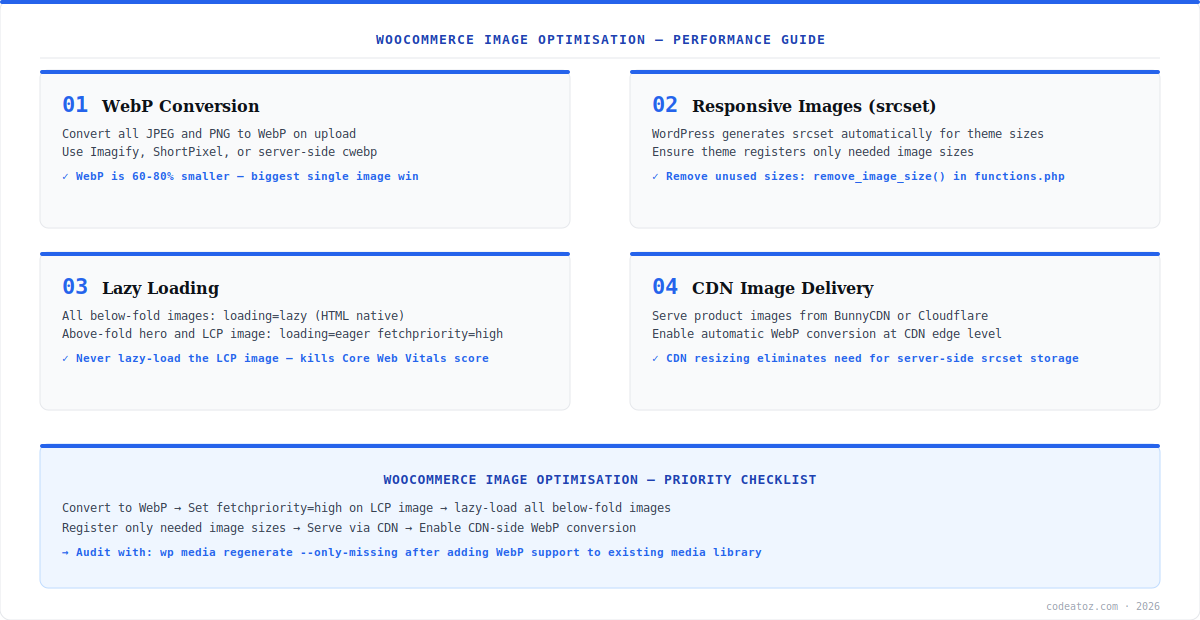
WebP is the highest-impact single change in any WooCommerce image optimisation project. WebP images are 60-80% smaller than equivalent JPEGs at the same visual quality. Every major browser has supported WebP since 2022, so there is no compatibility concern. The easiest approach is to use a WordPress plugin that auto-converts uploads: Imagify, ShortPixel, or Smush Pro all convert on upload and serve WebP via <picture> tags with JPEG fallback. Alternatively, enable automatic WebP conversion at CDN level — Cloudflare’s Polish feature does this for free on all plans.
// Auto-convert uploaded images to WebP (requires Imagick with WebP support)
add_filter('wp_handle_upload', function($upload) {
    if (in_array($upload['type'], ['image/jpeg', 'image/png'])) {
        $image = new Imagick($upload['file']);
        $image->setImageFormat('webp');
        $image->setImageCompressionQuality(82);
        $webp_path = preg_replace('/.(jpe?g|png)$/i', '.webp', $upload['file']);
        $image->writeImage($webp_path);
    }
    return $upload;
});WooCommerce Image Optimisation: LCP Image and Lazy Loading
The LCP (Largest Contentful Paint) image on a WooCommerce product page is almost always the main product image — and it must never be lazy-loaded. Setting loading=lazy on the LCP image is the number one WooCommerce image optimisation mistake. Lazy loading delays the browser from fetching the LCP image until it enters the viewport, which directly increases LCP time. Set the main product image to loading=eager and add fetchpriority=high to tell the browser to download it immediately during the preload scan. For all below-fold images — additional product gallery thumbnails, related products, review images — use loading=lazy.
The most damaging WooCommerce image optimisation error is adding loading=lazy to the main product image. Many performance plugins (WP Rocket, Autoptimize) apply lazy loading globally by default. Always exclude the WooCommerce single product main image from lazy loading in your plugin settings, or add fetchpriority=high loading=eager directly to the woocommerce_single_product_image_thumbnail_html filter.
WooCommerce Image Optimisation: Responsive srcset and Image Sizes
WordPress automatically generates srcset for registered image sizes and WooCommerce registers its own sizes: woocommerce_thumbnail, woocommerce_single, and woocommerce_gallery_thumbnail. For WooCommerce image optimisation, audit which image sizes are actually used by your theme and remove unused ones with remove_image_size(). Every registered size generates an additional file on upload — unnecessary sizes waste disk space and media upload time. Use Google PageSpeed Insights or WebPageTest to confirm your images are using the correctly-sized srcset variant for each device. Our WooCommerce performance team includes image optimisation in all site speed audits. See our full WooCommerce caching guide for the complementary caching layer.
// In functions.php or a plugin — remove sizes not used by your theme
add_action('init', function() {
    remove_image_size('1536x1536'); // WordPress default — rarely needed
    remove_image_size('2048x2048'); // WordPress default — rarely needed
    // Keep WooCommerce sizes unless you override them:
    // woocommerce_thumbnail, woocommerce_single, woocommerce_gallery_thumbnail
});

// Regenerate thumbnails after changing registered sizes:
// wp media regenerate --only-missingFrequently Asked Questions About WooCommerce Image Optimisation
What is WooCommerce image optimisation?
WooCommerce image optimisation is the process of reducing image file sizes, serving correct formats (WebP), using responsive srcset for different devices, correctly setting lazy loading (only for below-fold images), and delivering images via CDN. Proper WooCommerce image optimisation typically reduces product page weight by 50-70% and improves Core Web Vitals LCP scores significantly.
Does WooCommerce support WebP images?
Yes, WooCommerce supports WebP images as of WordPress 5.8 which added native WebP upload support. Use a plugin like Imagify or ShortPixel to auto-convert JPEG and PNG uploads to WebP, or enable WebP conversion at CDN level with Cloudflare Polish. WooCommerce image optimisation with WebP typically saves 60-80% on image file size versus JPEG at the same quality.
Should I use lazy loading on WooCommerce product images?
Use lazy loading on below-fold WooCommerce product images — gallery thumbnails, related products, review images. Never use lazy loading on the main product image (LCP image). Set the main product image to loading=eager and add fetchpriority=high. This is the most impactful single WooCommerce image optimisation for LCP Core Web Vitals scores.
What image sizes should WooCommerce generate?
WooCommerce generates three image sizes by default: woocommerce_thumbnail (for shop and category pages), woocommerce_single (for single product pages), and woocommerce_gallery_thumbnail (for product gallery navigation). For WooCommerce image optimisation, configure these sizes to match your theme’s display dimensions — oversized images waste bandwidth. Remove unused WordPress default sizes (1536×1536, 2048×2048) to reduce upload overhead.
How does CDN help with WooCommerce image optimisation?
A CDN serves WooCommerce images from edge servers geographically close to each visitor, reducing latency. Many CDNs — Cloudflare, BunnyCDN, Imagify CDN — also offer automatic WebP conversion and image resizing at the edge, eliminating the need for server-side processing. CDN delivery is the final layer of WooCommerce image optimisation after WebP conversion, srcset, and lazy loading are in place.
How do I find which images are hurting my WooCommerce performance?
Use Google PageSpeed Insights or WebPageTest on your product pages — both highlight oversized images, missing WebP conversion, and incorrectly lazy-loaded LCP images. The Opportunities section shows exactly how much each image fix would save in bytes and milliseconds. For ongoing WooCommerce image optimisation monitoring, set up a Lighthouse CI check on your key product page templates.
Need WooCommerce Image Optimisation Help?
Our performance team handles WebP conversion, LCP fixes, CDN setup, and full Core Web Vitals remediation as a fixed-price service.




