
The Complete Guide to Shopify Theme Development Liquid in 2026
Master Liquid templating, Sections Everywhere, JSON templates, metafields, and Shopify Theme CLI for professional Shopify stores.
Sections & schema
JSON templates
Metafields
Theme CLI workflow
Performance tips
If you are learning Shopify theme development Liquid, this guide takes you from the fundamentals of Liquid templating through to professional-grade section architecture, JSON templates, and deploying with Shopify Theme CLI. All examples are based on the Dawn v14 theme — Shopify’s current reference implementation for 2026.
Shopify theme development Liquid is the craft of building and customising Shopify storefronts using Shopify’s own template language. Liquid powers every Shopify theme — from the simplest starter to enterprise multi-region stores. It handles all dynamic data rendering: products, collections, cart contents, customer account data, and metafields.
In 2026 the Shopify theme development Liquid landscape has matured significantly. Sections Everywhere means every page can be drag-and-drop customisable. JSON templates replaced Liquid templates as the page structure layer. Metafields provide a native dynamic content system without apps. If your Shopify theme knowledge predates these features, this guide brings you fully up to date.
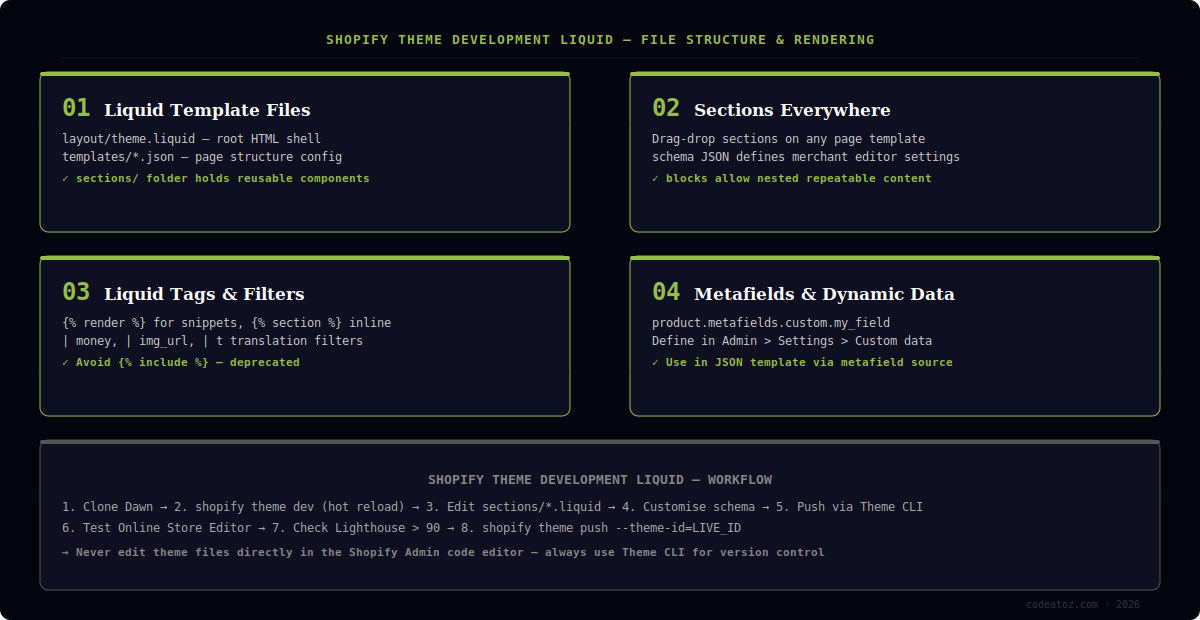
Shopify Theme Development Liquid: Understanding the File Structure
Every Shopify theme follows the same directory structure. Understanding it is the prerequisite for all Shopify theme development Liquid work. The layout/ folder contains theme.liquid — the root HTML shell that wraps every page. The templates/ folder holds JSON files that define which sections appear on each page type. The sections/ folder contains the reusable Liquid components that do the actual rendering.
layout/theme.liquid— root HTML, loads CSS and JS assets, renders content_for_layouttemplates/*.json— page structure config, references section files by namesections/*.liquid— the building blocks: header, footer, product cards, hero bannerssnippets/*.liquid— smaller reusable fragments rendered via {% render %}assets/— CSS, JS, and image files referenced in templatesconfig/settings_schema.json— defines the Theme Editor settings panel
Always use {% render %} instead of {% include %} for snippets. The include tag is deprecated in Shopify theme development Liquid because it leaks the parent scope into the snippet, causing hard-to-debug variable conflicts. The render tag creates an isolated scope and is significantly faster.
Shopify Theme Development Liquid: Sections and the Schema Object
Sections are the core unit of Shopify theme development Liquid. Every section file contains two parts: the Liquid template that renders HTML, and a {% schema %} block at the bottom that defines the settings merchants can change in the Online Store Editor. The schema is JSON — it describes inputs like text fields, image pickers, colour selectors, and blocks.
Blocks are nested repeatable elements within a section. A testimonials section might have a block for each individual testimonial — the merchant adds, removes, and reorders blocks without touching code. This is the mechanism that makes Shopify theme development Liquid themes genuinely merchant-editable rather than requiring developer changes for every content update.
{% comment %} sections/promo-banner.liquid {% endcomment %}
<div class="promo-banner" style="background:{{ section.settings.bg_colour }}">
  <h2>{{ section.settings.heading }}</h2>
  <p>{{ section.settings.subtext }}</p>
  {% for block in section.blocks %}
    <div class="promo-item" {{ block.shopify_attributes }}>
      {{ block.settings.label }}
    </div>
  {% endfor %}
</div>

{% schema %}
{
  "name": "Promo Banner",
  "settings": [
    { "type": "text", "id": "heading", "label": "Heading" },
    { "type": "textarea", "id": "subtext", "label": "Sub text" },
    { "type": "color", "id": "bg_colour", "label": "Background", "default": "#f5f5f5" }
  ],
  "blocks": [
    {
      "type": "item",
      "name": "Promo Item",
      "settings": [
        { "type": "text", "id": "label", "label": "Label text" }
      ]
    }
  ],
  "presets": [{ "name": "Promo Banner" }]
}
{% endschema %}Shopify Theme Development Liquid: JSON Templates Explained
JSON templates replaced Liquid templates as the page structure layer in Shopify theme development Liquid from Online Store 2.0 onward. Where the old product.liquid template contained both structure and logic in one file, the new product.json is a pure JSON configuration that lists which sections appear on the page and in what order.
This separation is what makes Sections Everywhere possible. Because the structure is data rather than code, the Online Store Editor can freely reorder, add, and remove sections from any page — not just the home page. Merchants get full drag-and-drop control. Developers write reusable section components once and configure them in JSON templates for any page type.
Never edit theme files directly in the Shopify Admin code editor for production stores. Always use Shopify theme development Liquid locally with Theme CLI and push tested changes via shopify theme push. Direct Admin edits cannot be version-controlled and are overwritten the moment another developer pushes.
Shopify Theme Development Liquid: Metafields and Dynamic Content
Metafields are Shopify’s native system for attaching custom data to any object — products, collections, customers, orders, and the shop itself. In Shopify theme development Liquid, metafields eliminate the need for third-party apps to add fields like “materials”, “care instructions”, “size guide PDF”, or “product video URL” to product pages.
Define metafield definitions in Admin → Settings → Custom data. Once defined, you access them in Liquid as product.metafields.NAMESPACE.KEY. For Shopify theme development Liquid, the most important metafield types are: single line text, multi-line text, integer, decimal, date, URL, file, JSON, and metaobject references.
Use metaobjects for complex structured data in Shopify theme development Liquid. A “staff member” metaobject with name, role, photo, and bio fields is far cleaner than storing the same data as separate metafields or in product descriptions. Metaobjects are listable, referenceable, and merchanteditable without code changes.
Shopify Theme Development Liquid: Performance and Best Practices
Performance in Shopify theme development Liquid comes down to three areas: Liquid rendering speed, asset loading strategy, and image optimisation. Shopify’s CDN handles asset delivery automatically, but what you serve and how you load it is entirely within your control. A Lighthouse score above 90 should be the minimum target for any production Shopify store.
- Use Shopify’s theme performance guidelines. Refer to the Shopify developer changelog for the latest API updates — lazy load images, defer non-critical JS
- Use the
| image_urlfilter with explicit width — prevents oversized image serving - Avoid loading large JS libraries globally — scope to pages that actually need them
- Use
{% liquid %}tag for multi-line Liquid logic — more readable and slightly faster than chained tags - Test with Shopify’s built-in Performance Dashboard before and after every major change
For stores requiring significant customisation beyond standard Shopify theme development Liquid, our team also handles platform migrations and Shopify developer hire engagements where a dedicated resource makes more sense than project work.
Frequently Asked Questions About Shopify Theme Development Liquid
What is Shopify theme development Liquid?
Shopify theme development Liquid is the practice of building and customising Shopify storefronts using Liquid — Shopify’s open-source template language. Liquid handles all dynamic data rendering in themes: products, collections, cart contents, customer data, and custom metafields. It combines HTML structure with Liquid tags and filters to produce the final HTML sent to the browser.
How long does Shopify theme development Liquid take to learn?
Basic Shopify theme development Liquid proficiency takes one to two weeks for a developer already familiar with HTML and CSS. Understanding sections, schema, and JSON templates adds another week. Becoming genuinely productive — able to build custom sections, work with metafields, and deploy via Theme CLI — takes about a month of hands-on project work.
What is the difference between sections and snippets in Shopify theme development Liquid?
Sections are the primary building block in Shopify theme development Liquid. They have a schema block that exposes settings to the merchant in the Online Store Editor, and they can contain blocks for repeatable content. Snippets are smaller fragments rendered with the render tag — they have no schema, are not directly editable by merchants, and are used for reusable code like icon sets, price formatting, or badge components.
Do I need to know JavaScript for Shopify theme development Liquid?
Basic Shopify theme development Liquid does not require JavaScript. Liquid handles all template rendering server-side. However, modern Shopify themes use JavaScript for cart drawer functionality, product option selectors, quick-view modals, and filtering — all of which require JavaScript. Dawn v14 uses vanilla JavaScript with web components, avoiding any framework dependency.
What is the best base theme for Shopify theme development Liquid in 2026?
Dawn is Shopify’s official reference theme and the best starting point for Shopify theme development Liquid in 2026. It is fully Online Store 2.0 compatible, uses JSON templates and Sections Everywhere, is built on vanilla JavaScript, and scores 90+ on Lighthouse out of the box. All Shopify-maintained themes are also good starting points, but Dawn is the most thoroughly documented for developers.
How does Shopify theme development Liquid handle translations?
Shopify theme development Liquid uses translation keys via the t filter — for example, ‘products.product.add_to_cart’ | t outputs the translated string for the active locale. Translation strings are stored in locale JSON files in the locales/ folder. Shopify’s Markets feature handles multi-region translation, and the translate.json locale file in the Online Store Editor lets merchants override any string without code changes.
Need Custom Shopify Theme Development?
We build conversion-optimised Shopify themes from Dawn — pixel-perfect, Lighthouse 90+, and fully merchant-editable. Fixed-price delivery.
Metafields & metaobjects
Lighthouse 90+
Theme CLI deployed




