
Shopify GraphQL Storefront API — Complete Guide 2026
Build with the Shopify GraphQL Storefront API — authentication, product queries, cart mutations, customer auth, and building a headless storefront with Next.js or React.
The Shopify GraphQL Storefront API is Shopify’s public-facing API for building custom storefronts — headless frontends, mobile apps, and any experience that needs to query products, manage carts, or authenticate customers without using Shopify’s own Liquid theme. Unlike the Admin API which requires OAuth and server-side secrets, the Shopify GraphQL Storefront API uses a public access token that is safe to embed in frontend JavaScript. This guide covers the complete Shopify GraphQL Storefront API workflow: token creation, product queries, cart mutations, customer account authentication, and integrating the API into a Next.js storefront.
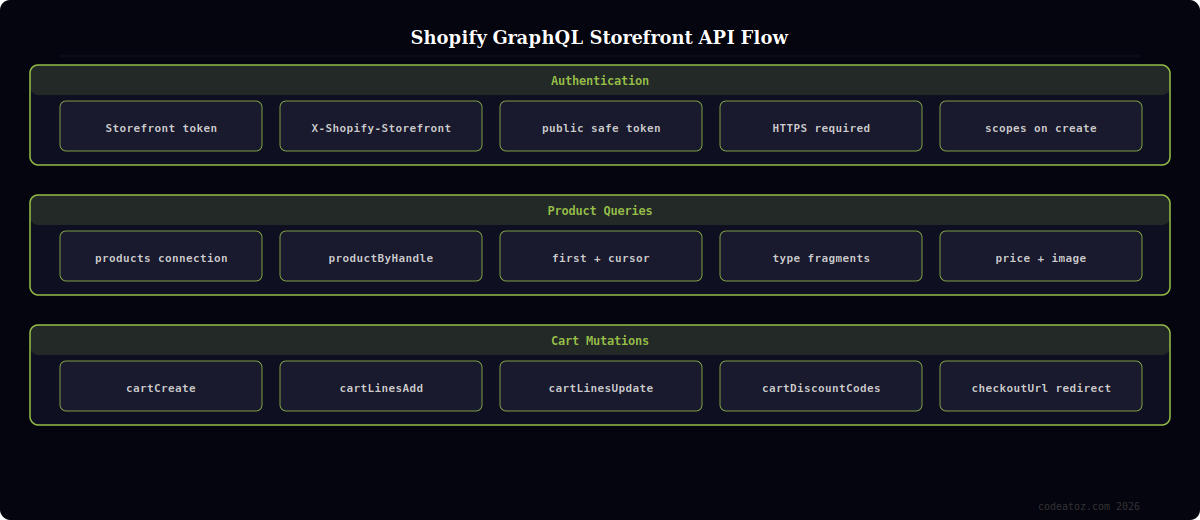
Shopify GraphQL Storefront API: Authentication and Client Setup
The Shopify GraphQL Storefront API uses a Storefront Access Token (not OAuth) — a public token created in the Shopify admin under Apps > Develop apps > API credentials. This token has read-only access to storefront data and is safe to use in client-side JavaScript.
// lib/shopify-storefront.ts
const SHOP = process.env.SHOPIFY_STORE_DOMAIN!;         // yourstore.myshopify.com
const TOKEN = process.env.SHOPIFY_STOREFRONT_TOKEN!;    // public access token

interface StorefrontResponse<T> {
  data: T;
  errors?: Array<{ message: string }>;
}

// Shopify GraphQL Storefront API typed fetch wrapper
export async function storefrontQuery<T>(
  query: string,
  variables?: Record<string, unknown>,
  options?: RequestInit
): Promise<T> {
  const res = await fetch(`https://${SHOP}/api/2025-01/graphql.json`, {
    method: 'POST',
    headers: {
      'Content-Type': 'application/json',
      'X-Shopify-Storefront-Access-Token': TOKEN,
    },
    body: JSON.stringify({ query, variables }),
    ...options,
  });

  const json: StorefrontResponse<T> = await res.json();

  if (json.errors?.length) {
    throw new Error(json.errors[0].message);
  }

  return json.data;
}
Shopify GraphQL Storefront API: Product Queries
The Shopify GraphQL Storefront API returns products, variants, images, and metafields through connection-based pagination. Use the products connection with first and after (cursor) for paginated listings, and productByHandle for individual product pages.
// Get product catalogue from Shopify GraphQL Storefront API
export async function getProducts(first = 20, after?: string) {
  const data = await storefrontQuery<{
    products: {
      edges: Array<{
        cursor: string;
        node: { id: string; title: string; handle: string; priceRange: { minVariantPrice: { amount: string; currencyCode: string } }; featuredImage: { url: string; altText: string } | null };
      }>;
      pageInfo: { hasNextPage: boolean; endCursor: string };
    };
  }>(`
    query GetProducts($first: Int!, $after: String) {
      products(first: $first, after: $after, sortKey: BEST_SELLING) {
        pageInfo { hasNextPage endCursor }
        edges {
          cursor
          node {
            id
            title
            handle
            featuredImage { url altText }
            priceRange {
              minVariantPrice { amount currencyCode }
            }
          }
        }
      }
    }
  `, { first, after });

  return data.products;
}

// Get single product by handle from Shopify GraphQL Storefront API
export async function getProductByHandle(handle: string) {
  const data = await storefrontQuery<{
    productByHandle: {
      id: string; title: string; description: string;
      variants: { edges: Array<{ node: { id: string; title: string; price: { amount: string } } }> };
    } | null;
  }>(`
    query GetProduct($handle: String!) {
      productByHandle(handle: $handle) {
        id title description
        variants(first: 10) {
          edges { node { id title price { amount } } }
        }
      }
    }
  `, { handle });

  return data.productByHandle;
}
Shopify GraphQL Storefront API: Cart Mutations
Cart management is one of the most important functions of the Shopify GraphQL Storefront API. Create carts, add/update/remove lines, and apply discount codes via mutations. The cart id persists in a cookie or localStorage and is reused across page loads to maintain the customer’s session.
// Create a new cart via Shopify GraphQL Storefront API
export async function createCart() {
  const data = await storefrontQuery<{
    cartCreate: { cart: { id: string; checkoutUrl: string } }
  }>(`
    mutation CreateCart {
      cartCreate {
        cart { id checkoutUrl }
      }
    }
  `);
  return data.cartCreate.cart;
}

// Add line items to cart via Shopify GraphQL Storefront API
export async function addToCart(cartId: string, variantId: string, quantity: number) {
  const data = await storefrontQuery<{
    cartLinesAdd: {
      cart: {
        id: string;
        totalQuantity: number;
        lines: { edges: Array<{ node: { id: string; quantity: number; merchandise: { title: string } } }> };
        cost: { totalAmount: { amount: string; currencyCode: string } };
      };
    };
  }>(`
    mutation AddToCart($cartId: ID!, $lines: [CartLineInput!]!) {
      cartLinesAdd(cartId: $cartId, lines: $lines) {
        cart {
          id totalQuantity
          lines(first: 20) {
            edges { node { id quantity merchandise { ... on ProductVariant { title } } } }
          }
          cost { totalAmount { amount currencyCode } }
        }
      }
    }
  `, {
    cartId,
    lines: [{ merchandiseId: variantId, quantity }],
  });
  return data.cartLinesAdd.cart;
}
💡 Store the cart ID in a cookie (not localStorage) in your Shopify GraphQL Storefront API integration. Cookies are sent with every request, making it easy to hydrate the cart server-side in Next.js Server Components without an extra client-side fetch. Use sameSite: 'strict' and httpOnly: false (it needs to be accessible by JavaScript for client-side cart updates). Name the cookie shopify_cart_id or similar.
The Shopify GraphQL Storefront API reference documents every query and mutation. The cartCreate mutation documentation covers cart creation and the full cart object schema. The Shopify Hydrogen documentation covers the official React metaframework built on the Shopify GraphQL Storefront API. See our Shopify custom app development guide and our headless commerce guide for architecture patterns.
Frequently Asked Questions — Shopify GraphQL Storefront API
What is the Shopify GraphQL Storefront API?
The Shopify GraphQL Storefront API is Shopify’s public customer-facing API for building custom storefronts. It provides access to products, collections, carts, checkout, and customer authentication. Unlike the Admin API, it uses a public access token safe for client-side use. It’s the foundation of Shopify Hydrogen and any headless storefront built outside of Shopify’s Liquid theme system. The Storefront API returns only publicly available data — it cannot access order history or private admin data.
How do I get a Shopify Storefront Access Token?
Create a Storefront Access Token in the Shopify admin under Apps > Develop apps > select your app > API credentials > Storefront API section. Click “Create token” and assign the scopes you need (unauthenticated_read_product_listings, unauthenticated_write_checkouts, etc.). The token is displayed once — save it immediately. Use it in the X-Shopify-Storefront-Access-Token header on every Shopify GraphQL Storefront API request.
What is the difference between the Storefront API and the Admin API?
The Shopify GraphQL Storefront API is public-facing and safe for client-side use — it accesses products, carts, checkout, and customer auth. The Admin API requires OAuth with a private API secret and should only be called server-side — it accesses orders, inventory, fulfilments, and store configuration. Use the Storefront API for your customer-facing storefront and the Admin API for backend automation, reporting, and admin app development.
How does cart management work in the Shopify GraphQL Storefront API?
Create a cart with the cartCreate mutation — it returns a cart ID and checkout URL. Store the cart ID in a cookie. Add items with cartLinesAdd, update quantities with cartLinesUpdate, and remove items with cartLinesRemove. Apply discount codes with cartDiscountCodesUpdate. When the customer is ready to checkout, redirect to the checkoutUrl returned by the cart object. The Shopify checkout page handles payment processing.
What API version should I use for the Shopify GraphQL Storefront API?
Use the latest stable API version — in 2026 that is 2025-01 or later. Include the version in the endpoint URL: https://yourstore.myshopify.com/api/2025-01/graphql.json. Shopify releases new API versions quarterly (January, April, July, October) and supports each version for 12 months. Set a calendar reminder to update your Shopify GraphQL Storefront API version at least annually before the version you’re using is deprecated.
Can I use the Shopify GraphQL Storefront API with Next.js?
Yes — the Shopify GraphQL Storefront API works seamlessly with Next.js. Call it from Server Components for SSR/ISR product pages (using Next.js fetch with revalidate for caching), from route handlers for cart mutations, and from client components for real-time cart updates. Store credentials in environment variables and call from the server side only. The Hydrogen framework by Shopify is built on Next.js-like primitives and provides first-party utilities for the Storefront API.
Need a Shopify Headless Storefront Built?
CodeAtoZ builds custom storefronts on the Shopify GraphQL Storefront API — Next.js, Hydrogen, React Native mobile apps, and multi-channel commerce integrations.




