
Deploying a React E-Commerce App with Node.js to Production (2026)
Complete guide to deploying a React e-commerce app with Node.js — PM2 process management, Nginx reverse proxy, SSL, environment variables, CI/CD with GitHub Actions, and zero-downtime deploys.
Deploying a React e-commerce app with Node.js to a production VPS requires more than npm start. A production-ready React e-commerce app with Node.js deployment uses PM2 for process management and automatic restarts, Nginx as a reverse proxy with SSL termination, GitHub Actions for automated CI/CD, and zero-downtime reload so customers never see an outage during deploys. This guide covers the complete deployment stack for a React e-commerce app with Node.js — from server provisioning through PM2 configuration, Nginx setup, Let’s Encrypt SSL, and a production-hardened GitHub Actions workflow.
The deployment architecture for a React e-commerce app with Node.js separates concerns cleanly: the Node.js Express server handles API requests, cart logic, and server-side rendering; Nginx sits in front as a reverse proxy handling HTTPS termination, static asset serving, and load balancing; and PM2 keeps the Node.js process alive, restarts it on crash, and enables zero-downtime deploys without dropping in-flight requests.
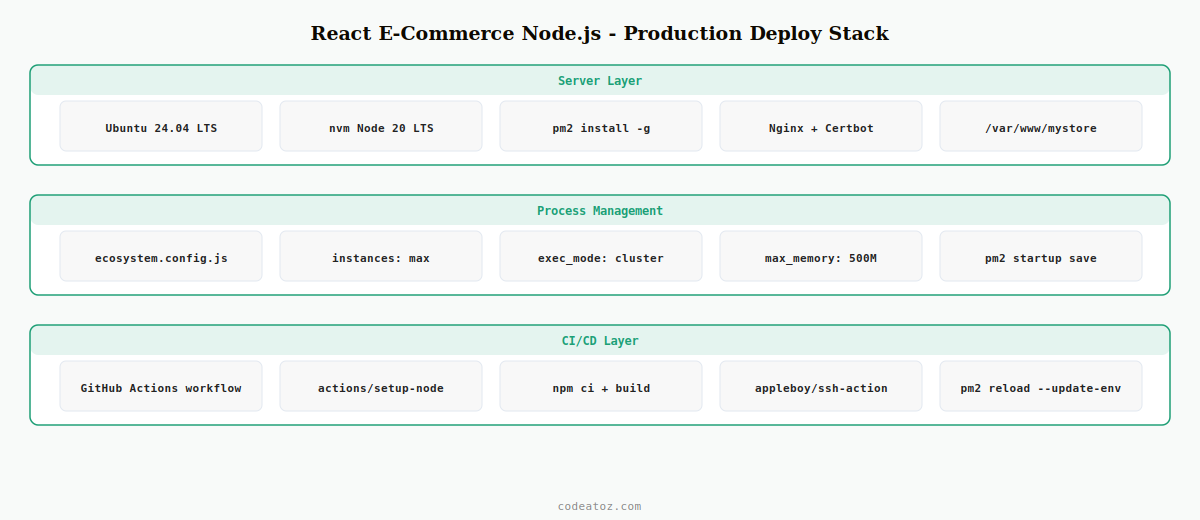
Step 1: Server Setup for the React E-Commerce App with Node.js
Provision an Ubuntu 24.04 LTS VPS with at least 2GB RAM for a React e-commerce app with Node.js. Install Node.js 20 LTS via nvm so you can manage versions per project, then install PM2 globally.
# Install nvm and Node.js 20 LTS
curl -o- https://raw.githubusercontent.com/nvm-sh/nvm/v0.39.7/install.sh | bash
source ~/.bashrc
nvm install 20
nvm use 20
nvm alias default 20

# Install PM2 globally for the React e-commerce app with Node.js process management
npm install -g pm2

# Install Nginx
apt-get update && apt-get install -y nginx certbot python3-certbot-nginx

# Create app directory
mkdir -p /var/www/mystore
chown -R $USER:www-data /var/www/mystore
Step 2: PM2 Configuration for the React E-Commerce App with Node.js
PM2 manages the Node.js process for your React e-commerce app with Node.js — keeping it alive after crashes, enabling cluster mode for multi-core utilisation, and allowing zero-downtime reloads during deployments.
module.exports = {
  apps: [{
    name:         'react-ecommerce-node',
    script:       'server/index.js',
    instances:    'max',          // use all CPU cores for React e-commerce app with Node.js
    exec_mode:    'cluster',      // cluster mode for zero-downtime reloads
    watch:        false,          // never watch in production
    max_memory_restart: '500M',   // restart if memory exceeds 500MB
    env_production: {
      NODE_ENV:   'production',
      PORT:       3000,
    },
    error_file:   '/var/log/pm2/ecommerce-error.log',
    out_file:     '/var/log/pm2/ecommerce-out.log',
    log_date_format: 'YYYY-MM-DD HH:mm:ss',
  }]
}

// Start the React e-commerce app with Node.js:
// pm2 start ecosystem.config.js --env production
// pm2 save
// pm2 startup   (to auto-start on server reboot)
Step 3: Nginx Reverse Proxy for the React E-Commerce App with Node.js
Nginx proxies HTTPS traffic to the Node.js server for your React e-commerce app with Node.js, serves static build assets directly from disk (bypassing Node.js entirely), and handles SSL termination via Let’s Encrypt.
server {
    listen 443 ssl http2;
    server_name mystore.com www.mystore.com;

    # SSL for React e-commerce app with Node.js — managed by Certbot
    ssl_certificate     /etc/letsencrypt/live/mystore.com/fullchain.pem;
    ssl_certificate_key /etc/letsencrypt/live/mystore.com/privkey.pem;
    ssl_protocols       TLSv1.2 TLSv1.3;

    # Serve React build static assets directly — bypasses Node.js
    location /static/ {
        root    /var/www/mystore/client/build;
        expires 1y;
        add_header Cache-Control "public, immutable";
        access_log off;
    }

    # Proxy all other requests to the React e-commerce app with Node.js
    location / {
        proxy_pass         http://127.0.0.1:3000;
        proxy_http_version 1.1;
        proxy_set_header   Upgrade $http_upgrade;
        proxy_set_header   Connection 'upgrade';
        proxy_set_header   Host $host;
        proxy_set_header   X-Real-IP $remote_addr;
        proxy_cache_bypass $http_upgrade;
        proxy_read_timeout 60s;
    }
}

server {
    listen 80;
    server_name mystore.com www.mystore.com;
    return 301 https://$host$request_uri;
}certbot --nginx -d mystore.com -d www.mystore.com
nginx -t && systemctl reload nginxStep 4: GitHub Actions CI/CD for the React E-Commerce App with Node.js
Automating deployment with GitHub Actions means every push to main triggers a build, test, and zero-downtime deploy of your React e-commerce app with Node.js — without manual SSH sessions.
name: Deploy React E-Commerce App with Node.js

on:
  push:
    branches: [main]

jobs:
  deploy:
    runs-on: ubuntu-latest
    steps:
      - uses: actions/checkout@v4

      - uses: actions/setup-node@v4
        with:
          node-version: '20'
          cache: 'npm'

      - name: Install and build React e-commerce app with Node.js
        run: |
          npm ci
          npm run build:client   # builds React frontend
          npm run build:server   # compiles TypeScript server

      - name: Run tests
        run: npm test -- --passWithNoTests

      - name: Deploy via SSH — zero-downtime PM2 reload
        uses: appleboy/ssh-action@v1
        with:
          host:     ${{ secrets.VPS_HOST }}
          username: ${{ secrets.VPS_USER }}
          key:      ${{ secrets.VPS_SSH_KEY }}
          script: |
            cd /var/www/mystore
            git pull origin main
            npm ci --omit=dev
            npm run build:client
            # Zero-downtime reload for React e-commerce app with Node.js
            pm2 reload react-ecommerce-node --update-env
            pm2 save
The PM2 cluster mode documentation covers zero-downtime reload mechanics. The Nginx reverse proxy documentation covers all proxy directives. The GitHub Actions deployment documentation covers secrets management and environment protection. See our Node.js WooCommerce integration guide for connecting the backend to WooCommerce, and our Next.js WooCommerce setup guide for the Vercel alternative.
💡 Use pm2 reload — not pm2 restart — for deployments. reload performs a graceful rolling restart in cluster mode: new workers start before old ones stop, so the React e-commerce app with Node.js serves zero dropped requests during the deploy. restart kills all workers simultaneously, causing brief downtime.
Frequently Asked Questions — React E-Commerce App with Node.js
What is the best way to deploy a React e-commerce app with Node.js to production?
Use PM2 in cluster mode for the Node.js server, Nginx as a reverse proxy for HTTPS termination and static asset serving, and GitHub Actions for automated CI/CD. This stack gives your React e-commerce app with Node.js automatic crash recovery, multi-core CPU utilisation, zero-downtime deploys, and automated SSL renewal — all without a managed platform fee.
Why use PM2 for a React e-commerce app with Node.js?
PM2 keeps your Node.js process alive after crashes, restarts it on server reboot via pm2 startup, enables cluster mode to use all CPU cores, and performs zero-downtime reloads during deployments via pm2 reload. Without PM2, a crash in your React e-commerce app with Node.js server would take the site offline until someone manually SSHs in and restarts the process.
How do I add SSL to a React e-commerce app with Node.js on a VPS?
Install Certbot with the Nginx plugin and run certbot –nginx -d yourdomain.com. Certbot automatically modifies the Nginx config to add SSL certificate paths and redirects HTTP to HTTPS. Let’s Encrypt certificates renew automatically every 90 days via a systemd timer or cron job. Never terminate SSL inside the Node.js server — always let Nginx handle it for the React e-commerce app with Node.js.
How do I manage environment variables in a React e-commerce app with Node.js deployment?
Store production secrets (database URLs, API keys, WooCommerce credentials) as GitHub Actions secrets and inject them into the server via the CI/CD pipeline — either written to a .env file during deployment or set as PM2 environment variables in ecosystem.config.js env_production. Never commit .env files to the repository. Keep client-side variables prefixed with REACT_APP_ and server-only variables as plain env vars in your React e-commerce app with Node.js.
How do I achieve zero-downtime deploys for a React e-commerce app with Node.js?
Run PM2 in cluster mode (instances: ‘max’) and use pm2 reload instead of pm2 restart during deployments. In cluster mode, reload starts new worker processes before stopping old ones, so the React e-commerce app with Node.js always has active workers serving requests. Combine this with GitHub Actions to automate the git pull, npm install, build, and reload sequence on every push to main.
Should I use Vercel or a VPS for a React e-commerce app with Node.js?
Vercel is simpler for pure Next.js setups but has limitations for custom Node.js server logic and long-running processes. A VPS with PM2 and Nginx gives full control over the server environment, is more cost-effective at scale, and supports WebSockets, custom middleware, and background jobs that serverless platforms handle poorly. For a React e-commerce app with Node.js with significant backend logic, a VPS is the more flexible choice.
Need Your React App Deployed to Production?
CodeAtoZ handles production deployment of React e-commerce apps with Node.js — VPS setup, PM2, Nginx, SSL, and CI/CD pipeline configuration.




