
Should You Do an Ecommerce Platform Migration? A 2026 Framework
An ecommerce platform migration is expensive, risky and resets your SEO. Before choosing a new platform, answer the question most teams skip: is your platform actually the problem?
An ecommerce platform migration is one of the biggest, riskiest projects a store can undertake — and a surprising share of them are unnecessary. Merchants frustrated by a slow, dated or limited store often conclude they need a new platform, when the real problem is a poorly built theme, bad hosting or a neglected implementation that a fraction of the migration budget would fix. This framework walks the honest decision: how to tell whether an ecommerce platform migration is genuinely the right move, or whether fixing what you have is smarter.
Search intent: decisional framework — merchants and technical leads weighing whether to replatform. We cover the question teams skip, diagnosing the real problem, costing both paths, weighing risk (especially SEO), and deciding. It builds on our replatforming cost guide and Magento vs Shopify Plus guide.
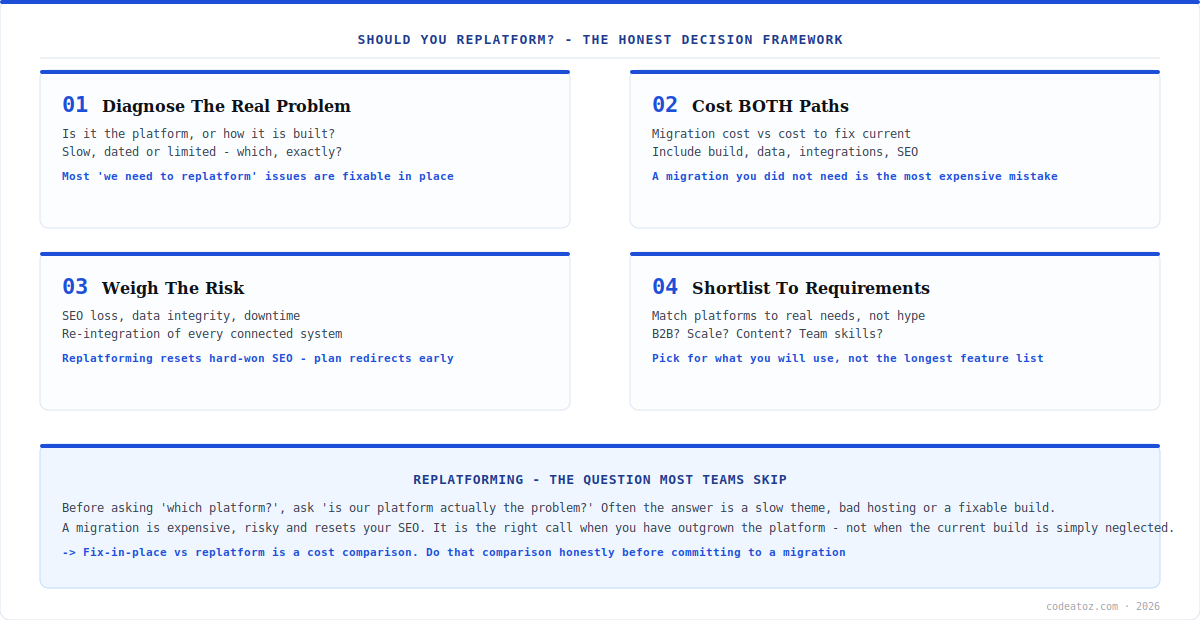
Ecommerce Platform Migration: The Question Teams Skip
The most important step in any ecommerce platform migration decision is the one most teams skip: asking whether the platform is actually the problem. “Our store is slow” leads straight to “we need to replatform” — but slowness is far more often a bad theme, unoptimised images, missing caching or cheap hosting than a fundamental platform limitation. “Our store looks dated” is usually a redesign, not a replatform. “We can’t do X” sometimes means the platform genuinely cannot, and sometimes means nobody has built X yet.
Getting this wrong is the most expensive mistake in ecommerce. An ecommerce platform migration undertaken to fix a problem that a redesign or performance project would have solved costs many times more, carries far more risk, and often leaves the merchant on a new platform with the same underlying issues because the real cause was never diagnosed. So the framework starts here: before evaluating platforms, rigorously establish what the actual problem is.
Ecommerce Platform Migration: Diagnose the Real Problem
Diagnosis means being specific. “Slow” is not a diagnosis — is it a slow server response (a hosting or backend problem), a heavy front end (a theme problem), or genuinely the platform’s ceiling? Our performance guides for Magento and WooCommerce show how often “we need a new platform” turns out to be a fixable build. Profile before you conclude.
Work through each complaint the same way. For “limited”, identify the exact capability you need and confirm the current platform genuinely cannot provide it — not that it would take custom work, but that it is impossible or wildly impractical. For “hard to manage”, separate platform limitations from workflow or training gaps. For “outdated”, ask whether a redesign on the current platform would achieve the goal. Only the complaints that survive this scrutiny — genuine, platform-level limitations you have confirmed cannot be economically fixed in place — justify considering an ecommerce platform migration. Everything else has a cheaper, lower-risk answer.
Ecommerce Platform Migration: Cost Both Paths and Weigh Risk
Once you have genuine platform-level problems, the ecommerce platform migration decision becomes a cost comparison: what does migrating cost versus what does fixing the current platform cost, and what does each deliver? This is where honesty pays off. Migration cost is not just the new platform’s fee — it is design and build, data migration, integration rebuild, SEO work, training and downtime risk, as detailed in our replatforming cost guide. Fixing in place is usually far cheaper. If a performance project and a redesign would solve 80% of the pain at 20% of the cost and risk, that is very often the right call.
The risk side is dominated by one factor teams underestimate: SEO. An ecommerce platform migration changes URLs, page structures and technical foundations, and a botched migration can cut organic traffic for months — a cost that can dwarf the migration invoice. Data integrity (products, orders, customer records migrating cleanly) and downtime are the other major risks. A migration is justified when the platform-level benefit genuinely outweighs this combined cost and risk. When it does not, fixing in place wins.
| Complaint | Often actually | Cheaper fix before migrating |
|---|---|---|
| “Too slow” | Theme, hosting or caching | Performance project |
| “Looks dated” | Design, not platform | Redesign on current platform |
| “Can’t do X” | Not yet built, vs impossible | Custom development |
| “Hard to manage” | Workflow or training gap | Process + training |
| “Won’t scale” | Architecture, not platform | Scaling engineering |
| Genuine platform ceiling | A real limitation | Migration may be justified |
A migration you did not need is the most expensive mistake in ecommerce. The entire point of this ecommerce platform migration framework is to avoid replatforming to fix a problem a redesign or performance project would have solved for a fraction of the cost and risk. Diagnose ruthlessly first. The migration should be the conclusion of an honest comparison, never the reflex answer to frustration.
Ecommerce Platform Migration: Shortlist and Decide
If — and only if — diagnosis confirms genuine platform-level limitations and the cost comparison favours moving, then you shortlist platforms. Match candidates to your actual, confirmed requirements, not to the longest feature list or the loudest marketing. If B2B is your real need, weight native B2B heavily; if content is central, weight that; if you want managed operations, that narrows the field. Our platform comparisons — Magento vs Shopify Plus, Magento vs WooCommerce, Shopify vs WooCommerce — exist to inform exactly this shortlisting step.
Then decide on evidence. A good ecommerce platform migration decision is defensible: here is the confirmed platform-level problem, here is why fixing in place cannot economically solve it, here is the migration cost and risk, here is the chosen platform and why it fits our requirements. A bad one is a reflex — frustration plus a compelling sales demo. If you have worked the framework honestly and a migration still comes out ahead, proceed with confidence and a rigorous SEO and data plan. If it does not, you have saved yourself the most expensive mistake in ecommerce. Our team runs this diagnosis with clients before any migration, because the right answer is sometimes “don’t”.
How we run a replatform decision
We start by trying to talk clients out of it. Not literally, but our first job is to diagnose whether the platform is genuinely the problem. A meaningful share of “we need to replatform” enquiries end with a performance project or a redesign that solves the real pain at a fraction of the cost — and clients are grateful we checked.
SEO risk is the part we make sure clients understand. The migration invoice is visible; the risk of a traffic drop from a botched URL and redirect plan is not, and it can be far larger. We plan redirects, URL mapping and data integrity from the very start of any migration, because retrofitting them after a rankings drop is painful and slow.
We shortlist to confirmed requirements, not feature lists. When a migration is justified, we match platforms to the specific, diagnosed needs — B2B, content, scale, managed operations — rather than the longest spec sheet. The right platform is the one that fits how the business actually operates, which is often not the one with the flashiest demo.
Frequently Asked Questions About Ecommerce Platform Migration
When should I do an ecommerce platform migration?
Only when you have confirmed genuine platform-level limitations that cannot be economically fixed in place, and a cost comparison shows migrating delivers more than fixing the current platform. Most “we need to replatform” situations are actually fixable — a slow theme, bad hosting, a needed redesign — so diagnose ruthlessly before deciding to migrate.
Is my platform the problem, or my store’s build?
Usually the build. “Slow” is more often a heavy theme, unoptimised images, missing caching or cheap hosting than a platform ceiling. “Dated” is usually a redesign. “Can’t do X” sometimes means impossible, sometimes just not yet built. Profile and diagnose specifically before concluding the platform itself is the limitation.
What is the biggest risk in replatforming?
SEO. A migration changes URLs, page structures and technical foundations, and a botched URL and redirect plan can cut organic traffic for months — a cost that can dwarf the migration itself. Data integrity and downtime are the other major risks. Plan redirects, URL mapping and data migration from the very start, not as an afterthought.
How do I decide between migrating and fixing my current store?
Cost both paths honestly. Migration cost includes design, build, data migration, integration rebuild, SEO, training and downtime risk — not just the new platform fee. Fixing in place is usually far cheaper. If a performance project and redesign solve most of the pain at a fraction of the cost and risk, that is very often the right call.
How do I choose a new platform if I do migrate?
Shortlist to your confirmed, diagnosed requirements — not the longest feature list. If B2B is the real need, weight native B2B; if content is central, weight that; if you want managed operations, that narrows the field. Match candidates to how your business actually operates rather than to the most impressive sales demo.
How long does an ecommerce platform migration take?
It varies widely with store complexity, but a serious migration is a project of months, not weeks — covering data migration, front-end rebuild, integration re-wiring, SEO preservation, testing and a careful go-live. Underestimating the timeline is common. Treat it as a major project with proper planning, not a quick switch, and build in contingency.
Considering a Replatform?
Our team diagnoses whether you actually need to migrate — and plans it properly, SEO-first, when you do.




