
The Complete Guide to Scaling WooCommerce for High Traffic 2026
Scaling WooCommerce the right way — cache first, tune the database, scale up then out, and offload heavy work, in the cost order that actually handles high traffic.
Scaling WooCommerce for high traffic is mostly about doing things in the right order — and that order is cost-ascending, not hardware-first. Most stores that think they need bigger servers actually need proper caching and database tuning. Effective scaling WooCommerce means: cache everything you can (cheapest, biggest win), then tune and offload the database (the usual bottleneck), then scale up (a bigger box), then scale out (multiple nodes behind a load balancer), and offload heavy work last. This guide walks that ladder.
Search intent: informational/procedural — WooCommerce developers and store owners preparing for growth or high traffic. We cover caching first, database tuning, scaling up versus out, offloading, the cost order, and flash-sale readiness. It builds on our Redis cache, hosting and TTFB guides.
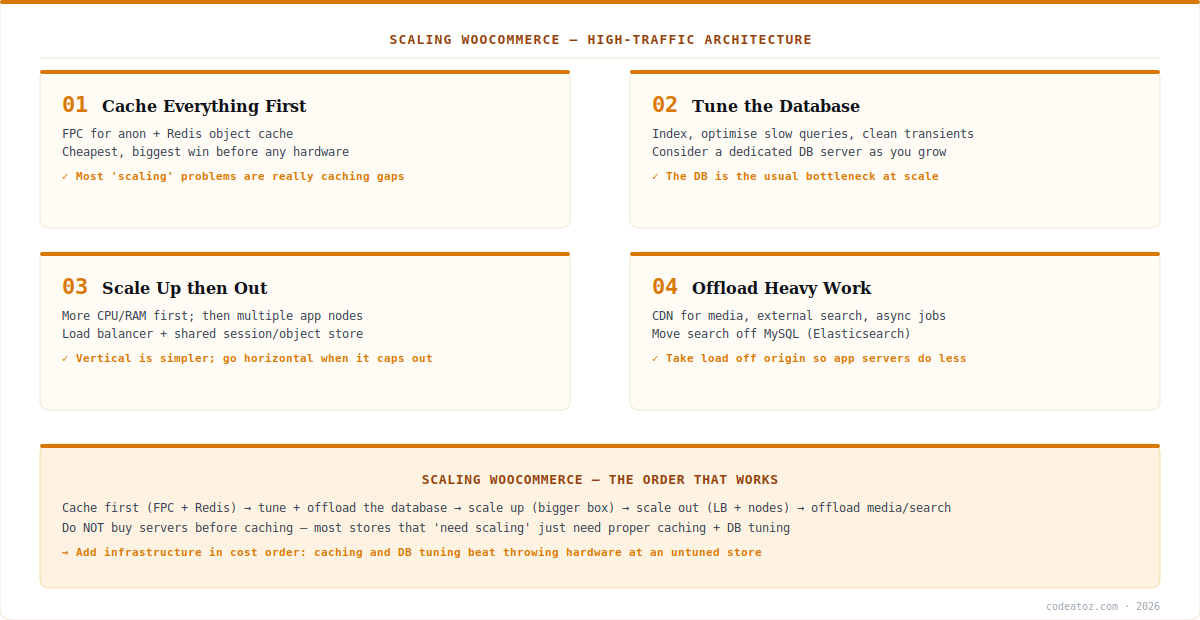
Scaling WooCommerce: Cache First (the Biggest Win)
The first and most important step in scaling WooCommerce is caching, because it is the cheapest way to handle vastly more traffic. Full-page caching serves anonymous visitors complete HTML without running PHP or WooCommerce at all — so a catalogue-browsing surge barely touches your application. A Redis object cache then handles the dynamic, logged-in pages full-page cache cannot. In our experience, most “we need to scale” situations in scaling WooCommerce are really caching gaps: a store buckling under traffic without full-page caching is doing enormous unnecessary work (the Redis docs explain the object-cache layer). Get caching right before spending a penny on hardware — it is the highest-leverage move in scaling WooCommerce, full stop.
Scaling WooCommerce: Database, Scale Up and Scale Out
After caching, the database is the usual bottleneck in scaling WooCommerce. Optimise slow queries, ensure proper indexing, clean up autoloaded options and expired transients, and as you grow, move MySQL to a dedicated database server so it is not fighting PHP for resources. Then comes scaling the infrastructure, and the order matters: scale up first (a bigger server with more CPU and RAM) because it is simpler and often sufficient; scale out (multiple application nodes behind a load balancer, with a shared session and object store) when a single box caps out. Scaling WooCommerce horizontally is more complex — you need shared storage for sessions, media and the object cache so all nodes agree — so reach for it only after vertical scaling and caching are exhausted. The WordPress optimization handbook and WooCommerce high-volume guidance cover the specifics.
| Step | Action | Why this order |
|---|---|---|
| 1. Cache | Full-page + Redis object cache | Cheapest, biggest capacity gain |
| 2. Database | Index, tune, dedicate DB server | The usual bottleneck at scale |
| 3. Scale up | Bigger box (CPU/RAM) | Simplest capacity increase |
| 4. Scale out | Load balancer + multiple nodes | When one box is not enough |
| 5. Offload | CDN, external search, async jobs | Take load off the origin |
Scaling WooCommerce: Offload and Flash Sales
The final rung of scaling WooCommerce is offloading heavy work off the origin: a CDN for all static media, moving product search off MySQL to Elasticsearch (search queries are punishing at scale), and running heavy tasks (emails, exports, syncs) as asynchronous background jobs rather than during page loads. For flash sales and traffic spikes — the hardest test of scaling WooCommerce — combine everything: aggressive full-page caching for the anonymous rush, a well-provisioned dynamic tier for checkout (which cannot be page-cached), database headroom, and ideally load testing beforehand so you discover limits in staging, not during the sale. The through-line of scaling WooCommerce is cost-order discipline: caching and tuning beat buying hardware, and horizontal scaling is a last resort, not a first move. Our WooCommerce team architects high-traffic stores and load-tests them.
What we have learned scaling WooCommerce stores
Most “scaling” tickets are caching tickets. Stores come to us convinced they need bigger servers, and the real fix is full-page caching they never had. We always verify caching and database tuning before recommending any hardware — it resolves the majority of capacity problems at a fraction of the cost.
Checkout is the part you cannot cache away. Anonymous browsing caches beautifully; cart and checkout do not. For flash sales we specifically provision the dynamic tier and database for the checkout load, because that is where a viral sale actually breaks — not on the cacheable catalogue.
Load test before the event, not during it. The teams that survive big sales are the ones who load-tested in staging and found their limits in advance. Discovering your database caps out at 2x expected traffic during the actual sale is avoidable — we simulate the spike first.
Frequently Asked Questions About Scaling WooCommerce
How do I scale WooCommerce for high traffic?
Scale in cost order: cache everything first (full-page cache plus Redis object cache), then tune and offload the database, then scale up to a bigger server, then scale out with multiple nodes behind a load balancer, and offload media and search last. Most scaling WooCommerce problems are solved at the caching stage.
What is the biggest bottleneck when scaling WooCommerce?
After caching gaps, the database is the usual bottleneck. WooCommerce is query-heavy, so slow queries, missing indexes and bloated autoloaded options and transients limit capacity. Optimising the database and, at scale, moving it to a dedicated server is a core step in scaling WooCommerce for high traffic.
Should I scale WooCommerce up or out?
Scale up first. A bigger server with more CPU and RAM is simpler and often sufficient. Scale out — multiple application nodes behind a load balancer with shared session and object storage — only when a single box caps out. In scaling WooCommerce, horizontal scaling is a last resort after caching and vertical scaling are exhausted.
Can caching alone handle high WooCommerce traffic?
Caching handles a surprising amount — full-page caching serves anonymous visitors without running WooCommerce, absorbing browsing surges cheaply. But cart and checkout cannot be page-cached, so scaling WooCommerce for high traffic also needs a well-provisioned dynamic tier and tuned database for the parts caching cannot cover.
How do I prepare WooCommerce for a flash sale?
Combine aggressive full-page caching for anonymous traffic, a well-provisioned dynamic tier and database for checkout (which cannot be cached), Redis object caching, and load testing beforehand to find limits in staging. Scaling WooCommerce for a flash sale is about the uncacheable checkout path plus proven headroom, not just a bigger server.
Should I move WooCommerce search off MySQL when scaling?
At scale, yes. Product search queries are punishing on MySQL under high traffic, so offloading search to Elasticsearch reduces database load significantly. This is part of the offload stage in scaling WooCommerce — along with a CDN for media and async background jobs — to take heavy work off the origin server.
Preparing WooCommerce for Growth or a Big Sale?
Our team architects high-traffic WooCommerce — caching, database, scaling and load testing for flash sales.




