Building a Gemini API WordPress Plugin — vs OpenAI Comparison Guide (2026)
Build a Gemini API WordPress plugin with PHP — API call structure, model comparison with OpenAI, content generation, encrypted key storage, and when to choose Google over OpenAI.
A Gemini API WordPress plugin built with PHP gives you access to Google’s most capable AI models directly from your WordPress dashboard — for content generation, product descriptions, SEO meta writing, and customer support automation. This guide builds a complete Gemini API WordPress plugin from scratch: encrypted API key storage, the PHP request structure for Gemini’s REST API, a side-by-side comparison with OpenAI’s API, and a practical content generator as the working example. By the end of this Gemini API WordPress plugin guide you will know exactly when to choose Gemini over OpenAI and how to build a plugin that can swap between both providers.
Google’s Gemini API has a meaningfully different request format from OpenAI’s Chat Completions API, which means an existing Gemini API WordPress plugin cannot simply swap the endpoint URL. The message structure, model names, safety settings, and response parsing are all different. This guide covers the exact PHP code needed for a production Gemini API WordPress plugin alongside the equivalent OpenAI code so you can see the differences clearly.
Gemini API WordPress Plugin — API Request Structure vs OpenAI
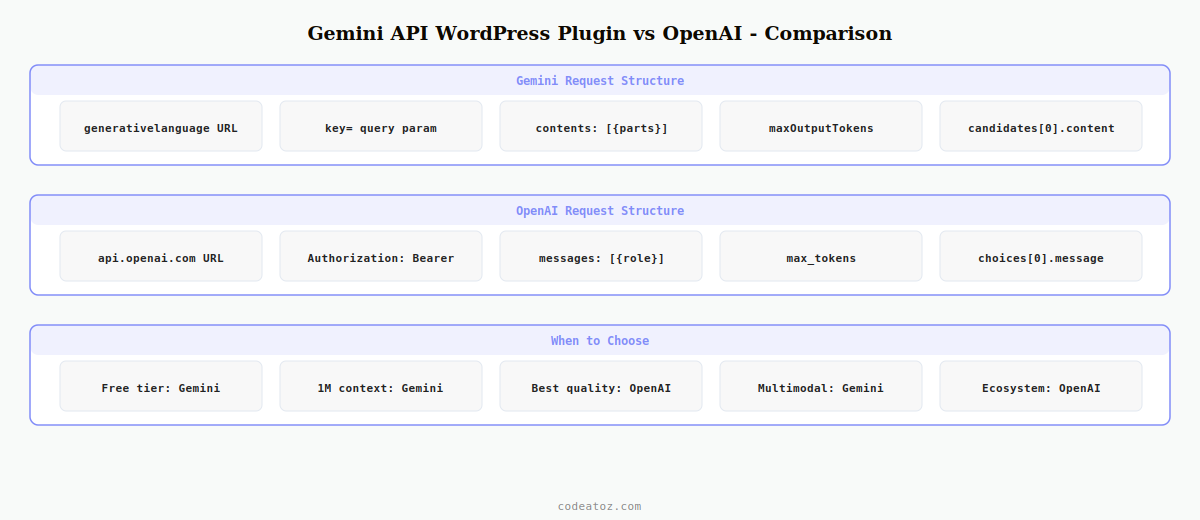
The Gemini API WordPress plugin uses a different endpoint pattern from OpenAI. Instead of a single chat completions URL, Gemini uses a model-specific endpoint with the API key as a query parameter. The message format also differs — Gemini uses contents with parts rather than OpenAI’s messages array.
<?php
class CAZ_Gemini_Client {

    // Gemini API WordPress plugin: endpoint with model and key in URL
    private function get_endpoint( string $model ): string {
        $key = $this->get_api_key();
        return "https://generativelanguage.googleapis.com/v1beta/models/{$model}:generateContent?key={$key}";
    }

    public function generate( string $prompt, string $model = 'gemini-2.0-flash' ): string {
        $response = wp_remote_post( $this->get_endpoint( $model ), [
            'timeout' => 30,
            'headers' => [ 'Content-Type' => 'application/json' ],
            // Gemini API WordPress plugin: contents/parts format (NOT messages)
            'body'    => wp_json_encode([
                'contents' => [[
                    'parts' => [[ 'text' => $prompt ]]
                ]],
                'generationConfig' => [
                    'maxOutputTokens' => 400,
                    'temperature'     => 0.7,
                ],
            ]),
        ]);

        $body = json_decode( wp_remote_retrieve_body( $response ), true );
        // Gemini API WordPress plugin: parse candidates[0].content.parts[0].text
        return $body['candidates'][0]['content']['parts'][0]['text'] ?? '';
    }
}

/* OpenAI equivalent for comparison:
wp_remote_post( 'https://api.openai.com/v1/chat/completions', [
    'headers' => [ 'Authorization' => 'Bearer ' . $key ],
    'body'    => wp_json_encode([
        'model'    => 'gpt-4o-mini',
        'messages' => [[ 'role' => 'user', 'content' => $prompt ]],
    ]),
]);
// Parse: $body['choices'][0]['message']['content']
*/
Gemini API WordPress Plugin — Model Comparison with OpenAI (2026)
Choosing between a Gemini API WordPress plugin and an OpenAI plugin depends on your use case, budget, and context window requirements. Here is how the key models compare in 2026:
| Model | Provider | Context window | Best for | Free tier |
|---|---|---|---|---|
| Gemini 2.0 Flash | 1M tokens | Fast generation, large docs, Gemini API WordPress plugin default | Yes (generous) | |
| Gemini 2.0 Pro | 2M tokens | Complex reasoning, multimodal | Limited | |
| GPT-4o mini | OpenAI | 128K tokens | Cost-effective generation, WooCommerce plugins | No |
| GPT-4o | OpenAI | 128K tokens | Highest quality output | No |
The key advantage of a Gemini API WordPress plugin over OpenAI in 2026 is the free tier — Gemini 2.0 Flash offers a generous free quota via Google AI Studio that is suitable for low-to-medium volume WordPress plugins without any billing setup. The 1M token context window is also transformative for tasks like summarising long documents or processing entire WooCommerce catalogues in a single API call.
Gemini API WordPress Plugin — Encrypted Key Storage
The Gemini API key for your WordPress plugin should be stored with the same encryption approach as any other AI API key. Use WordPress’s native options encryption or AES-256-CBC via OpenSSL — the key must never be stored in plain text in the database.
// Register Gemini API WordPress plugin settings
add_action( 'admin_init', function() {
    register_setting( 'caz_gemini_settings', 'caz_gemini_api_key', [
        'sanitize_callback' => function( $val ) {
            // Encrypt before saving for the Gemini API WordPress plugin
            if ( $val ) {
                $iv  = random_bytes( 16 );
                $enc = openssl_encrypt( $val, 'AES-256-CBC',
                    substr( hash( 'sha256', AUTH_KEY . SECURE_AUTH_SALT ), 0, 32 ), 0, $iv );
                return base64_encode( $iv . $enc );
            }
            return get_option( 'caz_gemini_api_key', '' );
        },
    ]);
});

// Decrypt the Gemini API WordPress plugin key for use
function caz_get_gemini_key(): string {
    $stored = get_option( 'caz_gemini_api_key', '' );
    if ( ! $stored ) return '';
    $raw = base64_decode( $stored );
    $iv  = substr( $raw, 0, 16 );
    $enc = substr( $raw, 16 );
    $key = substr( hash( 'sha256', AUTH_KEY . SECURE_AUTH_SALT ), 0, 32 );
    return openssl_decrypt( $enc, 'AES-256-CBC', $key, 0, $iv ) ?: '';
}
Gemini API WordPress Plugin — Practical Content Generator
A practical Gemini API WordPress plugin use case is generating post excerpts, SEO meta descriptions, or product summaries from existing content. The 1M token context window means you can pass entire posts to the Gemini API WordPress plugin without truncation.
add_action( 'wp_ajax_caz_gemini_generate', 'caz_gemini_generate_content' );

function caz_gemini_generate_content(): void {
    check_ajax_referer( 'caz-gemini-nonce', 'nonce' );
    if ( ! current_user_can( 'edit_posts' ) ) wp_send_json_error( 'Unauthorised', 403 );

    $post_id = absint( $_POST['post_id'] ?? 0 );
    $task    = sanitize_key( $_POST['task'] ?? 'excerpt' );
    $post    = get_post( $post_id );
    if ( ! $post ) wp_send_json_error( 'Post not found', 404 );

    $content = wp_strip_all_tags( $post->post_content );
    $prompts = [
        'excerpt'  => "Write a compelling 2-sentence excerpt for this blog post in British English:nn" . $content,
        'meta'     => "Write an SEO meta description under 155 characters for this post:nn" . $content,
        'summary'  => "Summarise the key points of this article in 3 bullet points:nn" . $content,
    ];

    $prompt = $prompts[ $task ] ?? $prompts['excerpt'];

    $client = new CAZ_Gemini_Client();
    $result = $client->generate( $prompt );

    wp_send_json_success([ 'content' => $result, 'task' => $task ]);
}
The Google Gemini API documentation covers all available models and request parameters for your Gemini API WordPress plugin. The Gemini model reference lists current model names, context windows, and pricing. See our OpenAI WooCommerce plugin guide for the equivalent OpenAI implementation, and our WooCommerce AI recommendations guide for embedding-based approaches that also work with Google’s Embedding API.
💡 When to choose a Gemini API WordPress plugin over OpenAI: choose Gemini when you need a free tier for a client site without billing setup, when your task involves very long documents that exceed GPT-4o’s 128K context window, or when you want multimodal capabilities (image analysis alongside text) without additional cost. Choose OpenAI when output quality on short-to-medium tasks is the top priority and cost is secondary.
Frequently Asked Questions — Gemini API WordPress Plugin
How do I build a Gemini API WordPress plugin in PHP?
Get an API key from Google AI Studio at aistudio.google.com. Store it encrypted in WordPress options using AES-256-CBC. In your plugin’s AJAX handler, call the Gemini REST endpoint at generativelanguage.googleapis.com/v1beta/models/{model}:generateContent with the key as a query parameter. The request body uses a contents array with parts rather than OpenAI’s messages format. Parse the response from candidates[0].content.parts[0].text.
Is there a free tier for a Gemini API WordPress plugin?
Yes — Google AI Studio provides a free tier for the Gemini API that is available without billing setup. Gemini 2.0 Flash on the free tier allows a generous number of requests per minute and per day, making it suitable for low-to-medium volume WordPress plugins. The free tier has no credit card requirement. Paid tiers are available for higher throughput Gemini API WordPress plugin deployments.
How is the Gemini API WordPress plugin request different from OpenAI?
Three key differences: the endpoint includes the model name and API key as a URL parameter rather than an Authorization header. The request body uses contents with parts arrays rather than OpenAI’s messages array with role and content fields. The response parses from candidates[0].content.parts[0].text rather than choices[0].message.content. The rest of the Gemini API WordPress plugin pattern — AJAX handler, nonce, wp_remote_post — is identical to the OpenAI approach.
Which Gemini model should I use for a WordPress plugin in 2026?
Use gemini-2.0-flash as the default for a Gemini API WordPress plugin in 2026. It is the fastest and most cost-effective model, handles content generation tasks well, and has a 1 million token context window. Use gemini-2.0-pro when tasks require deeper reasoning or multimodal capabilities. Avoid the experimental and preview models in production Gemini API WordPress plugin builds as their APIs may change without notice.
Can a Gemini API WordPress plugin handle multimodal inputs like images?
Yes — Gemini’s native multimodal capability means a Gemini API WordPress plugin can accept images alongside text in the same request. Pass image data as base64 in the parts array alongside the text prompt. This enables use cases like automatic alt text generation from uploaded images, product image description for WooCommerce, and visual content moderation — all from a single Gemini API WordPress plugin request without a separate image analysis API.
Should I build a Gemini API WordPress plugin or an OpenAI WordPress plugin?
Build a Gemini API WordPress plugin when: you need a free tier without billing setup, the task involves documents longer than 128K tokens (Gemini supports 1M), or multimodal image and text processing is required. Choose an OpenAI plugin when: output quality on short creative tasks is the priority, the project already uses OpenAI for other integrations, or you need the reliability of a more mature ecosystem. Both can be built with the same WordPress AJAX and nonce architecture.
Need a Custom AI Plugin for WordPress?
CodeAtoZ builds Gemini API WordPress plugins and OpenAI integrations — content generators, chatbots, SEO tools, and product description automation.