Building a WooCommerce AI Chatbot in PHP with OpenAI (2026)
Build a WooCommerce AI chatbot with PHP and OpenAI — AJAX backend, conversation history, order status lookup, product search context, and streaming responses.
A WooCommerce AI chatbot powered by OpenAI can handle the majority of customer support queries automatically — order status lookups, shipping questions, product comparisons, and return policy explanations — without a human agent. This guide builds a complete WooCommerce AI chatbot in PHP: a WordPress AJAX handler that maintains conversation history, injects WooCommerce store context into the system prompt, looks up real order data for authenticated customers, and streams responses back to the browser for a responsive chat experience. The entire WooCommerce AI chatbot runs server-side — the OpenAI API key never touches the browser.
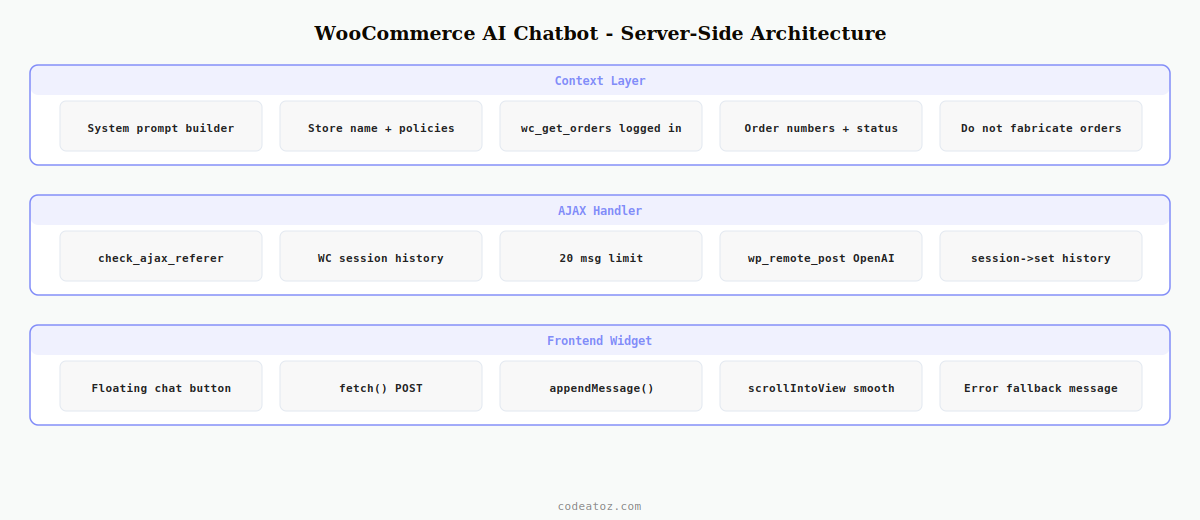
The architecture for a WooCommerce AI chatbot follows the same secure server-side pattern as our earlier guides in this series: WordPress AJAX handles the request, PHP calls OpenAI, and the conversation history is stored in the WordPress session. What makes this WooCommerce AI chatbot more powerful than a generic chatbot is the store-specific context injected into every request — the system prompt includes the store’s return policy, shipping information, and (for logged-in customers) their actual order history.
Step 1: WooCommerce AI Chatbot — System Prompt with Store Context
The system prompt is what transforms a generic OpenAI integration into a WooCommerce AI chatbot that knows your store. It includes your store name, return policy, shipping times, and — for logged-in customers — their recent orders and order statuses.
<?php
class CAZ_Chatbot_Context {

    public static function build_system_prompt(): string {
        $store_name = get_bloginfo( 'name' );
        $currency   = get_woocommerce_currency();

        $base = "You are a helpful customer support assistant for {$store_name}, a WooCommerce store.
You help customers with orders, shipping, returns, and product questions.
Always be polite and concise. Currency is {$currency}.

STORE POLICIES:
- Returns: 30 days for unused items in original packaging.
- Shipping: UK standard 3-5 business days. Express 1-2 days.
- Contact: support@{$store_name}.com for escalations.

IMPORTANT: You are a WooCommerce AI chatbot. Do not make up order details.
Only report order information provided to you in this prompt.";

        // Add customer order history for logged-in users
        if ( is_user_logged_in() ) {
            $customer_id = get_current_user_id();
            $orders = wc_get_orders([
                'customer_id' => $customer_id,
                'limit'       => 5,
                'orderby'     => 'date',
                'order'       => 'DESC',
            ]);

            if ( $orders ) {
                $base .= "nnCUSTOMER'S RECENT ORDERS (use for order status queries):";
                foreach ( $orders as $order ) {
                    $base .= sprintf(
                        "n- Order #%s | Status: %s | Total: %s | Date: %s",
                        $order->get_order_number(),
                        wc_get_order_status_name( $order->get_status() ),
                        $order->get_formatted_order_total(),
                        $order->get_date_created()->date( 'd M Y' )
                    );
                }
            }
        }

        return $base;
    }
}
Step 2: WooCommerce AI Chatbot — AJAX Handler with Conversation History
The AJAX handler is the core of the WooCommerce AI chatbot. It reads the conversation history from the session, appends the new user message, calls OpenAI, appends the assistant response, and saves the updated history back to the session for the next turn.
add_action( 'wp_ajax_caz_chatbot_message',        'caz_chatbot_handle_message' );
add_action( 'wp_ajax_nopriv_caz_chatbot_message', 'caz_chatbot_handle_message' );

function caz_chatbot_handle_message(): void {
    check_ajax_referer( 'caz-chatbot-nonce', 'nonce' );

    $user_message = sanitize_text_field( $_POST['message'] ?? '' );
    if ( ! $user_message ) wp_send_json_error( 'Empty message', 400 );

    // Load conversation history from WooCommerce session for this chatbot
    WC()->session->set_customer_session_cookie( true );
    $history = WC()->session->get( 'caz_chatbot_history', [] );

    // Limit history to last 10 turns to control token costs
    if ( count( $history ) > 20 ) {
        $history = array_slice( $history, -20 );
    }

    // Append user message to WooCommerce AI chatbot history
    $history[] = [ 'role' => 'user', 'content' => $user_message ];

    $api_key  = CAZ_AI_KeyManager::get();
    $response = wp_remote_post( 'https://api.openai.com/v1/chat/completions', [
        'timeout' => 30,
        'headers' => [
            'Authorization' => 'Bearer ' . $api_key,
            'Content-Type'  => 'application/json',
        ],
        'body' => wp_json_encode([
            'model'       => 'gpt-4o-mini',
            'max_tokens'  => 400,
            'temperature' => 0.5,
            'messages'    => array_merge(
                [[ 'role' => 'system', 'content' => CAZ_Chatbot_Context::build_system_prompt() ]],
                $history
            ),
        ]),
    ]);

    if ( is_wp_error( $response ) ) wp_send_json_error( 'API error', 500 );

    $body       = json_decode( wp_remote_retrieve_body( $response ), true );
    $assistant  = $body['choices'][0]['message']['content'] ?? '';

    if ( ! $assistant ) wp_send_json_error( 'No response from AI', 500 );

    // Save assistant reply to WooCommerce AI chatbot history
    $history[] = [ 'role' => 'assistant', 'content' => $assistant ];
    WC()->session->set( 'caz_chatbot_history', $history );

    wp_send_json_success([
        'message'    => $assistant,
        'turn_count' => count( $history ) / 2,
    ]);
}
Step 3: WooCommerce AI Chatbot — Frontend Widget JavaScript
The frontend widget for the WooCommerce AI chatbot is a floating chat button that expands into a conversation panel. It sends messages via fetch and appends responses to the message list — no jQuery required.
async function sendMessage( message ) {
  appendMessage( 'user', message );
  setLoading( true );

  const body = new URLSearchParams({
    action:  'caz_chatbot_message',
    nonce:   cazChatbot.nonce,
    message: message,
  });

  try {
    const res  = await fetch( cazChatbot.ajaxUrl, { method: 'POST', body });
    const data = await res.json();

    if ( data.success ) {
      appendMessage( 'assistant', data.data.message );
    } else {
      appendMessage( 'assistant', 'Sorry, I am having trouble responding. Please try again.' );
    }
  } catch {
    appendMessage( 'assistant', 'Connection error. Please check your internet and try again.' );
  } finally {
    setLoading( false );
  }
}

function appendMessage( role, text ) {
  const el = document.createElement( 'div' );
  el.className = 'caz-chat-message caz-chat-message--' + role;
  el.textContent = text;
  document.querySelector( '.caz-chat-messages' ).appendChild( el );
  el.scrollIntoView({ behavior: 'smooth' });
}
The OpenAI Chat Completions documentation covers the messages array format and conversation history pattern. The WooCommerce session documentation covers the session API used to persist chatbot history. See our OpenAI WooCommerce plugin guide for the secure key storage pattern this chatbot uses, and our WooCommerce AI recommendations guide for the embedding-based approach to product suggestions.
💡 Cost control tip: limit the WooCommerce AI chatbot history to the last 10 turns (20 messages) before each API call. Keeping the full conversation history grows the input token count on every message and significantly increases cost on long conversations. A 10-turn window retains enough context for coherent multi-step support without unbounded token usage.
Frequently Asked Questions — WooCommerce AI Chatbot
How do I build a WooCommerce AI chatbot with OpenAI?
Register a WordPress AJAX action for both logged-in and guest users. In the handler, verify the nonce, load conversation history from the WooCommerce session, append the user message, call the OpenAI Chat Completions API with your system prompt and history, save the assistant response back to the session, and return it as JSON. The WooCommerce AI chatbot’s intelligence comes from a store-specific system prompt injected on every API call.
How do I give the WooCommerce AI chatbot access to real order data?
For logged-in customers, fetch their recent orders via wc_get_orders() filtered by customer ID and include the order numbers, statuses, totals, and dates as structured text in the system prompt. The WooCommerce AI chatbot then has this data available for every turn of the conversation without additional API calls. Always include a clear instruction telling the model not to fabricate order information beyond what is provided.
How do I store WooCommerce AI chatbot conversation history?
Use WC()->session->get() and WC()->session->set() to store the messages array between AJAX requests. The WooCommerce session is tied to the browser session via a cookie and handles both logged-in and guest users. Limit the stored history to the last 20 messages to avoid growing token usage on the WooCommerce AI chatbot API call. Clear the history when the session ends or when the user starts a new conversation.
Is a WooCommerce AI chatbot GDPR compliant?
GDPR compliance for a WooCommerce AI chatbot requires several measures: inform users their messages are processed by a third-party AI (OpenAI) in your privacy policy, do not send customer PII (email, address) to the API unless strictly necessary, enable OpenAI’s zero data retention option if available for your tier, and provide a way for customers to clear their chatbot history on request. Store conversation history only as long as the active session, not permanently.
How do I prevent the WooCommerce AI chatbot from making up answers?
Include explicit instructions in the system prompt: “Only answer based on the information provided to you. If you do not know the answer, say so and provide the support email address.” Set temperature to 0.3-0.5 (lower is more factual) in the OpenAI API call. Include all the specific facts (return policy, shipping times, contact details) directly in the system prompt so the WooCommerce AI chatbot has accurate information to draw from rather than generating plausible-sounding answers.
What does a WooCommerce AI chatbot cost to run?
Using GPT-4o mini at approximately 600 tokens per turn (400 input including history + 200 output), a WooCommerce AI chatbot costs roughly $0.0003 per conversation turn — about $0.001-0.003 per complete support conversation. At 1,000 conversations per month this is $1-3 per month. GPT-4o is around 15x more expensive but produces noticeably better responses for complex support queries. Set a monthly spend cap in your OpenAI dashboard regardless of model choice.
Need an AI Chatbot for Your WooCommerce Store?
CodeAtoZ builds production WooCommerce AI chatbots — order lookup, product guidance, returns handling, and handoff to human agents.