
Hide Price WooCommerce — The Complete Guide 2026
This is CodeAtoZ’s hide price WooCommerce complete guide — covering every scenario where you need to control price visibility in WooCommerce. Whether you run a B2B trade portal, a wholesale catalogue, a price-on-request bespoke store, or a members-only shop, this hide price WooCommerce guide series gives you the PHP code to implement each pattern and explains when the code-free plugin approach makes more sense.
Hide Price WooCommerce: The 5 Core Scenarios
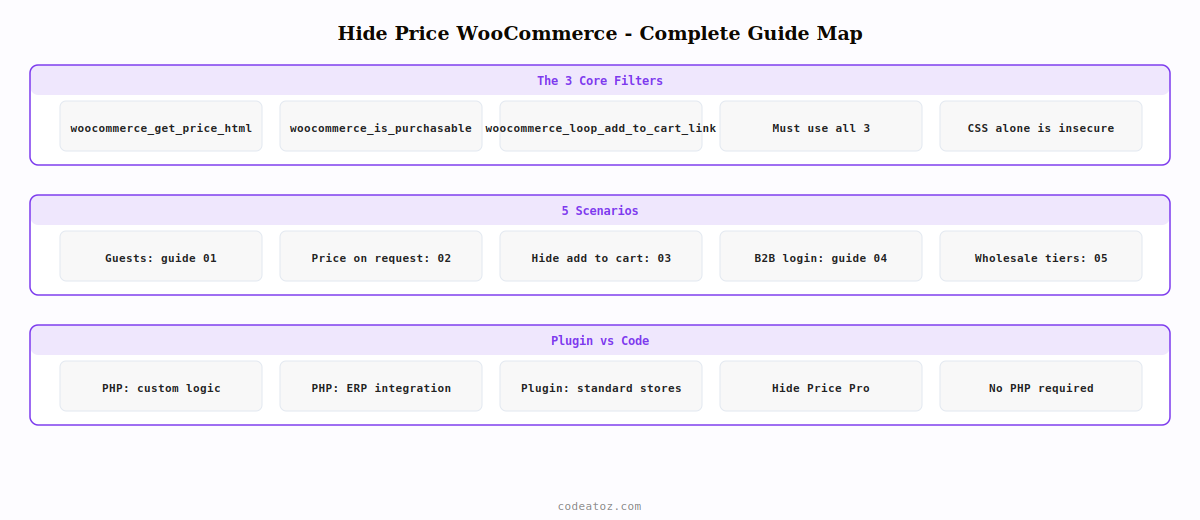
Every hide price WooCommerce requirement falls into one of five scenarios. Identify which one matches your store and jump to the relevant guide:
GUIDE 02Price on RequestReplace price with enquiry button — per-product toggle, contact form integration
GUIDE 03Hide Add to Cart ButtonRemove by role, category, or product — with AJAX cart protection
GUIDE 04B2B Login to See PriceRegistration gating, admin approval workflow, price reveal on login
GUIDE 05Wholesale Price HiddenMulti-tier visibility, hide RRP from trade buyers, dual-price catalogues
Hide Price WooCommerce: Which Scenario Fits Your Store?
Use this decision guide to find the right hide price WooCommerce approach for your business model:
- Trade portal / wholesale-only store: Guide 01 (hide price for guests) + Guide 04 (B2B login to see price) — guests see a registration prompt, approved trade accounts see pricing
- Mixed retail and wholesale catalogue: Guide 05 (wholesale price hidden) — retail customers see RRP, wholesale customers see trade pricing, neither sees the other’s price
- Bespoke or custom-order products: Guide 02 (price on request) — no published price, enquiry button links to contact form with product context
- Catalogue-only / no online sales: Guide 03 (hide add to cart button) globally — products visible but non-purchasable, enquiry or phone call required
- Members-only store: Guide 01 combined with Guide 03 — hide both price and add to cart button from non-members
Hide Price WooCommerce: The Correct Filter Architecture
All five hide price WooCommerce guides build on the same three-filter foundation. Understanding this architecture helps you combine scenarios — for example, adding a per-product price on request toggle to an existing B2B trade portal.
The three essential hide price WooCommerce filters:
1. woocommerce_get_price_html — controls what price HTML is displayed to the visitor. Return your custom HTML (login prompt, enquiry button, trade price) or return the original price string.
2. woocommerce_is_purchasable — controls whether the product can be added to cart at all. Returning false removes the add-to-cart button and blocks all purchase attempts including direct URL adds.
3. woocommerce_loop_add_to_cart_link — controls the button HTML in product archives (shop page, category pages). Return replacement HTML or an empty string to remove it.
Every hide price WooCommerce implementation that does not use all three filters is incomplete. Hiding price display without blocking purchases leaves the add-to-cart URL active. Blocking purchases without replacing the archive button leaves a broken UI. The three filters together give a complete, professional hide price WooCommerce experience.
Hide Price WooCommerce: Code Method vs Plugin
Each guide in this hide price WooCommerce series covers both the PHP code method and the plugin method. The PHP code method is right for developers who need custom logic — unusual role structures, integration with ERP systems, or price visibility rules that change based on order history. The plugin method is right for stores that need a reliable, maintained solution without ongoing PHP maintenance.
For most WooCommerce stores, the PHP code provided in each guide is a solid starting point. For stores where the hide price WooCommerce logic is business-critical — a trade portal handling significant wholesale volume — a dedicated plugin with a support contract gives you confidence that the price visibility rules will continue to work correctly as WooCommerce updates.
Hide Price Pro — WooCommerce Price Visibility Plugin
Hide Price Pro implements every scenario in this hide price WooCommerce guide through a WordPress admin configuration panel — no PHP, no theme file editing, no maintenance. Includes: guest price hiding, role-based visibility, per-product and per-category overrides, price on request mode, add-to-cart control, B2B registration gating, wholesale tier management, AJAX cart protection, HPOS compatibility, and WooCommerce Blocks support.
The five guides in this hide price WooCommerce series use WooCommerce 7.x and 8.x running on PHP 8.x. All code examples are HPOS-compatible — they use WooCommerce’s price display and purchasability filters which are unaffected by order storage. The WooCommerce pricing developer documentation is the authoritative reference for all price filters used across this hide price WooCommerce guide. The WooCommerce cart documentation covers the purchasability filter in detail, and the WordPress filter documentation explains the filter priority system used throughout these hide price WooCommerce guides.
Need Price Visibility Control on Your WooCommerce Store?
CodeAtoZ builds custom hide price WooCommerce implementations for complex B2B trade portals, and our Hide Price Pro plugin handles standard wholesale visibility rules without code.




