
WooCommerce Hide Add to Cart Button — By Role, Category & Product (2026)
Knowing how to hide add to cart button in WooCommerce is essential for B2B stores, catalogue-only sites, and trade portals where visitors can browse products but purchasing is restricted. The WooCommerce hide add to cart button implementation must go beyond CSS — simply hiding the button with CSS still allows determined users to add products to cart via direct URL. A proper WooCommerce hide add to cart button setup uses the woocommerce_is_purchasable filter to block purchases at the data layer, combined with button removal on the product page and product archives. This guide covers four scenarios: global removal, role-based removal, category-level removal, and per-product removal.
The most important principle when implementing WooCommerce hide add to cart button is to never rely on CSS alone. A customer who inspects the page source or knows WooCommerce’s URL patterns can add ?add-to-cart=PRODUCT_ID to any URL and bypass CSS-hidden buttons. The only reliable WooCommerce hide add to cart button approach combines the woocommerce_is_purchasable filter (which blocks the purchase at the PHP level) with the button display filters.
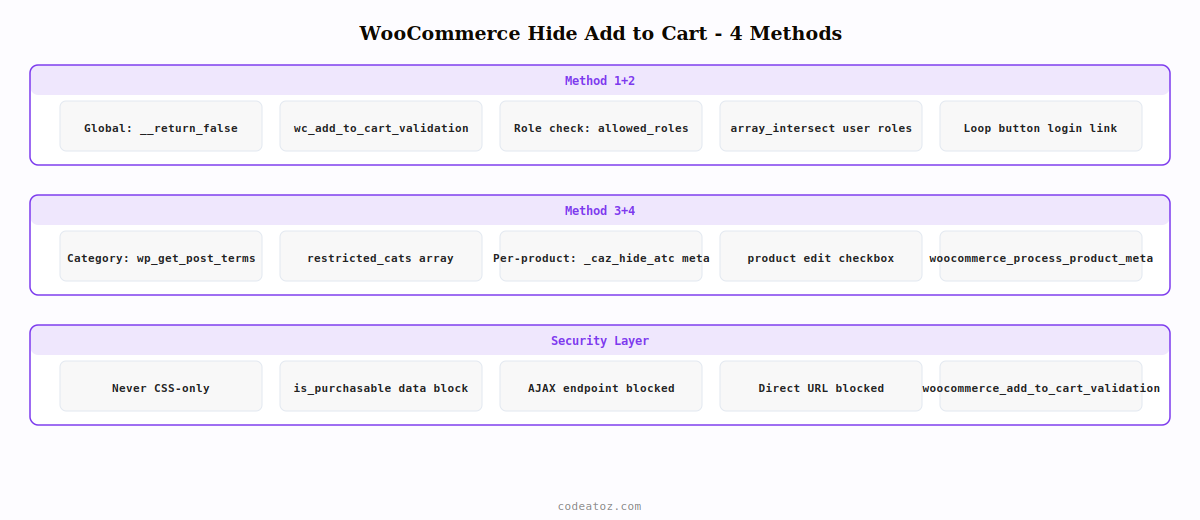
WooCommerce Hide Add to Cart Button — Method 1: Global Removal
To hide the add to cart button globally across all products — making your WooCommerce store a catalogue-only site — hook into woocommerce_is_purchasable and both button display filters. This is the simplest WooCommerce hide add to cart button implementation.
<?php
// Global WooCommerce hide add to cart button — catalogue-only mode
add_filter( 'woocommerce_is_purchasable',        '__return_false' );
add_filter( 'woocommerce_add_to_cart_validation', '__return_false' );

// Remove "Add to cart" text from single product page button
add_filter( 'woocommerce_product_single_add_to_cart_text', function() {
    return __( 'View product', 'caz-b2b' );
});

// Remove loop button entirely for WooCommerce hide add to cart button
add_filter( 'woocommerce_loop_add_to_cart_link', function() {
    return '';   // empty string removes the button from archives
});
WooCommerce Hide Add to Cart Button — Method 2: By User Role
Role-based WooCommerce hide add to cart button is the most common B2B pattern: retail visitors see the button, approved trade customers see it, but unapproved or guest visitors see a login or registration prompt instead.
<?php
function caz_user_can_purchase(): bool {
    $allowed_roles = apply_filters( 'caz_purchasable_roles', [
        'wholesale_customer',
        'trade_customer',
        'customer',          // standard WooCommerce customer can always buy
        'administrator',
    ]);
    $user = wp_get_current_user();
    return ! empty( array_intersect( $allowed_roles, (array) $user->roles ) );
}

// WooCommerce hide add to cart button: block purchase at data layer
add_filter( 'woocommerce_is_purchasable', function( bool $purchasable ): bool {
    if ( ! caz_user_can_purchase() ) return false;
    return $purchasable;
});

// Replace archive button with login link for WooCommerce hide add to cart
add_filter( 'woocommerce_loop_add_to_cart_link', function( string $button, WC_Product $product ): string {
    if ( caz_user_can_purchase() ) return $button;
    return '<a href="' . esc_url( wp_login_url() ) . '" class="button">'
        . __( 'Login to purchase', 'caz-b2b' )
        . '</a>';
}, 10, 2 );
WooCommerce Hide Add to Cart Button — Method 3: By Category
Hide the add to cart button only on products in specific categories — useful for stores that sell both retail products and trade-only items in the same catalogue.
<?php
add_filter( 'woocommerce_is_purchasable', 'caz_hide_atc_by_category', 10, 2 );

function caz_hide_atc_by_category( bool $purchasable, WC_Product $product ): bool {
    // WooCommerce hide add to cart button for these category slugs
    $restricted_cats = apply_filters( 'caz_restricted_purchase_cats', [
        'trade-only',
        'enquire-to-buy',
    ]);
    $product_cats = wp_get_post_terms( $product->get_id(), 'product_cat', [ 'fields' => 'slugs' ] );
    if ( ! empty( array_intersect( $restricted_cats, (array) $product_cats ) ) ) {
        return false;
    }
    return $purchasable;
}
WooCommerce Hide Add to Cart Button — Method 4: Per-Product Toggle
Add a per-product checkbox to enable WooCommerce hide add to cart button on specific products without affecting the rest of the catalogue.
<?php
// Add checkbox to product edit — WooCommerce hide add to cart button
add_action( 'woocommerce_product_options_general_product_data', function() {
    woocommerce_wp_checkbox([
        'id'    => '_caz_hide_atc',
        'label' => __( 'Hide add to cart button', 'caz-b2b' ),
    ]);
});

add_action( 'woocommerce_process_product_meta', function( int $id ) {
    update_post_meta( $id, '_caz_hide_atc', isset( $_POST['_caz_hide_atc'] ) ? 'yes' : 'no' );
});

add_filter( 'woocommerce_is_purchasable', function( bool $purchasable, WC_Product $product ): bool {
    if ( 'yes' === $product->get_meta( '_caz_hide_atc' ) ) return false;
    return $purchasable;
}, 10, 2 );
⚠ Never use CSS to hide the add to cart button as your only WooCommerce hide add to cart button method. The button may be hidden visually, but the add-to-cart URL and AJAX endpoint remain active. Always combine button removal with the woocommerce_is_purchasable filter and the woocommerce_add_to_cart_validation filter to block purchases at the server level.
The WooCommerce cart documentation covers the woocommerce_is_purchasable filter in detail. The WooCommerce add to cart documentation covers all available hooks. See our guide on WooCommerce hide price for guests which uses the same filter architecture, and our WooCommerce B2B wholesale pricing guide for the role-based system that typically accompanies WooCommerce hide add to cart button implementations.
Hide Price Pro — Complete Add to Cart Control
Hide add to cart button by role, category, or per product — with AJAX protection, custom replacement text, and a configuration panel. No PHP required.
Frequently Asked Questions — WooCommerce Hide Add to Cart Button
How do I hide the add to cart button in WooCommerce without CSS?
Use the woocommerce_is_purchasable filter to return false for the products or users where you want to hide add to cart. This removes the button from the product page template and prevents all purchase attempts including direct URL adds. Combine with woocommerce_loop_add_to_cart_link returning an empty string or replacement button for archive pages. This is the only reliable WooCommerce hide add to cart button approach.
Can I still show the product price when hiding the add to cart button?
Yes — the woocommerce_is_purchasable filter removes the purchase capability without affecting price display. You can hide add to cart button while keeping the price visible by only hooking the purchasable filter and the loop button filter, leaving the woocommerce_get_price_html filter untouched. This is useful for catalogue sites that want to show pricing for reference but not allow direct purchases.
How do I hide add to cart button for guests but show it for logged-in customers?
Add a is_user_logged_in() check inside the woocommerce_is_purchasable filter. Return false when the user is not logged in, and return the original $purchasable value when logged in. Replace the archive button with a login link for guests using woocommerce_loop_add_to_cart_link. This gives you a WooCommerce hide add to cart button implementation that restores the button immediately upon login.
Does WooCommerce hide add to cart button affect the mini cart widget?
Yes — when woocommerce_is_purchasable returns false, the product cannot be added to the cart by any method, including the mini cart. The add-to-cart AJAX endpoint also respects this filter, so AJAX-based add-to-cart attempts are blocked server-side. The mini cart and cart page will not show any quantity or add button for products where WooCommerce hide add to cart button is active via the purchasable filter.
How do I replace the hidden add to cart button with custom text or a button?
Return custom HTML from the woocommerce_loop_add_to_cart_link filter for archives and use the woocommerce_template_single_add_to_cart action to replace the single product page button. You can return a contact link, a custom register link, or a static text span. Always return valid HTML — returning an empty string removes the button entirely, while returning a link or button HTML replaces it with your custom WooCommerce hide add to cart button alternative.
What is the difference between removing and hiding the add to cart button in WooCommerce?
Hiding via CSS removes the button visually but leaves the purchase endpoints active. Removing via woocommerce_is_purchasable disables purchases at the data level — the button template is not rendered, the AJAX endpoint returns an error, and direct URL add-to-cart is blocked. For any serious WooCommerce hide add to cart button implementation in a B2B or restricted-access store, always use the filter method, not CSS.
Need Add to Cart Control on Your WooCommerce Store?
Hide Price Pro handles WooCommerce hide add to cart button by role, category, and product — with full AJAX protection and no code required.




