
wp2shell: How to Check If Your WordPress Site Was Compromised
wp2shell (CVE-2026-63030 + CVE-2026-60137) is a pre-authentication RCE in WordPress core, exploited in the wild since 20 July 2026. Updating closes the door — it does not evict anyone already inside.
wp2shell is the name given to a pre-authentication remote code execution chain in WordPress core, patched on 17 July 2026 and exploited in the wild within days. The critical detail most coverage skips: applying the update stops future exploitation, but it does nothing about a webshell already placed on your server. If your site ran an affected version while exposed to the internet during that window, patching alone is not an answer — you need to check. This guide covers wp2shell indicators of compromise, what to search your logs for, and what to do if you find something.
Search intent: urgent operational — WordPress developers and site owners who have patched and now need to know whether they were hit. We cover the vulnerability, affected versions, indicators of compromise, log analysis, incident response and hardening. It complements our WordPress 7 upgrade guide and plugin backdoor analysis.
Read this first. If you have not yet confirmed your version, do that now: you need 7.0.2, 6.9.5 or 6.8.6. WordPress enabled forced auto-updates, but forced updates do not reach every install — disabled updates, read-only filesystems and version-locked deployments all miss. Confirm, do not assume.
wp2shell: What Actually Happened
wp2shell chains two vulnerabilities disclosed together on 17 July 2026. CVE-2026-63030 is a route-confusion flaw in the REST API batch endpoint (/wp-json/batch/v1), which processes multiple sub-requests in a single HTTP call; improper handling lets a malformed sub-request cause later requests to be routed to unintended handlers, bypassing endpoint allow-lists. CVE-2026-60137 is a SQL injection in the author__not_in parameter of WP_Query, reachable because passing a string instead of an array bypasses type checks.
Individually, each is serious but constrained. Chained, they give an unauthenticated attacker code execution on a default install — no account, no plugins, no user interaction. That is why the WordPress security team took the unusual step of enabling forced background updates, and why wp2shell matters more than the average core advisory. The researchers who found it, at Searchlight Cyber, stated the attack has no preconditions and works against a stock install. See the official WordPress 7.0.2 release note and the Searchlight Cyber advisory.
wp2shell: Which Versions Are Affected
Version scope matters here because the two CVEs have different reach — and a lot of the summary posts circulating get this wrong by omitting the 6.8 branch entirely.
| Your version | Exposure | Update to |
|---|---|---|
| 7.0.0 – 7.0.1 | Full RCE chain | 7.0.2 |
| 6.9.0 – 6.9.4 | Full RCE chain | 6.9.5 |
| 6.8.0 – 6.8.5 | SQL injection only | 6.8.6 |
| Below 6.8 | Not affected | — |
| 7.1 beta | Full RCE chain | 7.1 beta2 |
# single site
wp core version

# across a directory of sites
for d in /var/www/*/; do
  printf "%-40s " "$d"
  wp core version --path="$d" --allow-root 2>/dev/null || echo "?"
done

# expect 7.0.2, 6.9.5 or 6.8.6 (or newer)
wp2shell Indicators of Compromise: What to Search For
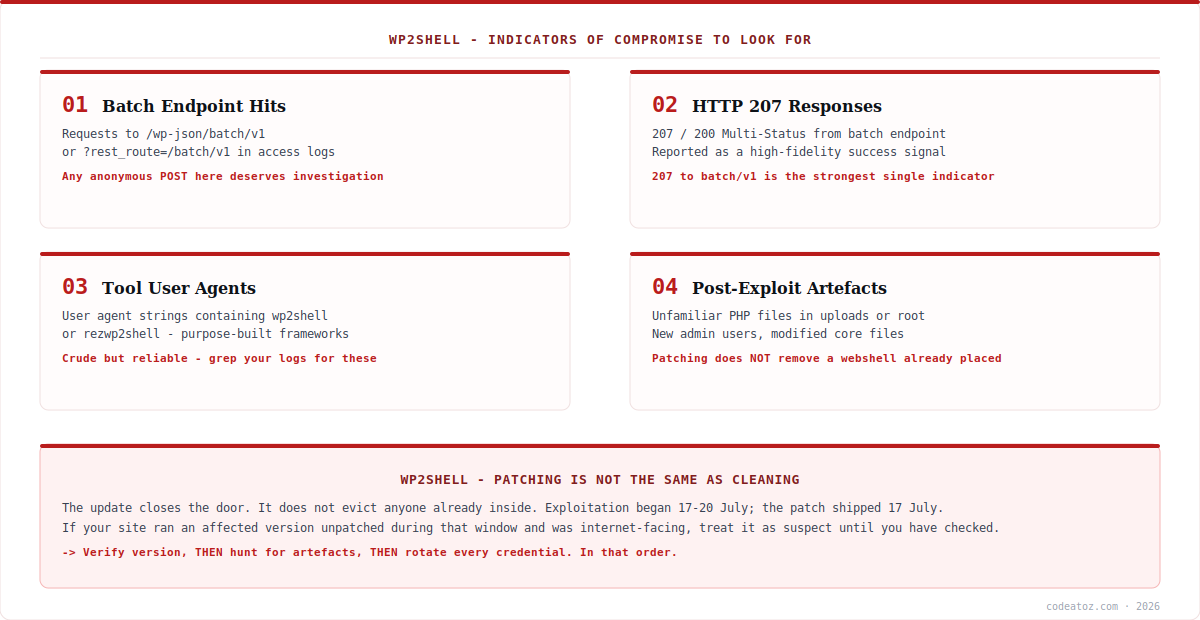
If your site was internet-facing and unpatched at any point after 17 July, hunt before you relax. The strongest wp2shell signals reported by responders fall into three groups.
Batch endpoint traffic. Requests to /wp-json/batch/v1 or ?rest_route=/batch/v1 are the attack path. The endpoint has legitimate uses, so presence alone is not proof — but anonymous POST traffic to it from unfamiliar addresses is worth investigating closely.
HTTP 207 responses. Multi-Status responses from the batch endpoint have been reported by incident responders as a high-fidelity indicator of successful exploitation, which makes them the single most useful thing to grep for.
Tool signatures. Purpose-built exploitation frameworks have used user-agent strings containing wp2shell and rezwp2shell. Crude, easily changed, but free to check and occasionally decisive.
LOG=/var/log/nginx/access.log

# 1. any traffic to the batch endpoint
grep -E "batch/v1|rest_route=/batch" $LOG | tail -50

# 2. HTTP 207 from the batch endpoint - strongest signal
grep -E "batch/v1|rest_route=/batch" $LOG | grep -E '" 207 |" 200 ' | tail -50

# 3. known tool user agents
grep -iE "wp2shell|rezwp2shell" $LOG

# 4. who is hitting it, ranked
grep -E "batch/v1|rest_route=/batch" $LOG
  | awk '{print $1}' | sort | uniq -c | sort -rn | head -20

# remember to check rotated logs too
zgrep -E "batch/v1|rest_route=/batch" /var/log/nginx/access.log.*.gz | head -50wp2shell: Checking the Filesystem and Database
Log evidence may be missing — rotated away, never retained, or behind a proxy that did not preserve the original request. So check the artefacts too. Successful wp2shell exploitation has been used to deploy persistent webshells, which means unfamiliar PHP files, especially in directories that should never contain executable code.
# PHP files in uploads - almost always malicious
find wp-content/uploads -name "*.php" -type f

# anything modified since the disclosure date
find . -type f -name "*.php" -newermt "2026-07-17"
  -not -path "./wp-content/cache/*" | head -50

# common webshell function calls
grep -rlE "eval(|base64_decode(|shell_exec(|assert("
  wp-content/ --include="*.php" | head -30

# verify core files against the official checksums
wp core verify-checksums

# unexpected administrators, newest first
wp user list --role=administrator --fields=ID,user_login,user_email,user_registered

# scheduled tasks are a common persistence spot
wp cron event list
wp core verify-checksums is the highest-value single command here: it compares your core files against WordPress.org’s published hashes and reports anything altered. It does not cover themes, plugins or uploads, so pair it with the file searches above. Our plugin backdoor write-up covers what these payloads typically look like once you find one.
wp2shell: What to Do If You Find Something
If you find evidence of compromise, deleting the file you found is not remediation. Attackers routinely place multiple persistence mechanisms, and a single visible webshell is often the least important one. The order that matters:
Take a forensic copy before you change anything — files and database — because cleaning destroys the evidence you may need for a notification decision. Then rotate every credential the server could have exposed: WordPress admin accounts, database, S/FTP and SSH, API keys, SMTP, and any payment gateway keys stored in configuration. Assume anything readable on that server is known to the attacker; the SQL injection component of wp2shell alone can read password hashes. Force a logout of all sessions and invalidate existing auth cookies by rotating the salts in wp-config.php.
For anything transactional or holding personal data, restoring from a known-good backup predating exploitation is usually safer and faster than cleaning in place — provided you patch before returning it to the internet. If customer data may have been accessed, get advice on notification obligations early rather than late. Our WordPress team handles compromise assessment and clean-up.
If you cannot patch immediately — a version-locked install, a client who will not authorise the window — block anonymous access to the batch endpoint at your WAF: both /wp-json/batch/v1 and ?rest_route=/batch/v1. Treat it as a temporary measure only; it can affect legitimate functionality and is not a substitute for updating.
How we are handling wp2shell across client sites
We verified versions rather than trusting forced updates. Auto-updates covered most of our managed estate, but not all — sites with updates disabled for stability, and one with a read-only filesystem, silently stayed vulnerable. A scripted version sweep across every site took minutes and is the only way to actually know.
Patching first, hunting second — but always hunting. The temptation after updating is to consider it closed. Because exploitation was confirmed within days of disclosure and webshells persist through updates, we treat any site that was internet-facing and unpatched during that window as needing a check, not just a patch.
Credential rotation is the step clients push back on, and the one that matters. It is disruptive, and it feels excessive when you have not confirmed a breach. But an attacker with code execution had read access to configuration; leaving database and payment keys unchanged after a suspected compromise leaves the door open long after the file is deleted.
Frequently Asked Questions About wp2shell
What is wp2shell?
wp2shell is the name given to a pre-authentication remote code execution chain in WordPress core, combining CVE-2026-63030 (REST API batch-route confusion) with CVE-2026-60137 (SQL injection in WP_Query). Chained, they let an unauthenticated attacker run code on a default install with no plugins and no login. It was patched on 17 July 2026.
Which WordPress versions does wp2shell affect?
The full RCE chain affects 6.9.0–6.9.4 and 7.0.0–7.0.1. Versions 6.8.0–6.8.5 are affected by the SQL injection component only. Anything below 6.8 is not affected. Patched releases are 7.0.2, 6.9.5 and 6.8.6 — note that the 6.8 branch has its own fix, which many summaries omit.
I already updated — am I safe?
You are protected from future exploitation, but updating does not remove a webshell already placed on your server. Because exploitation began within days of disclosure, any site that was internet-facing and unpatched during that window should be checked for indicators of compromise, not just patched and forgotten.
How do I check whether wp2shell was exploited on my site?
Search access logs for requests to /wp-json/batch/v1 or ?rest_route=/batch/v1, particularly those returning HTTP 207 Multi-Status, and for user agents containing wp2shell or rezwp2shell. Then check the filesystem for PHP files in uploads, files modified since 17 July, unexpected admin users, and run wp core verify-checksums.
Did forced auto-updates protect every site?
No. WordPress enabled forced background updates because of the severity, and that covered the large majority of installs, but it cannot reach sites with updates disabled, read-only filesystems, version-locked deployments or broken update mechanisms. Verify the running version explicitly rather than assuming the update applied.
What should I do if I cannot update right away?
Block anonymous access to the batch endpoint at your WAF — both /wp-json/batch/v1 and ?rest_route=/batch/v1 — or use a plugin restricting anonymous REST API access. Both are emergency measures that may affect legitimate functionality, and neither replaces updating to a patched version as soon as you can.
Should I restore from backup or clean the site?
For sites holding transactional or personal data, restoring from a known-good backup predating exploitation is usually safer and faster than cleaning in place, since attackers typically place multiple persistence mechanisms. Take a forensic copy first, patch before returning the site to the internet, and rotate all credentials either way.
Need a wp2shell Compromise Assessment?
Our team audits WordPress estates — version verification, log analysis, webshell hunting, clean-up and hardening.




