
The Complete Magento Security Checklist 2026
A practical Magento security checklist — patch cadence, admin hardening, CSP, file permissions and monitoring, ordered by how much real-world risk each control actually removes.
A useful Magento security checklist is not a list of every possible hardening measure — it is an ordered set of controls that removes the most risk for the least effort. Real-world Magento compromises overwhelmingly trace back to two causes: unpatched known vulnerabilities and weak admin access. Card-skimming attacks follow. This Magento security checklist is therefore ordered by impact, covering patching, admin hardening, application configuration, server and file controls, and monitoring — with the exotic stuff deliberately last.
Search intent: informational/procedural — Magento developers, agencies and merchants hardening a store. We cover patch cadence, admin access, application-layer controls including CSP, server and file permissions, monitoring and backups, then the priority order. It pairs with our APSB26-73 patch guide and Magento CSP guide.
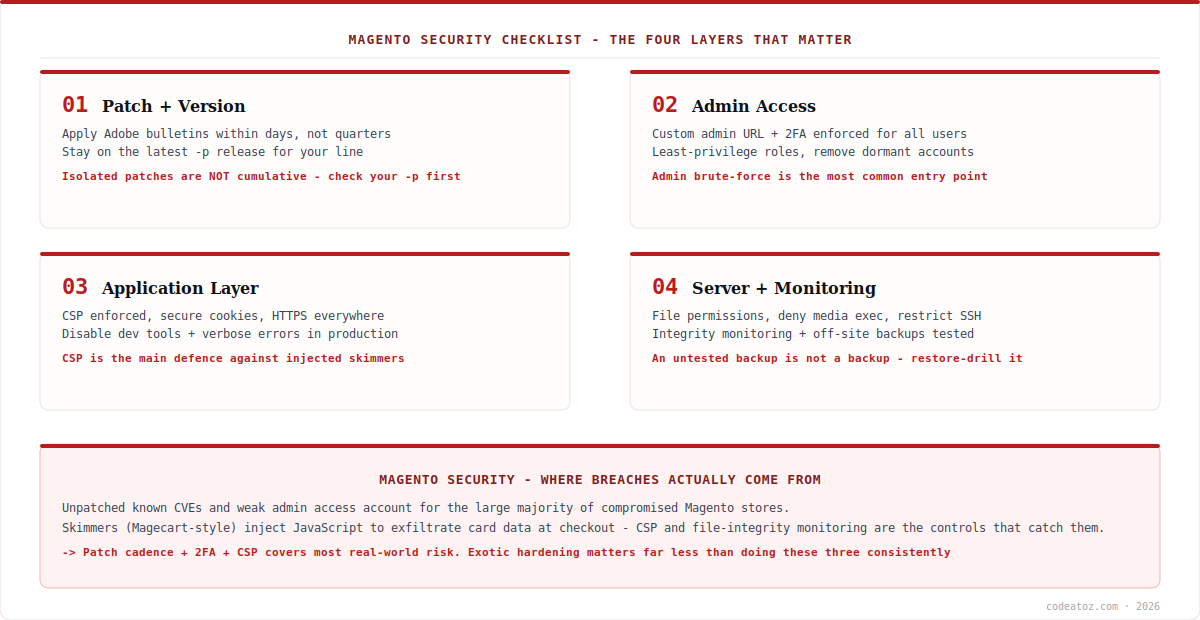
Magento Security Checklist: Patching Comes First
Nothing else on this Magento security checklist matters as much as patch cadence. Adobe publishes security bulletins on a regular schedule, and each one is a public description of exactly where the weaknesses are — which makes published-but-unpatched stores the softest targets available. Establish a defined process: subscribe to Adobe’s security notifications, review each bulletin within days of release, and maintain a tested path to production for security patches.
Two Magento-specific traps belong on any Magento security checklist. First, isolated patches are not cumulative — each is built against one specific patch level and applies cleanly only there, so you must be on the latest -p release for your line before patching (our APSB26-73 walkthrough covers this in detail). Second, some patch content only takes effect when you act on it — a web server rule shipped in nginx.conf.sample never touches your live config. Verify remediation rather than assuming it.
The single highest-value habit: treat security bulletins as a days-level obligation, not a quarterly one. “No known exploits in the wild” describes the moment of publication. Once a bulletin is public, researchers and attackers are reading the same document you are.
Magento Security Checklist: Admin Access Hardening
The admin panel is the second pillar of any Magento security checklist, because admin compromise means total compromise. The controls, in order of value:
Enforce two-factor authentication for every admin user — Magento ships 2FA built in and enabled by default, and it should never be disabled for convenience. Change the admin URL from the default path; this is obscurity rather than security, but it removes your login from automated scanning traffic and meaningfully reduces brute-force noise. Apply least privilege with proper admin roles, so a content editor cannot alter payment configuration. Audit accounts regularly and remove dormant users — ex-developers and departed agencies retaining admin access is a common finding. Restrict admin by IP at the web server where your team’s network allows it, which is the strongest control available for stores with fixed-location staff.
Complete the Magento security checklist here with session settings: a sensible admin session lifetime, a strict password policy and lockout thresholds for repeated failures. Together these turn admin brute-forcing from a viable attack into a losing one.
Magento Security Checklist: Application and Server Layer
The application section of the Magento security checklist centres on one control that punches far above its weight: Content Security Policy. Magento ships CSP support, and moving it from report-only to enforced is the main defence against injected payment skimmers, which work by loading attacker JavaScript at checkout to exfiltrate card data. A properly enforced CSP blocks that exfiltration even if an injection succeeds.
Alongside it: serve everything over HTTPS with secure and HttpOnly cookies, disable developer tooling and verbose error output in production, keep MAGE_MODE set to production, and remove any leftover installation or debug files. On the server side, set file permissions so the web server cannot write where it does not need to, deny script execution inside pub/media (a classic upload-to-execute path), keep app/etc/env.php out of web reach, and restrict SSH to keys with no password authentication. Adobe’s security and compliance guide and the OWASP Top Ten are the reference points behind most of these controls.
| Control | Layer | Risk removed | Effort |
|---|---|---|---|
| Patch cadence | Application | Known CVE exploitation | Ongoing process |
| 2FA on admin | Access | Credential + brute-force attacks | Low (built in) |
| Custom admin URL | Access | Automated scanning noise | Very low |
| CSP enforced | Application | Injected skimmers / XSS impact | Medium (tuning) |
| Deny exec in media | Server | Upload-to-execute | Low |
| Least-privilege roles | Access | Insider + lateral movement | Low |
| Tested backups | Recovery | Ransomware / destructive breach | Medium |
| Integrity monitoring | Detection | Undetected persistence | Medium |
Magento Security Checklist: Monitoring, Backups and Extensions
The final section of the Magento security checklist is about detection and recovery, because prevention is never complete. File-integrity monitoring matters especially on Magento: skimmers persist by modifying template or JavaScript files, and an alert on unexpected changes in app/ or pub/static/ is often the first sign of compromise. Watch admin login activity for unfamiliar users or locations, and keep logs somewhere an attacker cannot trivially erase.
Backups need one rule that most stores fail: test the restore. An untested backup is a hope, not a control, and the moment you need it is the worst time to discover it is incomplete. Keep copies off-site and off-host so a compromised server cannot destroy them.
Finally, extensions. Third-party modules are a genuine and under-managed part of the Magento security checklist — they run with full application privileges, they are frequently abandoned by their authors, and a vulnerable module bypasses everything else you have done. Inventory what is installed, remove what is unused, prefer maintained vendors, and review extension code (or have it reviewed) before it reaches production. Our Magento team runs security audits covering all of the above.
What we find auditing Magento store security
Unpatched stores and dormant admin accounts are the two universals. Almost every audit turns up a store several bulletins behind, plus admin users belonging to people who left the project a year ago. Neither is exotic, both are high risk, and fixing them costs an afternoon — which is why they head this checklist rather than more interesting hardening.
CSP is usually configured in report-only and forgotten. Teams enable it, see violations, and never complete the tuning needed to enforce. Report-only mode blocks nothing; it only observes. We treat “CSP enforced” as the milestone, not “CSP enabled”, because the skimmer protection only exists in enforcement mode.
Backups fail the restore test more often than anyone expects. We restore-drill client backups as part of audits, and the failure rate is uncomfortable — missing database dumps, media excluded, credentials nobody has. Discovering that during an incident is the difference between hours and weeks of downtime.
Frequently Asked Questions About the Magento Security Checklist
What is the most important item on a Magento security checklist?
Patch cadence. Most real-world Magento compromises exploit known, published vulnerabilities on stores that had not applied the relevant Adobe bulletin. A defined process for reviewing and applying security patches within days removes more risk than any other single control on the Magento security checklist.
How do I secure the Magento admin panel?
Enforce two-factor authentication for all admin users, change the admin URL from the default, apply least-privilege roles, audit and remove dormant accounts, and restrict admin access by IP where your team’s network allows it. Add a strict password policy, sensible session lifetime and lockout thresholds for failed logins.
Does changing the Magento admin URL actually help?
It is obscurity rather than true security, but it is still worthwhile. Changing the admin path removes your login page from the automated scanning and brute-force traffic that targets default URLs, reducing noise and opportunistic attacks. Treat it as a cheap supplement to 2FA and IP restriction, never a replacement for them.
How does CSP protect a Magento store?
Content Security Policy restricts which sources may load scripts and where data may be sent. That directly counters payment skimmers, which inject JavaScript at checkout to exfiltrate card details. An enforced CSP blocks the unauthorised script or its exfiltration destination even when an injection succeeds — but only in enforce mode, not report-only.
Are Magento extensions a security risk?
Yes, and an under-managed one. Third-party modules run with full application privileges, are often abandoned by their authors, and a single vulnerable extension can bypass your other controls. Inventory installed modules, remove unused ones, prefer actively maintained vendors, and review extension code before it reaches production.
How often should I run through a Magento security checklist?
Treat patching as continuous, reviewing each Adobe bulletin as it publishes. Run the full Magento security checklist — admin accounts, permissions, CSP, extensions, backup restore tests — at least quarterly, and always after major changes such as a version upgrade, agency handover or new extension rollout.
Want Your Magento Store Audited?
Our team runs full Magento security audits — patch state, admin access, CSP, permissions, extensions and backup restore tests.




