
WordPress 7.0 Is Here — Every Feature & Why You Must Upgrade Your Store
WordPress 7.0 is the most significant release since Gutenberg landed in 2018. Released on 20 May 2026, it ships native AI infrastructure directly into WordPress core, replaces the decade-old admin interface with a modern React-based DataViews system, introduces block-level Notes for editorial collaboration, and adds new blocks and developer APIs that fundamentally change how WordPress sites are built and managed. If you run a WooCommerce store, this upgrade affects everything from how you manage products to how your team edits content and how AI tools integrate with your site.
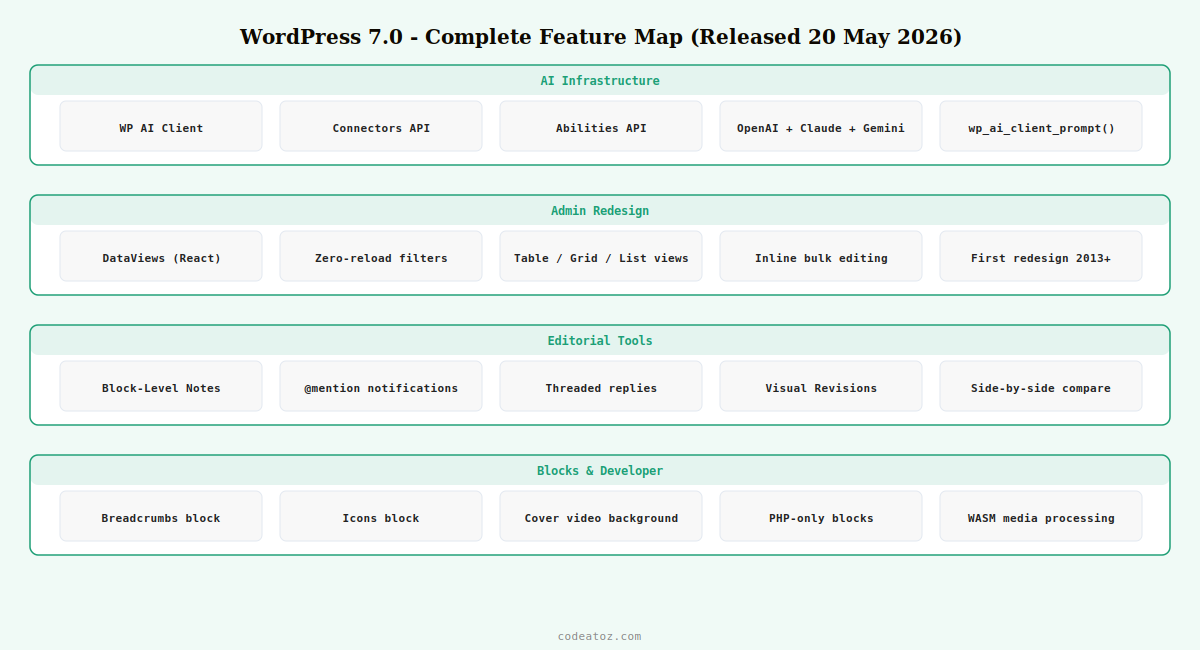
WordPress 7: What’s New — Every Feature Explained
WP AI Client — Native AI Baked Directly into WordPress Core
The headline infrastructure change in WordPress 7 is the WP AI Client — a provider-agnostic AI layer built directly into WordPress core. Site owners go to Settings → Connectors and enter API keys for their chosen AI provider. WordPress 7 ships with three pre-registered connectors out of the box: OpenAI, Anthropic Claude, and Google Gemini. Once connected, any plugin built against the AI Client API can use that connection without requiring its own API key management. For WooCommerce stores this means AI-powered product descriptions, SEO suggestions, customer service tools, and recommendation engines can all share one centrally managed AI connection rather than each plugin managing its own credentials separately. The wp_ai_client_prompt() PHP function is the developer-facing API, using a fluent builder with using_system_instruction(), using_max_tokens(), and generate_text().
Connectors API & Abilities API — Standardised AI for Every Plugin
WordPress 7 introduces the Connectors API — a standardised framework for plugins and themes to register and consume external AI providers. The Abilities API (available in both PHP and JavaScript) defines what each AI model can do: generate text, summarise, translate, or analyse images. This provider-agnostic approach means that when a new AI model emerges — a future Claude version, a specialist e-commerce AI — WordPress 7 stores simply update the connector, and every plugin using the Abilities API automatically gains access to the new capability. No more per-plugin AI upgrades and no more API key sprawl across your WooCommerce extensions.
DataViews — The First Admin Overhaul Since 2013
WordPress 7 delivers the first major admin interface redesign in over a decade. The traditional WP List Tables — the static, clunky screens for managing posts, pages, media, and users — are replaced by DataViews, a modern React-based interface. DataViews brings zero-reload filtering and sorting, seamless switching between table, grid, and list views on the same screen, inline editing without opening a full edit screen, and instant grouping by status, author, or category. For WooCommerce stores managing hundreds or thousands of products, the practical impact is significant: filtering by stock status, bulk updating prices, and sorting by sales volume now happen instantly without page reloads. The new design tokens — standardised colours, spacing, and typography — also mean the admin interface is consistent and accessible, meeting WCAG 2.2 level AA.
Block-Level Notes — Editorial Feedback Without Leaving WordPress
WordPress 7 significantly expands the Notes feature first introduced in WordPress 6.9. Notes allow editors, writers, and clients to leave threaded comments directly on specific blocks — or even on specific text selections within a paragraph — without switching to email or Slack. WordPress 7’s enhanced Notes support @mention notifications (tagged team members receive an email), threaded reply chains, and resolved/unresolved status. For WooCommerce agencies and stores with content teams, this is a transformative workflow change: a client can review a product description draft and leave inline feedback directly on the paragraph that needs revision. The writer sees the comment in context and resolves it when the change is made. No version-confusion over email threads.
Visual Revisions — See Exactly What Changed Between Versions
WordPress has had post revisions since version 2.6, but the revisions interface has always shown raw text diffs. WordPress 7 introduces a visual revisions screen that renders each revision as it would appear on the front end — a side-by-side visual comparison showing exactly what changed between any two versions of a page or post. For WooCommerce product pages this is particularly valuable: you can see precisely how a product description, price callout, or feature list changed between revisions, roll back to any previous version with one click, and compare the live version against a draft without publishing. Combined with Notes, visual revisions make WordPress 7 a genuinely collaborative content platform.
Breadcrumbs, Icons & Cover Block Video Backgrounds
WordPress 7 ships three notable new block additions. The Breadcrumbs block adds automatic schema-friendly breadcrumb navigation to any page without a plugin — previously requiring WooCommerce Breadcrumbs or Yoast SEO to generate structured breadcrumb markup. The Icons block brings a searchable library of SVG icons into the editor, enabling feature lists, benefit grids, and UI elements without uploading custom images. The Cover block can now use an embedded video — YouTube or Vimeo — as its background instead of requiring a locally uploaded video file, enabling rich hero sections with video backgrounds that load efficiently from CDN without hosting the video yourself.
PHP-Only Block Registration — Build Blocks Without React
WordPress 7 introduces PHP-only block registration — a major reduction in complexity for developers building custom blocks. Previously, every custom block required a JavaScript (React) build process, a compiled bundle, and a Node.js development environment. In WordPress 7, server-rendered blocks can be registered entirely in PHP using register_block_type() with a render_callback, with no JavaScript required. For WooCommerce developers building custom product listing blocks, specification table blocks, or store-specific UI elements, this means significantly faster development and zero build-tool setup for blocks whose output is generated server-side.
Client-Side Media Processing via WebAssembly
WordPress 7 adds browser-side media processing using WebAssembly (WASM). Image resizing, format conversion, and metadata stripping now happen in the customer’s browser before the file is uploaded to your server — significantly reducing upload times, server processing load, and storage costs. For WooCommerce stores where staff upload many product images, this is a meaningful operational improvement: large RAW or TIFF files from product photography are processed to web-optimised sizes client-side before hitting your hosting server. Combined with the HEIC format support from WordPress 6.7, image uploads from any device are now fast, efficient, and require no server-side image processing pipeline.
WordPress 7: What Did NOT Ship — Real-Time Collaboration Removed
WordPress 7 was originally planned to ship real-time multi-user collaborative editing — the ability for multiple editors to work on the same post simultaneously, Google Docs-style, with live cursors. This feature was pulled from the release by Matt Mullenweg on 8 May 2026, twelve days before launch. The code was deleted from core for RC3 (not just disabled with a flag). According to the release notes, a fundamental architectural flaw in the database synchronisation layer required a rebuild from scratch, and the team chose stability over a rushed ship.
💡 Real-time collaboration is planned for re-evaluation during the WordPress 7.1 cycle, but the core team has not committed to including it in 7.1. The Notes feature ships instead — a robust asynchronous collaboration system that covers the majority of editorial team workflows without the complexity of real-time synchronisation. For WooCommerce agencies reviewing content with clients, Notes is genuinely the more practical daily tool.
WordPress 7: System Requirements
WordPress 7 raises the minimum PHP requirement. Before upgrading any WooCommerce store, verify your hosting environment meets the new requirements.
| PHP minimum | 7.2.24 (hard minimum — WordPress 7 will refuse to install below this) |
| PHP recommended | 8.3+ for best performance and full feature support |
| MySQL minimum | 8.0 (required for DataViews query performance) |
| MariaDB | 10.6+ |
| HTTPS | Required for the AI Connectors API (API keys are transmitted over TLS) |
| WordPress memory | 256 MB recommended for AI Client features |
⚠ Check your PHP version before upgrading to WordPress 7. Many shared hosting accounts still run PHP 7.0 or 7.1 by default. These versions are incompatible with WordPress 7 and past their end-of-life security support. If your hosting control panel shows PHP 7.0 or 7.1, upgrade PHP to 8.1 or 8.2 first — and test your plugins and theme for compatibility — before upgrading WordPress core. WooCommerce itself requires PHP 7.4+ as of recent versions, so most active WooCommerce stores should already be on a compatible version.
WordPress 7: Why Your WooCommerce Store Should Upgrade Now
- AI-ready from day one: Every AI plugin you install in future — product description generators, SEO tools, customer chat — will integrate with one central AI connector rather than managing separate API keys per plugin
- Faster product management: DataViews makes filtering, sorting, and bulk-editing your WooCommerce product catalogue instant — no more full-page reloads when filtering by stock status or category
- Better client workflows: Block-level Notes with @mentions replaces back-and-forth email threads when reviewing product page copy with clients or getting sign-off on store content
- Native breadcrumbs: The new Breadcrumbs block adds structured navigation to product and category pages without a dedicated plugin
- Faster image uploads: Client-side WebAssembly processing means large product images upload faster and use less server processing
- Security and support: WordPress 7 is the only version receiving active security patches. Running 6.x means security vulnerabilities are not being fixed
WordPress 7: Safe Upgrade Checklist for WooCommerce Stores
wp-content/uploads before any change. Verify the backup restores successfully on a clean environment.The official WordPress 7.0 announcement post covers the full release highlights. The WordPress 7.0 Field Guide on Make WordPress provides technical documentation for the new APIs. The WordPress Developer Blog covers the new wp_ai_client_prompt() API, PHP-only blocks, and DataViews implementation details. See our WooCommerce wholesale pricing guide and WooCommerce development services for further store optimisation after your upgrade.
Frequently Asked Questions — WordPress 7.0 Upgrade
What is new in WordPress 7.0?
WordPress 7 ships with native AI infrastructure (WP AI Client and Connectors API supporting OpenAI, Anthropic Claude, and Google Gemini), the DataViews admin redesign replacing legacy WP List Tables, enhanced block-level Notes for editorial collaboration, visual revisions, new Breadcrumbs and Icons blocks, Cover block embedded video backgrounds, PHP-only block registration for developers, and client-side WebAssembly media processing. It is the largest WordPress release since Gutenberg in 2018.
Did WordPress 7 ship real-time collaboration?
No. Real-time multi-user collaborative editing was pulled from WordPress 7 by Matt Mullenweg on 8 May 2026, twelve days before the release date, due to architectural issues in the database synchronisation layer. The code was deleted from core for RC3. In its place, the enhanced Notes feature (block-level threaded comments with @mention notifications and visual revisions) ships as the collaboration toolset for WordPress 7. Real-time editing may be re-evaluated for a future release.
What PHP version does WordPress 7 require?
WordPress 7 requires PHP 7.2.24 as its hard minimum — WordPress will refuse to install on lower versions. PHP 8.3 is the recommended version for best performance and full feature support. Before upgrading to WordPress 7, check your hosting environment’s PHP version and upgrade if needed. Most active WooCommerce stores should already be on PHP 7.4+ as WooCommerce has required it for recent versions, but legacy stores on older PHP should upgrade PHP first.
What is the WordPress 7 AI Client and how does it work?
The WP AI Client is a native AI integration layer built into WordPress 7 core. Site owners enter API keys for their chosen AI provider (OpenAI, Anthropic Claude, or Google Gemini) in Settings > Connectors. Any WordPress plugin built against the AI Client API can then use that connection without managing its own API credentials. Developers access it via the wp_ai_client_prompt() PHP function. For WooCommerce stores this means future AI-powered plugins for product descriptions, SEO, and customer service will share one centrally managed connection.
What is DataViews in WordPress 7 and how does it affect WooCommerce?
DataViews is a new React-based admin interface in WordPress 7 that replaces the legacy WP List Tables used for posts, pages, media, and users. It brings zero-reload filtering and sorting, inline editing, and seamless switching between table, grid, and list views. For WooCommerce stores, DataViews makes managing product catalogues significantly faster — filtering by stock status, sorting by sales, and bulk editing prices no longer require full-page reloads. Note that plugins adding custom columns to WP List Tables should be tested for DataViews compatibility before upgrading production.
Is it safe to upgrade a WooCommerce store to WordPress 7 now?
Yes, with proper preparation. WordPress 7 is a stable production release. The critical steps are: verify PHP is 7.2.24 or higher (8.1+ recommended), back up everything, test on a staging environment, update all plugins to their latest versions, verify payment gateway functionality, then upgrade production. The most common compatibility issues are with plugins that customise WP List Tables (now replaced by DataViews) and those with outdated PHP syntax. CodeAtoZ handles the complete upgrade process for WooCommerce stores as a managed service.
What are block-level Notes in WordPress 7?
Block-level Notes in WordPress 7 are an editorial commenting system that lets team members leave threaded feedback directly on specific blocks or text selections within the editor, without switching to email or Slack. Notes support @mention notifications (tagged users receive an email), threaded replies, and resolved/unresolved status tracking. They are particularly useful for WooCommerce stores where product page copy needs client review — the client can comment on specific paragraphs and the developer or writer resolves each note after making the change.
What are PHP-only blocks in WordPress 7?
PHP-only blocks are a new block registration method in WordPress 7 that allows developers to build server-rendered blocks entirely in PHP without any JavaScript or React build process. Previously, all custom blocks required a compiled JavaScript bundle and a Node.js development environment. With PHP-only blocks, developers use register_block_type() with a render_callback function and no JS at all. For WooCommerce developers building custom product display blocks, specification tables, or store-specific UI elements, this significantly reduces development complexity and eliminates build-tool setup.
Ready to Upgrade Your Store to WordPress 7?
Don’t let an outdated WordPress hold your WooCommerce store back. CodeAtoZ handles the complete WordPress 7 upgrade — PHP compatibility check, full backup, staging test, plugin audit, payment verification, and production go-live — so nothing breaks and nothing is missed.




