
APRIL 2026
The WordPress Plugin Backdoor That Hit 31 Essential Plugins for 8 Months
A buyer purchased 30+ trusted plugins and planted malware. The auto-update didn’t fully clean infected sites. Here’s exactly what to do.
The WordPress plugin backdoor exposed on April 7, 2026 is one of the most serious supply-chain attacks in WordPress history. A buyer acquired 31 trusted plugins, planted a WordPress plugin backdoor that sat dormant for 8 months, then activated it on hundreds of thousands of websites. This guide shows you exactly how to check if your site was compromised by this WordPress plugin backdoor, how to clean it if it was, and how to replace the affected plugins safely.
This is not a theoretical security risk. This is an active attack that affected hundreds of thousands of WordPress sites between April 5 and April 8, 2026 — and many sites are still compromised right now without their owners knowing.
Here is what happened, how to check if your site was affected, and what to do if it was.
Important: If you have ever installed any plugin from the “Essential Plugin” author — including Countdown Timer Ultimate, Popup Anything on Click, or any of the 31 plugins listed below — read this article fully before doing anything else. The WordPress auto-update partially fixed the issue but did not clean already-infected sites.
What Actually Happened With This WordPress Plugin Backdoor
In late 2024, a 10-year-old WordPress plugin business called “Essential Plugin” — which owned over 30 free plugins with hundreds of thousands of combined installs — was sold on Flippa for six figures.
The buyer, identified only as “Kris,” had a background in SEO, crypto, and online gambling marketing. His very first code commit to the plugin was a backdoor.
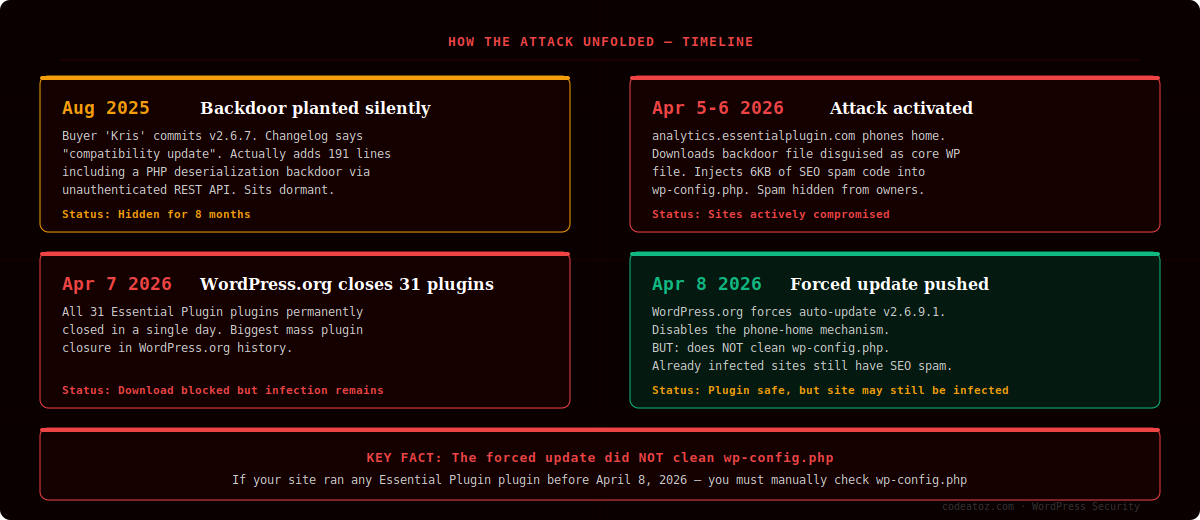
In August 2025, version 2.6.7 of Countdown Timer Ultimate was released. The changelog said: “Check compatibility with WordPress version 6.8.2.” What it actually did was add 191 lines of code including a PHP deserialization vulnerability accessible via an unauthenticated REST API endpoint. This WordPress plugin backdoor sat dormant on hundreds of thousands of websites for 8 months.
On April 5-6, 2026, the attack was activated. The plugin phoned home to analytics.essentialplugin.com, downloaded a malicious file disguised to look like a core WordPress file, and injected approximately 6KB of PHP code into wp-config.php.
How the malware hid itself: The injected spam code only showed content to Googlebot — invisible to site owners. It served hidden links, redirects, and fake pages to search engines. Your site could be actively poisoning your Google rankings right now while appearing completely normal to you.
On April 7, WordPress.org closed all 31 plugins permanently. On April 8, they pushed a forced auto-update to v2.6.9.1 which disabled the phone-home mechanism. But the forced update did not touch wp-config.php. Sites that were already infected are still infected.
The 31 Affected Plugins — Check Your Site Now
All of these plugins were developed by the same author and permanently closed by WordPress.org on April 7, 2026. If you have any of these installed, check your site immediately.
How to Check If Your Site Has the WordPress Plugin Backdoor
There are three things you need to check. Go through all three even if the first one comes back clean.
Step 1 — Check if any affected plugin is installed
Go to WordPress Admin → Plugins → Installed Plugins. Search for any plugin name from the list above. If you find one, note whether it shows version 2.6.9.1 or later. If it shows an older version, it has not received the forced update and needs to be removed immediately.
Even if it shows the updated version — continue to steps 2 and 3. The update does not clean an already-infected site.
Step 2 — Check your wp-config.php file size
This is the most important check. The WordPress plugin backdoor injects itself into wp-config.php, adding approximately 6KB of code. A normal, clean wp-config.php is typically between 2KB and 4KB.
To check: connect to your site via FTP or your hosting file manager. Navigate to your WordPress root directory (where wp-config.php lives). Check the file size. If it is significantly larger than expected — 8KB, 9KB, or more — your site was actively compromised and the malware is still there.
What to look for inside the file: The malware appends itself on the same line as require_once ABSPATH . 'wp-settings.php'; — making it easy to miss with a quick glance. Open the file in a text editor and look at that specific line. It should end cleanly with a semicolon. If there is any additional code on that line, the file is infected.
Step 3 — Scan for the backdoor file
The malware also drops a file called wp-comments-posts.php in your WordPress root — deliberately named to look like the legitimate core file wp-comments-post.php (one letter difference: “posts” vs “post”). Check your WordPress root directory for this file. If it exists, your site was compromised.
Quick check using a security plugin
If you’d prefer an automated scan, install Wordfence (free) or Sucuri Security (free) and run a full scan. Both will flag the injected code in wp-config.php and the backdoor file if they exist.
If Your Site Is Infected — What To Do
CLEANUP CHECKLIST — DO ALL OF THESE IN ORDER
- Remove or delete any affected plugin immediately — do not just deactivate
- Open wp-config.php and manually remove any code injected after
require_once ABSPATH . 'wp-settings.php'; - Delete
wp-comments-posts.phpfrom your WordPress root if it exists - Change all passwords: WordPress admin, database, FTP, and hosting panel
- Generate new WordPress security keys at api.wordpress.org/secret-key/1.1/salt and update them in wp-config.php
- Run a full site scan with Wordfence or Sucuri
- Submit your site for recrawling in Google Search Console to remove any spam content Google indexed
- Check your Google Search Console for any manual actions or unusual traffic patterns
If you are not comfortable doing this yourself — do not guess. A half-cleaned infection is worse than an uncleaned one because you think the problem is solved. Contact a developer who can do a proper forensic cleanup.
Why WordPress Plugin Backdoor Attacks Keep Happening
This is not the first WordPress plugin backdoor. In 2017, the same playbook was used with the Display Widgets plugin (200,000 installs). In early 2026, the Widget Logic plugin was compromised the same way. And now this — 31 plugins at once.
The pattern is always identical: buy a trusted plugin with an established install base on a marketplace like Flippa, inherit the WordPress.org commit access, and inject malicious code. The buyer’s background — SEO, crypto, gambling marketing — was publicly visible on Flippa. Yet the acquisition went through without any review from WordPress.org.
WordPress.org has no mechanism to flag or review plugin ownership transfers. There is no change-of-control notification to users, no additional code review triggered by a new committer. The only defence against the next WordPress plugin backdoor is vigilance from developers and site owners — and tools like Patchstack or Wordfence that can detect anomalous behaviour quickly.
Safe Alternative if You Were Using Countdown Timer Ultimate
One of the most widely used affected plugins was Countdown Timer Ultimate — a plugin used by WooCommerce stores to run flash sales, promotions, and countdown timers on product pages and announcement bars.
If you were using it for your store’s sales and promotions, you now need a replacement that:
- Doesn’t phone home to external servers
- Has no unauthenticated REST API endpoints
- Is actively maintained by a team you can contact
- Has clean, auditable code with no analytics modules
Smart Campaign Manager — our own WooCommerce plugin — does everything Countdown Timer Ultimate did, and significantly more. We wrote a detailed guide to running flash sales with it. Flash sales, announcement bars with live countdown timers, urgency badges, free shipping progress bars, and a full analytics dashboard. Built by our team, fully auditable, no external phone-home calls, no hidden analytics modules.
The free version on WordPress.org handles basic flash sales with countdown timers. The Pro version adds advanced targeting, recurring campaigns, holiday calendar presets, and an urgency popup — everything a WooCommerce store needs to run professional promotions without relying on a plugin you can no longer trust.
Given what just happened, we’re also making the Pro version available at no charge for any store owner who was directly affected by this WordPress plugin backdoor and needs to migrate off Countdown Timer Ultimate. Just reach out and mention this article.
Free Scanner — Check Your Site in 60 Seconds
We built a free PHP scanner specifically for this WordPress plugin backdoor. Upload it to your server, visit the URL, get instant results. It is completely read-only — it makes zero changes to your site.
HOW TO USE THE SCANNER — 4 STEPS
- Step 1 — Download the scanner file below and save it to your computer.
- Step 2 — Upload
codeatoz-scanner.phpto your WordPress root directory — the same folder that containswp-config.phpandwp-login.php. Use FTP, SFTP, or your hosting file manager. - Step 3 — Visit
https://yoursite.com/codeatoz-scanner.phpin your browser. The scanner will run automatically and show you a full report — whether your site is clean, infected, or at risk. - Step 4 — Delete the file from your server immediately after reading the results. Never leave scanner files on a live server.
CodeAtoZ Backdoor Scanner v1.0.0
Checks wp-config.php · Backdoor file · All 31 affected plugins · Read-only · Free
⚠ Delete the file from your server immediately after use
What the scanner checks: File size and contents of wp-config.php, the known backdoor file wp-comments-posts.php, malware signatures including analytics.essentialplugin.com and wpos_analytics_anl, and all 31 affected plugin slugs with version and module detection. Takes under 5 seconds to run.
Frequently Asked Questions
What is the WordPress plugin backdoor that hit Essential Plugins in 2026?
The WordPress plugin backdoor was a supply-chain attack planted in Countdown Timer Ultimate and 30 other plugins owned by the “Essential Plugin” author after the business was sold on Flippa in late 2024. The malicious code was added in August 2025, sat dormant for 8 months, then activated on April 5-6, 2026 — injecting spam code into wp-config.php on hundreds of thousands of WordPress sites.
How do I know if my site has the WordPress plugin backdoor?
Three checks: (1) Look for any of the 31 affected plugins in WordPress Admin → Plugins. (2) Check your wp-config.php file size — a clean file is 2-4KB, an infected one is 8KB or larger with injected code after the “wp-settings.php” require line. (3) Check your WordPress root for a file called wp-comments-posts.php (with an ‘s’ — the real core file is wp-comments-post.php). Our free scanner automates all three checks.
Does the WordPress.org auto-update fix the WordPress plugin backdoor?
No. WordPress.org pushed a forced auto-update to v2.6.9.1 on April 8, 2026 that disabled the phone-home mechanism going forward — but it did NOT clean sites that were already infected. If your wp-config.php was modified before April 8, the injected code is still there and still serving spam content to Googlebot. You must manually clean the file.
Can the WordPress plugin backdoor affect my Google rankings?
Yes, and this is the most damaging part. The injected malware only serves content to Googlebot — invisible to normal visitors and site owners. It injects hidden links, redirects, and fake pages that Google indexes as part of your site. This can trigger manual penalties, poison your rankings, and associate your domain with spam networks. After cleaning, submit your site for recrawling in Google Search Console.
Which plugins were affected by the WordPress plugin backdoor?
31 plugins in total, all previously owned by the “Essential Plugin” author. The most widely installed were Countdown Timer Ultimate, Popup Anything on Click, WP Testimonial with Widget, Blog Designer for Post and Widget, and Post Grid and Filter Ultimate. The full list of 31 affected plugins is in the section above. All were permanently closed by WordPress.org on April 7, 2026.
How do I prevent future WordPress plugin backdoor attacks?
There’s no foolproof prevention — WordPress.org doesn’t review plugin ownership transfers — but you can reduce risk. Keep your plugin count minimal, favour plugins with active maintainers you can contact, watch for “compatibility update” releases that change too much code, and run a security scanner like Wordfence or Patchstack with email alerts enabled. Regularly audit new code commits in plugins you depend on, and be especially cautious after a plugin changes ownership.
Need Help Cleaning Your Site or Replacing the Plugin?
We offer emergency security cleanups and can migrate you to a safe countdown timer solution. Free consultation — no obligation.




