
WordPress 7.0.2 and Your WooCommerce Store — What to Do Now
WordPress 7.0.2 patches a pre-authentication RCE being actively exploited. For a WooCommerce store this is not just a website problem — it is a payment and customer-data problem.
WordPress 7.0.2 was released on 17 July 2026 to fix a pre-authentication remote code execution chain in WordPress core, and exploitation began within days. Most coverage treats this as a generic “update your site” story. For a WooCommerce merchant it is materially worse than that: a store is a payment surface holding customer records, so the same flaw that defaces a blog can skim card details from your checkout. This guide covers what WordPress 7.0.2 means specifically for store owners, and the order to act in.
Search intent: urgent operational — WooCommerce store owners and the agencies running them. We cover why stores face higher stakes, confirming the patch applied, checking checkout for injected scripts, credential rotation, data-protection duties and prevention. It builds on our WordPress 7 upgrade guide and wp2shell compromise check.
The one-minute version. Confirm you are on 7.0.2, 6.9.5 or 6.8.6. If your store ran an older version while online after 17 July, assume it may have been reached, check before you relax, and rotate your payment gateway and database credentials. Updating alone does not remove code an attacker already placed.
WordPress 7.0.2: Why Stores Face Higher Stakes
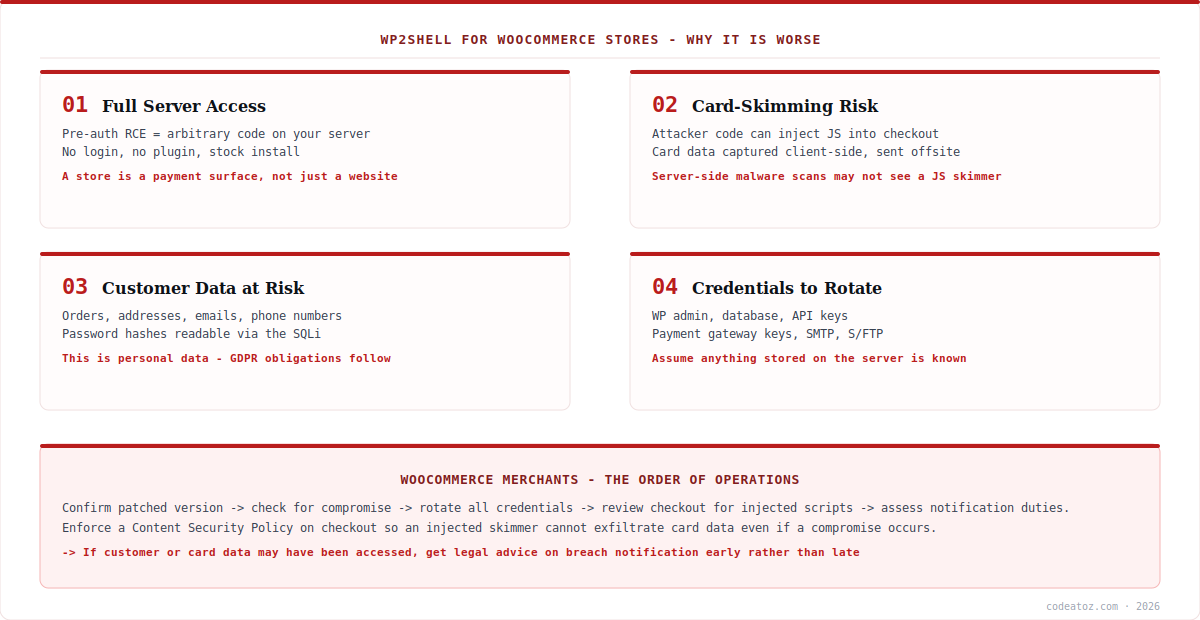
The flaw patched in WordPress 7.0.2 gives an unauthenticated attacker the ability to run code on your server. On a brochure site that means defacement, spam injection or a foothold for other attacks — bad, recoverable. On a WooCommerce store, the same access reaches three things that change the calculus.
Your checkout. Code execution means an attacker can inject JavaScript into checkout pages that captures card details as customers type and sends them elsewhere. This is the Magecart pattern, and it is quiet: the payment still completes, the customer sees nothing wrong, and server-side malware scanners frequently miss a small client-side script. Stores have run skimmers for months before noticing.
Your customer records. Orders carry names, addresses, email addresses and phone numbers. The SQL injection half of the chain can read database contents directly, including WordPress password hashes. That is personal data under GDPR and equivalent regimes, which turns a technical incident into a legal one.
Your credentials. Anything in wp-config.php or plugin settings — database credentials, payment gateway API keys, SMTP passwords, shipping and ERP integration tokens — is readable by code running on the server. That is why WordPress 7.0.2 is not a patch-and-move-on event for merchants.
WordPress 7.0.2: Confirm the Patch Actually Applied
WordPress enabled forced automatic updates because of the severity, and that reached most sites. It did not reach all of them. Stores are disproportionately likely to be in the gap, because merchants and agencies often disable core auto-updates to avoid an unattended change breaking a checkout or a theme. If that describes your setup, WordPress 7.0.2 did not install itself.
| Your version | Status | Action |
|---|---|---|
| 7.0.2 / 6.9.5 / 6.8.6 or newer | Patched | Verify no prior compromise |
| 7.0.0 – 7.0.1 | Full RCE exposure | Update to 7.0.2 now |
| 6.9.0 – 6.9.4 | Full RCE exposure | Update to 6.9.5 now |
| 6.8.0 – 6.8.5 | SQL injection exposure | Update to 6.8.6 now |
| Below 6.8 | Not affected by this | Still unsupported — plan an upgrade |
Check from the dashboard under Dashboard → Updates, or from the command line. For an agency running many stores, script it rather than clicking through each one.
# what version is actually running?
wp core version

# update core (test on staging first if the store is heavily customised)
wp core update
wp core update-db

# confirm core files match the official release
wp core verify-checksums
On staging first: normally we would insist on it. With an actively exploited pre-auth RCE, the balance shifts — an unpatched, internet-facing store is at greater risk than a minor-version core update is likely to cause. Take a backup, update, then test checkout immediately. If your store is heavily customised and you genuinely cannot risk it, put the WAF block in place first (see below) and schedule the update urgently.
WordPress 7.0.2: Check Your Checkout for Injected Scripts
This is the store-specific check that generic WordPress 7.0.2 advice will not tell you to do. If an attacker reached your site, checkout is the most valuable thing to tamper with — so inspect it directly rather than relying on a scanner.
Open your live checkout page in a browser, view source, and look at every script that loads. You are looking for anything you do not recognise: an inline script block you did not add, or a source loading from a domain that is not your site, your payment provider, or a tag you deliberately installed. Then open the browser’s network tab, complete a test order, and watch where requests go. A skimmer has to send the data somewhere, and that outbound request is visible.
# list every external script source on checkout
curl -s https://yourstore.com/checkout/
  | grep -oE 'src="https?://[^"]+"' | sort -u

# PHP dropped into uploads is almost never legitimate
find wp-content/uploads -name "*.php"

# template + theme files changed since disclosure
find wp-content/themes wp-content/plugins -name "*.php"
  -newermt "2026-07-17" | head -40
Anything you cannot account for on that list needs explaining before you consider the store clean. Our wp2shell compromise check covers the full log-hunting and filesystem procedure in detail.
WordPress 7.0.2: Rotate Credentials and Assess Data Duties
If there is any realistic chance your store was reached, rotate credentials. Code running on your server could read everything stored there, so treat the following as exposed: WordPress administrator passwords, database credentials, payment gateway API keys and secrets, SMTP credentials, S/FTP and SSH access, and any shipping, ERP or CRM integration tokens. Rotate the authentication salts in wp-config.php too, which invalidates existing login sessions and forces everyone to sign in again.
On the data-protection side, be realistic rather than optimistic. If customer personal data may have been accessed, GDPR and similar regimes impose notification duties with short deadlines, and the assessment turns on what an attacker could have reached, not what you can prove they took. Take legal advice early — it is far easier to decide not to notify after a proper assessment than to explain a late one. If card data may have been captured at checkout, contact your payment provider promptly; they have processes for exactly this and will tell you what they need. We are engineers rather than lawyers, so treat this as a prompt to get proper advice, not as the advice itself.
WordPress 7.0.2: Making the Next One Less Painful
The uncomfortable lesson of WordPress 7.0.2 is that core vulnerabilities of this severity are rare but not impossible, and the stores that came through it calmly were the ones with boring fundamentals already in place.
Leave core auto-updates enabled. Merchants disable them fearing a broken checkout, and this incident is the counter-argument: forced updates protected the sites that had them on. If you need control, use a staging environment and a short update cadence rather than switching them off.
Enforce a Content Security Policy on checkout. This is the control that would have limited the damage here. An enforced CSP restricts which scripts may run and, critically, where data may be sent — so an injected skimmer cannot exfiltrate card details to an attacker’s domain even if it gets onto the page. The same reasoning we set out in our Magento CSP guide applies directly to WooCommerce.
Keep tested, off-site backups. The fastest recovery from a confirmed compromise is a restore from a known-good copy predating it. An untested backup is not a backup. And keep a WAF in front of the store — for this incident, blocking anonymous access to /wp-json/batch/v1 and ?rest_route=/batch/v1 was the stopgap for sites that could not update immediately. Our WordPress and WooCommerce team runs maintenance retainers covering patching, monitoring and incident response.
What this incident looked like from an agency side
The stores at risk were the ones with auto-updates deliberately off. Almost every managed site took the forced update without incident. The exceptions were stores where someone had disabled core updates years earlier to protect a fragile checkout — exactly the sites where a compromise would have hurt most.
Merchants underestimate the checkout-skimming angle. The conversation usually starts at “is my site down?” and the honest answer is that a skimmed store looks completely normal. We walk clients through inspecting checkout scripts directly, because that is where the damage would be and it is not something a green uptime dashboard will reveal.
Credential rotation gets deferred and shouldn’t be. It is disruptive, and with no confirmed breach it feels like overkill. But an attacker with code execution had read access to gateway keys and database credentials. Rotating is a day of inconvenience; not rotating leaves a door open indefinitely.
Frequently Asked Questions About WordPress 7.0.2
What does WordPress 7.0.2 fix?
WordPress 7.0.2, released 17 July 2026, fixes a pre-authentication remote code execution chain in core, combining a REST API batch-route confusion flaw with a SQL injection in WP_Query. Chained, they let an unauthenticated attacker run code on a default install with no plugins and no login required.
Do I need WordPress 7.0.2 specifically, or will another version do?
It depends on your branch. WordPress 7.0.2 fixes the 7.0 line, 6.9.5 fixes the 6.9 line, and 6.8.6 fixes the 6.8 line, which is affected by the SQL injection component only. Versions below 6.8 are not affected by this issue, though they are unsupported for other reasons.
My WooCommerce store updated automatically — is that enough?
It protects you going forward, but not retrospectively. If the store was internet-facing and unpatched at any point after 17 July, an attacker could already have placed code that survives the update. Verify the running version, then check checkout scripts, uploads directories and admin users before considering it resolved.
Could this have exposed my customers’ card details?
Potentially, if your store was compromised. Code execution allows JavaScript to be injected into checkout that captures card details as they are typed and sends them to an attacker. This is quiet — payments still complete normally. Inspect the scripts loading on checkout, and contact your payment provider if you find anything unexplained.
Which credentials should I rotate after WordPress 7.0.2?
If compromise is plausible: WordPress admin passwords, database credentials, payment gateway API keys, SMTP details, S/FTP and SSH access, and any ERP, shipping or CRM integration tokens. Also rotate the authentication salts in wp-config.php, which invalidates existing sessions and forces everyone to log in again.
Should I update immediately or test on staging first?
Normally staging first. With an actively exploited pre-authentication RCE, an unpatched internet-facing store is the bigger risk. Take a backup, update, then test checkout straight away. If your store is too customised to risk it, block the batch endpoint at your WAF as a stopgap and schedule the update urgently.
How do I stop this happening to my store again?
Leave core auto-updates enabled, enforce a Content Security Policy on checkout so an injected skimmer cannot exfiltrate card data, keep tested off-site backups for fast recovery, and run a WAF in front of the store. None of these are exotic — the stores that handled WordPress 7.0.2 calmly already had them.
Worried About Your WooCommerce Store?
Our team checks stores for compromise, cleans and hardens them, and runs maintenance retainers that keep patching current.




