
The Complete Guide to WooCommerce WhatsApp Notifications 2026
This is CodeAtoZ’s complete guide to WooCommerce WhatsApp notifications — covering every scenario where sending a WhatsApp message instead of an email will measurably improve your store’s revenue, customer satisfaction, and operational efficiency. From basic order status WooCommerce WhatsApp notifications to abandoned cart recovery, COD order verification, and post-purchase review collection, this guide explains what each type does, why it works, and how to set it up via Meta’s Cloud API without paying a BSP middleman.
Why WooCommerce WhatsApp Notifications Outperform Email
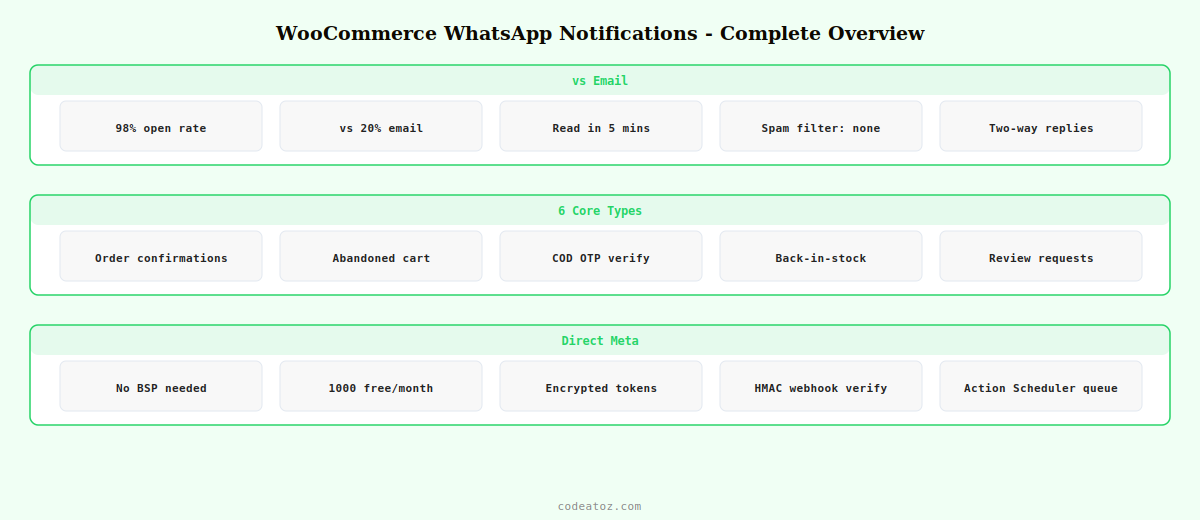
The gap between WhatsApp and email is not marginal. WooCommerce WhatsApp notifications achieve 98% open rates on average. Email order notifications average 20% open rates — and that number is optimistic for transactional emails in saturated inboxes. The practical consequence: 8 out of 10 of your customers never read your shipping notifications, delivery confirmations, or review requests when they arrive by email.
WhatsApp messages are read within minutes because WhatsApp is where people already spend their time. A WooCommerce WhatsApp notification for a shipped order lands in the same conversation thread where your customer chats with their family. It is not filtered, not buried in a promotions tab, and not mistaken for spam. For stores in India, the Middle East, Southeast Asia, and Latin America — where WhatsApp is the dominant messaging platform — WooCommerce WhatsApp notifications are not a nice-to-have: they are the primary customer communication channel.
| Metric | WooCommerce WhatsApp Notifications | Email Notifications |
|---|---|---|
| Open rate | 98% | 20% |
| Read within 5 minutes | 85% | 12% |
| Abandoned cart recovery | Up to 35% | 5–15% |
| Cost vs SMS | 70–90% cheaper | N/A |
| Two-way replies | Yes | Rarely |
| Spam filter risk | Minimal | High |
WooCommerce WhatsApp Notifications: The 6 Core Types
Every WooCommerce store that moves to WhatsApp notifications needs these six message types working reliably. The first two are essential for any store; the remaining four drive measurable revenue beyond simply informing customers about their orders.
TYPE 02Abandoned Cart RecoveryMulti-step recovery sequence, 30-min delay, direct checkout link
TYPE 03COD Verification OTPSlash fake cash-on-delivery orders with WhatsApp one-time passwords
TYPE 04Back-in-Stock AlertsCustomer opt-in, variation-level tracking, instant restock notification
TYPE 05Review RequestsSend 3 days after delivery — dramatically higher review conversion than email
TYPE 06Payment RemindersAuto-nudge unpaid BACS orders, optional auto-cancel after deadline
WooCommerce WhatsApp Notifications: Why Meta Cloud API, Not a BSP
Most WooCommerce WhatsApp notification plugins route your messages through a Business Solution Provider — a third-party reseller that sits between your store and Meta. You pay the BSP a monthly platform fee plus a per-message markup on top of Meta’s direct rates. For a store sending 500 order notifications per month, this typically costs 3–5x what you would pay going direct.
The correct approach for WooCommerce WhatsApp notifications is connecting directly to Meta’s WhatsApp Business Cloud API. You get a free Meta Business Manager account, create a WhatsApp Business App, and connect your store using a permanent System User token. Meta gives every business 1,000 free service conversations per month — enough for most small stores to send WooCommerce WhatsApp notifications entirely for free.
- No BSP monthly fee: direct Meta API connection, zero platform markup
- 1,000 free conversations/month: Meta’s free tier covers most small stores entirely
- No vendor lock-in: your WhatsApp Business Account belongs to you, not the BSP
- HMAC webhook verification: messages from Meta are cryptographically verified, not from a third-party server
- Action Scheduler queue: high-volume WooCommerce WhatsApp notifications are queued reliably, not dropped under load
WooCommerce WhatsApp Notifications: Setup Overview
Getting WooCommerce WhatsApp notifications live via Meta’s Cloud API takes about 30 minutes the first time. The steps are: create a Meta Business Manager account, create a WhatsApp Business App, add your phone number, create a permanent System User token, and paste those credentials into the plugin’s settings page. The plugin auto-generates your webhook URL and verify token — you copy and paste those into your Meta App configuration and you’re live.
- Step 1: Create or use existing Meta Business Manager at business.facebook.com
- Step 2: Create a new App of type Business, add the WhatsApp product
- Step 3: Add and verify your WhatsApp Business phone number
- Step 4: Create a System User in Meta Business Manager and generate a permanent token with
whatsapp_business_messagingpermission - Step 5: Enter Phone Number ID, WABA ID, System User Token, and App Secret in the plugin settings
- Step 6: Copy the auto-generated Webhook URL and Verify Token into your Meta App webhook configuration
- Step 7: Create and submit message templates in Meta Business Manager for approval (utility templates typically approve within minutes)
WooCommerce WhatsApp Notifications: Free vs Pro
The free version of Cloud Messaging for WooCommerce (available on WordPress.org) sends WooCommerce WhatsApp notifications for all 9 order statuses, includes GDPR checkout opt-in, STOP keyword unsubscribe, and encrypted token storage. Pro adds 12 automation modules — abandoned cart recovery, COD OTP, back-in-stock, review collector, payment reminders, address confirmation, returns flow, catalog sync, OTP login, unlimited staff phones, multi-language templates, and quiet hours with analytics.
💡 Meta gives every WhatsApp Business account 1,000 free service conversations per month. A service conversation is opened when a customer messages you first, or when you send a transactional notification the customer has opted in to. Most small WooCommerce stores send all their WooCommerce WhatsApp notifications within this free tier with zero cost. Above 1,000 conversations, Meta charges fractions of a cent per conversation — dramatically cheaper than SMS in most countries.
Cloud Messaging for WooCommerce Pro
All 9 order status WooCommerce WhatsApp notifications plus 12 automation modules — abandoned cart recovery, COD OTP verification, back-in-stock alerts, review collection, and more. Direct Meta Cloud API. No BSP. $35 one-time.
The Meta WhatsApp Cloud API documentation covers the full API reference for WooCommerce WhatsApp notifications. The WhatsApp Business Platform overview explains the direct API model versus BSP approaches. The WhatsApp Cloud API pricing page covers Meta’s per-conversation rates and the free tier that covers most WooCommerce WhatsApp notification volumes. See our WooCommerce WhatsApp order confirmation guide for setup and template examples, and our WooCommerce abandoned cart WhatsApp guide for the highest-ROI automation module.
Frequently Asked Questions — WooCommerce WhatsApp Notifications
How do I set up WooCommerce WhatsApp notifications?
Install Cloud Messaging for WooCommerce (free on WordPress.org), create a Meta Business Manager account, add a WhatsApp Business App, generate a permanent System User token with whatsapp_business_messaging permission, and enter your credentials in the plugin settings. The plugin generates your webhook URL automatically. Create message templates in Meta Business Manager, submit for approval, then select them in the plugin for each WooCommerce order status. Your first WooCommerce WhatsApp notifications go live in under 30 minutes.
Do I need a BSP to send WooCommerce WhatsApp notifications?
No — any business can connect directly to Meta’s WhatsApp Cloud API without a BSP. Cloud Messaging for WooCommerce connects your store directly to Meta using a System User token from your own Meta Business Manager account. You pay Meta’s rates directly with no BSP markup or platform fee. WooCommerce WhatsApp notifications via direct Meta API cost a fraction of BSP-routed messages and your account belongs entirely to you.
Are WooCommerce WhatsApp notifications free?
Meta gives every WhatsApp Business account 1,000 free service conversations per month. Most small WooCommerce stores can send all their order notification WooCommerce WhatsApp notifications within this free tier at zero cost. Above 1,000 conversations, Meta charges per-conversation rates ranging from $0.004 to $0.14 depending on the customer’s country — significantly cheaper than SMS. The Cloud Messaging plugin itself has a free version on WordPress.org and a Pro version at $35 one-time.
Which WooCommerce order statuses can trigger WhatsApp notifications?
Cloud Messaging for WooCommerce supports all 9 core WooCommerce order statuses: pending, processing, on hold, completed, cancelled, refunded, failed, shipped (if using a shipping plugin), and delivered. Each status has its own configurable template so the WooCommerce WhatsApp notification message content is appropriate for the context — a shipping notification includes the tracking link, a completion notification includes a review request link.
Do customers need to opt in to receive WooCommerce WhatsApp notifications?
For marketing-category messages (promotional offers, abandoned cart recovery), Meta requires prior customer opt-in. Cloud Messaging includes a GDPR-compliant checkout opt-in checkbox for these messages. For utility-category messages (order confirmations, shipping updates), Meta permits sending to the customer’s phone number without a separate opt-in because the customer initiated the transaction. All WooCommerce WhatsApp notifications include automatic STOP keyword unsubscribe processing.
What is the difference between the free and Pro versions for WooCommerce WhatsApp notifications?
The free version sends WooCommerce WhatsApp notifications for all 9 order statuses, one staff phone, GDPR opt-in, and basic message log. Pro adds 12 automation modules: abandoned cart recovery with multi-step sequences, COD verification OTP, back-in-stock alerts with subscriber management, review collection, payment reminders, address confirmation, returns flow, catalog sync, WhatsApp OTP login, unlimited staff phones, multi-language templates, and quiet hours with revenue analytics. Pro is $35 one-time with lifetime updates.
Ready to Send WooCommerce WhatsApp Notifications?
Start free — install from WordPress.org and send your first WooCommerce WhatsApp notification in 30 minutes. Upgrade to Pro for abandoned cart recovery and 11 more automation modules.




