
WooCommerce COD Verification OTP WhatsApp — Stop Fake Orders (2026)
Cash-on-delivery stores in India, the Middle East, and Southeast Asia routinely see 20–40% of COD orders rejected or returned at the doorstep — every one a direct shipping cost you carry. WooCommerce COD verification OTP via WhatsApp stops fake orders before fulfilment begins: the moment a COD order is placed, an instant one-time password is sent to the customer’s WhatsApp. Until they reply with the correct OTP, the order stays on hold and nothing ships. This guide covers the complete WooCommerce COD verification OTP WhatsApp implementation, the business case behind it, and how Cloud Messaging Pro automates the entire WooCommerce COD verification OTP workflow without any custom code.
The economics of unverified COD are punishing. A rejected delivery means a full round-trip shipping cost with zero revenue. On a ₹500 order with ₹80 delivery each way, one rejected COD costs ₹160 — a 32% effective loss before counting the restocking and customer service overhead. WooCommerce COD verification OTP via WhatsApp eliminates the majority of these rejections because fake or accidental orders are placed by people who either cannot or will not respond to a verification message on their own phone. If the OTP goes unanswered, the order is auto-held or auto-cancelled — you never ship it.
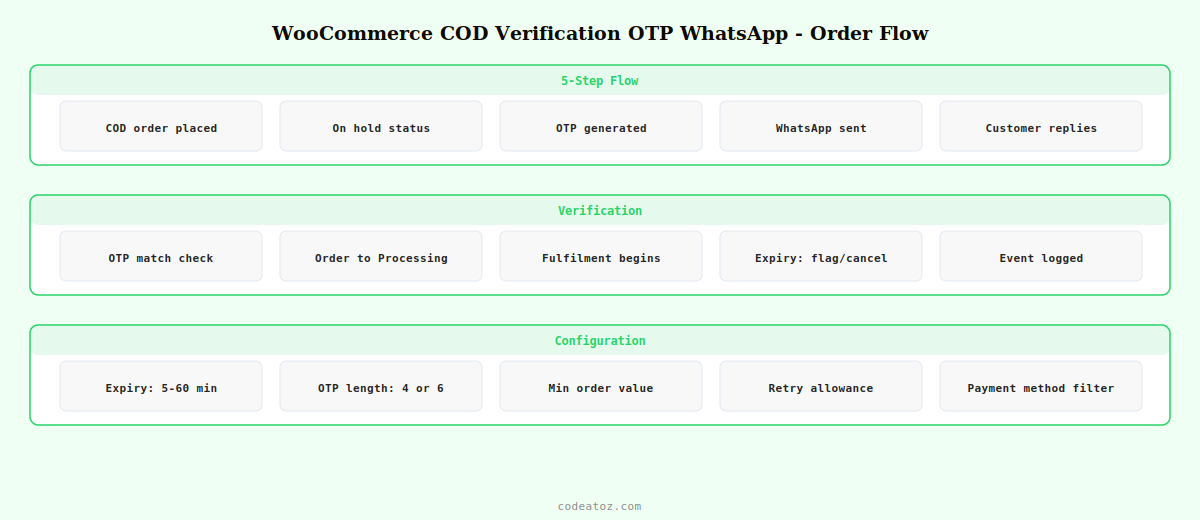
WooCommerce COD Verification OTP WhatsApp: How It Works
The WooCommerce COD verification OTP WhatsApp flow has five stages that happen automatically from the moment a COD order is placed:
WooCommerce COD Verification OTP WhatsApp: The OTP Message Template
Your WooCommerce COD verification OTP WhatsApp template needs Meta approval. Use the Utility category — OTP verification is a transactional message, not marketing, and utility templates approve faster and cost less per conversation.
🔒 *Order Verification Required*
Hi {{1}},
Your Cash on Delivery order #{{2}} (Total: {{3}}) has been received.
To confirm your order, please reply with this code:
*{{4}}*
This code expires in {{5}} minutes.
If you did not place this order, please ignore this message — it will be cancelled automatically.
*{{6}}*
Variables for the WooCommerce COD verification OTP WhatsApp template: {{1}} customer first name, {{2}} order number, {{3}} order total, {{4}} the 6-digit OTP, {{5}} expiry window in minutes (default 15), {{6}} store name. The expiry notice is important — it creates appropriate urgency without being aggressive, and the “if you did not place this order” clause prevents anxiety for accidental recipients.
WooCommerce COD Verification OTP WhatsApp: Configuration in Cloud Messaging Pro
The WooCommerce COD verification OTP WhatsApp module is configured from WooCommerce → Cloud Messaging → COD Verification. Enable the module, select your approved OTP template, set the expiry window, and choose what happens to unverified orders: flag for manual review or auto-cancel after expiry.
- OTP expiry window: 5 to 60 minutes — 15 minutes is the recommended default for WooCommerce COD verification OTP WhatsApp
- OTP length: 4 or 6 digits — 6-digit OTPs are standard for payment verification contexts
- Unverified order action: flag for review, auto-cancel, or leave on hold
- Payment method trigger: the WooCommerce COD verification OTP WhatsApp module activates only for COD orders — all other payment methods bypass it completely
- Minimum order value: set a threshold so low-value orders are not held up by verification overhead
- Retry allowance: allow 1 or 2 incorrect OTP attempts before flagging the order
WooCommerce COD Verification OTP WhatsApp: ROI Calculation
The business case for WooCommerce COD verification OTP WhatsApp is compelling for any store with meaningful COD volume. A store shipping 200 COD orders per month with a 25% rejection rate has 50 failed deliveries monthly. At ₹120 average round-trip shipping cost per failed delivery, that is ₹6,000 per month in direct shipping losses — ₹72,000 per year. Even if the WooCommerce COD verification OTP WhatsApp module reduces fake orders by 60%, the saving is ₹43,200 per year against a $35 one-time plugin cost.
The reduction in legitimate order volume from false negatives is minimal. Real customers who actually want their order reply to the OTP within seconds — they placed the order on their own phone, the WhatsApp message arrives on the same device, and the reply is two taps. The WooCommerce COD verification OTP WhatsApp friction is invisible to genuine customers and impenetrable to fake ones.
💡 Set a minimum order value threshold for WooCommerce COD verification OTP WhatsApp. For orders below ₹300 or your equivalent, the shipping cost of a fake order may be low enough that the verification overhead is not worth adding friction to the purchase. Apply WooCommerce COD verification OTP WhatsApp selectively to higher-value orders where the cost of a rejected delivery genuinely hurts margin.
⚠ The WooCommerce COD verification OTP WhatsApp webhook listener must be correctly configured in your Meta App for the OTP reply to be received and processed. If the webhook is not set up, customers can send the OTP but the order will never update to Processing. Always test the WooCommerce COD verification OTP WhatsApp flow end-to-end on a test order before enabling it for live traffic.
The Meta WhatsApp Cloud API webhooks documentation covers the incoming message webhook needed to receive OTP replies for WooCommerce COD verification OTP WhatsApp. The Meta template guidelines cover the authentication template category for OTP messages. The RBI COD guidelines provide context on cash-on-delivery fraud patterns in India. See our WooCommerce WhatsApp notifications guide for the full plugin setup, and our WhatsApp order confirmation guide for the status messages that follow a verified COD order.
WooCommerce COD Verification OTP WhatsApp — Built into Cloud Messaging Pro
Instant OTP on COD order placement, configurable expiry, auto-hold, auto-cancel, and order log. Cut fake COD orders from day one. $35 one-time — 14-day money-back.
Frequently Asked Questions — WooCommerce COD Verification OTP WhatsApp
How does WooCommerce COD verification OTP via WhatsApp work?
When a customer places a COD order, the plugin generates a 6-digit one-time password and sends it to their WhatsApp using an approved Meta template. The order is held on-hold and no fulfilment begins. When the customer replies with the correct OTP before expiry, the order automatically moves to Processing and fulfilment begins. If the OTP expires without a correct reply, the order is flagged or auto-cancelled depending on your WooCommerce COD verification OTP WhatsApp configuration.
How much does WooCommerce COD verification OTP WhatsApp reduce fake orders?
Stores using WooCommerce COD verification OTP WhatsApp typically see 60–80% reduction in fake or rejected COD orders. Accidental orders placed by children or through misclicks are eliminated entirely since the customer must actively reply with a code on their own device. Deliberately fake orders from customers who never intend to accept delivery are stopped because they will not respond to the OTP. Genuine customers complete verification in seconds with no friction.
What Meta template category should I use for WooCommerce COD verification OTP WhatsApp?
Use the Utility category for WooCommerce COD verification OTP WhatsApp templates. Utility covers transactional and operational messages the customer expects as part of their purchase, including verification codes. Alternatively, Meta offers an Authentication category specifically for OTP messages which includes a built-in “Copy Code” button. Both categories are suitable. Avoid the Marketing category for OTP messages as it requires marketing opt-in and costs more per conversation.
What happens if a customer does not reply to the WooCommerce COD verification OTP WhatsApp message?
After the configurable expiry window (default 15 minutes), the order is either flagged for manual staff review or automatically cancelled, depending on your WooCommerce COD verification OTP WhatsApp settings. Automatic cancellation is recommended for high-volume stores. Manual flagging is useful when you want to call the customer to confirm large orders before cancelling. In either case, no shipping label is generated and no fulfilment begins until the OTP is verified.
Does WooCommerce COD verification OTP WhatsApp affect genuine customers?
For genuine customers the WooCommerce COD verification OTP WhatsApp friction is minimal — they placed the order on their own phone, the WhatsApp message arrives on the same device within seconds, and replying takes two taps. Studies of OTP verification in COD contexts show legitimate customer completion rates above 90% when the message is clear and arrives promptly. The 5–10% drop-off typically includes the fake and accidental orders you want to filter out.
Can I apply WooCommerce COD verification OTP WhatsApp only to high-value orders?
Yes — Cloud Messaging Pro’s WooCommerce COD verification OTP WhatsApp module includes a minimum order value threshold. Orders below the threshold skip verification entirely and proceed straight to Processing. This lets you focus the verification friction on orders where the shipping cost of a fake delivery is significant, while keeping low-value orders frictionless. Set the threshold to the point where a rejected delivery costs more than the added friction is worth.
Stop Losing Money on Fake COD Orders
Cloud Messaging Pro’s WooCommerce COD verification OTP WhatsApp module pays for itself on the first prevented fake delivery. $35 one-time, 14-day guarantee.




