
WooCommerce Back in Stock WhatsApp Alert — Auto-Notify Customers (2026)
Every out-of-stock product on your WooCommerce store is a customer intent signal going uncaptured. A WooCommerce back in stock WhatsApp alert system converts that lost sale into a subscriber: the customer taps “Notify me via WhatsApp” on the out-of-stock product page, and the moment you restock, they receive an instant WooCommerce back in stock WhatsApp message with a direct link to buy. At 98% open rates, your WooCommerce back in stock WhatsApp alert is seen before the stock sells out again — unlike email alerts that arrive hours later and convert at 5–10%. This guide covers the complete WooCommerce back in stock WhatsApp setup using Cloud Messaging Pro.
Back-in-stock email alerts are structurally flawed for fast-selling products. A popular item restocked at 9am may be sold out again by 11am. An email alert sent at 9am may not be read until the afternoon — the customer clicks the link and finds the product out of stock again, creating frustration rather than a sale. A WooCommerce back in stock WhatsApp alert sent at 9am is read within minutes by 9 out of 10 subscribers, giving your most interested customers a genuine first-mover advantage.
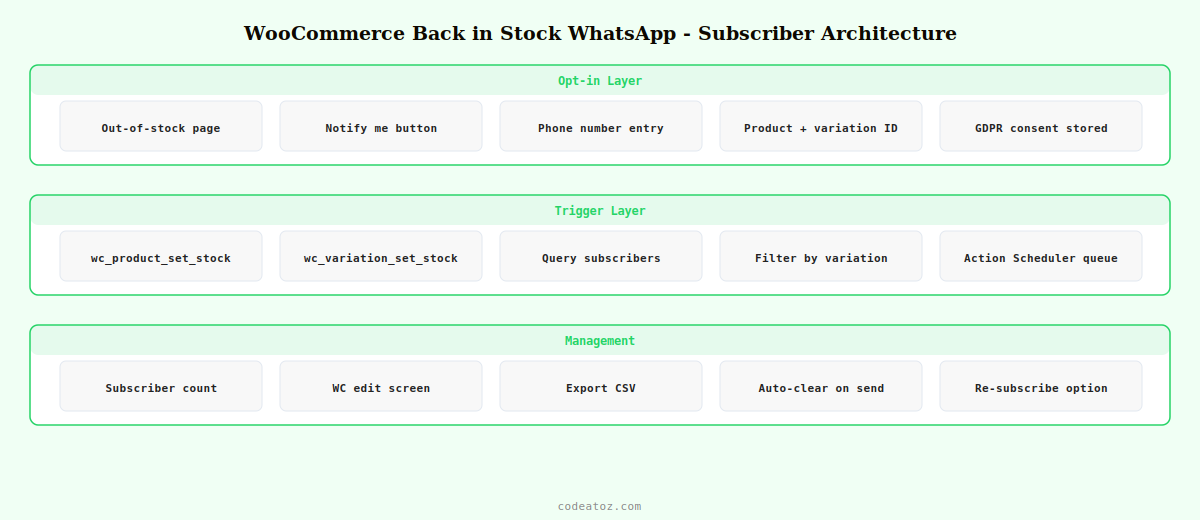
WooCommerce Back in Stock WhatsApp: How the Opt-In Works
The WooCommerce back in stock WhatsApp module adds a “Notify me via WhatsApp” button to out-of-stock product pages automatically. When a customer clicks it, they are prompted to enter their WhatsApp number (or it uses the number from their WooCommerce account if they are logged in). This constitutes marketing opt-in for the back-in-stock notification — a specific, contextual consent that satisfies both Meta’s requirements and GDPR.
WooCommerce Back in Stock WhatsApp: Variation-Level Tracking
The most common failure of back-in-stock systems is tracking at product level rather than variation level. A customer who wants the Blue / Size M hoodie should only be notified when Size M Blue is restocked — not when Size XL Red comes back in. The WooCommerce back in stock WhatsApp module in Cloud Messaging Pro tracks subscriptions at variation level, storing the exact product ID and variation ID combination.
When you restock a specific variation — by editing the variation stock in WooCommerce — only subscribers who opted in for that specific variation receive the WooCommerce back in stock WhatsApp alert. Subscribers waiting for other variations continue waiting. This prevents irrelevant notifications and the customer frustration of clicking a link to find their specific size still out of stock.
WooCommerce Back in Stock WhatsApp: The Alert Template
Your WooCommerce back in stock WhatsApp template needs Meta approval. Use the Utility category — this is a transactional notification the customer explicitly requested, not a marketing message. The template should be warm and urgent without being pushy.
✅ *Back in Stock!* — {{1}}
Hi {{2}},
Great news — the item you wanted is available again!
🛒 *{{3}}*
{{4}}
⚡ Stock is limited — grab yours before it sells out again:
👉 {{5}}
*{{6}}*
Template variables for the WooCommerce back in stock WhatsApp alert: {{1}} store name, {{2}} customer first name (or “there” if unknown), {{3}} product name including variation, {{4}} current price, {{5}} direct product URL with variation pre-selected, {{6}} store sign-off. The “stock is limited” line is important — it is honest (just restocked does mean limited stock) and creates the urgency that drives immediate action from the WooCommerce back in stock WhatsApp notification.
WooCommerce Back in Stock WhatsApp: Subscriber Management
The Cloud Messaging Pro admin shows a waitlist count on each product’s edit screen — you can see at a glance how much demand exists for out-of-stock products. This is valuable purchasing intelligence: a product with 50 WooCommerce back in stock WhatsApp subscribers is telling you to reorder more aggressively than one with 3.
- Subscriber count: visible on the WooCommerce product edit screen for each variation
- Export subscribers: download the waitlist as CSV for manual outreach or re-engagement campaigns
- Auto-clear on send: subscribers are removed from the waitlist after the WooCommerce back in stock WhatsApp alert fires so they don’t receive duplicate notifications on future restocks
- Re-subscribe option: customers can opt back in immediately after receiving an alert if they did not manage to purchase before stock sold out again
- Quiet hours: the Pro analytics module respects timezone-aware quiet hours so WooCommerce back in stock WhatsApp alerts don’t fire at 3am local time
💡 The WooCommerce back in stock WhatsApp subscriber waitlist is your most valuable demand signal. A product with 30+ waitlist subscribers is worth prioritising in your next purchase order. Review the waitlist counts weekly and use them to inform your replenishment decisions — you are effectively looking at pre-sold demand for products that don’t currently exist in your inventory.
The Meta WhatsApp Cloud API template send guide covers the API calls used to fire WooCommerce back in stock WhatsApp notifications. The WooCommerce stock management documentation covers the hooks triggered when stock is updated. See our WooCommerce WhatsApp notifications guide for the complete plugin setup overview, and our WhatsApp order confirmation guide for what happens after the back-in-stock customer completes their purchase.
WooCommerce Back in Stock WhatsApp — Built into Cloud Messaging Pro
One-click opt-in button, variation-level tracking, instant WhatsApp restock alert, and subscriber waitlist management. Plus 11 more automation modules. $35 one-time.
Frequently Asked Questions — WooCommerce Back in Stock WhatsApp
How do I add a WhatsApp back-in-stock alert to my WooCommerce store?
Install Cloud Messaging for WooCommerce Pro and enable the Back in Stock module. The plugin automatically adds a WhatsApp opt-in button to out-of-stock product pages. Configure the approved Meta template for the WooCommerce back in stock WhatsApp alert, connect your Meta credentials, and the system handles the rest — capturing subscribers, monitoring stock updates, and firing instant WhatsApp notifications when products are restocked.
Does the WooCommerce back in stock WhatsApp alert track product variations separately?
Yes — Cloud Messaging Pro tracks WooCommerce back in stock WhatsApp subscriptions at the variation level, storing the exact product ID and variation ID for each subscriber. When you restock a specific variation (e.g. Blue Size M), only subscribers who opted in for that exact combination receive the alert. Subscribers waiting for other variations are not notified until their specific variation is restocked.
Does a customer need to opt in to receive WooCommerce back in stock WhatsApp alerts?
Yes — customers explicitly opt in by clicking the Notify me via WhatsApp button and entering their phone number. This constitutes both Meta-required consent for utility messages and GDPR consent for sending the notification. Customers can STOP their subscription at any time by replying STOP. The consent is specific to back-in-stock notifications for that product — it does not grant permission to send unrelated WooCommerce back in stock WhatsApp messages.
How quickly are WooCommerce back in stock WhatsApp alerts sent after a restock?
WooCommerce back in stock WhatsApp alerts fire within seconds of the stock update. Cloud Messaging hooks into the woocommerce_product_set_stock and woocommerce_variation_set_stock hooks which fire immediately when stock is updated — whether manually in admin, via bulk import, or via a supplier API. For large waitlists, messages are queued via Action Scheduler and dispatched in rapid succession without impacting admin performance.
Can I see how many customers are waiting for a specific WooCommerce product on WhatsApp?
Yes — Cloud Messaging Pro displays the waitlist subscriber count on each product’s edit screen in WooCommerce admin, including per-variation breakdowns. You can see at a glance exactly how many customers are waiting for each size, colour, or variant. The subscriber data is also exportable as CSV. Use these WooCommerce back in stock WhatsApp waitlist counts as demand signals to prioritise your restocking and purchasing decisions.
What if my product sells out again before subscribers can buy after receiving the WhatsApp alert?
Because WooCommerce back in stock WhatsApp alerts arrive within seconds and are read within minutes by 98% of recipients, the window between alert and product selling out is much larger than with email. For products likely to sell out quickly, consider enabling a brief purchase window — temporarily limiting the quantity visible to subscribers by using a WooCommerce pre-order or limited-availability plugin alongside the back in stock WhatsApp notification to ensure your most loyal customers always get first access.
Turn Out-of-Stock Disappointment into Sales
Cloud Messaging Pro’s WooCommerce back in stock WhatsApp module captures demand from every out-of-stock visit and converts it on restock. $35 one-time, 14-day guarantee.




