
WooCommerce WhatsApp Meta Cloud API PHP — Developer Integration Guide (2026)
The WooCommerce WhatsApp Meta Cloud API PHP integration connects your store directly to Meta’s messaging infrastructure without a BSP intermediary. This guide covers the core developer tasks: authenticating with a System User token, sending a template message via the WooCommerce WhatsApp Meta Cloud API PHP endpoint, receiving and validating incoming webhook events with HMAC verification, and queuing outbound messages via Action Scheduler so your WooCommerce order hooks never slow down under load. By the end you will have a working WooCommerce WhatsApp Meta Cloud API PHP layer you can extend for any notification scenario.
The WooCommerce WhatsApp Meta Cloud API PHP flow has two directions: outbound (your server sends template messages to customers) and inbound (Meta sends webhook events to your server when customers reply). Most WooCommerce notifications only need outbound. Features like COD OTP verification and returns flow require both. This guide covers both directions with complete PHP code.
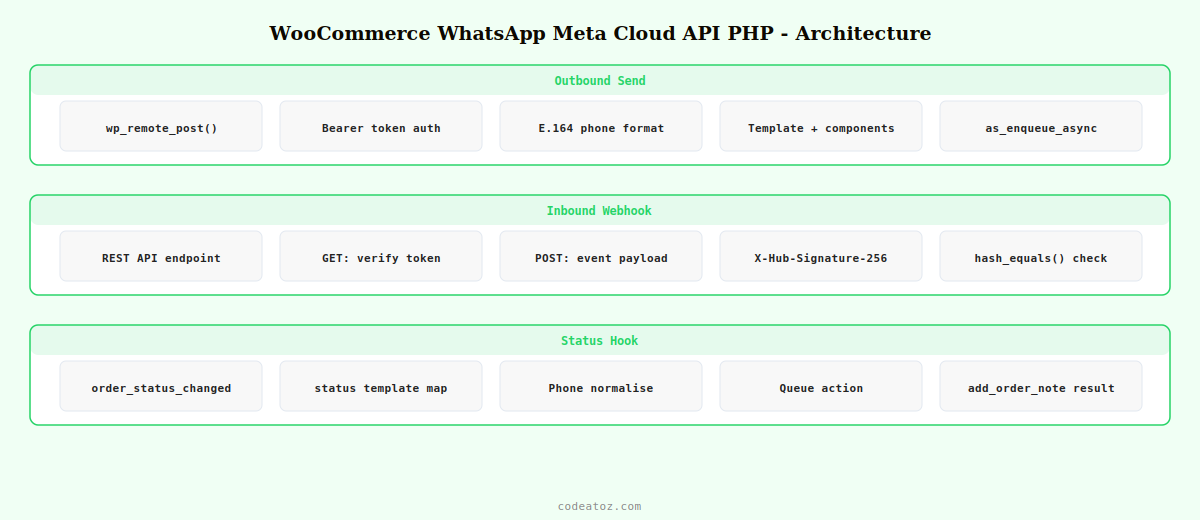
WooCommerce WhatsApp Meta Cloud API PHP: Send a Template Message
The WooCommerce WhatsApp Meta Cloud API PHP endpoint for sending messages is POST https://graph.facebook.com/v20.0/{phone_number_id}/messages. Authenticate with your System User token in the Authorization header. The request body is a JSON object specifying the recipient number, message type, and template details.
<?php
class WC_WhatsApp_Cloud_API {

    private string $phone_number_id;
    private string $access_token;
    private string $api_version = 'v20.0';

    public function __construct( string $phone_number_id, string $access_token ) {
        $this->phone_number_id = $phone_number_id;
        $this->access_token    = $access_token;
    }

    /**
     * Send a WooCommerce WhatsApp Meta Cloud API PHP template message.
     *
     * @param string $to      Recipient phone in E.164 format (e.g. 919876543210)
     * @param string $template Template name as approved in Meta Business Manager
     * @param string $lang    Template language code (e.g. en, en_GB, hi, ar)
     * @param array  $components Template body variable values
     * @return array          Meta API response body
     */
    public function send_template(
        string $to,
        string $template,
        string $lang,
        array  $components = []
    ): array {
        $url  = "https://graph.facebook.com/{$this->api_version}/{$this->phone_number_id}/messages";
        $body = [
            'messaging_product' => 'whatsapp',
            'to'                => $to,
            'type'              => 'template',
            'template'          => [
                'name'       => $template,
                'language'   => [ 'code' => $lang ],
                'components' => $components,
            ],
        ];

        $response = wp_remote_post( $url, [
            'headers' => [
                'Authorization' => 'Bearer ' . $this->access_token,
                'Content-Type'  => 'application/json',
            ],
            'body'    => wp_json_encode( $body ),
            'timeout' => 15,
        ]);

        if ( is_wp_error( $response ) ) {
            throw new RuntimeException( 'WooCommerce WhatsApp Meta Cloud API PHP error: ' . $response->get_error_message() );
        }

        return json_decode( wp_remote_retrieve_body( $response ), true ) ?: [];
    }

    /**
     * Build the components array for a WooCommerce WhatsApp Meta Cloud API PHP order template.
     */
    public static function order_components( WC_Order $order ): array {
        return [[
            'type'       => 'body',
            'parameters' => [
                [ 'type' => 'text', 'text' => get_bloginfo('name') ],
                [ 'type' => 'text', 'text' => $order->get_billing_first_name() ],
                [ 'type' => 'text', 'text' => (string) $order->get_order_number() ],
                [ 'type' => 'text', 'text' => $order->get_formatted_order_total() ],
            ],
        ]];
    }
}
WooCommerce WhatsApp Meta Cloud API PHP: Hook into WooCommerce Order Status
Trigger the WooCommerce WhatsApp Meta Cloud API PHP send on the woocommerce_order_status_changed hook. Queue messages via Action Scheduler so the status change never waits for the API call to complete.
<?php
add_action( 'woocommerce_order_status_changed', 'caz_queue_whatsapp_order_notification', 10, 3 );

function caz_queue_whatsapp_order_notification( int $order_id, string $old_status, string $new_status ): void {
    // Map WooCommerce statuses to WooCommerce WhatsApp Meta Cloud API PHP template names
    $status_template_map = apply_filters( 'caz_whatsapp_status_templates', [
        'processing' => 'wc_order_confirmed',
        'shipped'    => 'wc_order_shipped',
        'completed'  => 'wc_order_delivered',
        'cancelled'  => 'wc_order_cancelled',
    ]);

    if ( ! isset( $status_template_map[ $new_status ] ) ) return;

    $order = wc_get_order( $order_id );
    if ( ! $order ) return;

    $phone = $order->get_billing_phone();
    if ( ! $phone ) return;

    // Normalise to E.164 — WooCommerce WhatsApp Meta Cloud API PHP requirement
    $phone = preg_replace( '/[^0-9]/', '', $phone );
    if ( strlen( $phone ) === 10 ) $phone = '91' . $phone; // prepend India country code if bare

    // Queue via Action Scheduler for WooCommerce WhatsApp Meta Cloud API PHP
    as_enqueue_async_action( 'caz_send_whatsapp_order_notification', [
        'order_id' => $order_id,
        'phone'    => $phone,
        'template' => $status_template_map[ $new_status ],
    ], 'caz-whatsapp' );
}

// Process the queued WooCommerce WhatsApp Meta Cloud API PHP send
add_action( 'caz_send_whatsapp_order_notification', 'caz_process_whatsapp_send' );

function caz_process_whatsapp_send( int $order_id, string $phone, string $template ): void {
    $order  = wc_get_order( $order_id );
    $api    = new WC_WhatsApp_Cloud_API(
        get_option( 'caz_whatsapp_phone_number_id' ),
        get_option( 'caz_whatsapp_access_token' )
    );
    $result = $api->send_template( $phone, $template, 'en', WC_WhatsApp_Cloud_API::order_components( $order ) );
    $order->add_order_note( 'WooCommerce WhatsApp Meta Cloud API PHP: ' . ( $result['messages'][0]['id'] ?? 'error' ) );
}
WooCommerce WhatsApp Meta Cloud API PHP: Webhook Verification and Incoming Messages
To receive customer replies (needed for COD OTP and returns flow), configure a webhook endpoint. Meta sends a GET request to verify the endpoint on setup, then POST requests for every message event. Always verify the HMAC signature to confirm the request is genuinely from Meta.
<?php
// Register the webhook REST endpoint for WooCommerce WhatsApp Meta Cloud API PHP
add_action( 'rest_api_init', function() {
    register_rest_route( 'caz-whatsapp/v1', '/webhook', [
        [ 'methods' => 'GET',  'callback' => 'caz_whatsapp_webhook_verify',  'permission_callback' => '__return_true' ],
        [ 'methods' => 'POST', 'callback' => 'caz_whatsapp_webhook_receive', 'permission_callback' => '__return_true' ],
    ]);
});

// Handle Meta webhook verification challenge
function caz_whatsapp_webhook_verify( WP_REST_Request $req ): WP_REST_Response {
    $verify_token = get_option( 'caz_whatsapp_verify_token' );
    if ( $req->get_param('hub_verify_token') === $verify_token ) {
        return new WP_REST_Response( (int) $req->get_param('hub_challenge'), 200 );
    }
    return new WP_REST_Response( 'Forbidden', 403 );
}

// Receive and process WooCommerce WhatsApp Meta Cloud API PHP incoming messages
function caz_whatsapp_webhook_receive( WP_REST_Request $req ): WP_REST_Response {
    // HMAC verification — always validate WooCommerce WhatsApp Meta Cloud API PHP webhooks
    $app_secret = get_option( 'caz_whatsapp_app_secret' );
    $payload    = $req->get_body();
    $sig_header = $_SERVER['HTTP_X_HUB_SIGNATURE_256'] ?? '';
    $expected   = 'sha256=' . hash_hmac( 'sha256', $payload, $app_secret );

    if ( ! hash_equals( $expected, $sig_header ) ) {
        return new WP_REST_Response( 'Invalid signature', 403 );
    }

    $data = $req->get_json_params();

    // Extract incoming message from WooCommerce WhatsApp Meta Cloud API PHP event
    foreach ( $data['entry'] ?? [] as $entry ) {
        foreach ( $entry['changes'] ?? [] as $change ) {
            foreach ( $change['value']['messages'] ?? [] as $msg ) {
                $from = $msg['from'];   // customer phone number
                $text = $msg['text']['body'] ?? '';
                // Fire action for handlers (COD OTP, returns flow, etc.)
                do_action( 'caz_whatsapp_incoming_message', $from, $text, $msg );
            }
        }
    }

    return new WP_REST_Response( [ 'status' => 'ok' ], 200 );
}
💡 Always use hash_equals() not === for HMAC comparison in your WooCommerce WhatsApp Meta Cloud API PHP webhook handler. String comparison with === is vulnerable to timing attacks. hash_equals() performs a constant-time comparison that prevents an attacker from guessing the HMAC byte-by-byte. This is a security requirement for any production WooCommerce WhatsApp Meta Cloud API PHP webhook endpoint.
The Meta WhatsApp Cloud API messages reference documents the full request schema for WooCommerce WhatsApp Meta Cloud API PHP sends. The Meta webhook components documentation covers the incoming event structure your WooCommerce WhatsApp Meta Cloud API PHP webhook handler parses. See our WooCommerce WhatsApp notifications guide for the no-code plugin approach, and our Magento 2 message queue guide for the equivalent async queuing pattern on Magento.
All of the Above, Without Writing a Line of PHP
Cloud Messaging Pro implements the complete WooCommerce WhatsApp Meta Cloud API PHP layer — outbound templates, webhook handling, HMAC verification, Action Scheduler queuing, and 12 automation modules. $35 one-time.
Frequently Asked Questions — WooCommerce WhatsApp Meta Cloud API PHP
How do I send a WhatsApp message from WooCommerce using PHP and the Meta Cloud API?
Make a POST request to https://graph.facebook.com/v20.0/{phone_number_id}/messages with an Authorization header containing your System User access token. The request body specifies the recipient phone in E.164 format, message type as template, and the template name, language, and component variables. Use wp_remote_post() for the HTTP call and queue it via Action Scheduler so the WooCommerce WhatsApp Meta Cloud API PHP send never delays order status changes.
How do I verify a Meta WhatsApp webhook in PHP?
Register a REST endpoint for both GET and POST methods. For GET requests, check that the hub_verify_token parameter matches your stored verify token and return the hub_challenge integer. For POST requests, compute sha256=HMAC(sha256, raw_body, app_secret) and compare to the X-Hub-Signature-256 header using hash_equals(). Reject requests where the signatures do not match. Always validate the HMAC before processing any WooCommerce WhatsApp Meta Cloud API PHP webhook event.
What phone number format does the WooCommerce WhatsApp Meta Cloud API PHP endpoint require?
Meta’s WooCommerce WhatsApp Meta Cloud API PHP endpoint requires E.164 format — country code followed by the full national number with no spaces, dashes, or brackets. For India, 9876543210 becomes 919876543210. Strip all non-numeric characters from the WooCommerce billing phone field, then prepend the country code if not already present. Use the customer’s billing country code to determine which country prefix to add for stores serving multiple countries.
How do I pass dynamic order data into a WhatsApp template via PHP?
Build the components array with a body type containing a parameters array. Each parameter has a type of text and a text value. The order of parameters must match the order of {{1}}, {{2}}, {{3}} variables in the approved Meta template. Pass order number as get_order_number(), customer first name as get_billing_first_name(), order total as get_formatted_order_total(), and tracking URL from your shipping plugin’s meta. The WooCommerce WhatsApp Meta Cloud API PHP endpoint substitutes each parameter in sequence.
Why should I use Action Scheduler to send WooCommerce WhatsApp Meta Cloud API PHP messages?
Sending a WooCommerce WhatsApp Meta Cloud API PHP request synchronously inside a woocommerce_order_status_changed hook means the order status change waits for the API call to complete — typically 300–800ms. Under load, this slows every order status transition. Queuing with as_enqueue_async_action() returns immediately and processes the send in the background within seconds. It also provides automatic retry on failure and a log of every WooCommerce WhatsApp Meta Cloud API PHP send attempt in the Action Scheduler admin screen.
Should I build the WhatsApp integration myself or use Cloud Messaging Pro?
Build it yourself when you need custom logic that no plugin supports — triggers based on ERP events, messages combining data from multiple systems, or deeply custom template variable sets. Use Cloud Messaging Pro when you need standard WooCommerce notification patterns: order confirmations, abandoned cart recovery, COD OTP, back-in-stock alerts, and reviews. Pro implements the full WooCommerce WhatsApp Meta Cloud API PHP layer, handles HMAC verification, Action Scheduler queuing, and 12 automation modules at $35 one-time — weeks of PHP development for the cost of an hour.
Build WhatsApp Into WooCommerce Your Way
Use the PHP code above for custom integrations, or let Cloud Messaging Pro handle the WooCommerce WhatsApp Meta Cloud API PHP layer for you — ready in 30 minutes, not 30 hours.




